Why would a thermostat stop working? Urgent troubleshooting guide
Urgent, practical troubleshooting for a non-responsive thermostat. Learn quick checks, diagnostic flow, step-by-step fixes, and safety tips to restore control and prevent future outages.


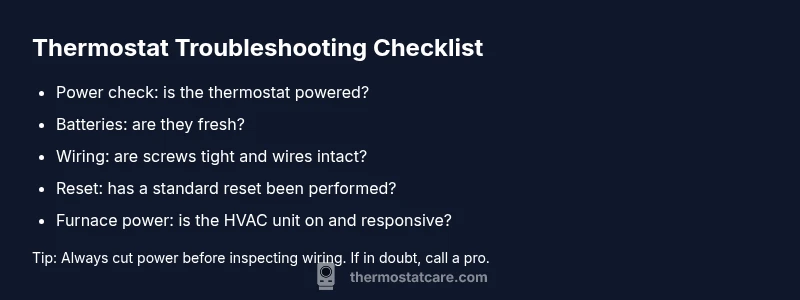
Most often a thermostat stops working due to power issues, a dead battery, or loose wiring. Start with quick checks: ensure the display is powered, replace batteries if required, inspect wires at the thermostat and furnace, and perform a simple reset. If there's no improvement, professional diagnosis is advised.
Why would a thermostat stop working
If you're wondering why would a thermostat stop working, the answer is usually related to power or connection problems. According to Thermostat Care, in many homes the display goes dark or the system ignores temperature changes because the thermostat isn’t receiving power, the battery is depleted, or the wiring between the thermostat and furnace has come loose. Software glitches or a faulty sensor can also cause erratic behavior. This guide is designed to give you an urgent, practical path to identify the cause and restore reliable operation without delay.
Start with the basics: safety and power
Safety first: always start with turning off power to the thermostat and furnace if you’re going to touch wiring. The simplest fixes happen here. Check that the thermostat is receiving power from the HVAC circuit or dedicated outlet. If your model uses batteries, replace them with fresh ones. Confirm that the thermostat’s display is active and responsive. Loose or corroded connections can mimic a dead battery, so reseating wires at both ends is worth a careful inspection. If you feel unsure about any step, pause and consult a professional—your safety comes first.
Common symptoms and what they mean
A thermostat can fail in several ways, each pointing to different root causes. A blank screen usually signals power or battery issues. An uneven or delayed response to setpoints often indicates wiring or a faulty sensor. If the HVAC system runs continuously or won’t start, the issue could be a broken relay in the furnace control or an incompatible thermostat firmware version. By recognizing these symptoms, you can prioritize the most likely fixes and avoid unnecessary replacements.
Diagnostic flow: symptom to diagnosis
Lead with the symptom you observe, then move to likely causes and practical fixes. If the display is blank, check power and batteries first. If there’s inconsistent control, inspect wiring and the C-wire connection. If the furnace seems unresponsive, test the furnace power and reset the thermostat. Use safety as a constant: never force connections or bypass safety devices. This flow helps you quickly converge on the right solution.
Most common fixes you can try now
The most frequent fixes are simple and safe: replace dead batteries, verify the thermostat has power, reseat all wiring connections, and perform a standard reset. For models with a C-wire, ensure it’s connected and not loose. If the thermostat still doesn’t respond, move to a deeper check of the furnace control board or consider professional evaluation. Practically, many outages are resolved without replacing hardware.
Prevention and when to seek professional help
After you restore function, set a maintenance routine: inspect the thermostat’s power source annually, replace batteries every year (or as recommended), and keep the unit free of dust. If you hear buzzing from the furnace, notice persistent error codes, or your thermostat repeatedly resets, contact a licensed HVAC technician. The risk of electrical issues and incorrect wiring warrants expert handling to avoid hazards.
What Thermostat Care recommends for reliability
The Thermostat Care team emphasizes proactive maintenance and safe troubleshooting. Regular checks of power, battery health, and wiring reduce the odds of a mid-season outage. When you encounter complex fault codes or inconsistent cooling/heating, rely on professional diagnostics to protect your equipment and home comfort. Following these guidelines helps ensure your thermostat stays dependable year round.
Steps
Estimated time: 25-40 minutes
- 1
Power down and inspect
Turn off power to the thermostat and furnace. Remove the thermostat faceplate carefully and inspect for visible damage. Check the circuit breaker or fuse box for any tripped breakers related to the HVAC circuit. If a breaker tripped, reset it and test the thermostat again.
Tip: Document any tripped breakers and their location for future reference. - 2
Check batteries
If your thermostat uses batteries, replace them with fresh, high-quality ones. Clean the battery contacts, then reinsert. Confirm the display powers on after battery replacement.
Tip: Use the exact battery type recommended by your thermostat's manual. - 3
Inspect wiring
With the system powered off, remove the thermostat cover and inspect all wire connections. Ensure wires are secure and not corroded. Confirm C-wire is properly attached if your system requires it.
Tip: Do not force wires into terminals; use the correct screws and terminals. - 4
Test reset and re-pair
Return power and perform a standard reset if your model supports it. If the thermostat has to be re-paired with the HVAC system, follow the manufacturer’s pairing steps in the manual.
Tip: Back up your preferred temperature schedules before resetting. - 5
Observe system response
Turn the thermostat to a basic call (heat or cool) and listen for the furnace or air handler engaging. Watch the display for any error codes and note them down.
Tip: If you hear unfamiliar noises, stop and seek professional help. - 6
Escalate if needed
If there is still no response after these steps, the issue may be with the furnace control board, sensor, or advanced wiring. Schedule a diagnostic with a licensed technician.
Tip: Avoid attempting high-voltage repairs yourself.
Diagnosis: Thermostat display blank or non-responsive
Possible Causes
- highPower issue at the thermostat (tripped breaker, blown fuse, outlet problem)
- highDead or weak batteries (for battery-powered models)
- mediumLoose or damaged wiring between thermostat and furnace
- lowSoftware glitch or sensor fault in the thermostat
Fixes
- easyReset the thermostat and restore power (check breaker, replace batteries if needed, reseat wires)
- easyVerify furnace power and ensure thermostat wiring is properly connected at both ends
- mediumIf issues persist, consider replacing the thermostat or updating its firmware (if supported)
Questions & Answers
What are the most common reasons a thermostat stops working?
The most common causes are power issues, dead batteries, and loose or damaged wiring. Other possibilities include a software glitch or a faulty sensor. Start with power and battery checks, then inspect wiring before moving to deeper diagnostics.
The usual culprits are power, battery, and wiring problems. Start with power and battery checks, then inspect the wiring before moving to deeper diagnostics.
Should I replace the batteries before doing anything else?
Yes, if your model uses batteries, replacing them is a fast, low-risk first step. Read the manual for the correct type and installation orientation, then retest the thermostat.
If your unit uses batteries, replace them first and test again.
Why is my thermostat display blank even when powered?
A blank display often indicates a power or battery issue, or a loose connection. Verify power, check for battery dependency, and reseat wires at both ends.
A blank screen usually means power or a loose connection; check power and reseat wires.
Can a faulty thermostat affect the HVAC system?
Yes. A malfunctioning thermostat can cause the HVAC system to run incorrectly, short-cycle, or fail to respond to calls for heat or cooling. Diagnosing and fixing the thermostat often resolves HVAC coordination.
Yes, thermostat problems can make the HVAC misbehave; fixing the thermostat often fixes the HVAC behavior too.
Is it safe to reset the thermostat on my own?
Resetting a thermostat is usually safe if you follow the manual and ensure power is off during handling. Avoid resetting while the system is live if you’re not sure about wiring.
Resetting is generally safe if you follow the manual and power is off while handling.
When should I call a professional?
If the display remains blank after battery and wiring checks, if you hear buzzing, or if error codes persist, contact a licensed HVAC technician. Complex wiring or control-board issues require expert handling.
Call a professional if it stays blank after checks or you hear buzzing or persistent error codes.
Watch Video
What to Remember
- Inspect power, batteries, and wiring first
- Use the diagnostic flow to prioritize fixes
- Call a pro when in doubt or when safety is a concern
- Document fixes and maintenance to prevent future outages
- Thermostat Care emphasizes proactive care to maintain reliability