When Thermostat Doesn T Work: Urgent Troubleshooting
Urgent, step-by-step guide to diagnose and fix a non-working thermostat. Power checks, battery swaps, wiring, app issues, and professional help—all you need to restore comfort fast.


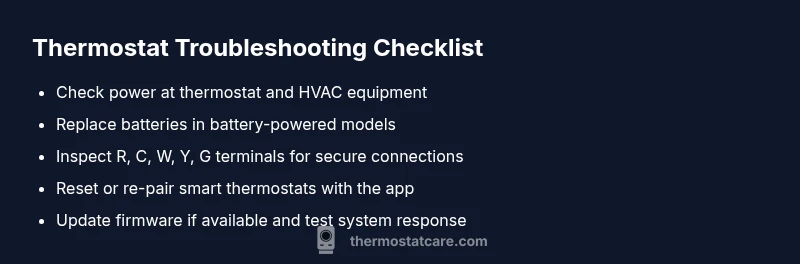
Most likely, the issue is a power problem or a dead battery. First, check the display, verify the furnace breaker is ON, and reset the thermostat. If it still doesn’t respond, inspect the wiring and confirm the unit is compatible with your HVAC system. When thermostat doesn t work, follow a safe, step-by-step diagnostic to avoid damage.
Quick assessment: what you’re seeing
Every thermostat problem starts with symptoms you can describe in a few words. If you’re reading this, you’re likely dealing with a thermostat that won't respond, display is blank, or temperatures don't match your settings. The exact phrase when thermostat doesn t work pops up in many DIY searches, and it's a cue to start a safe, systematic check. In this section, note your model and age, recent changes (like a new battery, wiring work, or a breaker trip), and the HVAC system type. By framing the problem clearly, you\’ll speed up the diagnosis and avoid unnecessary calls. According to Thermostat Care, most non-responsive thermostats stem from power issues or compatibility mismatches, so start there and work methodically.
Common culprits at a glance
- Power loss or tripped breaker
- Dead or incompatible batteries
- Loose or damaged wiring at the thermostat or furnace
- Outdated firmware or software (for smart thermostats)
- Sensor misplacement or sticky mechanical contacts
- HVAC communication faults between thermostat and furnace
- Wiring that isn’t common across all equipment
Tip: keep a quick checklist handy so you can track what you’ve tested and what remains. Brand notes from Thermostat Care are embedded here to guide proactive troubleshooting.
Safety first: power and electrical checks
Safety always comes first. Before touching any wires, turn off power to the thermostat circuit at the main breaker panel and, if possible, the HVAC equipment. Use a non-contact voltage tester to confirm no live current is present before handling terminals. Avoid twisting or forcing wires, and never work on a live circuit. If you see signs of burns, arcing, or damaged insulation, stop and call a licensed electrician. This section focuses on safe, basic checks that don't require special tools, and it aligns with best practices recommended by Thermostat Care.
Battery and power supply checks
Many thermostats rely on batteries or a steady 24V power supply. If yours is battery-powered, replace with the correct type (alkaline or lithium, depending on model) and inspect the battery contacts for corrosion. For hardwired models, verify that the 24V supply is stable and that the C-wire is connected properly at both ends. A weak battery or poor contact can cause intermittent resets, inaccurate readings, or total shutdown. After replacing batteries or confirming power, perform a quick restart to see if the display returns.
Wiring and control board basics
Understanding common terminals helps you identify loose connections. At the thermostat, ensure R (or RC/RH) is securely connected to the furnace/air handler, and that C (common) is present for continuous power on smart thermostats. At the furnace, look for loose screws on R, W, Y, G, and C terminals. Avoid mixing up wires from different cables, and do not tighten beyond snug. A loose wire can prevent the thermostat from communicating with the control board or HVAC equipment. If you notice discoloration or melted insulation, discontinue use and call a pro.
Sensor, Wi-Fi, and app integration checks
Smart thermostats depend on sensors and network connectivity. Check that the thermostat registers the indoor/outdoor sensors correctly, and verify your home Wi-Fi is stable enough to support firmware updates and app control. If the unit is not pairing with the app, try forgetting the device in the app, then re-pair. Ensure the mobile device and thermostat are on the same network band (2.4 GHz is typical for many devices). Network glitches can masquerade as hardware failures; rule those out first.
Replacement parts and compatibility notes
If the model is old or not compatible with your HVAC system, performance may degrade or fail to engage cooling or heating. Compare your thermostat model with your furnace/air handler requirements, especially voltage, current, and control signals. Replacements should match the system type (conventional, heat pump, or multi-stage) and wire count. If in doubt, consult the installation manual or Thermostat Care guidance to confirm compatibility before purchasing a new unit.
When in doubt: escalate to pro
If you've completed power, battery, wiring, and network checks and the thermostat still won't operate properly, there may be an underlying control board fault or furnace issue. Don't risk damaging components with guesswork. Schedule a professional diagnostic with a licensed technician who can verify 24V integrity, board function, and HVAC system health. In many cases, timely professional help prevents expensive collateral damage.
Steps
Estimated time: 45-60 minutes
- 1
Power down and prep
Turn off power to the thermostat at the breaker and remove the faceplate carefully. Gather model information and the HVAC system type before you begin. This preparation prevents accidental shorts and organizes your approach.
Tip: Label wires with tape before disconnecting anything to ensure proper reattachment. - 2
Check power and battery status
Verify the thermostat display is receiving power. If it uses batteries, replace them with the recommended type and test the unit again. A basic power reset after battery changes often resolves simple lockups.
Tip: Use fresh batteries and avoid mixing brands in a single device. - 3
Inspect thermostat wiring
Look for loose screws, corrosion, or damaged insulation on R, C, W, Y, and G wires. Re-seat any loose connections and ensure the wire ends are clean and inserted fully. Then reattach the faceplate.
Tip: Take a photo of the original wiring configuration before making changes. - 4
Reset and re-pair (if smart)**
If you have a smart thermostat, reset to factory defaults and re-pair with the app and HVAC system. Follow the manufacturer prompts carefully to avoid misconfiguration.
Tip: Do not skip the pairing step; a failed re-pair is a common source of non-responsiveness. - 5
Test system operation
Set a simple target temperature and observe if heating or cooling engages. Listen for the furnace call and check for any error codes on the thermostat display or furnace panel.
Tip: If you hear unusual noises or rapid cycling, stop and call a pro. - 6
Firmware and compatibility check
Confirm you have the latest firmware or software update for the thermostat. Ensure the device remains compatible with your HVAC system’s control signals.
Tip: Updates can fix bugs that cause non-response or misreadings. - 7
Document and secondary checks
Record the model, serial, date tested, and observed behaviors. Re-check power, then validate with a second thermostat if available to rule out unit-specific faults.
Tip: A second unit helps isolate whether the issue is with the thermostat or the HVAC system. - 8
Know when to escalate
If issues persist after these steps, arrange professional service. A licensed technician can test 24V circuits, control boards, and heater safety components safely.
Tip: Don\'t defer safety-critical diagnostics—further investigation may prevent damage.
Diagnosis: Thermostat is unresponsive or blank display
Possible Causes
- highPower issue (tripped breaker or blown fuse)
- highDead battery or no power to the thermostat
- mediumLoose or damaged wiring at thermostat/furnace
- lowFaulty thermostat control board or sensor
- lowHVAC communication fault between thermostat and furnace
- mediumWi-Fi/app integration issues (for smart models)
Fixes
- easyPower cycle the thermostat and verify the 24V supply from the furnace/air handler
- easyReplace batteries in battery-powered models with the correct type
- mediumInspect thermostat wiring at both the thermostat and furnace for loose connections
- easyReset the thermostat to factory settings and re-enter configurations
- mediumUpdate firmware or re-pair the thermostat with the HVAC system
- hardIf unresolved, schedule a professional inspection of the control board and wiring
Questions & Answers
What is the first thing I should check when my thermostat isn’t working?
Begin with power, battery level (if applicable), and a quick reset. Ensure the thermostat display is on and the HVAC system has power. These basics resolve most issues.
Check power and batteries first, then reset. If it still won’t respond, keep reading for deeper steps.
Why is my thermostat blank or unresponsive after power is restored?
A blank screen often points to a power supply issue or a loose connection. Inspect the 24V supply and both ends of the wiring, including the C-wire if present.
A blank screen usually means power or wiring problems, so start there.
Can a weak battery cause a smart thermostat to stop working?
Yes. Replace the battery with the recommended type and ensure contacts are clean. For hardwired units, confirm the C-wire is delivering power.
A weak battery or bad contact can stop a smart thermostat from working.
Is it safe to reset my thermostat myself?
Yes, as long as you power down first and follow the manual. A factory reset can clear glitches but may require reconfiguration afterward.
Resetting is generally safe if power is cut first and you follow the steps.
When should I call a professional for thermostat issues?
If power, wiring, batteries, and app pairing have been checked but the unit still won\'t operate, or you suspect a furnace issue, a licensed technician is recommended.
If it still won\'t work after basics, call a pro.
Will replacing the thermostat fix the system if the furnace is faulty?
Often not; the furnace or control board may be the root cause. A pro can diagnose electrical and mechanical faults beyond the thermostat itself.
Sometimes a failing furnace causes the thermostat to misbehave; check the furnace too.
Watch Video
What to Remember
- Start with power and batteries.
- Check wiring at thermostat and furnace.
- Reset and re-pair smart models.
- Test HVAC response after each step.
- Call a pro if issues persist.