Thermostat Stop Working: Quick Troubleshooting Guide
Learn fast steps to diagnose and fix a thermostat that stops working. This urgent guide covers power checks, battery replacement, wiring tests, and when to call a pro from Thermostat Care.


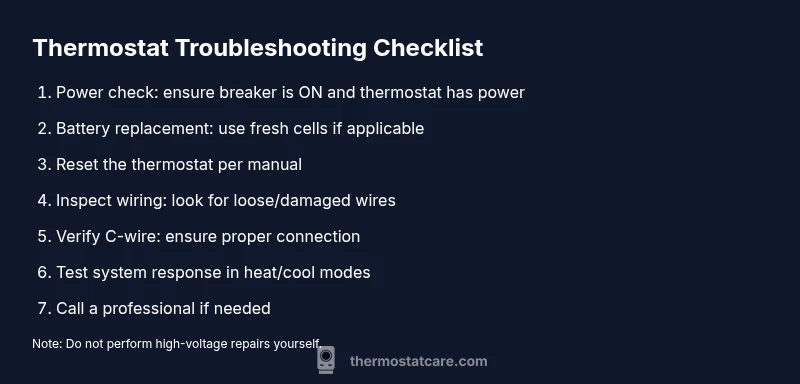
Most often, a thermostat stops working due to a power issue or a dead backup battery. Start by confirming the thermostat has power at the wall outlet or the HVAC circuit breaker is on, and replace the thermostat batteries if applicable. If the screen is blank, perform a reset and check the C-wire connection before calling a professional.
Why the thermostat stop working
When your thermostat stops working, it can feel urgent because comfort hinges on steady temperature control. The Thermostat Care team has found that power and battery issues are the most common culprits, not a failing furnace or air conditioner. A simple power check often reveals the root cause, especially when the display is dim or completely blank. If you notice the screen flicker or lose responsiveness, don’t panic—most problems are solvable with safe, low-effort steps. In many homes, a tripped circuit, a dead backup battery in a programmable unit, or a loose connection at the furnace control board account for the majority of outages. By approaching the issue methodically, you can rule out the quickest fixes first and avoid unnecessary service calls. If a fix requires you to interact with wiring, proceed with caution and only perform what you’re comfortable handling. If the thermostat still won’t cooperate after power and battery checks, it’s time to advance to more diagnostic steps or contact a professional.
Quick checks you can safely perform
- Check the display: If the screen is blank or intermittently dim, power is the likely issue. Start by ensuring the HVAC circuit breaker is ON and the thermostat’s power source is delivering electricity.
- Swap batteries (if applicable): Many thermostats rely on a removable battery for memory and display functions. Use fresh, high-quality batteries and reinsert them correctly.
- Inspect wiring at the thermostat: Look for loose or disconnected wires at the terminals. Do not tug on wires or press on live contacts.
- Verify the C-wire connection: If your thermostat is smart or programmable, a missing or loose C-wire can cause power loss with no display.
- Examine the furnace/air handler area: A loose wire at the furnace control board or a corroded terminal can disrupt power delivery to the thermostat.
- Document signs of moisture or damage: Water exposure or corrosion around the thermostat or wiring can create intermittent failures. If you see this, avoid further handling and seek professional help.
Safety first: what you should and shouldn't touch
Safety comes first when troubleshooting a thermostat. Always cut power to the thermostat at the breaker before touching wires or terminals. Do not attempt high-voltage work or modify wires to force a connection. If you’re unsure about any step, pause and contact a licensed technician. Keep children and pets away from exposed wires. Use insulated tools if you must handle conductors, and never work behind a cover plate while live power is present.
Diagnostic flow at a glance
The diagnostic flow helps you quickly map symptoms to likely causes and practical fixes:
- Symptom: Display blank or thermostat unresponsive -> Diagnosis: Power issue or dead battery -> Fix: Check power and replace batteries.
- Symptom: System won’t heat or cool despite a responsive display -> Diagnosis: Wiring or sensor issue -> Fix: Inspect wiring, verify C-wire, and test the control signals.
- Symptom: Thermostat loses settings after power loss -> Diagnosis: Firmware issue or memory loss -> Fix: Reset to factory defaults and reprogram schedules.
- Symptom: Odd temperature swings or uncalibrated readings -> Diagnosis: Sensor alignment or faulty stat -> Fix: Recalibrate or replace. If none of these steps resolve the issue, professional diagnosis may be required to inspect the furnace control board or HVAC wiring.
In-depth: power and battery issues
Power and battery problems account for the majority of thermostat malfunctions. If the thermostat display is blank, begin by confirming power at the thermostat and the HVAC system. Battery-powered thermostats will often show a warning icon when the battery is weak—replace with the recommended type and ensure correct orientation. After battery replacement, perform a soft reset or restart according to the manufacturer’s instructions. If the appliance still fails to respond, verify the C-wire connection at both ends. A loose C-wire can silently deprive the thermostat of steady power, causing intermittent failures. These checks address the most frequent failures and often restore full control without requiring furnace service.
When to replace vs repair and smart thermostats
age matters. If your thermostat is older than ten years, or if multiple issues persist after power and wiring checks, replacement is often more cost-effective than repair. Smart thermostats introduce additional considerations, such as Wi-Fi connectivity and app integration. Ensure the C-wire is present and compatible with your HVAC system, since some older units aren’t designed for smart features. If you rely on voice assistants or geofencing, verify compatibility and firmware updates. A failed control board at the thermostat or an irreversible wear pattern in the internal sensors may warrant a full replacement for reliability and efficiency.
Prevention: routine maintenance tips
Preventing future outages starts with a simple maintenance routine. Schedule a quarterly check of thermostat batteries (if applicable) and a fresh battery replacement every year for non-rechargeable types. Keep the thermostat area clean and dry, away from direct sunlight or heat sources. Periodically inspect the wiring at the furnace/air handler and tighten any loose terminals. Consider labeling wires and taking photos before adjustments to simplify future service. Finally, set a reminder to test thermostat function at the change of each season, ensuring the system responds promptly to temperature commands.
Steps
Estimated time: 30-60 minutes
- 1
Power down and check the breaker
Begin by turning off power to the thermostat at the main breaker. This prevents any shock or shorts while you inspect the circuit. After a minute, switch the breaker back on and see if the display returns. If it doesn’t, proceed to battery check.
Tip: A quick photo of wiring before any disassembly helps during reassembly. - 2
Replace or reseat batteries
If your thermostat uses batteries, replace with fresh alkaline or lithium cells as per the manual. Remove the old batteries, clean any corrosion from the battery contacts, and reinsert in the correct orientation. Restore power and verify display response.
Tip: Use high-quality batteries and avoid over-tightening battery compartments. - 3
Reset the thermostat
Perform a soft reset or factory reset following the manufacturer’s instructions. This clears memory glitches but may require you to re-enter schedules and settings afterward. Don’t over-press reset buttons if you’re unsure of the model.
Tip: Note down a few key settings before resetting to speed up setup. - 4
Inspect and reseat wiring
With power still off, inspect the thermostat terminals for loose or damaged wires. Re-seat any suspect connections firmly but gently. If you see frayed insulation, replace the damaged wire or call a pro.
Tip: Never force a wire into a terminal; ensure the wire strands are clean and tight. - 5
Check the C-wire at the furnace
If the thermostat is smart or needs constant power, verify the C-wire is connected at the furnace control board. Look for a loose connector and reattach if needed. Confirm 24VAC output with a suitable meter, or call a pro if you’re unsure.
Tip: Only test voltage if you’re trained; incorrect testing can damage equipment. - 6
Test system response
Power the system back up and set to different modes (heat, cool, auto) to confirm command signals reach the HVAC. Listen for furnace relay clicks or system air changes. If there’s still no response, the problem may lie deeper in the control board or a failed thermostat.
Tip: Document which modes worked to help a professional diagnose faster. - 7
Decide on replacement vs repair
If the stat is older or multiple issues persist after checks, assessment of replacement may be prudent. For smart thermostats, ensure compatibility with your HVAC system. If you’re uncertain, schedule a professional evaluation.
Tip: Choose a model that supports your system and energy goals.
Diagnosis: Thermostat screen is blank or thermostat not responding
Possible Causes
- highPower issue (tripped breaker or disconnected outlet)
- highDead backup battery (for battery-powered models)
- mediumLoose or damaged wiring at thermostat terminals
- mediumC-wire disconnected or failed
- lowFaulty thermostat control board
Fixes
- easyCheck power supply to thermostat and HVAC system; reset breaker if needed
- easyReplace installed batteries with fresh ones and reseat
- easyReseat and secure wiring at thermostat terminals; avoid touching live contacts
- mediumInspect C-wire at both ends for proper connection; reattach if loose
- hardReview furnace control board connections; look for burn marks or corrosion (do not power on)
- hardIf issues persist after these steps, contact a licensed HVAC professional
Questions & Answers
Why is my thermostat display blank or unresponsive?
A blank display is most often caused by a power issue or dead batteries. Start with power checks, replace batteries if applicable, and reset the unit. If it still won’t respond, proceed through the diagnostic flow or contact a professional.
A blank display usually means power or battery issues. Check power, replace batteries, and reset, then continue troubleshooting or call a pro if needed.
Can a dead battery stop my thermostat from working?
Yes. Many thermostats rely on batteries for memory and display. Replace with fresh batteries and confirm the unit powers on before testing other functions. If the model is hardwired, battery checks may not apply but confirm the power source.
Absolutely. Dead batteries can cause non-responsiveness; replace and test, then continue troubleshooting.
Should I reset my thermostat?
Resetting can clear glitches but may erase schedules. Use a soft reset first, then re-enter settings. If you’re unsure, refer to your manual or consult a pro.
Resetting can help, but you might need to reprogram schedules afterward.
Is it safe to touch thermostat wiring if I’m not experienced?
Only perform wiring checks after turning off power. If you’re unsure about what you’re doing, stop and contact a professional. High-voltage work can be dangerous and cause damage.
If you’re not confident, it’s best to call a pro for wiring.
When should I call a professional?
Call a professional if power checks fail, wires look damaged, or the system won’t respond after resets. A licensed HVAC technician can safely diagnose the control board and wiring and confirm system compatibility.
Call a professional if basic checks don’t restore function.
Do smart thermostats require a C-wire?
Many smart thermostats rely on a constant power supply via the C-wire. If your C-wire is missing or weak, the thermostat may glitch or fail to stay powered. Ensure C-wire is properly connected or consider a compatible adapter.
A C-wire helps smart thermostats stay powered reliably.
Watch Video
What to Remember
- Check power and batteries first to fix most outages
- Reset after quieting memory glitches and re-program schedules
- Inspect C-wire and terminal connections for reliability
- Call a pro if power checks fail or you see damaged wiring
- Prevent future problems with regular thermostat maintenance