Why Is My Thermostat Not Clicking? A Practical Troubleshooting Guide
Diagnose and fix a thermostat that won't click with a safe, step-by-step guide. Learn common power and wiring issues, firmware glitches, and when to call a pro.


Power issues are the most common cause when a thermostat won’t click: battery depletion, a loose C-wire, or a tripped circuit. Start by replacing the batteries if it’s battery-powered, then check the C-wire connections at the thermostat and furnace. If power is present but it still won’t click, perform a reset and inspect the wiring.
Common Causes of a Non-Clicking Thermostat
If your thermostat won't click to wake or change modes, you're likely facing a power or wiring issue rather than a mechanical failure inside the thermostat itself. According to Thermostat Care, many non-clicking symptoms start with simple power problems that are easy to fix with the right steps. The most frequent culprits include dead batteries (for battery-operated models), a loose or disconnected C-wire, a tripped circuit, or a blown fuse that cuts power to the thermostat. Other causes can be a misconfigured mode, a stuck relay in older thermostats, or a firmware glitch that prevents the user interface from responding. In any case, diagnosing requires a systematic check of the power path—from the batteries to the furnace control board. Having a clear plan helps you avoid unnecessary repairs and protects your HVAC system from improper operation.
Quick Checks You Can Do Right Now
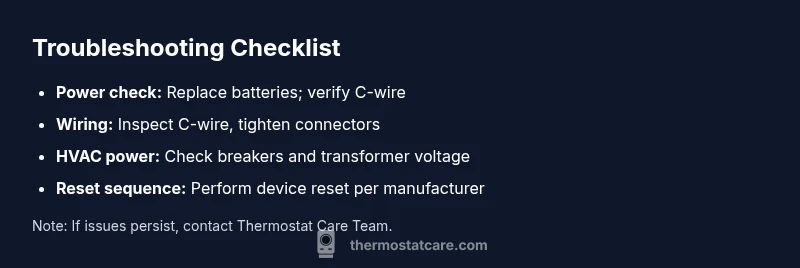
Before you dismantle the thermostat, run through a quick set of checks that cover the majority of non-clicking cases. Start with basic power: replace the batteries if your model uses them and verify that the power source isn’t draining them quickly—some devices indicate low power with a dim display or a flashing icon. Next, inspect the C-wire connection at both ends: remove any corrosion, reseat the connector, and ensure the wire is fully inserted. If the thermostat is connected to a power adapter, unplug and replug to refresh the circuit. Look at the breaker panel or fuse box for any tripped breakers or blown fuses related to the HVAC circuit. Finally, perform a soft reset as prescribed by the manufacturer to clear minor glitches. If you notice the display responds intermittently, or if you smell burning plastic, stop and seek professional help immediately.
The Power and Wiring Perspective
Power delivery to a thermostat involves several components: the air handler, the control board, the C-wire, and sometimes a dedicated transformer. A weak or intermittent power supply can cause the thermostat to be unresponsive or to fail to click when you attempt to change settings. The C-wire serves as a common return path; if it’s loose or damaged, the thermostat may have enough power to stay on but not enough to engage relays. In some houses, a shared circuit with lighting or other appliances can cause voltage fluctuations that briefly drop the thermostat's voltage below the threshold it needs to respond. By understanding this chain, you can target the fix more precisely, avoiding unnecessary replacements. Thermostat Care notes that most power-related failures are resolved by tightening connections, replacing batteries, or reconfiguring the C-wire properly.
Battery vs C-Wire: Which Issue Comes First?
Battery-powered thermostats rely entirely on their internal cells; when batteries sag, the display dims and the click response can disappear. C-wire-powered models rely on the house power; a degraded C-wire can produce a faint glow on the display but still fail to register user input. The test here is to swap out the batteries first, then check the C-wire continuity. If both checks pass and the thermostat still won't click, you might be dealing with a control-board issue or a firmware fault that requires more advanced steps. For each path, follow the manufacturer’s reset procedure after addressing the power components. Regular verification of battery health and C-wire integrity is a key preventive measure to reduce future outages.
Safety Protocols While Troubleshooting
Always turn off power to the thermostat and HVAC at the breaker before probing exposed wiring or terminals. Use insulated tools and avoid touching metal conductors with bare hands. If you smell burning, hear crackling, or notice scorching on wiring, stop immediately and contact a licensed HVAC technician. Do not bypass safety switches or wire directly from the thermostat to the furnace. When in doubt, consult the manual or Thermostat Care’s troubleshooting guide and proceed only with recommended steps.
Pathway to a Fix: How to Approach the Most Common Cause
If the root cause appears to be a power issue, begin with safe, incremental steps: replace the batteries, verify C-wire continuity, reseat or replace the C-wire connector, and then perform a controlled reset. If you find the C-wire is damaged, replace the segment or install a new C-wire, following local electrical codes. Some older HVAC setups benefit from a quick professional check of the furnace control board and transformer. After any fix, re-test the thermostat by commanding it to wake and change a setting, observing whether the click and response occur. This approach minimizes downtime and reduces the risk of unintended consequences.
When to Call a Professional
Not all non-clicking thermostats can be resolved safely with DIY steps. If you have a hardwired system and you’re uncertain about wiring, if the unit is under warranty but you’re unsure about the terms, or if you encounter signs of overheating or burnt components, it’s time to call a pro. A licensed technician can verify the transformer voltage, check the furnace control board, and confirm whether a firmware update is needed. They can also install or replace the necessary sensors and wires so your thermostat communicates reliably with your HVAC system. Remember: most service calls are faster and cheaper when you’ve already performed basic checks like battery replacement and C-wire reseating.
Prevention: Keeping Your Thermostat Click-Ready
Regular maintenance reduces the chances of future clicking failures. Keep the thermostat and mounting plate clean and free of dust, inspect batteries every season (or per manufacturer guidelines), and verify the C-wire integrity at the start of each heating season. Update firmware when available, and avoid extending the thermostat’s power draw beyond its design. Maintain a simple, accessible wiring diagram so future technicians can diagnose issues quickly. Thermostat Care’s practical tips emphasize documenting any prior fixes and noting changes in system behavior.
Troubleshooting Scenarios You Might Encounter
In real-world homes, you may see intermittent clicking, a display that comes on but won’t respond to commands, or a complete lockout where the thermostat UI is blank. Each scenario hints at different root causes—battery, C-wire, or control-board issues—and guides you to the most efficient fix path. Keeping a small log of when the issue happens (time of day, weather, thermostat settings) can help you and any technician pinpoint the cause faster. The goal is to restore reliable control of your climate without unnecessary parts replacement.
Steps
Estimated time: 45-60 minutes
- 1
Power down and prep safety
Turn off power to the thermostat and HVAC at the breaker. Remove the thermostat cover and ensure you’re working with a non-live circuit. Gather non-conductive tools and a flashlight to inspect terminals.
Tip: Use a non-contact tester to verify no voltage before touching wires. - 2
Replace the batteries (if applicable)
Open the battery compartment, remove old cells, and insert fresh ones of the recommended type. Confirm the display lights up clearly and hold a charge before proceeding.
Tip: Do not mix old and new batteries; replace all at once. - 3
Inspect and reseat the C-wire
Disconnect the C-wire at both ends, inspect for corrosion, and reseat firmly. If the wire is damaged, consider replacing the segment or adding a new C-wire.
Tip: Take a quick photo of the wiring before making changes. - 4
Check furnace power and transformers
Ensure the HVAC circuit is powered, breakers are on, and the transformer's secondary voltage is within spec. A faulty transformer can mimic a battery issue.
Tip: If you sense heat from wires or smell burning, stop and call a pro. - 5
Reset the thermostat
Follow the manufacturer’s reset sequence to clear glitches. After reset, restore power and test the device to wake and respond to commands.
Tip: Only perform a factory reset if other fixes fail. - 6
Test and observe
Power the system back on, command a change, and observe whether the click occurs and the HVAC responds. If not, record symptoms for the technician.
Tip: Keep notes on timing and what settings were changed.
Diagnosis: Thermostat won't click to wake or change settings.
Possible Causes
- highPower issue (dead battery or no power to thermostat)
- mediumLoose or damaged C-wire wiring
- mediumTripped circuit breaker or blown fuse in HVAC circuit
- lowFirmware glitch or faulty thermostat control board
- lowStuck relay or internal failure in older thermostat
Fixes
- easyReplace batteries or supply power to thermostat; check display shows power
- easyReseat or replace C-wire connections at thermostat and furnace
- easyReset the thermostat per manufacturer procedure and test after power restoration
- mediumCheck breakers/fuses and transformer voltage; consult pro if unsure
- hardIf hardware fault suspected, consider thermostat or control-board replacement by a professional
Questions & Answers
What causes a thermostat not to click?
Power issues, such as dead batteries or a loose C-wire, are the most common causes. Wiring faults or a firmware glitch can also prevent the thermostat from clicking.
Power issues are usually the culprit—check batteries and C-wire, then reset the thermostat.
Should I replace the thermostat batteries?
If your model uses batteries, replace them with fresh ones and observe if the click returns. Do not mix old and new batteries.
Yes, start with fresh batteries and see if the click returns.
When is it time to call a professional?
Call a professional if power checks don’t restore clicking, if you have a hardwired system, signs of burning, or if the control board or transformer may be at fault.
If basic fixes fail or you notice burning smells, contact a licensed HVAC technician.
Can a tripped breaker cause the thermostat to stop clicking?
Yes. A tripped breaker cuts power to the HVAC circuit, which can prevent the thermostat from receiving power and responding to input.
A tripped breaker can cut power and stop the thermostat from clicking.
What is a C-wire and why does it matter?
The C-wire provides a common return path for power. If it’s loose or damaged, the thermostat may not get enough power to click or engage relays.
C-wire is essential for providing stable power to the thermostat.
Why might a thermostat click after a firmware update?
Firmware updates can resolve glitches but occasionally require a reset after installation. If issues persist, check for additional updates or revert to a stable version per manufacturer guidance.
Sometimes updates fix glitches, but a reset is often needed afterward.
Watch Video
What to Remember
- Identify power issues first: batteries or C-wire.
- Safely test and reseat wiring before replacing parts.
- Reset after fixes and test thermostat response.
- Call a pro for hardwired systems or suspected control-board faults.
- Prevent future failures with regular maintenance.