Troubleshooting a Thermostat That Keeps Clicking
Diagnose and fix a thermostat that keeps clicking with practical, safe steps. Learn common causes, step-by-step fixes, and when to call a professional.


Most often, a thermostat that keeps clicking is caused by a stuck relay or a loose wiring connection between the thermostat and the HVAC system. Start with the easy checks: replace batteries if your model uses them, use the reset option, and re-seat the wires behind the wall plate. If the clicking persists, power down the system and inspect connections or call a professional.
Why the thermostat keeps clicking: what it means
When a thermostat repeatedly clicks, it's usually signaling a relay switch or contact opening and closing in the control circuit. In many homes, this behavior happens as the device calls for heat or cooling to reach a setpoint, but the HVAC system can't respond smoothly. According to Thermostat Care Team, a ticking or clicking sound that's persistent is a red flag that should be addressed promptly, not ignored. The most common causes are mechanical relay chatter, loose or corroded wiring, or a dying battery in legacy models. For homeowners, the first step is to rule out simple, safe fixes and then narrow down the likely culprit. By understanding what the click indicates, you can decide whether you can safely troubleshoot at home or if you should bring in a professional. In short: a persistent click usually points to a mechanical or electrical connection issue rather than a mysterious software fault. This guide will walk you through practical checks, step-by-step fixes, and safety precautions you can use tonight.
Common culprits behind the clicking sound
The following are the most frequent reasons a thermostat keeps clicking:
- Stuck relay or actuator inside the thermostat or the furnace control board. This is the leading cause and can cause rapid cycling.
- Loose, damaged, or dusty wiring between the thermostat and HVAC equipment. A loose terminal can create arcing or intermittent contact.
- Weak or dead batteries in battery-powered thermostats. When voltage is low, the thermostat can repeatedly try to energize the circuit.
- Dirty contacts or debris in the thermostat or switch housing. Dirt acts like an insulator and can cause contact bounce.
- Incorrect settings or a thermostat in “hold” mode causing rapid cycling or short bursts of calls.
Thermostat Care Analysis, 2026 notes that most clicks can be resolved by fixing wiring and battery issues, with professional help required for control-board-related chatter.
Safety first: what you can safely check today
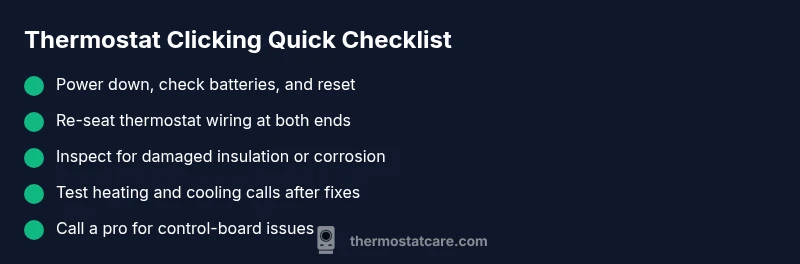
Before you touch any wires, power down the system at the breaker and, if possible, at the furnace disconnect. If your thermostat uses batteries, replace them with fresh ones of the correct type. Re-seat the thermostat’s faceplate to make sure wires are not loose behind the wall. Do not attempt to disassemble the furnace or the control board; these components can carry dangerous voltages. If your thermostat still keeps clicking after these steps, proceed to the next sections.
Diagnostic mindset: approach to isolate the issue
Start with the easiest explanations and verify them one by one. Confirm power to the thermostat is stable; listen for the click and see if it aligns with HVAC calls. If the click occurs while the system is idle, it's likely a wiring or battery issue. If the click coincides with a heat or cool call, suspect the relay. Use a multimeter if you are comfortable and consult a professional for complex tests.
Step-by-step: Basic fixes you can try today
- Power down the thermostat and HVAC at the main breaker. Confirm there’s no power to the unit before you touch wires.
- Replace batteries (if applicable) with fresh alkaline cells and reset the thermostat to ensure it starts from a clean slate.
- Re-seat wires at both ends: remove the faceplate, loosen screws, and push each wire firmly into its terminal before tightening.
- Reset the thermostat to factory defaults or perform a master reset per the manual.
- Turn power back on and observe: does the click recur, or does the system respond normally to changes in temperature? Tip: label wires before disconnecting and avoid over-tightening terminals to prevent future issues.
Deeper fixes if the basics don't work
If the simple steps don’t resolve the issue, the problem may lie with the wiring harness, a failing relay on the control board, or a short somewhere in the system. Inspect for signs of burned insulation, melted connectors, or loose ground wires. If you’re comfortable, you can gently test each wire with a non-contact tester and confirm that voltage is present only where expected. However, avoid probing inside the furnace cabinet beyond safe areas. In many cases, a stubborn click indicates a relay that’s failing or a control board issue, which requires professional service to avoid further damage or safety risks. Thermostat Care recommends erring on the side of caution and scheduling a diagnostic if you’re unsure.
How to test after fixes and prevent future clicking
After completing fixes, restore power and set your thermostat to multiple setpoints to observe stability. Check that the system heats and cools as commanded and that there’s no residual clicking. Regular checks of battery life, wiring integrity, and mounting tightness can prevent many common causes. Consider setting a quarterly maintenance reminder to clean dust from the thermostat area, verify that screw terminals are tight, and confirm that the C-wire is secure if your setup uses it. Small, proactive checks dramatically reduce future noise and cycling problems.
When to call a professional
If you’ve followed basic safety steps and the thermostat keeps clicking, or you notice signs of burnt wiring, melted insulation, or a humming control board, it’s time to call a licensed HVAC technician. A professional can test the control board, verify relay operation, and check system-wide electrical integrity without risking personal injury or equipment damage. The Thermostat Care Team emphasizes safety and recommends booking a diagnostic if you’re uncertain or uncomfortable working near live electrical components.
Cleaning and maintenance to minimize future clicking
Preventive maintenance helps keep clicking at bay. Regularly dust around the thermostat and HVAC intake areas, ensure the wall plate is snug, and replace batteries at the interval recommended by your model. Keep terminals clean and corrosion-free by avoiding moisture or cleaners that could leave residue. If you notice the click returning after maintenance, record when it happens and any accompanying symptoms (temperature changes, system mode changes, etc.) to help a technician pinpoint the cause more quickly.
Steps
Estimated time: 30-60 minutes
- 1
Power down safely
Switch off the thermostat and HVAC at the main breaker. This ensures no live voltage is present while you inspect the system. Confirm the status with the breaker off and wait a few minutes to discharge residual charges.
Tip: Always double-check the breaker before touching any wires. - 2
Check and replace batteries
If your model uses batteries, open the battery compartment and replace with fresh, alkaline cells. Reset the thermostat afterward to clear any error states and test if the click returns during startup.
Tip: Use fresh batteries from the same brand for consistency. - 3
Re-seat wiring connections
Remove the front plate, loosen the terminal screws, and push each wire securely into its terminal. Re-tighten screws and confirm there are no stray strands that could cause a short. Replace the cover plate safely.
Tip: Label wires before disconnecting if you’re removing multiple wires. - 4
Reset the thermostat
Perform a factory reset per the user manual or use the master reset option in the settings. This clears old error states that might cause repeating clicks.
Tip: Note your critical settings before a reset to re-enter them quickly. - 5
Power up and test
Turn the breaker back on and set a few test temperatures. Watch for the click and observe how the system responds to calls for heat or cooling.
Tip: Test both heating and cooling modes to ensure full function. - 6
Check C-wire and voltage
If you have a C-wire, verify it’s connected firmly and measure supply voltage if you have the tools. A loose C-wire can cause erratic behavior and extra clicks.
Tip: A professional can safely perform voltage checks if you’re unsure. - 7
Decide on next steps
If the click persists after steps 1–6, it may indicate a faulty relay or control board. Plan a professional diagnostic to prevent further risk.
Tip: Document symptoms and timing to help a technician diagnose quickly.
Diagnosis: Thermostat keeps clicking
Possible Causes
- highStuck relay or actuator in thermostat or furnace control board
- highLoose or damaged wiring between thermostat and HVAC equipment
- mediumLow or dead batteries in battery-powered thermostats
- lowDirty contacts or debris in thermostat switch housing
- lowIncorrect settings causing rapid cycling
Fixes
- easyReplace batteries and reset thermostat
- easyPower down and reseat/secure wiring at both ends
- mediumInspect for damaged insulation, replace wiring as needed
- hardConsult HVAC technician to test control board/relays
Questions & Answers
Why does my thermostat keep clicking even when I’m not adjusting it?
Persistent clicking usually points to a wiring or relay issue. Start with batteries, resets, and checking connections, then consider professional testing if the sound continues.
If the thermostat keeps clicking while idle, the likely causes are wiring or a relay problem. Start with batteries and resets, then check connections before calling a pro.
Can battery-powered thermostats click due to low batteries?
Yes. Low batteries can cause the thermostat to repeatedly energize the circuit. Replace with fresh batteries and reset the device.
Low batteries can trigger repeated clicking; replace them and reset the thermostat.
Is it safe to open the thermostat and check wiring?
Power off at the breaker before opening. If you’re not comfortable with wiring, hire a professional to avoid shocks or damage.
Turn off power at the breaker before opening. If unsure, call a pro for safety.
What does it mean if the click comes from the furnace control board?
That can indicate a failing relay or contact on the board. It’s typically a job for a licensed HVAC tech.
If the click seems to come from the control board, you should call a pro.
How long should a thermostat last before replacing it?
Thermostats last many years, but frequent clicking may signal failure. Consider replacement if issues persist after basic fixes.
A thermostat can last many years, but persistent clicking may mean replacement.
When should I replace HVAC wiring rather than repair?
If wires show burns, damage, or insulation wear, replace them with proper gauge wiring and secure terminations.
Damaged wiring means replacement; safe handling is essential.
Watch Video
What to Remember
- Start with battery checks and resets.
- Secure and re-seat all wiring connections.
- Power down before inspecting electrical components.
- Call a pro if clicks persist after basics.