Why Is My Thermostat Heating Instead of Cooling? A Troubleshooting Guide
Learn why your thermostat heats when you expect cooling and follow a practical, urgent troubleshooting guide from Thermostat Care. Quick checks, step-by-step fixes, and safety tips to get cooling working fast.


Most often this happens because the thermostat is in Heat mode, or the heat pump is on emergency/auxiliary heat. Start by confirming Cool mode, then verify wiring (R, Y, G, C) and that the breaker is intact. If the issue persists, switch to Auto and observe cooling cycles; contact a pro for reversing-valve or electrical faults.
Why heating occurs in cooling mode: core concepts
When you ask, "why is my thermostat heating instead of cooling?" the answer often lies in simple configuration or wiring, not a mysterious fault. According to Thermostat Care, many heating-in-cooling issues begin with the thermostat being set to Heat rather than Cool, or with an active auxiliary/emergency heat on a heat pump. In cooling mode, the thermostat should command the outdoor unit to Y (compressor) and the fan to G, while the system should ignore any heater calls unless the HVAC equipment demands it. Calibration and sensor placement can also skew readings, making the thermostat think the room is cooler than it actually is, which triggers heating. Understanding these fundamentals helps homeowners triage quickly without overhauling the system.
A frequent culprit is a misconfigured system type in the thermostat’s software. If a single-stage air conditioner is wired with a heat-pump configuration, the thermostat might initiate heat calls. Similarly, a misread indoor temperature due to a sunlit wall or a draft near the thermostat can push the control to heat unintentionally. Regular maintenance, including sensor calibration and ensuring the thermostat is compatible with your HVAC setup, reduces the odds of a repeat occurrence. Thermostat Care’s analysis shows mode misconfigurations and wiring faults are among the top contributors to heating in cooling scenarios in 2026. Keeping mode, system type, and fan settings aligned is the simplest, most powerful defense.
To prevent confusion in the future, always verify the current mode before testing cooling performance, and use Auto mode so the fan runs only when needed. A properly calibrated sensor and a correctly wired control board deliver accurate calls for cooling without triggering heating.
Quick checks you can do now: a practical starter list
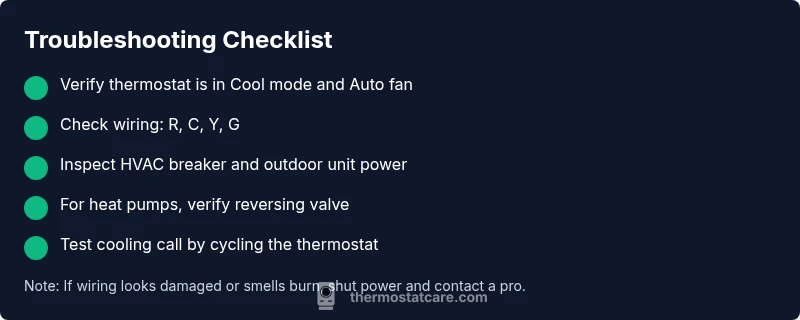
- Confirm the thermostat is set to Cool or Auto and that the fan is set to Auto (not On) to avoid constant fan operation that can resemble heat.
- Verify the mode indicator and any Hold or temporary hold settings. A lingering Hold can override intended cooling behavior.
- Inspect the wires at the thermostat: R (24V supply), C (common), Y (compressor), G (fan). Ensure there are no loose or corroded connections.
- Check the HVAC breaker and the power supply to the outdoor unit (for heat pumps, the reversing valve and compressor may be involved).
- If you have a heat pump, confirm that Emergency Heat is not engaged during cooling attempts; this is a common cause of heating when cooling is desired.
- Switch the thermostat to Cool and cycle the system by turning the unit off for a minute, then back on, to see if cooling engages as expected.
- Review recent changes: new thermostat install, software updates, or wiring alterations can inadvertently switch modes or sensor expectations. Reversing a recent change often resolves the issue.
- If the problem persists after these checks, document the symptoms, take photos of wiring, and prepare to call a licensed HVAC pro. Emergency heat can be powerful and misconfigured wiring poses safety risks.
Intended for homeowners and DIY enthusiasts, these checks form the first line of defense. They also align with Thermostat Care recommendations, which emphasize moving stepwise from simple settings to more complex diagnostics.
The goal is to confirm cooling mode, correct wiring, and stable power. If any part of the check reveals damage, looseness, or heat smell, stop and seek professional help immediately.
How settings and hardware interact: deeper dive
Thermostats act as conductors for your HVAC system, translating room temperature readings into calls for cooling or heating. When a thermostat reports a call for heat while you expect cooling, you should consider the following: the heat call could come from Emergency Heat on a heat pump, the reversing valve might be stuck in the heating position, or your thermostat might be misconfigured for a heat-only system. A miswired R and C can cause erratic behavior, including heating when cooling is requested, because the thermostat loses a stable reference voltage. The Y terminal should energize the compressor, while G powers the blower; if wires are swapped, you can see heat being produced in the wrong moment.
The first thing is to ensure the thermostat is not erroneously configured for a heat-pump with auxiliary heat enabled. If your home relies on a conventional furnace and air conditioner, confirm you aren’t accidentally using a thermostat profile designed for heat pumps. In short, misconfiguration and wiring faults are the main culprits, with sensor placement and calibration as a close third. Thermostat Care’s 2026 analysis highlights how easy it is to misinterpret a temperature reading when the sensor is placed near heat sources or direct sunlight.
Finally, remember safety: never bypass safety features or wires. If any troubleshooting step requires handling live wires or opening electrical panels, proceed only if you’re confident in your electrical knowledge. When in doubt, pause and call a professional to avoid shocks or equipment damage.
Common scenarios and fixes: tailored guidance
In many households, the simplest fix is switching the thermostat from Heat to Cool and clearing Hold settings. If this doesn’t solve the problem, the next likely causes involve the heat pump or traditional furnace configurations. For heat pumps, a stuck reversing valve can cause the outdoor unit to run as if it’s cooling in reverse, triggering heat. In conventional systems, the problem might be that the thermostat is still calling for heat due to a misinterpreted indoor temperature. Check the indoor sensor window near the thermostat; drafts, sun exposure, or a nearby heat-generating appliance can skew readings. A quick sensor repositioning, recalibration, or replacing an aging thermostat battery (if applicable) can restore correct cooling calls.
If the issue persists after confirming Cool mode and resetting the system, inspect the control wiring for the thermostat: confirm R, C, Y, and G terminals remain properly connected, and ensure there are no frayed conductors. Do not overlook the outdoor unit: a clogged condenser coil or blocked airflow can cause the system to overheat, triggering safety protections that may resemble a heating issue. In many cases, a professional check of the reversing valve, capacitor, and control board will identify the root cause and prevent future episodes.
Safety, precautions, and when to call a pro
This kind of troubleshooting can involve live electrical components and potentially hazardous equipment. Always disconnect power before inspecting wiring at the thermostat or HVAC panel. If you notice burning smells, buzzing noises, or visible damage, shut off power at the breaker and contact a qualified HVAC technician immediately. When DIY troubleshooting, wear protective gear and use insulated tools, and never bypass safety switches or fuse blocks to test cooling when there’s a risk of shock or fire. If you’re unsure about any step—especially wiring or heat-pump components—schedule a visit from a certified pro. Regular professional maintenance reduces the likelihood of mode misconfiguration and wiring faults recurring in the future, keeping your home comfortable safely and efficiently.
Steps
Estimated time: 45-60 minutes
- 1
Verify thermostat mode and hold settings
Begin by confirming the thermostat is set to Cool or Auto. Look for any Hold or temporary hold that may override cooling. If needed, reset the thermostat to factory defaults to clear problematic configurations.
Tip: Document current settings before changes. - 2
Inspect thermostat wiring
Power off the system. Remove the thermostat cover and check that R, C, Y, and G wires are properly connected and not damaged. Re-seat each wire and ensure the terminals match the labeled letters.
Tip: Take a photo of wiring before unplugging. - 3
Test power and breakers
Check the main electrical panel for tripped breakers related to the HVAC circuit. Reset any tripped breakers, and ensure the outdoor unit is receiving power if applicable.
Tip: If breakers keep tripping, stop and call a pro. - 4
Cycle cooling call
Set to Cool and run a quick cycle by turning the system off for 60 seconds, then back on. Observe if the outdoor unit engages and the air turns cool within a few minutes.
Tip: If the outdoor unit doesn’t engage, there may be a control or electrical fault. - 5
Check heat-pump specific components
If you have a heat pump, inspect the reversing valve and auxiliary/emergency heat settings. Ensure the valve is not stuck and that auxiliary heat is only used in extremely cold conditions.
Tip: Misuse of auxiliary heat is a common cause of unexpected heating. - 6
Re-test and observe
Return to Cool, set to Auto, and monitor for consistent cooling. If heating returns, escalate the issue with a professional diagnostic that includes refrigerant and electrical system checks.
Tip: Keep a log of behavior to share with the technician.
Diagnosis: Thermostat calls for heat while cooling is selected
Possible Causes
- highMode set to Heat or Hold active
- highEmergency/Aux heat engaged on a heat pump
- mediumIncorrect system type configured in thermostat (heat-pump vs. conventional)
- mediumWiring fault (R-C-Y-G wires mixed or loose)
- lowSensor misread due to placement near heat source or draft
Fixes
- easySet thermostat to Cool or Auto and ensure Hold is off
- easyDisable Emergency Heat and test cooling calls
- mediumInspect and correct thermostat wiring (R, C, Y, G); reseat connections
- easyCheck main power andHVAC breaker; reset if necessary
- hardFor heat pumps, verify reversing valve operation; if uncertain, call a pro
Questions & Answers
Why does my thermostat heat when cooling is selected?
Common reasons include the thermostat being in Heat mode, active Emergency Heat on a heat pump, or incorrect wiring. Double-check mode, wiring, and breakers before advancing.
If heating occurs while cooling, start by checking mode and wiring, then breakers.
What should I check first when this happens?
First, confirm Cool mode and Auto fan. Then inspect R, C, Y, and G wiring and ensure the outdoor unit is powered and responding to cooling calls.
Start with mode, wiring, and power checks.
Can sensor placement cause heating in cooling mode?
Yes. A misread temperature due to the sensor being near heat sources or drafts can trigger heating calls. Reposition or recalibrate the sensor.
A misreading sensor can trigger heating.
Is it safe to adjust thermostat wiring myself?
Only if you have electrical training. Always power off before handling wires, and call a pro if you’re unsure.
Wiring should be handled by someone with training.
When should I replace my thermostat?
If the unit frequently misreads, calibration is unreliable, or wiring shows damage, replacement may be the best option.
Frequent misreads or damage means replacement may be best.
Do heat pumps affect cooling mode?
Yes. In cold weather, Emergency Heat can engage. Ensure the reversing valve is functioning and not stuck in a heating position.
Heat pumps can trigger Emergency Heat; check the reversing valve.
Watch Video
What to Remember
- Verify Cool mode and disable Hold to start
- Check wiring connections and breaker status
- Test cooling call before calling a pro
- Heat pump specifics require attention to reversing valve
- When in doubt, call a licensed HVAC technician