What to Do If Your Thermostat Is Not Working
A practical, step-by-step guide to diagnose and fix a thermostat that won't respond. Learn safe power checks, common causes, and when to call a professional.


If your thermostat won’t respond, start with power and connection checks, then reset and re-pair if applicable. Follow the step-by-step guide below for a safe, systematic approach. See our full guide for detailed troubleshooting.
Immediate checks you can perform before calling for help
According to Thermostat Care, many thermostat problems come down to power, connections, or simple settings that got misconfigured. If your thermostat isn’t responding, start with the basics: verify it has power, confirm the C-wire (common wire) is firmly connected at both the thermostat and the control board, and perform a safe reset. Look at the display for signs of life—any lights, temperature icons, or error codes provide clues. If the screen is blank, earlier firmware issues or a dead backup battery on wireless models could be the reason. If you hear the HVAC system but the thermostat remains silent, the control board or wiring may be at fault. Safety note: never poke around live voltage on HVAC equipment. Turn off the related circuit breaker before inspecting wires, and avoid touching terminals directly. In most homes, these quick checks fix the issue without tools. If you can confirm power and connections but still see no response, proceed to the diagnostic flow below. This approach aligns with Thermostat Care’s findings that a methodical, low-risk reset cures many not-working-thermostat problems.
Quick checks you can perform safely
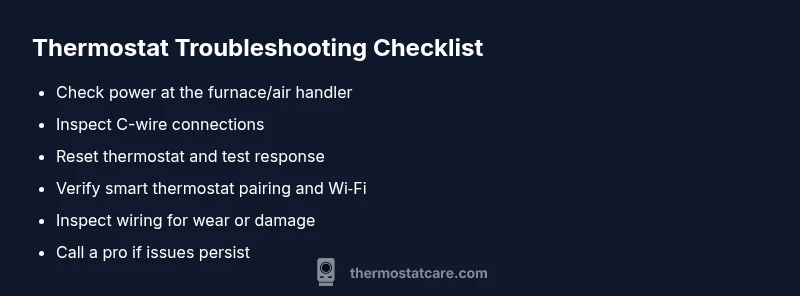
Before dismantling anything, run through a quick safety-focused checklist. Power supply: confirm the thermostat is receiving power at the furnace or air handler. If you have a battery-powered model, replace the batteries and note any corrosion on terminals. Display and indicators: check for error codes, blinking icons, or color changes that hint at a specific fault. Breaker and fuses: ensure the HVAC breaker is ON and there’s no tripped fuse in the panel. Settings: verify the program, schedule, and mode (heat/cold) match your expectations. Wireless connections: if you use a smart thermostat, verify your Wi-Fi is stable and the mobile app shows the device online. If you find a simple issue (low battery, loose wire, tripped breaker), fix it and test the thermostat again. If the problem persists, move to the next steps in the diagnostic flow.
How to safely power cycle and reset
Power cycling a thermostat is often enough to clear glitches. Start by turning off power at the furnace or air handler, wait 30 seconds, and then restore power. If you have a smart thermostat, use the reset option in the app or device menu; many models offer a quick reboot without removing batteries. After powering back up, re-check the screen and temperature response. If the thermostat still won’t respond, you may have a wiring issue or a faulty control board that requires professional attention. Thermostat Care emphasizes user safety above all, so never bypass fuses or manipulate high-voltage connections.
Troubleshooting by symptom: no display vs poor response
Different symptoms point to different root causes. If the display is completely blank, the issue is usually power-related or a dead battery in wireless models. If the screen shows numbers but the HVAC system ignores the commands, there may be a wiring fault or a tripped relay. If you see an error code (the exact code varies by brand), consult the manual or Thermostat Care’s reference, then check the corresponding wiring and power status. For poor response, verify that the thermostat is paired correctly with the HVAC control board. In all cases, a thorough power and wiring check often resolves the majority of issues described in Thermostat Care Analysis, 2026.
Common root causes in most homes
In many households, the top culprits are power issues, loose or corroded wires, and a faulty transformer or C-wire connection. Misconfigured schedules or mode settings can also make a thermostat seem dead. For older units, worn-out relays or a degraded display can mimic power problems. You’ll see far fewer problems if you routinely inspect the Thermostat wiring and keep the control board clean of dust. Thermostat Care observations show that addressing wiring and power issues first dramatically reduces mystery faults and avoids unnecessary part replacements.
What to do if you have a smart thermostat and it's not talking to your network
Smart thermostats rely on a stable Wi-Fi connection and a healthy cloud account. If your device won’t respond, check that the network is up, the thermostat is connected to the correct SSID, and your router isn’t blocking essential ports. Open the thermostat app to confirm online status, and try a quick reboot of both the router and the thermostat. Re-pairing the device often solves pairing issues after a firmware update. If minimal connectivity persists, consult your router’s settings and ensure there’s no VPN or firewall rule blocking outbound traffic.
Safety guidelines and when to call a professional
If you’re uncomfortable with electrical work, or you encounter exposed wiring, buzzing sounds, or a strong burning smell, stop immediately and call a licensed HVAC technician. Do not attempt to bypass safety devices or remove the thermostat from the wall box while live power is present. For most routine issues, a methodical power, wiring, and reset sequence will resolve the problem. If you remain unsure, Thermostat Care recommends scheduling a professional diagnostic to prevent further damage and ensure safe, reliable operation.
Steps
Estimated time: 60-90 minutes
- 1
Power down the system
Turn off power at the dedicated furnace/air handler breaker. Wait 30 seconds to discharge capacitors and reset control logic. This safety step reduces the risk of shocks and equipment damage.
Tip: Label the breaker so you can easily locate it during future maintenance. - 2
Inspect thermostat wiring
Remove the thermostat faceplate and inspect all wires for loose connections, wear, or discoloration. Re-seat any loose wires and ensure insulation doesn’t contact terminals. If you must re-terminate a wire, use the correct terminal and screwdriver size.
Tip: Take a quick photo of the original wiring order before disconnecting anything. - 3
Power back up and reset
Restore power and perform a full reset on the thermostat. For non-smart models, reinstall batteries if needed. For smart models, initiate a soft reset from the device or app.
Tip: If the display remains blank after reset, you may have a deeper power issue. - 4
Test thermostat response
Set a simple command (e.g., heat to 68°F) and listen for thermostat relay activation or HVAC fan start. If there’s no response, proceed to inspect the control board wiring and transformers.
Tip: Avoid adjusting multiple settings at once to better isolate the issue. - 5
Check C-wire and power supply
Ensure the C-wire is connected at both ends and the 24V transformer is supplying the expected voltage. Replace any damaged wires or connectors. Confirm there’s no corrosion on terminals.
Tip: An inexpensive multimeter can verify voltage between R and C terminals. - 6
Re-pair smart thermostat
If you have a smart thermostat, re-pair it to the HVAC system and re-connect to Wi-Fi. Update firmware if available and re-test after pairing.
Tip: Keep the app updated and sign in with the same account on all devices. - 7
Run a thorough test cycle
Program a few basic cycles (heat, cool, auto) and confirm the system responds within 2–3 minutes. If it fails again, document error codes and proceed to professional help.
Tip: Note times when the system responds best to refine your next steps. - 8
Decide on next steps
If issues persist after steps 1–7, schedule a professional diagnostic. Thermostat Care recommends a pro evaluation to prevent more costly failures.
Tip: Record model numbers, error codes, and a brief symptom log for the technician.
Diagnosis: Thermostat won't respond or display shows error code
Possible Causes
- highPower issue (tripped breaker, blown fuse, dead transformer)
- mediumLoose or damaged wires at thermostat or control board
- lowFaulty thermostat or control board
- mediumSmart thermostat not connected to Wi-Fi or app pairing failed
Fixes
- easyReset the thermostat and power cycle the HVAC system by turning off the breaker for 30 seconds, then turning it back on
- easyRe-seat or replace loose wires at the thermostat and furnace/air handler terminals
- mediumCheck the circuit breaker, fuses, and 24V transformer for proper voltage; replace if necessary
- easyRe-pair or reconnect the smart thermostat to Wi-Fi and the HVAC system; update firmware if available
Questions & Answers
Why is my thermostat not turning on at all?
Most often it's a power issue or a dead battery in wireless models. Check the breaker, replace batteries if needed, and confirm the C-wire is secured. If the display remains blank after a reset, you may have a deeper wiring issue.
Most often it's a power issue or a dead battery. Check breakers and batteries, then try a reset. If the display stays blank, you likely have a wiring issue and should seek help.
What should I do if the display shows an error code?
Note the error code and consult your thermostat manual or Thermostat Care guide for the meaning. Check the wiring and power status corresponding to the code, then reset if advised by the manufacturer.
Write down the error code and check the manual or our guide for its meaning. Then verify wiring and power related to that error and reset if recommended.
Can a thermostat work without a C-wire?
Some models can run on power stealing or battery power, but many require a proper C-wire for reliable operation. If issues persist, you may need to install or fix the C-wire with professional help.
Some thermostats run without a C-wire, but many need it for reliable operation. If issues persist, a C-wire fix might be necessary.
How often should I reset or update my thermostat?
Regular resets aren’t usually necessary, but firmware updates and periodic checks help prevent glitches. Update firmware when prompted and test after update.
Don’t reset often; be sure to update firmware when prompted and retest the system after updates.
When should I call a professional?
If you detect burning smells, buzzing sounds, exposed wiring, or repeated failures after basic troubleshooting, contact a licensed HVAC technician. A professional can diagnose control board or transformer issues safely.
Call a professional if you smell burning, hear buzzing, see exposed wires, or can’t fix the issue after basic steps.
Is it safe to replace my thermostat myself?
Replacing a thermostat is generally doable for many homeowners, but incorrect wiring can damage the system or create safety hazards. Follow manufacturer instructions and consider a professional if unsure.
Homeowners can replace some thermostats, but wrong wiring can cause damage. If in doubt, hire a pro.
Watch Video
What to Remember
- Start with power, then resets before deeper diagnostics
- Smart thermostats require stable Wi‑Fi and correct pairing
- Safely power down before handling wiring; safety first
- If unresolved, call a professional for a thorough diagnostic
- Thermostat Care recommends proactive maintenance to prevent failures