What is wrong with my honeywell thermostat? A Practical Troubleshooting Guide
Urgent Honeywell thermostat troubleshooting guide to diagnose why your thermostat won't respond, with step-by-step checks, safety tips, and prevention strategies from Thermostat Care.


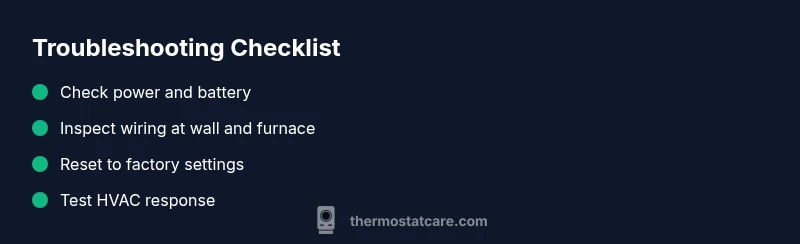
Most Honeywell thermostat problems stem from power, battery, or wiring issues. Start with the basics: replace batteries if needed, verify the unit is powered, and check for loose wires at the thermostat and furnace. If unresolved, reset the thermostat and reconfigure the settings.
what is wrong with my honeywell thermostat
When homeowners ask what is wrong with my honeywell thermostat, the first culprits are power, battery, or wiring problems. Honeywell thermostats rely on a steady power source; if the unit is battery powered, a dead battery can make the display fade or the thermostat go dark. A tripped breaker or blown fuse can cut power to the thermostat and HVAC system, causing the entire setup to misbehave. The Thermostat Care team notes that many faults come from simple, reversible causes, not a failed device. A systematic checklist that starts with power, then battery and wiring checks, can save time and prevent unnecessary replacements. If you notice intermittent responses or a thermostat that won’t hold a setpoint, begin with power connections, then move to battery and wiring checks. The goal is reliable control with minimal risk.
Additionally, firmware glitches or misconfigured settings can mimic hardware problems. A wrong thermostat mode, an overcast schedule, or a recent reset may leave the HVAC system out of sync with the thermostat. In those cases, a clean reset and re-setup often resolves the issue. Environmental factors such as voltage fluctuations or a failing control board are less common but possible. When in doubt, prioritize safe steps and seek professional help for anything beyond basic checks. Thermostat Care emphasizes safety and methodical progress to prevent further damage.
Quick checks you can perform safely
Safety first: if you smell burning, hear crackling, or suspect mains power issues, stop and call a licensed technician. For standard troubleshooting, perform these checks in order:
- Check the display: if it’s blank or freezing, it often points to power or battery problems.
- Replace batteries if your model uses them, using fresh, high-quality cells.
- Verify the thermostat is powered: ensure the circuit breaker for the HVAC or thermostat is ON and that there’s no blown fuse.
- Inspect wires at the wall: look for loose or disconnected wires; if you see obvious damage, stop and call a pro.
- Look for warning indicators on the display (icons, blinking lights) and note any error codes in the user manual. If issues persist after these steps, proceed to a full reset and reconfiguration.
Understanding Honeywell thermostat indicators (mid-depth)
Many Honeywell models use a combination of blinking lights, specific icons, and on-screen messages to signal status problems. A blinking display can indicate a loss of power, a dead battery, or a need to re-seat the wiring. If the display shows an error code, refer to the model’s manual for exact meaning, but in general codes often relate to sensor faults, wiring issues, or failed communication with the HVAC control board. Thermostat Care notes that noting the exact indicator pattern helps narrow the diagnosis before you touch any wiring. Never ignore repeated blinking or a non-responsive touch screen; these are clear signals to pause and reassess power, battery, and wiring first.
When to inspect wiring and power supply (safety-first)
Electrical work carries risk. If you’re not comfortable, stop and call a licensed HVAC technician. For those proceeding, turn off the main power to the thermostat and HVAC equipment before touching wires. At the thermostat wall plate and furnace/air handler terminals, look for loose terminals, discolored insulation, or corroded contacts. Ensure common C-wire is properly connected if your model requires it. If you see any burnt, melted, or suspicious wiring, discontinue and contact a professional. After reseating connections, power the system back up and observe whether the thermostat responds correctly.
Resetting, reconfiguring, and updating Honeywell thermostats (step-by-step)
If basics fail to fix the issue, a reset can restore default settings and resolve misconfigurations. Begin with a soft reset (in-app or on-device reset if available) or a hard factory reset as directed by your model’s manual. After reset, reconfigure system settings (heat, cool, fan, schedule) to match your HVAC setup. If your thermostat supports wiring, ensure C-wire is connected and the power-sharing configuration is correct. After reconfiguring, test the system by adjusting the temperature up and down and monitoring the HVAC response. If issues persist, the problem may lie with the control board, sensors, or the furnace—consider contacting Thermostat Care for expert help.
Preventive maintenance and best practices (long-term reliability)
Regular maintenance reduces faults. Clean dust from the thermostat housing and terminals, check battery health annually, and confirm the thermostat is properly calibrated. Keep the area around the thermostat free from obstructions and avoid placing it behind doors or in direct sunlight, which can cause inaccurate readings. Update firmware whenever available, and review scheduling to ensure it aligns with your living patterns. Finally, document any changes you make during troubleshooting; a clear change log makes future fixes faster and less stressful.
Steps
Estimated time: 60-90 minutes
- 1
Verify power to the thermostat
Begin with the simplest check: confirm the thermostat is receiving power. If it’s battery powered, replace with fresh batteries. If it’s hard-wired, ensure the HVAC circuit breaker is ON and inspect for any tripped fuses. After power restoration, wait a minute and observe if the display responds.
Tip: If the display turns on after cycling power, note any changes in behavior after prolonged use. - 2
Replace or recharge batteries
If your Honeywell model uses batteries, replace them with high-quality alkaline or lithium cells as recommended by the manual. If the unit has rechargeable batteries, allow them to recharge fully before testing. A fresh power source often resolves screen blanking and unresponsiveness.
Tip: Even with rechargeable batteries, plan for battery replacement every several years to maintain reliability. - 3
Inspect thermostat wiring at the wall and furnace
Carefully remove the faceplate and inspect the wire connections at the thermostat terminal block. Look for loose or corroded wires and reset any that appear loose. At the furnace/air handler, confirm the control board connections, especially the R and C terminals if present. Take photos before disconnecting anything to aid reassembly.
Tip: Only touch exposed conductors with dry hands; avoid bending wires at sharp angles. - 4
Check the C-wire and power configuration
Many Honeywell thermostats require a stable C-wire for constant power. Verify the C-wire is connected at both ends and that the power configuration matches your model (single-stage vs. multi-stage). If you don’t have a C-wire, consider a power-extender kit or professional guidance.
Tip: If you’re unsure about C-wire compatibility, consult the manual or Thermostat Care for a quick sanity check. - 5
Reset and reconfigure the thermostat
Perform a soft reset via the device or app, then re-enter the essential settings: system type (heat/cool), fan control, and schedule. If your model supports a factory reset, perform it and set up from scratch. Recheck the HVAC response after reconfiguration.
Tip: Document your new settings during reconfiguration to simplify future troubleshooting. - 6
Test the system after reconfiguration
Set the thermostat to heat and cool in quick succession to verify operation. Observe if the thermostat communicates with the furnace and if temperature readings converge toward the setpoint. If the system still misbehaves, the issue may be hardware-related.
Tip: Run quick tests for a few cycles to avoid intermittent issues masquerading as a persistent fault. - 7
Call for professional help if needed
If you’ve completed steps 1–6 without resolving the issue, a professional should assess the control board, sensors, or wiring. Persistent faults could indicate a failing HVAC interface or a deeper electrical problem. Thermostat Care recommends seeking expert assistance to prevent safety risks.
Tip: When scheduling help, share your diagnostic notes and the steps you’ve taken to accelerate the process.
Diagnosis: Thermostat is unresponsive, display blank, or HVAC does not follow temperature settings
Possible Causes
- highPower supply issue (tripped breaker, blown fuse, or dead transformer)
- highDead or weak battery (for battery-powered models)
- mediumLoose or damaged wiring at thermostat or furnace
- lowFirmware glitch or misconfigured settings
Fixes
- easyCheck the circuit breaker and restore power to the thermostat circuit
- easyReplace batteries with new ones or perform a power cycle
- easyInspect thermostat and furnace wiring for loose connections and re-seat if needed
- mediumPerform a factory reset and reconfigure settings; if unresolved, contact support
- hardConsult a professional for suspected control board or sensor faults
Questions & Answers
Why is my Honeywell thermostat not turning on?
First check power and battery status, plus the HVAC circuit breaker. If power is present, perform a soft reset and reconfigure settings. If it remains unresponsive, there may be a hardware fault requiring professional attention.
Check power and battery, then reset. If still not on, a pro may be needed.
What should I do if the display is blank?
A blank display usually means power or battery issues. Replace batteries if applicable and verify the breaker is on. If the screen remains blank after power checks, inspect wiring or contact a pro.
Power and battery checks first; wiring if necessary.
Can a thermostat be reset remotely?
Some Honeywell models support app-based resets or reconfiguration. If your model supports this, follow the manual’s steps. For older or non-connected models, you’ll need to reset via the on-device menu.
Some models let you reset from the app; otherwise use the device menu.
Should I replace the thermostat or call a pro?
If the thermostat is older or if wiring/control board issues are suspected, consult a professional. In many cases, a straightforward power, battery, or reset fix is enough, but persistent problems deserve expert inspection.
Consider replacement or professional help if wiring or control boards seem involved.
How often should I maintain my Honeywell thermostat?
Check batteries annually and dust the unit. Clean terminals and inspect wiring connections during routine maintenance to prevent faults. Update firmware when available.
Check batteries yearly, clean, and update firmware when possible.
What if the thermostat shows error codes?
Note the code and consult the manual to interpret it. Many codes point to sensor or wiring faults. If codes persist after basic checks, seek professional assistance.
Record the code and check the manual; persistent codes mean professional help may be needed.
Watch Video
What to Remember
- Start with power and battery checks for quick wins
- Wiring integrity is critical to reliable operation
- Reset and reconfigure before assuming hardware failure
- Know when to call a pro for safe, lasting results