Honeywell Thermostat Turned Off? A Urgent Troubleshooting Guide
Urgent guide to diagnose and fix a Honeywell thermostat that turned off. Learn power checks, battery replacement, wiring, and safe steps to restore heating. Quick, practical steps for homeowners and DIY enthusiasts.


Most Honeywell thermostat turned off issues stem from a power loss or dead batteries. Start by checking that the thermostat and furnace have power, replace batteries if needed, and ensure the display is on. If it still shows Off, verify the system mode and perform a quick reset. If nothing works, call a professional.
Common causes when a Honeywell thermostat turns off
A Honeywell thermostat turned off unexpectedly is usually a sign of a power-related issue or a miscommunication between components. According to Thermostat Care, the most frequent culprits are power loss to the thermostat or furnace, dead batteries in battery-powered models, and an incorrect mode setting that sends the system to Off. Start by confirming the thermostat has power and that the display is alive. If the screen is blank, you’ll want to check the home's main power, the furnace switch, and any inline fuses. In wired Honeywell units, a loose C-wire or a tripped circuit can cut voltage to the stat and cause a complete shutdown. If the thermostat is old or has endured a rapid battery drain, it may simply reset to a minimal state, so battery replacement often resolves the issue. Finally, if the system is in a scheduled Off period, or if a smart thermostat is waiting for a manual override, the unit can appear to be turned off even when power is available.
Safety and immediate checks
Safety always comes first. Do not bypass protective switches or tamper with gas valves or furnace controls. Before you touch any wiring, switch off the circuit breaker that powers the HVAC equipment and confirm the power is truly off with a tester. Wear insulated gloves if you’ll be handling exposed wires. If you smell gas, leave the area and call emergency services. With power off, you can inspect the thermostat’s backplate, screws, and wall-mounted connectors for looseness. A small wiggle in a loose wire at the thermostat can interrupt power. If the thermostat uses batteries, replace them with fresh ones of the correct type and ensure the contacts are clean. This safety-forward approach helps prevent shocks or fire risks while you diagnose the problem.
Quick diagnostic checkpoints you can do now
- Look at the thermostat display: if nothing shows, there is likely a power issue. Check the circuit breaker and the furnace power switch.
- Check the batteries: replace if the model uses batteries and the display is dim or flickering.
- Inspect the wiring: verify the C-wire connection at both the thermostat and the furnace control board; a loose wire can cut power.
- Confirm mode and schedule: ensure the unit isn’t set to Off or a hold that keeps it silent.
- Listen for the furnace: if the HVAC doesn’t start when it should, the problem may be with the furnace rather than the thermostat.
- Reset the thermostat: a soft or hard reset can clear minor firmware glitches that mimic an Off state.
Diagnostic flow: symptom to solution
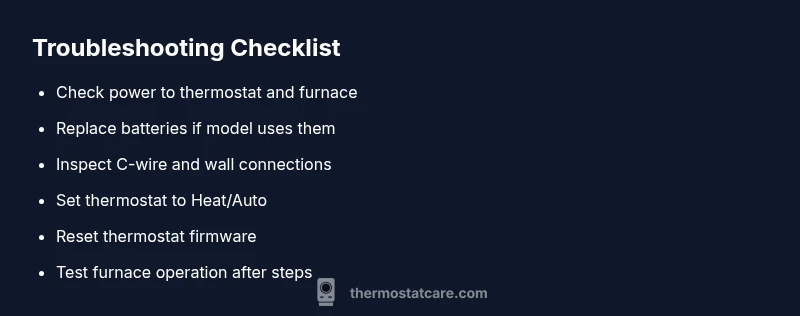
Symptom: Thermostat turns off or blank display. Causes typically center on power (high likelihood), dead batteries (medium), loose wiring (medium), or a tripped breaker (high). Software glitches (medium) can also trigger Off states. Solutions flow from simplest to more involved: restore power, replace batteries, secure wiring, reset firmware, and finally test the furnace operation. If you’re uncomfortable with any step, or if you detect burning smells or sparking, stop immediately and contact a pro.
Step-by-step fix for the most common cause (power issue)
- Turn off power to the thermostat and furnace at the main breaker. 2) Verify the furnace switch is in the ON position. 3) Restore power and observe the thermostat display. 4) If the display returns, reset the thermostat to confirm normal operation. 5) If the screen remains blank, check or replace the C-wire and ensure all connections are clean and tight. 6) Reinsert or replace batteries if applicable. 7) Set the system to Heat or Auto and run a quick test call. 8) If the issue recurs, contact a licensed HVAC technician for a deeper inspection. [Tip: always ensure power is OFF before touching wiring.]
Preventive maintenance to avoid future outages
Regular battery checks, annual furnace service, and firmware updates for smart thermostats reduce the odds of an abrupt shutdown. Keep a basic spare set of batteries on hand and label wires before disconnecting any terminal. Maintain a clean installation area to prevent dust buildup from interfering with connections. Thermostat Care's analysis shows that proactive checks can dramatically cut down on emergency fixes and help you stay warm through the next heating season.
When to call a professional and next steps
If you’ve followed the steps and the Honeywell thermostat still turns off, the issue may be beyond a quick fix. A licensed HVAC technician can test the control board, verify 24V power, and inspect safety switches or gas valves for proper operation. Prepare your thermostat model, recent symptoms, and any error codes to speed up service. The Thermostat Care team recommends seeking professional help when you detect unusual furnace noises, gas smells, or unsafe wiring.
Steps
Estimated time: 45-60 minutes
- 1
Power down and verify main supply
Turn off power to the thermostat and furnace at the main breaker. Use a tester to confirm there is no residual voltage before you touch any wires.
Tip: Taking photos of terminal layouts helps when reconnecting wires. - 2
Check furnace switch and breakers
Ensure the furnace inline switch is ON and that the house circuit breaker feeding the HVAC system is not tripped. Flip the breaker off and on to reset, if needed.
Tip: If a fuse has blown, replace it with the same rating and avoid bypassing it. - 3
Inspect thermostat wiring
Remove the thermostat faceplate and check that all wires are fully inserted under their terminals. Re-seat loose wires and confirm the C-wire is secure for powered models.
Tip: Label wires before disconnecting to simplify reassembly. - 4
Replace batteries (if applicable)
Install fresh batteries of the correct type. Clean battery contacts with a dry cloth before reinserting.
Tip: Use fresh batteries and avoid mixing old and new cells. - 5
Reset and reprogram the thermostat
Reset to the recommended settings for your Honeywell model. Re-enter the schedule and ensure the system is set to Heat/Auto.
Tip: Document your schedules before reset; you can recreate them quickly. - 6
Test call and verify operation
Turn power back on and run a test call for heat to verify the furnace ignites and the thermostat remains on.
Tip: If the furnace doesn’t respond, stop and call a technician.
Diagnosis: Thermostat turns off or display is blank
Possible Causes
- highPower loss to thermostat or furnace
- mediumDead batteries in battery-powered model
- mediumLoose C-wire or wiring fault
- highTripped circuit breaker or blown fuse
- mediumSoftware glitch or incorrect mode
Fixes
- easyCheck main power, furnace switch, and breakers; restore power if tripped
- easyReplace batteries and reseat C-wire connections
- easyReset thermostat to factory or recommended settings
- easyConfirm mode is Heat/Auto and remove Off holds in programming
- hardInspect control board and safety switches with a professional
Questions & Answers
Why is my Honeywell thermostat blank or turned off even though the power is on?
Common causes include dead batteries, loose wiring, a tripped breaker, or a faulty control board. Start with power and battery checks, then inspect wiring connections at both ends.
A blank display usually means power or wiring issues; check batteries, wiring, and breakers first.
Can incorrect settings cause the thermostat to turn off?
Yes. If the thermostat is set to Off or the mode is not Heat/Auto, the system will seem off. Review and correct the mode and any holds or schedules.
Setting the mode to Heat or Auto is essential to get the system running.
Should I reset my Honeywell thermostat?
Resetting can fix basic firmware glitches. Use the reset method specified for your model and reconfigure your preferred settings afterward.
A reset can clear glitches, but follow your model’s manual.
Is a tripped breaker always the culprit?
Not always, but it’s a frequent cause. Check the breakers feeding both the thermostat and furnace and reset if needed.
Tripped breakers are common; reset carefully.
When should I call a professional?
If the thermostat still turns off after following steps, if you smell gas, or if you hear sparking, contact a licensed HVAC technician promptly.
If problems persist or you smell gas, get professional help.
Can low batteries affect a wired thermostat?
Wired units rely mainly on house power, but some models still use batteries for backup. If the display is dim, replace them and check connections.
Even wired models may need battery backups checked.
Watch Video
What to Remember
- Inspect power first to fix most outages
- Replace batteries if needed and secure C-wire
- Verify mode and schedule are not Off
- Call a professional if issues persist after steps