Thermostat Won't Turn On: Step-by-Step Troubleshooting
If your thermostat won't turn on, start with safe checks and a clear diagnostic flow. This Thermostat Care guide walks you through quick checks, common causes, and safe fixes to restore heat fast.


If your thermostat won't turn on, the most common culprit is a power issue or a drained battery. Start with the basics: check power at the outlet or furnace, inspect the thermostat battery (if applicable), and confirm the HVAC circuit is on. This quick-check approach often restores operation without tools, saving time and frustration.
Why a Thermostat Won't Turn On
In most homes, the reason a thermostat won’t turn on is related to power, not a broken device. According to Thermostat Care, a tiny interruption in the 24-volt control circuit or a dead battery can leave the display dark and the furnace idle. Before assuming the thermostat is faulty, run through quick, safe checks on power sources, fuses, and the backplate connections. By starting with the simplest explanations, you can often restore operation in minutes and avoid unnecessary replacements. This section sets the stage for practical, DIY fixes that homeowners can perform safely.
Quick Safety Checks You Can Do Before Digging In
Safety should come first. Always cut power to the thermostat at the furnace or breaker panel before touching wires or the backplate. Use insulated tools and keep liquids away from electrical components. If you smell burning, hear buzzing, or notice melted plastic, stop immediately and call a pro. These checks reduce risk and prevent further damage while you diagnose the issue. Remember: safety first keeps you and your equipment protected while you troubleshoot.
Check Power and Circuit Supply
A blank display is almost always a power issue. Start by confirming the furnace switch is ON and the dedicated breaker feeding the HVAC side is not tripped. Look for a 24-volt power supply at the thermostat or at the furnace control board; a No/Low voltage reading indicates an upstream problem. If you have a separate backplate battery, replace it with fresh batteries. If the power check passes, move to battery and wiring considerations. This step helps distinguish between a power source and a device problem.
Battery, Wiring, and Display Issues
If your thermostat uses replaceable batteries, install fresh alkaline or lithium cells following the polarity marks. For units wired to the C-wire, ensure the common wire is securely connected at both the thermostat and the furnace. A dim or flickering display often hints at a loose wire or weak power. After any wiring adjustment, reattach the thermostat and test by selecting heat or cool for a quick response. Addressing wiring and battery problems early prevents repeat failures.
Diagnostic Flow: Symptom to Solution
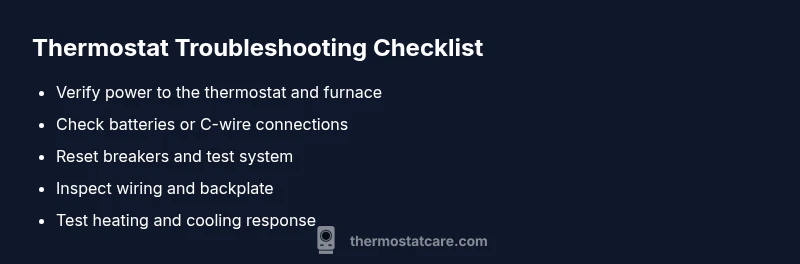
Start with the symptom: no power or blank display. Then test: is there power at the thermostat and at the furnace? If yes, check the thermostat batteries and C-wire. If power appears but the unit still won’t turn on, inspect for a tripped breaker, a blown fuse, or a faulty transformer. The goal is to isolate whether the issue is electrical, wiring, or internal to the thermostat. If you’re uncertain at any stage, stop and consult a professional.
Prevention Tips and Common Troubleshooting Mistakes
Avoid bypassing safety features or jumping wiring to force a response. Always reassemble the wall plate exactly as you found it, and replace worn wires rather than twisting them to fit. Label wires or take a photo before disconnecting anything, so you can restore the correct connections later. Regularly test the power supply at the furnace matrix and schedule routine checks to catch issues before they leave you in the cold.
Safety, Warnings, and Professional Limits
This guide emphasizes safe, DIY-friendly fixes, but there are limits. If you notice buzzing, burning smells, visible damage, or you’re unsure about any step, stop and call a licensed HVAC technician. Working with live circuits can be dangerous, and improper wiring can damage the furnace or void warranties. Keep a clear space around the thermostat and avoid using heat sources to power it up.
Prevention Tips to Avoid Future Non-Turn-Ons
Implement a simple maintenance routine: check batteries (if applicable) every 6–12 months, inspect the C-wire connections, and confirm the furnace switch and breaker are in good shape. Keeping your thermostat firmware up to date and reviewing wiring connections after home renovations can prevent many common problems from cropping up again.
Steps
Estimated time: 30-45 minutes
- 1
Power at the thermostat
Confirm the display is off and there’s no power. If the display is completely dark, move to the next steps. Do not attempt to power it with external adapters. This protects the control board and wiring.
Tip: Document any signs of power loss (dim display, no backlight) for better diagnosis. - 2
Check furnace switch and breakers
Locate the furnace switch and ensure it’s in the ON position. Check the HVAC circuit breaker in the main panel and reset any tripped breakers. After resetting, wait 30 seconds and observe the thermostat for any sign of life.
Tip: If the breaker trips again, there may be a short or overload; stop and call a pro. - 3
Test or replace batteries (if applicable)
Remove the thermostat cover and test batteries. Replace with high-quality alkaline or lithium batteries if the unit uses them. Reinsert, reseat connections, and power the thermostat back on to test.
Tip: Always replace both batteries at the same time to avoid mismatch power. - 4
Check the C-wire and wiring
Turn off power before inspecting. Verify the C-wire is securely connected at the thermostat and the furnace control board. Look for loose screws or damaged insulation and reseat or replace as needed.
Tip: Take a photo of the wiring before disconnecting to aid reassembly. - 5
Test system response
Power the system back on and set thermostat to heat or cool. Listen for the furnace engaging and a temperature change on the room side. If nothing happens, the issue could be internal to the thermostat or the control board.
Tip: If the system still won’t respond, stop here and schedule a professional diagnostic.
Diagnosis: Thermostat won't turn on
Possible Causes
- highPower issue (furnace switch, breaker, or transformer)
- mediumDead or drained batteries (where applicable)
- highTripped breaker or blown fuse in HVAC circuit
- lowWiring/C-wire connection problem between thermostat and furnace
Fixes
- easyReset the furnace/air handler switch and the HVAC circuit breaker; restore power
- easyReplace thermostat batteries or ensure the C-wire is securely connected
- easyInspect thermostat wiring and tighten loose connections at both ends
- mediumIf power remains absent or you hear unusual sounds, consult a professional
Questions & Answers
Why won't my thermostat turn on after a power outage?
Power outages can reset a thermostat’s control board or drain backup power. After power returns, check the display, replace batteries if needed, and reset the device before attempting further fixes.
Power outages can reset the thermostat. Check the display, replace batteries if needed, and reset the device before trying more fixes.
Should I replace the thermostat batteries if the display is blank?
If your model uses batteries, a blank display often means batteries are dead or poorly connected. Replace them with fresh ones and re-seat the backplate connections.
A blank display often means the batteries are dead or not connected; replace and reseat.
Can Wi‑Fi or software cause a non-turn-on issue?
Software glitches can affect startup on some smart thermostats, but power and wiring problems are far more common culprits. Update firmware after basic power and wiring checks.
Software can cause startup issues, but power and wiring problems are more common. Update firmware after basics.
When should I call a professional?
If basic checks fail, you hear buzzing or burning smells, or you’re unsure about wiring, contact a licensed HVAC technician. They can safely diagnose electrical issues and protect your equipment.
If basic checks fail or you hear buzzing or burning smells, call a licensed HVAC technician.
Can a faulty C-wire prevent the thermostat from turning on?
Yes, a loose or damaged C-wire can prevent the thermostat from getting power. Inspect connections at both ends or have a pro repair the wiring.
A bad C-wire can stop power reaching the thermostat; inspect or get help to fix it.
Is a non-responsive thermostat dangerous?
Generally not dangerous, but it can indicate wiring issues that affect heating safety. If you notice burning smells or overheating, shut off power and seek professional help.
Not usually dangerous, but wiring issues can be risky. If in doubt, turn off power and contact a pro.
Watch Video
What to Remember
- Start with power, then battery checks.
- Secure all wiring connections before testing.
- Call a pro if basic checks fail or you smell burning.
- Prevent future issues with routine maintenance and firmware checks.