Thermostat Won't Turn Heater On: Troubleshooting Guide
Urgent, practical guide to diagnose and fix a thermostat that won't turn on the heater. Learn checks, step-by-step fixes, and safety tips to restore comfort quickly.


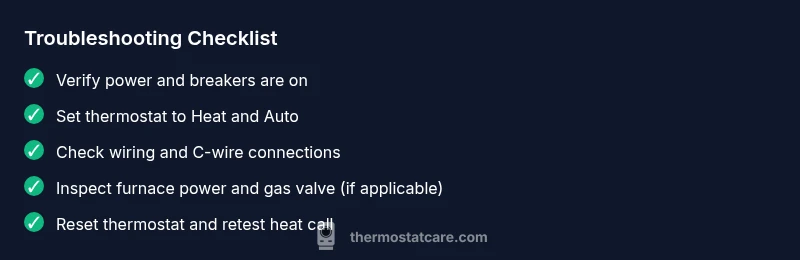
If your thermostat won't turn heater on, start with the simplest checks: verify the thermostat is set to heat, the display is on, and the circuit breaker for the furnace is not tripped. Reset the thermostat and power to the furnace, then test again. If it still won’t heat, proceed with the diagnostic flow for common power, wiring, or sensor issues.
Why thermostat won't turn heater on
When you notice that thermostat won’t turn heater on, you aren’t imagining it—this is a common residential problem that leaves homeowners uncomfortable and frustrated. According to Thermostat Care, most failures like this originate from simple power, setting, or sensor issues rather than a full furnace breakdown. The goal is to quickly identify the first-guard issues that prevent heat from starting, then apply safe fixes. If you follow these steps and still have no heat, you should consider professional help as a next step, to avoid hardware damage or safety risks associated with gas furnaces or electrical work. The core idea is that you can often restore heat with careful checks in the right order, especially when you spot a mis-set thermostat or blown breaker. The phrase thermostat won’t turn heater on is a signal to move from guesswork to systematic testing.
Quick diagnostic overview
This section maps out the most probable causes and how to test them without specialized tools. The diagnostic flow focuses on power, control signals, and communication between the thermostat and the furnace. You’ll learn which checks are safe to perform at home and when to call a technician. By documenting symptoms as you go, you can provide precise information to a pro if needed. Thermostat troubleshooting starts with the lowest-effort checks and progresses to wiring and sensor tests that can explain why heat fails to start. Remember, if anything involves gas lines or electrical panels, prioritize safety and call a pro if you’re unsure.
Power and power supply checks
Power issues are by far the most common reason a thermostat won’t turn heater on. Start by confirming that the thermostat is receiving power and that the furnace circuit breaker is ON. If you use a switch near the furnace, verify it’s in the ON position. Check for a blown fuse or a tripped GFCI outlet feeding the furnace. If your thermostat is battery-powered, replace the batteries with fresh ones, noting the correct orientation. In many homes, a dead battery in a non-wired thermostat can cause it to display but not trigger the furnace, which leads to an apparent heat outage. Keeping the power path clear and uninterrupted is a key preventive habit that Thermostat Care emphasizes.
Thermostat settings and display checks
Settings errors are a frequent cause of no-heat symptoms. Ensure the thermostat is set to Heat (not Cool or Auto) and that the fan is set to Auto rather than On. Check the schedule to ensure there isn’t a temporary setback or hold that suppresses heat. If your thermostat has a Humidity or Seasonal setting, make sure they aren’t interfering with heating calls. A blank or dim display can indicate a power issue, but a fully visible display with incorrect settings is a different problem that often resolves with a quick reset or re-entry of the proper temperature. In some cases, a firmware update is needed for smart thermostats to resume proper operation.
Wiring, batteries, and sensors
Incorrect wiring between the thermostat and the furnace, a loose C-wire, or a failed sensor can prevent heat from turning on. If you’re comfortable, power down the system and inspect the thermostat-to-furnace wiring at both ends for loose connections or damaged insulation. Ensure the common wire (C) is solidly connected, as a missing C-wire can cause the thermostat to misbehave on newer, low-power systems. For battery-powered models, replace batteries and reseat connectors. If you notice rust, corrosion, or melted insulation, do not reuse the wiring—call a pro. Sensor misreads can also trigger no-heat responses in some smart thermostats, so consider testing with a basic non-smart unit if available.
Interactions with the furnace or boiler
The thermostat is only part of the heating system; a furnace or boiler issue can masquerade as thermostat trouble. Confirm the furnace has power, the control board is lit, and the gas valve (for gas furnaces) is open when heat is demanded. Listen for the furnace blower’s startup sound; if it never starts, the issue may be with the furnace, not the thermostat. A dirty filter, low refrigerant charging not relevant to heating, or a blocked vent can also cause heat failure and may trigger safety interlocks. When in doubt, testing these furnace-side conditions with a qualified HVAC technician is wise. The aim is to rule out the central equipment before replacing a thermostat.
Resetting and re-testing
A factory or hard reset can clear the odd glitch that prevents heat from initiating. Follow your thermostat’s reset procedure to restore default settings, then re-enter your preferred temperature and mode. After the reset, test the heat call: set to Heat, wait for a call, and listen for the furnace to engage. If your thermostat is a learning or smart model, allow a few minutes for it to reacquire network signals and re-learn schedules. If the heat still won’t engage, proceed to deeper checks or professional service.
Safety and when to call a professional
If you smell gas, hear unusual banging, or see scorch marks around any furnace wiring, immediately evacuate and call emergency services and a licensed HVAC technician. Do not attempt to bypass safety interlocks or perform live electrical work. Gas furnaces involve risks that require trained personnel. For basic at-home checks, always begin with power, mode, and wiring tests that do not involve live disassembly. When you’re unsure, it’s safer to call a pro and spare yourself potential injuries or property damage.
Prevention and maintenance tips
To minimize future no-heat events, establish a simple maintenance routine: test heat call monthly, replace batteries as needed, keep furnace air filters clean, and schedule annual professional furnace inspections. A well-maintained HVAC system reduces the probability of thermostat-induced heat failures and extends equipment life. Use a simple log to note any thermostat warnings, display errors, or intermittent behavior, so you can detect patterns early. Thermostat Care recommends documenting the problem with the exact settings, time of day, and any triggering events to speed up future troubleshooting.
Common mistakes to avoid
Avoid haste in changing the thermostat instead of the furnace—misdiagnosing heat failures is common. Don’t ignore safety steps when wiring or testing power; always cut power to avoid shocks. Don’t assume a smart thermostat will automatically work after a power outage—reconnect and reconfigure. Finally, never force the furnace to run if the furnace panels show warning lights or error codes; consult a pro if codes appear.
mainTopicQuery":"thermostat troubleshooting"},
diagnosticFlow
stepByStep
tipsList
keyTakeaways
videoEmbed
faqSection
mainTopicQuery
Steps
Estimated time: 30-60 minutes
- 1
Verify power and mode
Power down for safety, then turn the furnace power back on and ensure the thermostat is set to Heat with the fan on Auto. This establishes a correct baseline before deeper testing.
Tip: Always start with the simplest step to avoid unnecessary disassembly. - 2
Check thermostat display and battery
If the display is dim or blank, replace batteries if applicable. Ensure the thermostat is getting power; if it’s wired, confirm the 24V supply from the furnace is present.
Tip: A faint display can mask a lighting issue, not just settings. - 3
Inspect wiring connections
Turn off power, then inspect the wires at the thermostat and the furnace control board for loose, corroded, or damaged wires. Re-seat or replace as needed.
Tip: Loose connections are a frequent cause of intermittent heat. - 4
Test the furnace call
With the thermostat set to Heat, listen for the furnace calling for heat and the blower starting. If there’s no call, check the limit switch and safety interlocks in the furnace.
Tip: If you hear beeps or error codes, note them for the technician. - 5
Reset and re-test
Perform a full reset on the thermostat and power cycle the furnace once more, then run a temperature test to confirm heat triggers.
Tip: Sometimes timing matters; give it a minute after reset. - 6
Call a professional if needed
If none of the steps restore heat or you detected gas smells, shut off power and call a pro immediately.
Tip: Gas safety is non-negotiable; don’t take chances.
Diagnosis: Thermostat won't turn heater on
Possible Causes
- highPower issue (breaker, fuse, furnace power off)
- highIncorrect thermostat settings or mode (heat vs cool, fan)
- mediumWiring issues between thermostat and furnace
- lowDead or dying thermostat battery (if battery-powered)
- lowHVAC equipment fault (gas valve, blower, safety interlock)
Fixes
- easyCheck the furnace circuit breaker and main power switch; reset any tripped breakers.
- easyVerify thermostat is set to Heat, mode is correct, and the fan is Auto.
- mediumInspect thermostat wiring at both ends for loose connections; reseat wires as needed.
- easyIf battery-powered, replace batteries and re-test; reseat battery contacts.
- easyReset the thermostat to factory settings and reconfigure; test call for heat.
- hardIf issues persist, contact a licensed HVAC technician for furnace-side diagnostics.
Questions & Answers
Why won't my thermostat turn on the heater even though the display is on?
A common reason is a wrong setting or a fault in the thermostat-furnace communication. Start by ensuring the device is set to Heat, the fan is Auto, and the schedule isn’t suppressing heat calls. If the issue persists, test the furnace call and wiring.
If your thermostat displays but won’t heat, check the Heat setting first, then verify power and wiring.”
Can a low battery cause a thermostat to fail to call for heat?
Yes, battery-powered thermostats may fail to call for heat if the battery is weak or improperly seated. Replace batteries and re-test the heat call. For hardwired models, battery isn’t the fix.
Low batteries can stop a thermostat from requesting heat; replace them and try again.
What should I check first if the furnace won’t start, even with a calling thermostat?
Look for power to the furnace, a tripped breaker, blown fuse, gas valve status, and a clean air filter. If the furnace still won’t start, you may have a safety interlock issue that requires a professional.
If the furnace won’t start, inspect power, gas valve, and filters, and consider a pro if unsure.
Is resetting the thermostat safe, and will it fix most issues?
Resetting can clear minor glitches and re-sync schedules. It’s safe if you follow the manufacturer’s instructions. If problems persist after a reset, deeper diagnostics are needed.
Reset is safe and often helpful, but persistent issues mean professional help may be needed.
When should I call a professional for a thermostat that won’t turn on heat?
If you detect gas smells, hear unusual furnace noises, see error codes you don’t recognize, or are uncomfortable with wiring, call a licensed HVAC technician.
Call a pro if you smell gas or see unsafe furnace behavior, or if you’re unsure about wiring.
Can a faulty C-wire cause a no-heat issue, and how do I fix it?
A loose or broken C-wire can prevent the thermostat from communicating with the furnace. Check the C-wire at both ends and re-seat or replace if necessary.
A bad C-wire can stop heat calls; check connections at the thermostat and furnace.
Watch Video
What to Remember
- Verify power and correct heat mode first
- Check for loose wiring and defective batteries
- Reset devices and re-test before calling a pro
- Regular maintenance reduces future no-heat events