What to Do When Your Thermostat Won't Go Below 68
Discover why your thermostat won’t go below 68 degrees and how to troubleshoot safely. Step-by-step checks, a diagnostic flow, and quick fixes from Thermostat Care to restore comfortable heating.


Most likely the minimum setpoint is being limited by a setting rather than a failed heat call. Check for Hold, Eco, or energy-saving presets, and verify the mode is heating. A quick reset or fresh batteries often resolves the issue; if not, a wiring or sensor fault may be involved.
Understanding the 68-degree boundary and what it means for your system
When your thermostat won't go below 68, the first thing to rule out is whether you're hitting a hard limit set by the thermostat or a control feature within your HVAC system. Some thermostats have a predefined minimum setpoint to prevent unsafe furnace or heat pump operation in very cold weather. In addition, a few modes—such as Eco/hold or energy-saving presets—can temporarily cap how low you can set the temperature. This is especially common on newer smart thermostats, which balance comfort with energy savings. The Thermostat Care team finds that most cases are caused by user settings, rather than a malfunctioning heater, though equipment faults do occur. Start by checking the current mode (heat vs. auto), any holds, and whether the display shows an error or obstruction.
Quick checks you can perform safely (no tools required)
- Verify the thermostat is in heating mode and not in cool or auto mode that would reverse expectations.
- Check for a “Hold” or “Permanent Hold” setting and release it or reset to a lower setpoint.
- Replace or recharge the thermostat batteries if it uses them; a weak battery can cause erratic limits.
- Look for a temporary ECO or energy-saving setting that caps the minimum; disable if appropriate.
- Confirm the HVAC system itself hasn’t tripped or fallen into a fault that prevents lower temperatures.
If any of these steps changes the setpoint, you’re likely addressing the root cause. If not, proceed to the diagnostic flow.
Diagnostic flow: symptom → diagnosis → fixes
Symptom: thermostat won’t go below 68 even when you lower the setting. Possible causes (high/medium/low likelihood):
- Power issue or dead battery: high
- Hold mode or safety lock engaged: high
- Sensor or temperature reading fault: medium
- Wiring or C-wire problems: medium
- HVAC control board limit or furnace issue: low
Proposed fixes (easy to hard):
- Check/replace batteries and ensure power is reaching the thermostat: easy
- Turn off hold mode and perform a full reset: easy
- Recalibrate the sensor or relocate the thermostat away from heat sources: medium
- Inspect wiring at the thermostat and furnace, ensuring common (C) wire is connected: medium
- If the unit or system continues to restrict, consult an HVAC pro: hard
Step-by-step: fix for the most common cause (low-hanging fruit)
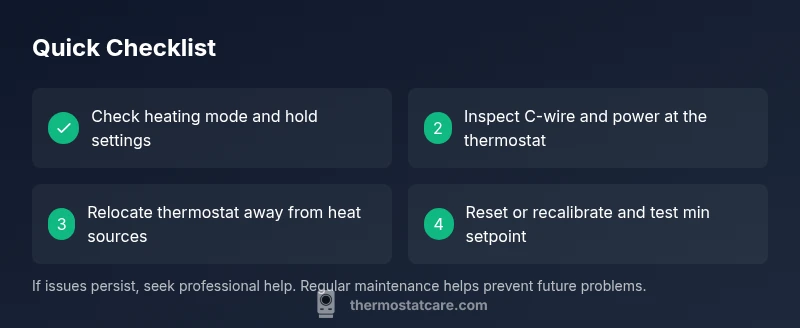
- Verify mode and hold: Ensure the thermostat is in heat mode and not stuck on Hold. Keep notes of current settings before changes. Tip: Take a quick photo to reference later.
- Power check and battery replacement: If your thermostat uses batteries, replace them with fresh alkaline cells; ensure the power connector is snug. Tip: Use high-quality batteries to prevent intermittent voltage.
- Reset and reconfigure: Perform a soft reset or factory reset if needed, then re-enter your preferred schedule and minimum setpoint. Tip: Back up schedules before resetting.
- Check C-wire and wiring: Inspect the wiring at both the thermostat and furnace/air handler; ensure the C-wire is connected and intact. Tip: If you see loose wire, power off and reconnect securely.
- Sensor placement and calibration: Make sure the thermostat is away from heat sources, drafts, or direct sunlight; calibrate if available. Tip: Move the thermostat to a location with representative room temperature.
- Call a pro if unresolved: If temperatures still won’t drop, a licensed HVAC technician should evaluate power, wiring, and equipment limits. Tip: Document any error codes to speed up diagnosis. Estimated time: 30-45 minutes
Safety considerations, warnings, and when to involve a professional
- Always power down the system before touching wiring or panels to avoid electric shock.
- Do not bypass safety features or disable protective limits to chase a lower temperature.
- If you smell gas, hear unusual noises, or see scorch marks, evacuate and call emergency services.
- If you’re uncomfortable with any step, stop and contact a qualified HVAC technician. The Thermostat Care team emphasizes safety first.
Prevention: how to avoid this issue in the future
- Schedule regular thermostat maintenance and firmware updates for smart devices.
- Keep the thermostat away from heat sources, vents, or direct sun.
- Periodically test the temperature at different setpoints to ensure accurate readings.
- Verify that routines and holds aren’t inadvertently restricting minimums during the cold season.
- Use a reputable thermostat with clear minimum setpoint controls and robust power handling.
Steps
Estimated time: 30-45 minutes
- 1
Verify mode and hold
Ensure the thermostat is in heat mode and not stuck on Hold. Keep notes of current settings before changes. Tip: Take a quick photo to reference later.
Tip: A quick photo saves your schedule before adjustments. - 2
Power check and battery replacement
If your thermostat uses batteries, replace them with fresh alkaline cells; ensure the power connector is snug. Tip: Use high-quality batteries to prevent intermittent voltage.
Tip: Fresh power can instantly resolve many mini glitches. - 3
Reset and reconfigure
Perform a soft reset or factory reset if needed, then re-enter your preferred schedule and minimum setpoint. Tip: Back up schedules before resetting.
Tip: Keep a copy of your programmed temps. - 4
Check C-wire and wiring
Inspect the wiring at both the thermostat and furnace/air handler; ensure the C-wire is connected and intact. Tip: If you see loose wire, power off and reconnect securely.
Tip: A secure C-wire is essential for stable power. - 5
Sensor placement and calibration
Make sure the thermostat is away from heat sources, drafts, or direct sunlight; calibrate if available. Tip: Move the thermostat to a location with representative room temperature.
Tip: Avoid sunlit walls or vents nearby. - 6
Call a pro if unresolved
If temperatures still won’t drop, a licensed HVAC technician should evaluate power, wiring, and equipment limits. Tip: Document any error codes to speed up diagnosis.
Tip: Professional help prevents risky DIY mistakes.
Diagnosis: Thermostat won't go below 68
Possible Causes
- highPower issue or dead battery
- highHold mode or safety lock engaged
- mediumSensor or temperature reading fault
- mediumWiring or C-wire problems
- lowHVAC control board limit or furnace issue
Fixes
- easyCheck/replace batteries and ensure power is reaching the thermostat
- easyTurn off hold mode and perform a full reset
- mediumRecalibrate the sensor or relocate the thermostat away from heat sources
- mediumInspect wiring at the thermostat and furnace, ensuring common (C) wire is connected
- hardIf the unit or system continues to restrict, consult an HVAC pro
Questions & Answers
Why can't my thermostat go below 68 even when I lower it?
This is usually due to a minimum setpoint setting, eco mode, or a safety lock. Verify mode, hold, and energy-saving presets. If the problem continues, check for sensor or wiring issues.
Usually a minimum setpoint or hold setting; check modes and presets, and if needed inspect wiring.
Could a faulty temperature sensor cause this issue?
Yes, a bad sensor can misread room temperature and keep the system from cooling below a threshold. Recalibrate or replace the thermostat if sensor failure is suspected.
A faulty sensor can misread temp; recalibrate or replace the thermostat.
Does the C-wire connection affect the minimum setpoint?
A loose or missing C-wire can cause power issues and incorrect operation. Check the wiring at both ends and ensure a solid C connection when troubleshooting.
C-wire issues can affect operation; check connections.
Should I reset my thermostat to fix this?
A reset can clear temporary glitches and restore default min settings. After resetting, reconfigure schedules and confirm the min setpoint is allowed.
Resetting can clear glitches; reconfigure after.
When should I call a professional?
If power, wiring, or control board issues are suspected, or if the thermostat and HVAC system won't respond to basic fixes, a licensed technician is recommended.
Call a pro if basic fixes don’t work or you suspect wiring/power issues.
Is it unsafe to keep lowering the setpoint while troubleshooting?
Lowering a setpoint is generally safe while you troubleshoot, but never bypass safety or heat anticipators. Stop if you notice strange smells, heat, or ventilation issues.
Lowering is usually safe, but don't bypass safety features.
Watch Video
What to Remember
- Check hold and Eco settings first
- Replace weak batteries and verify power
- Reset and recalibrate before calling a pro
- Inspect wiring and C-wire connections
- Call a pro if basic fixes don’t resolve the issue