Thermostat Won't Go Above 70: Urgent Troubleshooting Guide
Facing a thermostat that won’t rise past 70? This Thermostat Care troubleshooting guide helps homeowners diagnose power, wiring, and programming issues, with safe fixes and clear next steps.


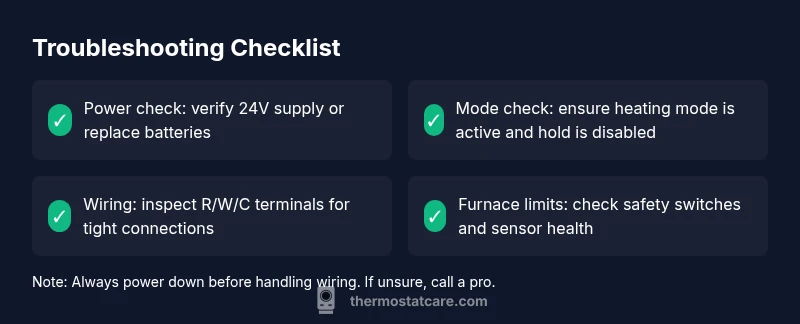
Most likely, thermostat won't go above 70 due to a power issue or incorrect programming. Start by replacing dead batteries or confirming the thermostat has 24-volt power. Next, verify heat mode and any hold settings. If the issue continues, inspect wiring and the furnace limit switch, but stop and call a pro for safety.
Why the thermostat won't go above 70: common culprits
According to Thermostat Care, when a thermostat won't go above 70, it's usually because the system is being restrained by power or programming rather than the heating element itself. The first thing to check is whether the thermostat is actually powered and in the correct mode. A low or dead battery can keep the display lit but prevent the unit from delivering heat. Another frequent offender is incorrect hold or schedule settings that keep the temperature pinned, even if you raise the target. In many homes, a misconfigured thermostat limits heat output to protect the equipment, or a failing 24-volt supply trips the controller into a safe mode. In this guide we walk through a practical, safe diagnostic flow, with steps you can complete in under an hour in most cases. Throughout, remember that the goal is to restore normal operation without bypassing safety features. If you notice burnt smells, buzzing noises, or the furnace refusing to start, stop and call a professional right away. This problem is common and solvable, but it also carries safety risks if you ignore signs of electrical issues.
Quick checks: power and batteries
Power is the most common reason a thermostat won't go above 70. Start by verifying the thermostat is receiving power from the HVAC system. If your model uses replaceable batteries, install fresh alkaline batteries and confirm the display remains stable; note the exact battery type and orientation. If there is a dedicated power wire, check the circuit breaker and fuses feeding the thermostat's line; a tripped breaker will cut power with no obvious sign. A modern smart thermostat can have a separate power extender kit; ensure it is installed correctly and seated firmly. Next, confirm that the thermostat actually communicates with the furnace or air handler. A dead or weak 24V signal can hold the system in a safety limit, even if the thermostat is set higher. If you detect power issues, fix them before adjusting any temperature settings. After resolving power, revisit the heat setting to confirm whether thermostat won’t go above 70 due to programming versus hardware.
Verify heating mode, hold, and scheduling
Many homeowners forget to check that the thermostat is in the correct heating mode and not accidentally set to a cooling or fan-only operation. Ensure the mode is set to heat (or auto heat) and that the fan is not forcing lower temperatures. If your thermostat uses a hold or vacation setting, disable hold for a continuous run and test by raising the setpoint by 3-5 degrees and waiting for the system to respond. Some thermostats have a reheat limitation or a stage limit that prevents large temperature jumps in one cycle; check user manual or on-screen help to confirm. Be mindful of energy-saving features like 'eco' or 'smart recovery' that gradually adjust temperatures to save energy; these can give the impression that the thermostat won't go above 70 when the system is simply adjusting gradually. If you still see no heat after these checks, proceed to the next diagnostic step.
Inspect wiring and the thermostat’s C-wire
Wiring problems are a frequent reason for restricted heating. Turn off power at the breaker before touching any wires. Inspect the thermostat’s terminals for loose or corroded connections, especially the R (or Rh/Rc) and W (heat) terminals. A loose wire can disrupt heat call, producing a phantom limit that keeps the temperature below the setting. If your system uses a C-wire (common) to power the thermostat, ensure the wire is connected securely at both the thermostat and the furnace control board. A loose or frayed wire may cause voltage drops that prevent heat from being commanded. If you see signs of damaged insulation, replace the wire or consult a licensed HVAC technician. After securing wiring, recheck the thermostat function; if the temperature still won't rise above 70, move to the furnace controls inspection.
Check furnace limits, safety switches, and service calls
High limit switches and furnace controls are designed to prevent overheat, but a misadjusted limit or faulty sensor can cause the system to short-cycle or stall at a lower temperature. If you hear a click or feel a delayed heat response, test the limit switch by carefully observing the furnace's burners when you raise the thermostat. If the limit engages too early, call a pro to test and adjust the limit with professional equipment. Do not bypass safety switches or temporary jumpers; trying hacks can create hazardous conditions and damage equipment. If your furnace or heat source has an electronic control board, a fault could present as a stuck temperature call; in that case, a professional diagnostic is recommended to avoid fire risks.
Reset, recalibrate, and re-test
Sometimes a simple reset restores normal performance. Power down the thermostat for 30 seconds, then power it back up and re-enter the settings. If your model supports recalibration, run the calibration procedure according to the manual; a miscalibrated sensor can report incorrect ambient temperature, causing the control system to overcompensate and end up with 70 as the ceiling. After reset, attempt a test by setting the target 3-5 degrees higher and observing the response over a complete heating cycle. If you have a Wi‑Fi connected model, ensure the firmware is up to date; updates often fix temperature-sensing glitches. If the unit still won’t go above 70, you’ll need to broaden the diagnostic to the HVAC system itself and consider professional evaluation.
When to call a professional and safety reminders
If you are uncomfortable working with electricity or you notice burning smells, buzzing, or scorch marks, pause and contact a licensed HVAC technician. Electrical faults can cause shock or fire, so never bypass safety devices. A pro can test wiring, measure 24V power, evaluate the furnace limit switch, and inspect the control board for stuck calls. In many cases, a technician can restore normal heat delivery and identify worn sensors or aging components that cause the thermostat to cap at 70. You can reduce risk and future failures by scheduling annual maintenance, keeping the thermostat clean, and testing it at the start of each heating season.
Quick reference and prevention checklist
- Regularly replace batteries and check for power at the thermostat
- Confirm heating mode and disable unintended holds
- Inspect wiring and C-wire connections; look for corrosion
- Clean the thermostat and ensure firmware is up to date
- Schedule professional HVAC maintenance at least once per year
- Document any error codes or abnormal heat calls to show to the tech
Steps
Estimated time: 1-2 hours
- 1
Power check and battery replacement
Turn off power at the circuit breaker before touching any components. Inspect whether the thermostat is powered and, if applicable, replace dead batteries with fresh ones. Confirm the display remains active and that the HVAC system seems to respond when the thermostat calls for heat.
Tip: Power off before touching wires to avoid shock; replace with the exact battery type recommended by the model. - 2
Verify heating mode and hold settings
Ensure the thermostat is set to heat (or auto) and that there is no active 'hold' or vacation mode preventing temperature rise. If your system uses schedules, temporarily disable them and test by increasing the setpoint by 3–5 degrees.
Tip: Temporary hold can mimic a failure; disable it to test real response. - 3
Test setpoint response
With power verified, raise the setpoint incrementally and observe if the heat call initiates. Check for any delay, cycling, or no heat response. If heat begins but stalls at 70, this points toward either programming quirks or a control-cap in the furnace.
Tip: Allow a full heating cycle to complete before judging the result. - 4
Inspect thermostat wiring and C-wire
Turn off power again, remove the thermostat faceplate, and inspect terminal connections. Look for loose or corroded wires on R and W and confirm the C-wire is connected if used. Re-seat any loose wires firmly and trim any frayed sections.
Tip: Secure connections firmly; loose wires often cause intermittent heat calls. - 5
Check furnace limits and safety devices
Observe the furnace while testing heat; listen for burner activation and check if a limit switch trips early. If you suspect a faulty limit or sensor, do not bypass; this requires professional adjustment and testing with proper equipment.
Tip: Never bypass safety devices; misadjusted limits can cause fires. - 6
Reset and recalibrate if available
Perform a standard reset on the thermostat and reconfigure the basic heating settings. If your model supports calibration, follow the manual precisely to align ambient readings with actual room temperature.
Tip: Keep notes of settings after reset for easier reconfiguration. - 7
Firmware and app checks
If your thermostat is smart, verify firmware is current and the app shows a healthy connection to the device. Sometimes software glitches surface as temperature ceilings or late heat calls.
Tip: Update firmware during a low-usage period to minimize disruption. - 8
Document and plan next steps
Record the observed symptoms, which steps you took, and the results. If the problem recurs, share this log with a technician to speed up diagnosis and resolution.
Tip: A well-documented history reduces diagnostic time and cost.
Diagnosis: Thermostat won't go above 70 even when setpoint is higher
Possible Causes
- highPower issue or dead battery
- mediumIncorrect thermostat mode or programming
- lowFaulty wiring or furnace limit switch
Fixes
- easyCheck power supply and replace batteries; restore 24V power if needed
- easyVerify heating mode, hold/settings, and recalibrate the setpoint
- mediumInspect wiring and furnace limit switch; call a pro if wiring shows damage or limits misbehave
Questions & Answers
Why won't my thermostat go above 70 even after I adjust the setting?
Common reasons include power issues, incorrect mode or hold settings, and a faulty furnace limit switch. Start with power checks and mode verification before investigating wiring or limits.
Most often it's power or mode, start there, then check wiring if needed.
How can I tell if the batteries are dead?
Look for a battery icon or a dim display. Replace with fresh batteries of the correct type and re-test. If the system still won't heat, continue with power and mode checks.
Check for a low-battery icon and replace them with the right type.
Is it safe to reset the thermostat myself?
Yes, resetting is generally safe when you follow the manual and power is off during the procedure. Re-enter settings carefully and test after completion.
Resetting is usually safe if you follow the manual and power down first.
Can a faulty furnace limit switch cause a temperature cap at 70?
Yes. A faulty limit switch can prevent the furnace from heating beyond a certain temperature. This requires professional testing and adjustment.
A malfunctioning limit switch can cap heat; a pro should check it.
When should I call a professional?
If you’ve completed power, mode, and wiring checks and the issue persists, or you smell burning, contact a licensed HVAC technician immediately.
If basic checks don’t fix it or you smell burning, call a pro right away.
Will recalibrating help if the thermostat is reading the room wrong?
Recalibration can align sensor readings with actual temperature. If the problem persists after recalibration, consider replacing the thermostat or inspecting the HVAC system.
Calibrating helps if readings are off; if not, you may need a replacement or service.
What to Remember
- Verify power and replace batteries before diving deeper
- Check heating mode and scheduling to rule out simple misconfigurations
- Inspect wiring and furnace limits—don’t bypass safety devices
- Reset or recalibrate; firmware updates can fix temperature glitches
- Call a professional if the issue persists after basic checks