Honeywell Thermostat Won't Reach Set Temperature: Troubleshooting Guide
Urgent guide to diagnose and fix a Honeywell thermostat that won’t reach the set temperature. Step-by-step checks, diagnostic flow, safety tips, and pro guidance to restore comfort fast.


The honeywell thermostat won't reach set temperature primarily due to power or sensor issues. Start with quick checks: replace batteries if used, confirm the thermostat is powered, and compare actual room temperature to the setpoint. If the issue persists, inspect the wiring, confirm the C-wire is connected, and verify the HVAC system is capable of reaching the desired temperature.
What the symptom usually signals with a Honeywell thermostat
When a Honeywell thermostat won't reach set temperature, the usual culprits are power issues, sensor calibration drift, or HVAC limitations. According to Thermostat Care, the most common problems are dead or weak batteries, a loose or missing C-wire, or a loss of power to the thermostat, which prevents heat calls. The thermostat relies on a reliable power path to call for heat; if the device isn't getting stable power, the system may never respond to the desired temperature. Environmental factors like direct sunlight, drafts, or a poor thermostat location can skew readings and fool the device into under-calling heat. Before pulling furnace panels, confirm the thermostat is in Heating mode and that Hold settings aren't masking a mismatch between the actual room temperature and the target. If the display shows the setpoint but the room stays cooler, you likely have an issue between the thermostat and the furnace: wiring, power, or calibration. Thermostat Care emphasizes starting with simple checks and documenting observations for easy discussion with a technician if needed.
Quick checks you can do in minutes
- Replace disposable batteries in battery-powered Honeywell models and confirm the thermostat is getting power from the circuit or the C-wire is securely connected at both ends.
- Verify the setpoint and actual room temperature; ensure the thermostat isn’t stuck in Hold or a non-Heating schedule.
- Inspect the thermostat’s wiring on the control board and at the furnace or air handler (look for loose terminals or signs of corrosion).
- Check for a tripped breaker or a blown fuse that could cut power to the thermostat or the HVAC system.
- Ensure the thermostat location isn’t directly in sunlight or near a vent, which can skew readings.
- If you’re comfortable, perform a quick reset per the Honeywell model’s manual, then re-enter your settings.
Common culprits by Honeywell model family
Different Honeywell lines have different power and control needs. Wi-Fi-enabled models draw power through the R and C lines and may behave oddly if the C-wire isn’t present or the power stealing feature is misbehaving. Non-Wi-Fi models rely on batteries, which can die or leak. Some models have sensitive temperature sensors mounted behind a screen or near a heat source; relocation or calibration can fix mismatch. If your model supports remote sensors, verify those readings aren’t conflicting with the main unit. In all cases, verify that the thermostat’s mode is Heating (not Cool) and that the fan isn’t set to ON constantly, which can mask true heat delivery.
How to test the HVAC system while troubleshooting
A thermostat problem can mask an HVAC issue or vice versa. Start by checking the furnace or heat source: listen for the burner when heat is called, observe if the inducer or blower starts, and feel for warm air at supply vents after heat call. Replace dirty air filters, since restricted airflow can prevent the system from reaching the desired temperature. If you have a gas furnace, ensure the gas valve opens when heat is requested. If you have a heat pump, confirm AUX or emergency heat is activated only when appropriate. Finally, verify outdoor temperature limits and the system’s ability to satisfy the setpoint under current conditions.
Step-by-step diagnosis you can perform (most common fix)
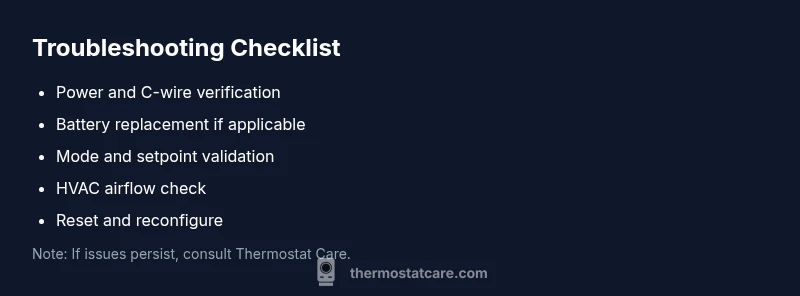
- Power and battery check: Replace batteries and confirm power to the thermostat is stable.
- C-wire verification: Ensure the C terminal is connected and there is 24V between R and C when heat is demanded.
- Reset and recalibrate: Reset thermostat to factory defaults, then reconfigure the date/time, location, and heating parameters.
- Recheck wiring: Confirm terminal screws are snug and correct on both the thermostat and furnace control board.
- Heat call test: Manually increase the setpoint and listen for furnace ignition and blower.
- Airflow improvement: Inspect filters and ducts; clean or replace as needed. If the issue persists after these steps, proceed to a professional evaluation.
Safety and prevention reminders
- Safety first: Turn off power at the breaker before handling wiring. - Do not bypass safety switches or connect C-wire improperly; incorrect wiring can damage equipment. - Use appropriate PPE when inspecting furnaces and electrical panels. - Regular maintenance, including yearly HVAC service and quarterly filter changes, reduces future thermostat issues. - If the thermostat still won’t reach temperature after these steps, contact a qualified technician; a pro can diagnose control board faults or sensor drift beyond home repair scope.
What to do next and how to prevent recurrences
Schedule a quick preventive check every season to ensure both the thermostat and HVAC equipment operate in sync. Keep the thermostat away from heat sources and ensure the room is well-insulated. Maintain battery health and verify C-wire continuity whenever you replace the thermostat. Document steps you’ve taken so future issues can be resolved faster. With regular care, a Honeywell thermostat can reliably reach the set temperature and keep your home comfortable year-round.
Steps
Estimated time: 45-60 minutes
- 1
Confirm power to the thermostat
Check that the thermostat has power, whether via batteries or a 24V supply from the furnace. If the display is dim or unresponsive, replace batteries or verify the transformer is delivering voltage.
Tip: Tip: Use a multimeter to verify ~24V between R and C when heat is commanded. - 2
Verify mode and setpoints
Make sure the thermostat is in Heating mode and that the setpoint is clearly above the room temperature. Disable Hold if active and re-check after a few minutes.
Tip: Tip: Some models treat Hold as a temporary lock; double-check the scheduling settings. - 3
Check C-wire and wiring
Power issues often come from a loose C-wire. Power down, re-seat the C-wire at both ends, and tighten terminal screws to spec.
Tip: Tip: Take a quick photo of the wiring before changing anything so you can revert easily. - 4
Test the heat call
Raise the setpoint and listen for the furnace or heat source to ignite. If nothing happens, there may be a fault in the control board or gas valve.
Tip: Tip: If you hear the system cycling abnormally, stop and consult a technician. - 5
Check airflow and filters
Replace dirty filters and ensure vents are open. Poor airflow can prevent the system from delivering warm air to the room.
Tip: Tip: Schedule quarterly filter changes to prevent recurrence. - 6
Reset and re-test
After completing the checks, reset the thermostat to default settings and re-enter your preferred schedule and temperature preferences.
Tip: Tip: Document changes so future troubleshooting is faster.
Diagnosis: Honeywell thermostat won't reach set temperature
Possible Causes
- highPower issue (dead battery or loss of power)
- highIncorrect wiring or missing C-wire
- mediumThermostat sensor drift or calibration error
- lowHVAC-system limitation or airflow issue
Fixes
- easyCheck power supply and replace batteries; ensure 24V power when heat is called
- easyInspect and re-seat C-wire at thermostat and furnace control board
- easyReset to defaults and recalibrate temperature sensor
- mediumInspect furnace blower, clean or replace air filters to improve airflow
Questions & Answers
Why won't my Honeywell thermostat reach the set temperature even when the display shows the setpoint?
Common causes are power issues, wiring problems, battery failure, or calibration drift. Start with power and C-wire checks, then reset if needed. If unresolved, document observations for a pro.
Common causes are power, wiring, battery, or sensor drift. Start with power and C-wire checks, then reset if needed.
Should I replace the batteries in the thermostat first?
If your model uses batteries, install fresh alkaline cells and confirm the device powers up correctly. Some Wi‑Fi models also draw power from the circuit, so ensure a stable supply.
If it uses batteries, install fresh ones and confirm power. Some models draw power from the circuit, ensure a stable supply.
How can I test the C-wire if I’m not comfortable opening the furnace?
Check for 24V between R and C with power on, at the thermostat side if you can access it safely. If you’re unsure, hire a licensed technician to avoid damage.
Check for 24V between R and C if safe to do so. If unsure, call a technician.
What if the furnace runs but the air never gets warm enough?
This could be an airflow issue, clogged filters, or a failing heat source. Inspect and replace filters, then have the heat source evaluated if warmth is still not achieved.
The furnace runs but not warm enough? Check airflow and filters, then have the heat source checked if needed.
When should I call a professional?
If you’ve tried power, wiring, and calibration fixes but the problem remains, or you suspect a control board or gas valve fault, a licensed HVAC tech is recommended.
If fixes don’t work or you suspect control board or gas valve issues, call a pro.
Watch Video
What to Remember
- Power and wiring fixes first
- Check C-wire and battery health
- Calibrate or reset the thermostat if readings drift
- If HVAC can’t satisfy the setpoint, call a pro