Thermostat is Off? Troubleshooting Guide
Learn fast, safe steps to diagnose and fix a thermostat that won’t heat or cool. This guide covers common causes, diagnostic flow, step-by-step fixes, and when to call a pro.


Most likely, the thermostat is off due to a power issue, depleted batteries, or a tripped circuit. Start with simple steps: replace batteries if your model uses them, ensure the thermostat is set to the correct mode (heat or cool), and perform a power cycle by turning the thermostat off for 30 seconds or resetting the HVAC circuit breaker. If the display stays dark, check the 24V transformer and wiring at the thermostat and furnace.
Why thermostat is off: common causes
When the thermostat is off, the root causes are usually power related, a dead battery in battery-powered models, or a tripped circuit. A blank or dim display is a telltale sign. Loose or damaged wiring to the thermostat or a loose C-wire can interrupt the circuit even if the furnace has power. In smart systems, a misconfigured routine or a faulty connection can push the thermostat into an off state. The Thermostat Care team emphasizes checking power and basic settings first, then moving to batteries and wiring if needed. A calm, methodical approach saves time and prevents unnecessary repairs. The simplest fix is often the correct fix when the thermostat is off.
Immediate checks you can perform now
Before you grab tools, run through quick, non-invasive checks. First, inspect the display; if the screen is blank, replace the batteries if the model uses them, or perform a soft reset. Next, locate the HVAC breaker or fuse box and confirm the circuit feeding the furnace or air handler is ON. A tripped breaker is a common reason the thermostat is off. Then verify the thermostat is set to heat or cool and that the setpoint isn’t identical to the current room temperature. Finally, inspect visible wiring at the thermostat for loose terminals or obvious damage, and ensure the C-wire is firmly connected at both ends. By systematically ruling out power and setting issues, you can often restore normal operation without tools.
Diagnostic flow: symptom to solution
Starting with the symptom thermostat is off, you move through a logical flow: confirm power to the HVAC system, then check the thermostat’s batteries and settings. If power and batteries are good, test for a 24V signal at the furnace control board and at the thermostat. If 24V is present, the problem may be the thermostat or its wiring; if not, the transformer or breaker is likely at fault. Document each finding to avoid repeating steps and to help a technician if needed.
Step-by-step: fix the most common cause (power and batteries)
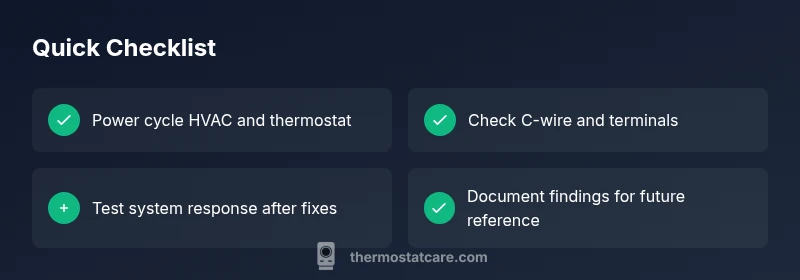
- Power cycle the thermostat and HVAC system: switch off the breaker for 60 seconds, then restore power. 2) If batteries are present, replace them with fresh ones, ensuring correct polarity. 3) Confirm the thermostat mode and ensure it’s not in Hold or Vacation mode. 4) Revisit the thermostat wiring: tighten terminals and reseat wires to prevent intermittent contact. 5) After reassembly, run a test: set to heat with a known setpoint and observe if temperature changes are reflected on the display. 6) If the unit still shows no response, inspect the 24V transformer and common wire (C-wire) connections at both ends. If you’re uncomfortable, proceed to professional support.
Safety, warnings, and mistakes to avoid
Never work on live low-voltage wiring without proper precautions. Disconnect power to the furnace before inspecting wiring beyond the thermostat. Avoid mixing battery power with hardwired circuits without confirming compatibility. Do not replace a transformer based on sound alone; test with a multimeter or consult a professional. Remember that some thermostats are part of a larger smart home routine; disabling automations could cause temporary off states. If safety concerns arise, call a licensed HVAC technician promptly.
Prevention and maintenance to keep it reliable
Schedule regular visual checks for visible wires and terminals, especially after home renovations. Keep the thermostat enclosure clean and dust-free to prevent heat buildup that could trigger off states. If your system uses a C-wire, ensure it remains firmly connected and free of corrosion. Update firmware for smart thermostats when prompted and review any automation rules that may inadvertently set the unit to off. Consistent maintenance reduces the likelihood of repeat thermostat is off scenarios.
When to call a professional
If power, batteries, and basic wiring checks don’t restore operation, or if you see a 24V signal issue or a suspected transformer fault, it's safer to contact an HVAC technician. Electrical work on 24V systems carries risk and requires specialized tools. A professional can verify control board integrity, transformer health, and furnace safety interlocks, ensuring a lasting fix without compromising system safety.
Real-world scenarios and examples
In one case, a homeowner found the issue was a tripped breaker in the HVAC circuit, not the thermostat itself. After resetting the breaker and replacing a drained battery, the thermostat regained control and began heating normally. In another instance, a loose C-wire caused intermittent power, producing a flickering display and erratic temperature changes; reseating the C-wire fixed the problem. In every situation, a methodical power-first approach saved time and avoided unnecessary parts replacements.
Steps
Estimated time: 45-60 minutes
- 1
Power cycle and battery check
Turn off the breaker feeding the HVAC system for at least 60 seconds, then restore power. If your thermostat runs on batteries, replace them with fresh ones and observe responses on the display.
Tip: A quick power reset fixes many off-state problems. - 2
Verify thermostat settings
Ensure the thermostat is set to the correct mode (heat or cool) and that the setpoint is not equal to the current room temperature. Some units also have hold or vacation modes that mimic an off state.
Tip: Double-check any smart routines that could override manual settings. - 3
Inspect wiring and C-wire
Remove the faceplate carefully and inspect terminal connections. Reseat wires firmly, especially the C-wire, which supplies common power to the thermostat.
Tip: Work with dry hands and keep track of wire colors for reassembly. - 4
Test the 24V signal
If you’re comfortable, test for a 24V signal between R and C using a multimeter. Absence of voltage indicates transformer or circuit issues that require professional attention.
Tip: If you’re unsure, stop and call a pro to avoid shock hazards. - 5
Check furnace/air handler
Confirm the furnace blower is triggering when the thermostat calls for heat or cool. Listen for clicking sounds and inspect the control board for error codes.
Tip: Be mindful of moving parts and hot surfaces inside the unit. - 6
Test and verify
Return power, run a quick heat and cool test, and confirm the thermostat responds to changes. If not, escalate to a professional.
Tip: Document symptoms and steps taken to share with a technician.
Diagnosis: Thermostat is off or unresponsive
Possible Causes
- highPower issue (tripped breaker, blown fuse, or no 24V supply)
- mediumDead or missing batteries (for battery-powered units)
- lowLoose or damaged wiring to thermostat or HVAC control board
Fixes
- easyReset the HVAC breaker, replace batteries, and perform a 30-60 second power cycle on the thermostat
- easyInspect and reseat thermostat wires, especially the C-wire; repair any visible damage
- mediumTest the 24V transformer and voltage at the thermostat and furnace; replace transformer if voltage is out of range
- hardIf power and wiring are solid, consider professional diagnostics of the furnace control board
Questions & Answers
Why is my thermostat screen blank?
A blank screen is usually power related. Check for dead batteries, a tripped breaker, and verify the 24V supply. If power is present, inspect wiring for loose connections.
If your thermostat screen is blank, start with power checks like batteries and the breaker, then verify the 24V supply.
Should I replace batteries if my thermostat is hardwired?
Hardwired units may still use batteries as a backup. If the display is dim or unresponsive, test or replace the backup battery if applicable and verify the power path to the thermostat.
Even hardwired thermostats can have backup batteries; check them if the screen behaves oddly.
What does not responding mean for my thermostat?
Not responding usually signals a power, wiring, or signal issue between the thermostat and the furnace. Follow a power-first diagnostic flow and ensure the 24V signal is present.
If it’s not responding, it’s likely a power or signal issue that you can diagnose step by step.
Can a faulty transformer cause thermostat to stop working?
A faulty 24V transformer can stop power from reaching the thermostat. A professional should test and replace the transformer if voltage is incorrect.
Yes, transformer problems can stop power flow; a pro can test and fix this safely.
When should I call a professional?
If you’re uncomfortable with electrical testing, or if basic checks don’t restore function, contact a licensed HVAC technician for safety and accuracy.
If you’re unsure or the thermostat remains off after checks, call a pro.
What to Remember
- Power cycle first for the thermostat is off issue
- Check batteries and C-wire connections
- Verify furnace and transformer health if power remains
- Proceed to professional help when unsure or unsafe