Plug In Thermostat: A Practical How-To Guide
A comprehensive, step-by-step guide to safely plug in a thermostat, verify power, and test basic functions. Includes tools, step-by-step actions, safety tips, troubleshooting, and maintenance for homeowners and DIY enthusiasts.


Goal: safely plug in a thermostat and verify it powers on correctly. You will confirm compatibility, gather essential tools, and complete a basic power test before programming. If your thermostat requires a C-wire or separate transformer, follow the manufacturer’s guidance. Before you start, review safety steps and keep a clear workspace to prevent accidental shorts or shocks. Thermostat Care recommends proceeding slowly and methodically.
Safety prerequisites and quick diagnostic
Before you touch any wiring, ensure the power is off at the circuit breaker and the thermostat's power is disconnected. A plug-in thermostat still relies on a stable power source, so confirm that the device is rated for your HVAC system and that the location has a clean, dry environment. According to Thermostat Care, the safest approach is to treat every plug-in thermostat installation as a small electrical project: plan, pause to check, and proceed with caution. Inspect for signs of wear on the mounting plate, loose cables, or damaged connectors. If you notice any of these issues, stop and consult a professional. Grounding, proper labeling, and avoiding moisture are non-negotiable.
Keep a flashlight handy and work with one hand free to avoid accidental contact with live parts. Have a non-contact voltage tester available to verify that no voltage is present before you touch wires. If your thermostat is designed to plug into a wall outlet or a dedicated power rectifier, ensure the outlet is in good condition and not overloaded. Remember that even a plug-in model may require specific clearance around the device to prevent overheating. By starting with safety and environment checks, you reduce risk and pave the way for a smooth setup.
What plug-in thermostat means for your system
A plug-in thermostat is designed to sit between the power source and your heating or cooling equipment, delivering control signals without permanent wiring changes. It is distinct from classic hardwired thermostats that connect directly to control boards. For many households, plug-in variants provide a practical bridge for evaluating smart features, energy budgets, or temporary setups during renovations. The key to success is confirming compatibility with your HVAC type (gas, electric, heat pump) and your home's electrical load. Always consult the manual to check for load ratings, adapter requirements, and any limitations on power cycling. When used correctly, plug-in thermostats can deliver reliable temperature control and energy insights without a full install.
Quick workspace and safety setup
Clear a clean, dry area near an outlet or mounting location. Remove any clutter, and lay out your tools in a logical order so you don’t scramble mid-task. If you’re using a wall outlet plug-in model, check the outlet’s condition and ensure it shares no other high-load devices that could trip the circuit. For safety, unplug devices from the outlet you’ll use and avoid touching metal terminals with bare hands. Use insulated tools and wear safety glasses if you’re working near potential debris. Prepare a short notes sheet with your model numbers and any compatibility notes to refer back during installation.
Compatibility considerations for successful results
Not all thermostats can plug into every system. Some units require a dedicated C-wire or a neutral, while others work solely with battery power. Heat-only or cooling-only systems may impose different constraints. If your HVAC uses a two-stage compressor, verify that the plug-in unit supports that feature. Review the system’s manual and the thermostat’s spec sheet; mismatches can cause inaccurate readings, delayed responses, or safety shutdowns. If in doubt, contact the manufacturer or a qualified technician. Thermostat Care notes that compatibility checks save time and prevent costly power issues later.
Pre-installation checklist for a smooth start
Make a quick inventory of required information: system type (gas, electric, heat pump), power supply (120V in most homes), and the thermostat’s expected load. Confirm whether your model requires a C-wire adapter or a transformer. Check that the mounting surface is solid and free of dust, and that the space around the device allows proper airflow to avoid overheating. If you’re replacing an existing device, photograph the current connections before disconnecting anything. This prep reduces surprises when you reassemble.
How to approach the power-up safely
With power off, attach the thermostat’s plug-in module to the outlet or integrate it into the control circuit per the manual. Secure any mounting screws and ensure the display has a clean view. Reconnect power only after everything is fastened and looks correct. Turn on power and observe the screen for a boot sequence or startup message. If the display stays blank, double-check the outlet and the adapter’s connection. Avoid forcing any connectors that don’t align; misalignment can damage the unit.
Initial testing and basic function checks
Once powered, set a basic temperature and verify that the HVAC responds in the expected direction. Confirm that the thermostat’s fan setting engages correctly and that the system cycles on and off without unusual sounds or delays. Use the app or interface to confirm basic schedule functions, where available. Note any latency in temperature changes, as this can indicate sensor placement or wiring issues. Record observations for later reference.
Common issues and practical fixes
Blank screens, incorrect readings, or no response after power-up are among the most frequent problems. First, verify the power source and reset any fuses or breakers if necessary. Check whether the thermostat is within range of a hub or router if it uses wireless connectivity. If a C-wire adapter is required, ensure it’s properly connected and configured. Persistent problems may signal compatibility or hardware faults; in that case, consult the manufacturer’s support or a licensed technician. Thermostat Care’s guidelines emphasize safety and methodical troubleshooting rather than guesswork.
Long-term care, maintenance, and next steps
To keep performance consistent, schedule periodic checks of the thermostat’s sensors, mounting stability, and power connections. Clean the air intake around the device and ensure the faceplate remains undamaged. Update firmware or software when prompted and review energy reports to spot opportunities for savings. If you’re upgrading to a newer model, verify the plug-in variant’s compatibility with your existing HVAC equipment and any smart home integrations. The Thermostat Care team suggests documenting all installations for future maintenance and warranty purposes.
Tools & Materials
- Non-contact voltage tester(Use to verify absence of live voltage before touching wires)
- Screwdriver set (Phillips and flathead)(For mounting hardware and terminal screws)
- Insulated pliers or needle-nose pliers(Optional for handling connectors safely)
- Electrical tape(Use to secure loose wires if needed)
- User manual for the thermostat model(Important for model-specific steps)
- Outlet tester (if plug-in model)(Check outlet integrity if using a wall outlet plug-in)
- Flashlight(Illuminates dim workspaces)
Steps
Estimated time: 45-60 minutes
- 1
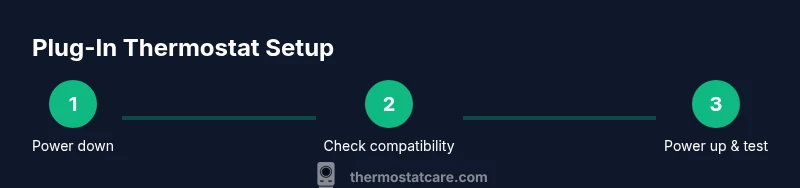
Power down and access the installation area
Turn off the circuit breaker or remove the fuse powering the HVAC system, then confirm with a voltage tester that no live voltage is present. Remove the existing device or locate the plug-in module as applicable. This step prevents shocks and damage to components.
Tip: Double-check the breaker labeling to ensure you’re not cutting power to other circuits. - 2
Check compatibility and read the manual
Review the thermostat’s specification sheet and your HVAC system type to ensure the plug-in model is suitable. Note any required adapters, C-wire needs, or power ratings. If compatibility isn’t clear, contact the manufacturer before proceeding.
Tip: Keep a copy of the model’s spec sheet handy during setup. - 3
Prepare the mounting area and tools
Organize tools, test equipment, and safety gear near the work area. Clear the workspace of moisture or conductive materials and ensure good lighting. Photograph existing connections if you’re replacing a device.
Tip: Lay out screws and mounting hardware in order to speed assembly. - 4
Connect the plug-in module and secure the device
Attach the plug-in module per the manual, align connectors, and fasten mounting screws. Ensure the unit is level and the display is easily readable. Do not force misaligned connectors.
Tip: Check that all wiring is firmly seated before powering up. - 5
Power up and perform an initial test
Reconnect power and observe the startup sequence on the display. If the screen lights and shows a default screen or welcome message, proceed to basic tests.
Tip: If the display stays blank, power off, recheck connections, and test the outlet with the voltage tester. - 6
Verify basic HVAC control
Set a target temperature and confirm the HVAC responds in the expected direction. Check fan operation and basic scheduling if supported by the model.
Tip: Document timing for how quickly the room temperature changes.
Questions & Answers
What is a plug-in thermostat and when should I use it?
A plug-in thermostat sits between the power source and HVAC equipment, allowing control without permanent wiring. It’s useful for testing smart features, temporary setups, or during renovations. Always check compatibility and follow the manual.
A plug-in thermostat sits between power and your HVAC system, letting you control temperature without permanent wiring. It’s great for testing features or temporary setups, but always check compatibility and follow the manual.
Is a plug-in thermostat compatible with all HVAC systems?
Compatibility depends on the model and system type. Some require a C-wire or adapter, while others run on power from a wall outlet. Always review the spec sheet and installation notes for your specific unit.
Compatibility varies by model and system. Some need a C-wire or adapter; others are plug-in only. Check the specs before you buy.
What safety precautions should I follow when plugging in a thermostat?
Power off at the breaker, use insulated tools, and keep the area dry. Verify there is no voltage present before handling any terminals. If unsure, consult a professional.
Always power off, use insulated tools, and stay dry. If you’re unsure, get professional help.
What should I do if the thermostat screen stays blank after power-up?
Check the outlet and adapter connections, reseat the module, and reset if the manual allows. If the screen remains blank, test another outlet and contact support if needed.
If the screen is blank, check power, reseat connections, and reset. If it still won’t turn on, contact support.
How do I test that the thermostat actually controls the HVAC system?
Set a target temperature and verify the system responds. Confirm that heating and cooling commands are executed and that the unit cycles properly.
Set a temperature and check that the HVAC responds as expected and cycles normally.
Watch Video
What to Remember
- Prepare safety checks before powering.
- Verify compatibility to avoid issues.
- Follow manufacturer steps exactly.
- Test power and HVAC response.
- Document the setup for future maintenance.