Nest Thermostat Delayed Cooling: Fast Troubleshooting Guide
Urgent troubleshooting guide for Nest thermostat delayed cooling. Learn a practical diagnostic flow, quick fixes, and prevention tips to restore reliable cooling quickly.


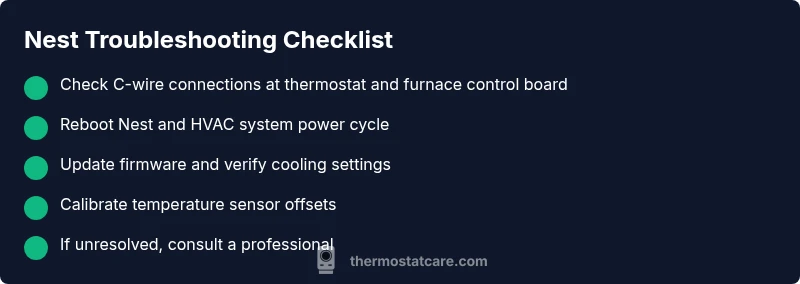
Most often, nest thermostat delayed cooling is caused by a power issue or a software glitch. Start by rebooting the Nest and verifying the C-wire power at both the thermostat and the HVAC control board. If cooling remains sluggish, check for firmware updates, recalibrate temperature offsets, and perform a quick reset if needed.
Understanding the Nest Thermostat Delayed Cooling
According to Thermostat Care, a delayed cooling problem with the Nest thermostat is almost always rooted in power delivery or software behavior. When you set cooling, the system should respond within a minute or two, not minutes longer. Many homeowners notice this during heat waves or after an extended period of inactivity when the Nest’s learning features, schedules, or Eco modes interact with the HVAC system. In practical terms, delayed cooling means your indoor temperature remains high longer than expected, and you may hear the fan run without the perceived impact of cold air. In this guide, you’ll learn to distinguish between normal lockouts or hold modes and genuine malfunctions, and you’ll gain actionable steps to restore reliable cooling without guessing.
First, verify that you’re addressing a real delay, not a slow ramp. Some systems take a few minutes to reach the target due to outdoor temperature swings, duct losses, or oversized/undersized equipment. If the problem persists across multiple cooling cycles, it’s time to diagnose deeper into thermostat wiring, firmware, and the HVAC side. The Thermostat Care team emphasizes a methodical approach: test power, confirm wiring integrity, review settings, and then isolate whether the issue is the thermostat or the HVAC system. Use this flow to avoid unnecessary replacements and to keep your home comfortable fast.
Common Causes of Delayed Cooling with Nest Thermostat
There are several frequent triggers for delayed cooling with a Nest thermostat. The most common are power-related: a weak common wire (C-wire) or loose connections at the furnace/air handler. Software-related causes include outdated firmware, a miscalibrated temperature offset, or an aggressive energy-saving setting that delays compressor engagement. Environmental factors matter too: extreme outdoor temperatures, a visibly iced coil, or a clogged air filter can masquerade as thermostat delays. Finally, settings like Eco mode or scheduled holds can create apparent delays if not aligned with your actual HVAC duty cycle. By understanding these causes, you can systematically rule them out and avoid unnecessary service calls.
A practical tip: keep your thermostat and HVAC components powered during testing, and avoid unplugging equipment without noting wire positions. The Nest unit’s internal diagnostics can help reveal if sensors are reporting inaccurately, which is why firmware and sensor health are crucial in the troubleshooting process.
Diagnostic Flow: From Symptom to Solution
This section walks you through a practical diagnostic path that starts with the symptom (delayed cooling) and ends with targeted fixes. Begin by confirming the thermostat is powered and that the C-wire delivers stable voltage (neither floating nor disconnected). Next, check for firmware updates and review the Nest’s cooling settings, including Eco mode, hold settings, and any schedule overrides. If the issue persists, perform a controlled power cycle of both the thermostat and HVAC equipment to clear temporary glitches. Finally, isolate whether the thermostat itself or the HVAC system is at fault by testing a known-good thermostat or temporarily bypassing theNest’s control with a manual thermostat test.
This flow emphasizes incremental checks: simple power and wiring tests first, then configuration checks, then firmware, and finally hardware testing. If you reach the point where the HVAC system itself shows timing issues (for example, ice on coils, erratic compressor cycling, or a factory fault that stops cooling entirely), you should escalate to professional service. The goal is to identify the root cause with minimal disruption and cost.
Step-by-Step Fixes for the Most Common Cause
Executing the most likely fix first saves time and reduces risk. The steps below address power/wiring and quick software corrections. The approach is to fix the likely cause before moving to more invasive actions, ensuring you can restore cooling safely and promptly. Each step includes a practical tip to avoid errors. If any step involves electrical work beyond your comfort level, stop and call a pro.
- Step 1: Power cycle the Nest and HVAC system. Turn off the thermostat, shut off the HVAC breaker, wait 60 seconds, then restore power. This clears minor glitches that can cause delayed cooling. Tip: keep a log of times you cycle power to correlate with performance.
- Step 2: Check the C-wire and wiring connections. Make sure the C-wire is securely connected at both the Nest base and the furnace control board. A loose or corroded connection can prevent proper cooling engagement. Tip: unplug and reseat connectors one at a time to avoid cross-wiring.
- Step 3: Update firmware and review settings. Ensure Nest firmware is current and review cooling setpoints, hold mode, and Eco settings. A misconfigured hold or overly aggressive Eco profile can simulate delays. Tip: after updating, re-test cooling from a cold start.
- Step 4: Calibrate thermostatic offsets and sensor health. If the Nest reads indoor temperature differently from a separate thermometer, adjust offset or perform sensor diagnostics in the app. Tip: use a reliable room thermometer for comparison.
- Step 5: Test with a manual thermostat comparison. If possible, temporarily bypass the Nest by using a traditional programmable thermostat to verify that cooling responds promptly. Tip: this helps identify whether the issue is the HVAC system or the Nest controller.
- Step 6: If the delay persists, check for system-level indicators like refrigerant issues, duct leaks, or filtration problems. At this point, a professional assessment is warranted. Tip: document symptoms, timing, and any recent changes to help the technician.
Estimated total time: 45-60 minutes for most households, depending on wiring conditions and familiarity with the equipment.
Safety, Warnings, and When to Call a Pro
Electrical work carries risk. Never work inside the furnace or compressor panels unless you have proper training and power isolated. If you notice buzzing noises, warm components, or burnt smells, stop immediately and contact a licensed HVAC technician. If you’re uncomfortable with wiring tasks or if the C-wire is damaged, seek professional help sooner rather than later. The Nest thermostat is a sophisticated device that relies on precise power and sensor readings; improper handling can worsen delays or damage electronics. Always follow manufacturer guidelines and local codes when performing any maintenance.
Prevention and Long-Term Care for Nest Thermostat Delayed Cooling
To minimize future delays, implement routine checks that target the most common root causes. Regularly inspect wiring connections for looseness or corrosion, ensure the C-wire remains solid, and keep the thermostat firmware up to date. Replace air filters on a schedule to maintain airflow, and avoid dynamic changes to cooling settings during peak heat periods. If you rely on Eco or adaptive schedules, consider adjusting them to match real-life usage patterns and your HVAC system’s capacity. A simple maintenance routine can preserve cooling responsiveness and energy efficiency.
Conclusion (Note: This section intentionally does not contain a formal conclusion.)
Steps
Estimated time: 45-60 minutes
- 1
Power cycle the thermostat and HVAC
Turn off the thermostat, switch off the HVAC breaker, wait 60 seconds, then restore power. This clears temporary glitches that cause delayed cooling.
Tip: Note the exact times you cycle power to correlate with performance. - 2
Inspect C-wire and connections
Verify the C-wire is firmly connected at the Nest base and the furnace control board. Look for corrosion or loose screws.
Tip: Disconnect and reseat wires one at a time to avoid miswiring. - 3
Check and update firmware/settings
Ensure Nest firmware is current. Review cooling schedule, Eco mode, and any hold settings that might delay engagement.
Tip: After updates, run a cooling command from cold to test responsiveness. - 4
Calibrate sensors and offsets
If indoor temp readings differ from a separate thermometer, adjust the Nest’s offset and run sensor diagnostics.
Tip: Use a reliable room thermometer for accurate comparison. - 5
Test with a manual thermostat
If possible, temporarily bypass Nest control with a traditional thermostat to verify HVAC responsiveness.
Tip: This helps isolate whether the issue is the thermostat or the HVAC system. - 6
Call a professional if needed
If delayed cooling persists or you detect refrigerant signs or ice on coils, schedule a professional inspection.
Tip: Prepare symptom log and recent changes to show the technician.
Diagnosis: Nest thermostat delayed cooling: the AC does not reach set temperature promptly after selecting cooling
Possible Causes
- highPower issue or weak C-wire
- highOutdated firmware or software glitch
- mediumIncorrect thermostat settings (Eco/hold)
- lowHVAC system issue (restricted airflow, refrigerant concerns)
Fixes
- easyVerify C-wire power and secure all thermostat/furnace connections
- easyReboot Nest and HVAC system; perform a power cycle on both
- easyUpdate Nest firmware and review/adjust cooling settings
- mediumReset thermostat to default or recalibrate temperature readings
- mediumIf symptoms persist, consult a licensed HVAC technician for system diagnostics
Questions & Answers
Why is my Nest thermostat cooling delayed after I set it to cool?
Delayed cooling usually points to power or software issues. Start with a power cycle, verify C-wire connections, and check firmware. If the problem continues, follow a structured diagnostic path to isolate whether the thermostat or HVAC system is at fault.
Delayed cooling is typically due to power or software problems. Start with a reboot and wiring check, then follow the diagnostic steps to identify the root cause.
How do I recalibrate the Nest temperature sensor?
Recalibration involves adjusting the temperature offset in the Nest app and running sensor diagnostics. Compare readings with a reliable room thermometer and apply the offset until the readings align.
Calibrate by adjusting the temperature offset in the app and compare with a room thermometer to fix sensor drift.
Should I reset the Nest thermostat to fix delayed cooling?
Resetting can clear glitches but should be a last resort after firmware updates and wiring checks. Back up settings if available, then perform a factory reset and reconfigure the thermostat.
Reset should be a last resort after other fixes; back up settings and reconfigure afterward.
Can a faulty C-wire cause delayed cooling?
Yes. A poor C-wire connection can prevent proper power delivery to the Nest, causing delays in cooling engagement. Inspect and secure the C-wire at both ends.
A bad C-wire can stop proper power delivery and delay cooling, so check connections at both ends.
When should I call a professional for Nest delays?
Call a professional if you notice ice on coils, refrigerant signs, or consistent delays after basic fixes. A licensed HVAC technician can diagnose refrigerant levels, airflow, and equipment health.
Call a pro if cooling remains delayed after basic steps or you see signs of HVAC issues.
Does Eco mode affect cooling response time?
Yes. Eco mode can delay compressor engagement to save energy. Review Eco settings and timings to ensure they align with desired comfort, especially during peak heat.
Eco mode can delay cooling; adjust the settings to match your comfort needs during hot days.
Watch Video
What to Remember
- Start with power and C-wire checks before deeper fixes
- Update firmware and review cooling settings for immediate impact
- Use a structured diagnostic flow to isolate thermostat vs HVAC issues
- Know when to call a professional for refrigerant or system-level problems