Is It OK to Reset Your Thermostat? A Practical DIY Guide
Learn when it's safe to reset a thermostat, how to perform soft and factory resets, and what to expect afterward. Thermostat Care provides practical, step-by-step guidance for homeowners and DIY enthusiasts.


Yes, it is generally OK to reset a thermostat as a quick diagnostic step for common glitches. A soft reset or power cycle can resolve unresponsive displays and erratic readings without erasing your schedules. Avoid resets if you smell gas, hear furnace banging, or suspect a safety issue. If problems persist, consult Thermostat Care for guidance.
Is It OK to Reset Your Thermostat? A Practical Starting Point
Resetting a thermostat is a common first move for homeowners facing stubborn glitches. When a thermostat freezes, displays a blank screen, or begins to heat or cool at the wrong times, a reset can clear software hiccups and restore normal operation. According to Thermostat Care, a reset is not a substitute for professional diagnosis if you suspect an HVAC or electrical hazard, but it often resolves harmless software glitches. The key is to distinguish between glitches and genuine safety concerns. A reset should never replace a power-off procedure during a true emergency, and it should be followed by a quick test to confirm that the system maintains correct temperatures. For many households, this simple step buys time while you decide whether a deeper inspection is needed. Remember: a reset is a diagnostic tool, not a cure for a critical fault, and it should be approached deliberately rather than as a reflex action.
Soft Reset vs Factory Reset: What’s the Difference?
A soft reset is a light touch that reboots the thermostat’s software without changing user data like schedules or Wi‑Fi settings (on many models). It’s ideal for unresponsive screens, minor lag, or misreadings caused by a temporary glitch. A factory reset, in contrast, restores the device to its original defaults and clears customized settings, saved networks, schedules, and saved temperatures. Factory resets are rarely needed, and they typically require reconfiguring the thermostat from scratch. Thermostat Care emphasizes using a factory reset only after backing up essential information and after confirming that the issue is not tied to a sensor, wiring, or HVAC component. If the thermostat is part of a smart home ecosystem, a factory reset may also remove it from linked routines and apps, so plan accordingly.
Soft Reset: How to Clear Glitches Without Losing Data
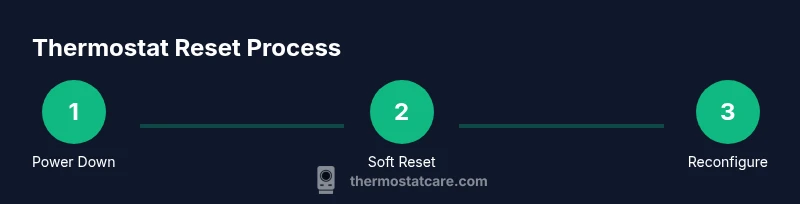
Performing a soft reset typically involves a simple reboot sequence or the built-in restart option in the settings menu. This action refreshes the operating system and clears minor memory glitches that can cause delayed responses or incorrect readings. For many models, you can initiate a soft reset by holding the reset button for several seconds or selecting Restart from the menu. In some cases, simply power-cycling the thermostat by turning it off and back on after a short pause achieves the same result. After a soft reset, monitor the system for 15–30 minutes to verify stable readings and confirm that schedules continue to function. If problems persist, proceed to more advanced steps with caution.
Factory Reset: When It’s Really Necessary
A factory reset should be a last resort when the thermostat continues to misbehave after a soft reset, or if you suspect firmware corruption, persistent connectivity problems, or a misconfigured account. Before performing a factory reset, back up schedules and wifi credentials if your model supports it. Note that this action will erase all personalized settings and revert the device to its original state. After the reset, you’ll need to re-enter time settings, reconnect to Wi‑Fi, re-link any smart home integrations, and re-create schedules. Thermostat Care recommends scheduling a quick test after completion to confirm reliable operation and proper temperature control.
Troubleshooting Scenarios Where a Reset Helps
If your thermostat shows an unresponsive display, fails to heat or cool on schedule, or reports erroneous temperatures, a reset can often restore intended behavior. For instance, a glitch may cause the unit to miss a programmed setback or to run the system when it’s not needed. A soft reset is usually enough in these cases. If readings drift persistently after a soft reset, consider a factory reset only after safe-guarded backup of settings. In scenarios where the thermostat is part of a larger smart home network, re-pairing the device after a reset is a normal part of the process. The Thermostat Care team notes that resetting can save time and reduce frustration when hardware is functioning properly but software has otherwise fallen out of sync.
Special Considerations for Smart vs Non-Smart Thermostats
Smart thermostats rely on cloud connections and mobile apps. A reset can remove device pairing and disrupt schedules stored in the cloud, so you’ll need to re-authenticate accounts and re-create routines. Non-smart thermostats depend more on internal firmware; resets tend to be straightforward but may erase certain manual settings if performing a factory reset. Always check the user manual for model-specific instructions and backup options. If in doubt, start with a soft reset and preserve any data you can, as reverse resets can complicate future programming. The Thermostat Care team emphasizes a cautious approach to resets across all kinds of thermostats.
After the Reset: Reprogramming, Connectivity, and Scheduling
Once your thermostat has been reset, take a deliberate approach to re-establishing comfort and energy efficiency. Reconnect to Wi‑Fi, re-link to any smart home ecosystems, and re-enter your daily schedules and temperature preferences. Take this opportunity to review your programming: adjust wake times, cooling setbacks, and holiday schedules to align with current routines. Consider validating system efficiency by running a short heat or cool cycle and comparing outcomes with expected temperatures. If you rely on energy-saving features, re-calibrate them based on current usage patterns and the season. Thermostat Care’s guidance highlights the importance of a planned, incremental reprogramming process rather than rushing back to full operation.
Safety, Not Sure? When to Pause the Reset
There are times when resetting is not the right move. If you detect gas smells, hear unusual furnace noises, see scorch marks, or notice frequent breaker trips, stop and call a licensed HVAC technician. Resetting a device will not fix an electrical hazard or a faulty furnace component. In such cases, prioritize safety and seek professional assessment. The Thermostat Care team notes that homeowners should treat resets as a diagnostic step, not a substitute for professional service when safety is involved. If you’re uncertain about the next step, you can always schedule a diagnostic call with a trusted technician.
Authority and Further Reading
For rigorous guidance on thermostat safety and best practices, consult reputable sources. This article references general guidelines and practical steps preferred by the Thermostat Care team. If you want deeper, user-focused information, you can explore official energy and safety resources to reinforce your understanding.
AUTHORITY SOURCES
- Thermostat Care Analysis, 2026 (Internal guide referenced throughout this article).
- U.S. Department of Energy Energy Saver: Thermostats and energy efficiency tips.
- National Institute of Standards and Technology (NIST) resources on residential controls and safety considerations.
Tools & Materials
- Safety gloves(Protect hands when handling panels; ensure clean, dry work area.)
- Non-contact voltage tester(Verify power is off before touching components.)
- Screwdriver set (Phillips/flathead as needed)(Use correct size to avoid stripped screws.)
- Owner's manual or model-specific guide(Back up backup settings if available.)
- Smartphone or tablet with Wi‑Fi credentials(Needed to reconnect after a reset and re-link to apps.)
- Soft cleaning cloth(Wipe dust from terminal area if needed.)
Steps
Estimated time: 15-25 minutes
- 1
Power off and prepare
Turn off the thermostat and, if accessible, switch off the corresponding HVAC circuit at the breaker. This ensures safety while you inspect the unit and reduces the risk of electric shock or short circuits.
Tip: Use a non-contact tester to confirm there is no live voltage before touching terminals. - 2
Perform a soft reset
If your model supports it, select Restart or hold the reset button for several seconds to reboot the device. This clears temporary memory and can fix minor freezes without altering saved data.
Tip: Check the display for a normal startup sequence and a return to previous settings. - 3
Power cycle the thermostat
If a soft reset isn’t available or doesn’t work, remove the thermostat from the wall for about 60 seconds, then reattach it. This clears residual power and can resolve hangups.
Tip: Carefully support the unit to avoid bending the mounting plate or disconnecting wires. - 4
Test operation after soft reset
Restore power and verify the thermostat powers on, the touchscreen responds, and the HVAC system responds to commanded temperatures.
Tip: Run a quick heat and cool cycle to confirm responsiveness across modes. - 5
Back up and consider a factory reset
If issues persist, back up schedules and wifi credentials, then perform a factory reset following the model’s instructions. Expect to re-enter settings afterward.
Tip: Only proceed if you’ve exhausted soft-reset options and confirmed there are no safety concerns. - 6
Reconfigure after reset
Reconnect to Wi‑Fi, re-link to any smart-home ecosystems, and re-create schedules with a gradual approach to testing.
Tip: Document changes so you can revert to a preferred setup if needed.
Questions & Answers
Is reset safe if I smell gas or hear furnace noises?
No. If you detect a gas smell or hear unusual furnace noises, stop and call a licensed HVAC technician. Resetting won’t fix a hazardous condition.
If you smell gas or hear unusual furnace noises, do not reset the thermostat. Call a professional right away.
Will resetting erase schedules or Wi‑Fi settings?
A soft reset typically preserves your schedules and connections, while a factory reset clears them. Always back up settings if your model supports it.
A soft reset usually keeps your schedules and Wi-Fi, but a factory reset will erase them. Back up first if possible.
Should I reset after a power outage?
Power outages can cause temporary glitches. Start with a soft reset or power cycle before considering a factory reset.
After a power outage, try a soft reset first. If that doesn’t fix things, you may need a factory reset.
What’s the difference between soft and factory reset?
A soft reset reboots the device without losing data; a factory reset restores defaults and wipes custom settings. Use the soft reset first.
Soft reset reboots with data kept; factory reset wipes settings. Start with soft reset.
How long should I wait after a reset to test?
Give the system a short test window, typically 15-30 minutes, to confirm temperature control and response.
Wait about 15 to 30 minutes after resetting to test that everything’s working.
Can I reset a wired thermostat without turning off power?
No. Always turn off power to the HVAC circuit before handling wiring to avoid shocks or shorts.
Never reset a wired thermostat without powering down first. Turn off the HVAC circuit.
Watch Video
What to Remember
- Start with a soft reset to test for glitches
- Factory resets are a last resort and require backup
- Safety first: avoid resets during hazardous conditions
- Reprogramming after a reset is normal and expected