How to Use a Thermostat for Cooling: A Step-by-Step Guide
Learn how to use a thermostat for cooling to optimize comfort and energy savings. This guide covers cooling modes, target temperatures, scheduling, and practical safety tips for homeowners and DIY enthusiasts.


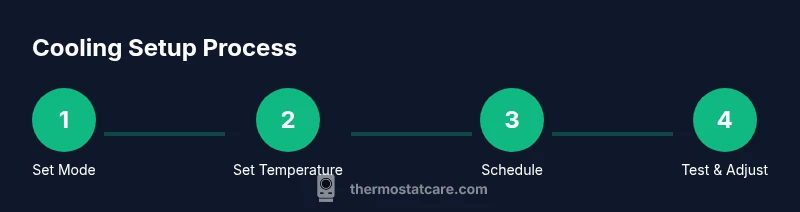
By the end of this guide, you will know how to use a thermostat for cooling to maintain comfortable indoor temperatures efficiently. Start by switching to cooling mode, setting a realistic target temperature, and enabling a daytime schedule aligned with occupancy. Then tune the fan behavior, verify contactor operation, and confirm that cooling cycles are steady and quiet.
Why cooling efficiency matters
Cooling accounts for a large share of home energy use, especially in hot weather. For homeowners and DIY enthusiasts, learning how to use a thermostat for cooling is not just about making rooms chilly; it’s about balancing comfort, energy costs, and system longevity. The right settings reduce cycling on and off, prevent overcooling, and minimize humidity swings that can make interiors feel damp. According to Thermostat Care, starting with a clear cooling mode and a sensible target temperature lays the foundation for effective comfort management. In this section we unpack the core ideas: what cooling mode does, how temperature targets influence daily energy use, and why scheduling matters. With a solid understanding, you’ll be better prepared to apply practical steps later in this guide and tailor settings to your climate, home size, and daily routine.
Understanding cooling mode and temperature targets
Your thermostat’s cooling mode instructs the HVAC system to remove heat and bring spaces to the setpoint. The choice between cooling mode, auto, and fan-on can affect how quickly rooms feel comfortable and how much energy is used. A practical starting point is a target around the mid‑70s Fahrenheit during occupied periods, with a slight lift at night or when the house is empty. This range tends to strike a balance between comfort, dehumidification, and energy usage without overworking the compressor. If you have sunlit rooms or high heat gains from windows, you may need to adjust the target a few degrees. The goal is steady comfort rather than chasing a single number. When you adjust targets, allow the system 15–30 minutes to respond before evaluating results. how to use a thermostat for cooling becomes clearer once you align mode, temperature, and schedule.
How to set a cooling schedule that matches your day
Scheduling is one of the most powerful tools for keeping your home comfortable while avoiding waste. Start by mapping a typical day: identify when you’re home, awake, and asleep, then translate that into temperature targets and run times. For example, you might cool more aggressively during evening hours and allow a higher setpoint during the workday. If your thermostat supports weekday/weekend profiles, enable that separation so the system adapts automatically. After implementing the schedule, monitor performance for a full week and adjust by one or two degrees if rooms feel too warm or too chilly. For smart thermostats, leverage occupancy sensing and mobile app reminders to enforce consistency. The outcome should be predictable comfort with minimal energy spikes.
Fan settings and airflow optimization
Fan behavior can significantly influence perceived comfort and energy use. In most setups, using the fan in auto mode means it only runs when cooling is active, which saves energy and reduces wear. If you notice warm spots near windows or doors, you can temporarily switch to the fan-on setting to improve air mixing while cooling. However, running the fan continuously can increase energy use and may not improve dehumidification in all climates. If you have multiple zones, consider a zone-specific approach to balance airflow and temperature evenly. Regularly ensuring air ducts are clear and vents are unobstructed helps the system respond more efficiently to cooling commands.
Verifying system response and comfort cues
After making changes, confirm that the system responds as expected. Check that rooms gradually reach the target temperature within 20–30 minutes and that vents distribute air evenly. Listen for compressor cycling; excessive short cycles often indicate a target temperature that’s too low or miscalibrated sensors. Use a thermometer in a representative room to verify actual temperatures track the thermostat setting. Humidity levels should feel comfortable rather than damp; if humidity remains high, consider a slightly longer cooling cycle or dedicated dehumidification settings where available. If you notice persistent issues, document the symptoms and review the manual or contact support.
Common mistakes and how to avoid them
Several missteps are common when learning how to use a thermostat for cooling. Setting the target temperature too low wastes energy and can cause rapid cycling. Ignoring the schedule leads to constant cooling when the house is empty. Neglecting air filter maintenance reduces airflow and efficiency. Finally, not considering humidity can undermine comfort even if the temperature is correct. Avoid these by sticking to a sensible temperature range, enforcing a predictable schedule, timing changes to off-peak periods when possible, and performing routine maintenance.
Tips for different thermostat types
Programmable thermostats let you define precise schedules, while non-programmable thermostats require manual adjustments. Smart thermostats add learning features, occupancy sensing, and remote control via apps. For all types, start with a consistent cooling mode and a reasonable target temperature, then tailor schedules to your daily pattern. If you’re upgrading to a smart model, take advantage of geofencing, weather-based adjustments, and energy reports to optimize performance. Always consult the manufacturer’s manual for model-specific steps and wiring safety.
Energy savings and safety considerations
Efficient cooling isn’t only about temperature settings; it’s about keeping systems balanced and well maintained. Regularly changing air filters, sealing ducts, and preventing heat gains from windows can dramatically impact performance. Use programmable or smart scheduling to align cooling with occupancy, and avoid extreme setpoints that force the compressor to work harder than necessary. Safety-wise, ensure power connections are secure, avoid modifying electrical components beyond your comfort level, and disconnect power before routine maintenance to prevent shocks or damage. If you experience unexpected behavior, revert to a known-good baseline setting and proceed cautiously.
Troubleshooting quick checks
If cooling seems weak or inconsistent, start with simple checks: 1) verify the thermostat is in cooling mode and displaying the correct setpoint, 2) inspect and replace dirty air filters, 3) confirm supply vents are open and unobstructed, and 4) check for unusual noises that might indicate mechanical issues. If the thermostat won’t respond to changes, re-pair or reconnect it to the HVAC system as described in the manual, and confirm the circuit breaker hasn’t tripped. When all else fails, consult the support resources for your model or contact a qualified technician for a professional evaluation.
Tools & Materials
- Thermostat user manual(Model-specific instructions and wiring diagrams)
- Flat-head screwdriver(Small size for panel screws)
- Phillips-head screwdriver(Medium size for mounting screws)
- Fresh batteries(If your thermostat uses batteries)
- Smart thermostat app on smartphone(Use for smart/connected models)
- Notepad or digital notes(Record target temps and times)
- Step ladder or stable stool(Access thermostats mounted high)
- Basic HVAC access tools(Only if you need to inspect wiring or panels)
Steps
Estimated time: 60-90 minutes
- 1
Power up and identify thermostat
Inspect the thermostat power source (battery or hard-wired). Ensure the device is powered on and responsive; if batteries are low, replace them before proceeding. Consult the manual for any model-specific startup steps such as relearning or reconnecting sensors.
Tip: If you’re unsure about wiring, avoid touching live terminals and refer to the manual. - 2
Switch to cooling mode and set fan to auto
Change the mode to cooling and set the fan to auto so it runs only with cooling. This saves energy and reduces unnecessary fan wear. If your thermostat offers a temporary 'cooling mode only' option, use it during setup.
Tip: Auto fan generally improves efficiency; only use fan-on for short comfort tests or in troubleshooting. - 3
Set a practical target temperature
Choose a moderate target temperature within the typical comfort range for your climate. Start around mid‑70s Fahrenheit and adjust in small increments based on comfort and humidity. Allow 15–30 minutes for the system to respond after each change.
Tip: Document the initial setting to compare before and after results. - 4
Create or adjust a daily schedule
If your thermostat supports scheduling, program your preferred temperatures for different times of day. Align cooling periods with occupancy and routines to avoid cooling when no one is home. Test the schedule over several days and fine-tune as needed.
Tip: Leverage weekly patterns if available to minimize manual adjustments. - 5
Run a test cycle and observe response
Trigger a test cycle to confirm the system cools, the vents distribute air, and there are no obvious leaks or noises. Note room temperatures and compare with the setpoint after 20–30 minutes.
Tip: Keep a thermometer in a representative room during the test. - 6
Check airflow and filters
Inspect air filters and replace if clogged. Ensure vents aren’t blocked by furniture, and inspect ducts for obvious leaks or obstructions. Proper airflow makes cooling more effective and reduces strain on the compressor.
Tip: Clean or replace filters every 1–3 months during peak cooling season. - 7
Consider humidity control
Humidity affects comfort; if your space feels damp even when cool, you may need a slightly lower temperature or longer run cycles to remove more moisture. In humid climates, dehumidification features can enhance comfort without excessive cooling.
Tip: In some setups, a dedicated dehumidifier or humidity-controlled mode helps maintain comfort more efficiently. - 8
Document changes and monitor performance
Record the final target temperatures, schedule times, and any observed improvements. Monitor energy use and comfort over the next 1–2 weeks and iterate if necessary. Keep the manual handy for reference.
Tip: Review performance monthly and adjust with the seasons.
Questions & Answers
What is the best thermostat setting for cooling in summer?
Start with a moderate target in the mid-70s Fahrenheit during occupied times and adjust as needed for comfort and humidity. Avoid setting the temperature too low to prevent energy waste.
Try starting around the mid-70s and adjust based on comfort and humidity.
Why won’t my thermostat respond to changes?
Check that the thermostat is powered, the mode is set to cooling, and the circuit breaker hasn’t tripped. If it’s a smart thermostat, verify Wi‑Fi connectivity and app settings.
Verify power, mode, and connectivity, then retry changing the setting.
Can I run the fan all day to improve air distribution?
Running the fan continuously can improve distribution in some spaces but may raise energy use. Use auto for typical operation and test temporary fan-on when needed for uneven cooling.
Fan-on can help in some cases, but auto is usually more energy-efficient.
Do I need a professional to install a thermostat?
For most standard thermostats, installation is straightforward and can be done by homeowners using the manual. Complex wiring or unfamiliar systems may benefit from professional help.
Most installs are DIY friendly, but consult a pro if wiring looks tricky.
How often should I replace the thermostat’s batteries?
If you use a battery-powered thermostat, replace batteries as needed per the manual, typically every 1–2 years. Consider upgrading to a model with a power adapter if you prefer fewer changes.
Check the battery life in the device and replace when low.
Watch Video
What to Remember
- Set cooling mode and target temps first.
- Schedule cooling to match occupancy.
- Maintain airflow for consistent comfort.
- Test and document changes for ongoing optimization.
- Use humidity-aware settings to improve comfort.