How to Set Your Thermostat for Cooling Efficiently
Learn how to set your thermostat for cooling with a clear, step-by-step approach. This guide covers mode selection, target temps, energy-saving features, fan settings, safety tips, and troubleshooting to keep your home comfortable while saving energy in 2026.


Learn how to set your thermostat for cooling quickly and safely. This guide covers selecting the cooling mode, choosing a comfortable target temperature, enabling energy-saving features, and verifying airflow and fan settings. You’ll also find safety tips and a quick troubleshooting checklist to prevent common cooling issues.
Why getting the cooling setup right matters
If you’re asking how to set thermostat for cooling, you’re aiming to balance comfort with energy efficiency. According to Thermostat Care, a properly configured cooling schedule reduces HVAC wear, lowers energy waste, and helps maintain a consistent indoor environment during hot weather. When you set cooling correctly, you avoid overworking the compressor, keep humidity in check, and minimize temperature swings that can wake you at night. This section explains the concepts behind a solid cooling setup and why small adjustments can yield noticeable comfort improvements without skyrocketing energy bills.
Before you begin: understand your system and thermostat type
Different systems (central AC, heat pumps, multi-stage setups) require slightly different approaches. Check your thermostat manual to confirm compatibility with cooling mode, the number of stages, and whether a heat pump reversing valve is present. If you’re using a smart thermostat, ensure the app is linked to your HVAC system and that firmware is up to date. For DIYers, visualize where the wires connect and keep a safe, dry workspace. Having the right expectations saves time when you begin the adjustments. Thermostat Care’s guidance emphasizes starting with a straightforward cooling configuration before exploring advanced features.
The core steps for setting cooling: a practical overview
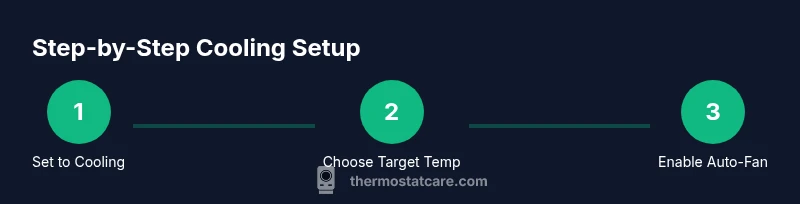
To set cooling effectively, switch the system to cooling mode, select a target temperature that suits occupancy and climate, and enable energy-saving features like scheduling and auto-fan. If your thermostat supports hold vs. program modes, choose a steady hold during periods of occupancy to prevent rapid temperature changes. Review airflow by ensuring the fan cycles appropriately and that vents are open in living spaces. A well-tuned cooling setup reduces temperature fluctuations and promotes steady comfort throughout the day.
Fine-tuning for comfort and energy savings
After you have the basics in place, refine the setup to optimize comfort and efficiency. Use a consistent schedule to avoid unnecessary temperature swings when you’re away, and prefer auto fan operation to leverage system efficiency. If you live in a drafty home, consider a slightly higher setpoint during the day and lower at night when occupants are present. Smart features like adaptive scheduling, occupancy sensing, or learning algorithms can further enhance efficiency, but only if your HVAC system is compatible and your thermostat is properly configured. The goal is steady comfort with minimal runtime.
Safety reminders and ongoing maintenance
Working with electrical components requires caution. Always power off at the breaker before removing or touching thermostat components that expose wiring. Keep the area dry, avoid loose connections, and replace batteries in non-powered thermostats as needed. Regular maintenance—such as changing air filters, inspecting outdoor units for obstructions, and ensuring condensate drainage is clear—helps cooling systems run smoothly and safely. If you notice buzzing, burning smells, or persistent cooling failures, stop and seek professional assistance.
Troubleshooting common cooling issues
If cooling isn’t performing as expected, start with simple checks: confirm the thermostat is in cooling mode, verify the setpoint, and inspect the circuit breaker and fuses. Check whether the air filter is clean and whether outdoor unit clearance is adequate. For intermittent cooling, review whether schedules or energy-saving modes are forcing unexpected holds. If the problem persists, consult your manual or contact a qualified technician. Thermostat Care recommends documenting any changes you make so you can revert if needed.
Smart thermostats and cooling optimization
Smart thermostats can fine-tune cooling by learning patterns, detecting occupancy, and adjusting schedules automatically. They can also integrate with your home's Wi-Fi and voice assistants for convenient control. When using a smart thermostat, verify compatibility with your HVAC system, enable remote access, and use energy-savings profiles to maximize efficiency. While smart features are powerful, ensure you’ve completed the basic cooling setup first and that the device is receiving accurate temperature readings.
The Thermostat Care recommended approach: trustworthy steps you can trust
The Thermostat Care team emphasizes starting with a simple, reliable cooling configuration, then layering in advanced features if your system supports them. Set a consistent cooling mode, establish a sensible target temperature, enable scheduling, and monitor system performance over a few days. By following these steps and avoiding common mistakes, you’ll achieve comfortable indoor temperatures while keeping energy use reasonable. For ongoing improvement, revisit your settings seasonally and after any major HVAC changes.
Tools & Materials
- Thermostat owner's manual(Keep for wiring diagrams and mode explanations)
- Screwdriver set (Phillips and flat-head)(For accessing thermostat cover and wiring terminals)
- Non-conductive gloves(Optional safety accessory when handling components)
- Dry, clear workspace(Prevent moisture and static risk)
- Breaker access (for safety)(Useful if you need to disconnect power during wiring checks)
- Smartphone or tablet (for app control and updates)(Helpful for smart thermostats)
Steps
Estimated time: 45-60 minutes
- 1
Power off safety
Turn off the thermostat power at the circuit breaker to prevent shocks and protect electronics while you inspect the system.
Tip: If you must touch wiring, use insulated tools and avoid metal jewelry. - 2
Set the mode to cooling
Navigate to the thermostat menu and switch the operation mode to cooling. This ensures commands go to the AC compressor rather than the heater.
Tip: Double-check that the mode icon clearly shows cooling (often a snowflake or - 3
Choose a target temperature
Select a comfortable setpoint based on occupancy and climate. Avoid drastic changes that trigger rapid cooling cycles.
Tip: If unsure, start with a moderate setpoint and adjust after a few hours of steady operation. - 4
Enable energy-saving features
Turn on scheduling, eco modes, and auto-fan if available to reduce energy use while maintaining comfort.
Tip: Disable ‘hold’ during occupied periods when you want automatic adjustments. - 5
Check fan settings
Set the fan to Auto to let the system run the blower only when cooling is needed, avoiding unnecessary fan run.
Tip: If humidity feels high, you may temporarily set fan to On after cooling stabilizes for faster dehumidification. - 6
Test the system
Power the thermostat back on and observe the cooling cycle. Listen for the compressor engaging and feel airflow from registers.
Tip: If cooling doesn’t start within 5–10 minutes, re-check mode, power connections, and breakers. - 7
Create a simple schedule
Program a consistent daily routine to minimize temperature swings when the space is unoccupied.
Tip: Aim for gradual temperature changes rather than abrupt shifts between day and night. - 8
Document and review
Record the settings and any notes about comfort. Review after a season and adjust as needed.
Tip: Keep a small troubleshooting log to track what changes helped or did not.
Questions & Answers
What is the best cooling setpoint for energy efficiency?
There isn't a universal best point; start with a comfortable range and maintain a steady setting to avoid extra compressor cycles. Revisit the setting as seasons change.
There isn't a single best point; start with a comfortable range and keep a steady setting, then adjust with the seasons.
Do I need to turn off power before changing thermostat settings?
For safety, turn off power at the breaker if you will touch wiring or open the thermostat. If you’re only adjusting settings on the screen, power-off is usually not required.
For safety, turn off power at the breaker if you touch the wiring. If you’re just changing settings on the screen, you usually don’t need to.
Can I rely on manual controls rather than auto mode?
Auto mode is generally preferred because it lets the system balance cooling and fan operation based on real-time needs, reducing energy waste.
Auto mode is usually better because it balances cooling and fan use automatically, saving energy.
What should I do if the cooling isn’t starting after changes?
Check that the thermostat is in cooling mode, verify the setpoint, inspect breakers and fuses, and ensure the air filter is clean. If still not working, consult a professional.
If cooling won’t start after changes, check mode, breaker, and the filter, and call a pro if it remains an issue.
Are smart thermostats worth it for cooling efficiency?
Smart thermostats can optimize schedules and respond to occupancy, but require compatible HVAC equipment and proper setup to realize benefits.
Smart thermostats can help with schedules and occupancy, but you need compatible equipment and correct setup to get results.
Is it safe to adjust wiring or replace batteries myself?
Only proceed if you’re confident in electrical work and follow the manual. When in doubt, hire a licensed professional to avoid shock or damage.
Only do wiring if you’re confident and following the manual; otherwise, hire a pro to stay safe.
Watch Video
What to Remember
- Set cooling mode correctly before adjustments
- Choose a stable, comfortable setpoint
- Enable scheduling and eco features
- Regularly inspect safety and maintenance steps
- Consider smart thermostat benefits after basic setup