Keep Your Nest Thermostat From Turning Off: A Practical DIY Guide
Learn practical steps to stop your Nest thermostat from turning off unexpectedly. Check power, wiring, and settings with safe, DIY-friendly fixes. Follow our step-by-step guide to keep your Nest online and efficient.


To keep your Nest thermostat from turning off unexpectedly, start by confirming a stable power supply and a properly connected C-wire, then review Nest settings that trigger auto-off modes. Ensure the HVAC system is compatible, update the firmware, and consider using a Nest Power Connector if needed. This guide helps homeowners troubleshooting power-related shutoffs.
Why Nest Thermostat Might Turn Off Unexpectedly
If you're wondering how to keep nest thermostat from turning off, you're not alone. The Nest thermostat is designed to manage power intelligently, but certain conditions can cause it to drop out of power and revert to a basic mode. According to Thermostat Care, the most common reasons are related to power supply and wiring rather than a faulty software update. By understanding these causes, you can systematically test power, confirm the C-wire, and adjust settings to maintain continuous operation.
In many homes, a hidden power short, a loose connection at the furnace control board, or a marginal C-wire can cause intermittent shutdowns that feel like the thermostat is 'turning off.' The goal of this guide is to give you a practical, safe path to diagnose and fix the issue without guesswork. We will cover checks you can perform, when to upgrade wiring, and how to verify compatibility with your HVAC system. Staying methodical and patient will usually resolve most power-related off events.
Confirm Your C-Wire and Power Supply
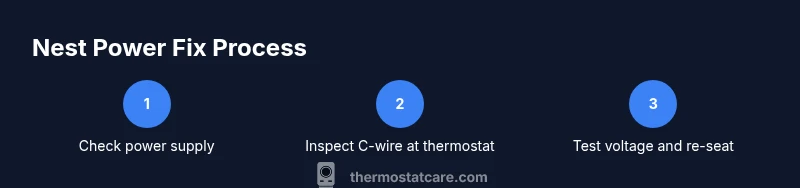
The most common reason a Nest thermostat powers down is insufficient or inconsistent power coming from the HVAC system. Thermostat Care analysis shows that a weak or intermittent C-wire is behind many such shutdowns. Start by confirming both ends of the C-wire are connected firmly: at the thermostat base and at the furnace/air handler terminal block. If you have a dedicated C-wire, ensure it is not damaged or corroded. Use a multimeter to check that the circuit between R (24V supply) and C reads a steady voltage when the thermostat is calling for heat or cool. If the reading is erratic or near zero, power delivery is the culprit. In some cases, the Nest may pull power from R to power internal electronics, causing unintended restarts if the load is heavy. A persistent power issue should be fixed before making settings changes.
Understand Nest Power and Auto-Off Features
Nest devices are built to balance comfort and energy use by drawing power from the HVAC circuit and from the internal battery during brief cycles. When the power draw is inconsistent, Nest may pause functions or revert to a minimal state to protect itself, which can feel like turning off. Auto-off behaviors are often triggered by Eco mode, schedules, or when the thermostat detects that the system is not actively heating or cooling. Review your Nest app settings to identify any Eco or hold settings that may be forcing shorter cycles. If you rely on an automatic schedule, ensure it aligns with your occupancy patterns to avoid unnecessary restarts.
Check Your Wiring at the Furnace/Control Board
The thermostat’s power is ultimately governed by connections at the furnace or air handler. Loose wires, corroded terminals, or a damaged wire path can interrupt power delivery to the thermostat. Power-off safety first: switch off the main breaker before inspecting any wiring. Remove the thermostat's wire bundle from the control board terminal strip and inspect each conductor for damage. Re-seat the connections firmly, especially the R and C wires. If you notice a damaged conductor, replace that section or route a fresh wire from the thermostat to the control board. When in doubt, consult the furnace manual or your HVAC technician before making permanent changes.
When to Use a C-Wire Adapter or Nest Power Connector
If you cannot run a dedicated C-wire through the wall, a C-wire adapter or the official Nest Power Connector can be used to stabilize power for the thermostat. These devices help ensure the Nest receives consistent power during demand spikes, reducing the chance of a shutdown. Follow the adapter or connector’s installation instructions carefully and re-test the thermostat after wiring changes. Note that not all systems support these accessories, and you may need to verify compatibility with your furnace or air handler.
Upgrading to a Dedicated C-Wire or Alternative Power Plan
In some cases, upgrading to a dedicated C-wire from the furnace is the most robust solution. Run a new conductor from the C terminal to the thermostat, ensuring proper compliance with electrical codes and safe routing. If running a new wire is not feasible, consider professional installation or an approved power-sharing solution from your HVAC equipment manufacturer. A correct power setup minimizes the risk of power drops during compressor or fan cycles and helps keep the Nest online during temperature changes.
Improving System Compatibility with Your HVAC
Compatibility between your Nest and your HVAC system is essential. Some older furnaces or heat pumps may not supply a stable 24V supply compatible with Nest power needs, especially if the system uses variable-speed or stage-controlled equipment. Review your equipment’s compatibility list and confirm you have the latest Nest firmware. If you recently upgraded your system, double-check all wiring for changes in terminal labeling or color coding. Incompatible configurations can produce intermittent power losses that appear as the thermostat turning off.
Practical Settings and Habits to Prevent Offs
Beyond wiring, there are practical settings and habits that reduce the odds of a shutdown. Regularly update the Nest firmware when prompted, as updates may address power management issues. Keep the HVAC sensors clean and unobstructed so the thermostat’s decisions reflect actual conditions. Maintain stable internet connectivity and use the official app to monitor any unusual power warnings. If you have a large home or multiple zones, consider a zone controller or a dedicated power-friendly configuration to minimize load on the Nest when the system starts up.
Quick Troubleshooting Checklist You Can Run Tonight
Use this quick list to triage tonight: ensure power is on at the furnace; confirm R and C are connected and intact; check for Eco mode or energy-saving schedules; verify firmware version and apply updates if available; test by forcing a call for heat or cool and observe if the Nest remains powered. If issues persist, revert to a safe baseline configuration and plan for a more thorough inspection tomorrow. Thermostat Care recommends documenting each change to track what fixes work.
Tools & Materials
- Multimeter(Measure voltage between R and C to verify power stability)
- Screwdriver set (Phillips and flathead)(To access thermostat and furnace terminal blocks)
- Wire stripper/cutter(Prepare wires for re-termination if needed)
- Electrical tape or wire nuts(Secure connections and insulate exposed conductors)
- C-wire adapter or Nest Power Connector(Optional if you can’t run a dedicated C-wire)
Steps
Estimated time: 45-75 minutes
- 1
Power down and prepare
Turn off power at the thermostat and the furnace breaker before touching any wiring. Gather tools and label wires to avoid confusion. This prevents accidental shocks and miswiring.
Tip: Double-check that the breaker is OFF with your multimeter before touching terminals. - 2
Inspect thermostat wiring at the base
Remove the thermostat faceplate and inspect R and C terminals for secure attachment and signs of wear. If the C-wire appears loose or damaged, re-seat or replace as needed.
Tip: Take a photo of the current wiring before making changes. - 3
Check C-wire at the furnace
Go to the furnace/air handler and locate the C terminal. Ensure the wire is firmly inserted and not corroded. If you see loose strands, trim and re-terminate.
Tip: Keep spare length of wire tucked away safely to avoid snagging during reassembly. - 4
Test power with a meter
With power still off, set your meter to AC voltage and probe between R and C at the thermostat. When you re-energize, observe a steady reading around 24V (range variations exist by model).
Tip: If you see unstable readings, power delivery is the issue you must fix first. - 5
Re-seat connections and re-test
Reconnect all wires firmly, reattach the thermostat, and restore power. Observe the Nest for continued operation during a test call for heat or cool.
Tip: If the Nest still powers down, proceed to adapter or potential C-wire upgrade. - 6
Consider a C-wire adapter or Power Connector
If no dedicated C-wire exists or you cannot run one, install the adapter per manufacturer instructions and re-test.
Tip: Follow instructions precisely; improper installation can cause wiring issues. - 7
Plan a dedicated C-wire upgrade if needed
If issues persist, plan to run a new C-wire from the furnace to the thermostat with proper routing and insulation. This is the most robust long-term fix.
Tip: Use a professional if required by code or safety concerns. - 8
Final test and documentation
Run multiple cycles (heat, cool, fan) and confirm the Nest remains powered. Document the changes for future reference.
Tip: Keep a simple log of what you changed and the outcomes.
Questions & Answers
Why does my Nest thermostat turn off suddenly?
Power loss, a weak C-wire, or Eco mode/scheduling can cause shutdowns. Diagnose power, wiring, and settings for a safe fix.
Power loss, a weak C-wire, or Eco mode can cause shutdowns. Check power, wiring, and settings.
What exactly is the C-wire and why is it important?
The C-wire provides a continuous 24-volt return path from the furnace to the thermostat, keeping the thermostat powered during operation.
C-wire provides steady power from the furnace to the thermostat.
Can Nest work without a C-wire?
Yes, but power-sharing can cause more frequent shutdowns. A dedicated C-wire or a Nest Power Connector reduces these risks.
Nest can work without C-wire, but power-sharing can cause issues.
How do I check HVAC compatibility with Nest?
Refer to Ness compatibility guides and confirm your furnace model matches supported configurations for Nest power.
Check compatibility guides for your furnace model.
When should I call a professional?
If you’re uncomfortable with electrical work or accessing the furnace, hire a qualified technician to avoid safety risks.
If you're unsure, it's wise to call a professional.
Watch Video
What to Remember
- Verify C-wire integrity to prevent shutdowns
- Keep Nest firmware up to date
- Upgrade wiring if needed for reliable power
- The Thermostat Care team recommends ensuring a proper C-wire and considering a power connector if needed