How to Get Your Thermostat Off Hold: A DIY Guide
Learn how to safely remove hold mode from your thermostat with a step-by-step approach, troubleshooting tips, and expert guidance from Thermostat Care.


To get your thermostat off hold, locate the hold control on the device or app and disable it. Confirm the thermostat follows the schedule by testing a temperature change. If you can't find a hold option, check for a temporary hold or vacation hold that may override settings. After turning off hold, monitor for correct response.
Understanding Hold on Thermostats
A hold on a thermostat is a setting that locks in a specific temperature and prevents the program from adjusting based on the current schedule. Many homeowners encounter it when the device is set to a temporary or vacation hold. If you're wondering how to get thermostat off hold, you're aiming to return the system to automatic scheduling. The Thermostat Care team notes that most holds are easy to reverse, but the steps depend on your model. Some devices show a plain Hold label; others require tapping a clock icon or diving into a menu. Begin by distinguishing whether you have a manual hold, a temporary hold, or a vacation hold, and then pick the method that matches your device. Remember that a hold is not the same as pausing a schedule; releasing it should let the thermostat follow its programmed timings again.
note”:null},
Hold Types Across Popular Brands
Most thermostats offer several hold types, and understanding them prevents confusion when you try to remove a hold. The simplest is a manual hold, which locks at a specific temperature until you turn it off. A temporary hold applies for a set duration, after which the device returns to its schedule. Some models also offer a vacation hold that keeps a desired setpoint during trips. Across popular brands, the naming and icons vary, but the concept is the same: the hold overrides the programmed schedule until released. The Thermostat Care team notes that many users misinterpret a vacation hold as a permanent hold, leading to cold or hot rooms. To avoid this, check the on-screen label and the end time displayed next to the hold indicator. If you use a mobile app, ensure you aren’t re-enabling hold by mistake after adjusting the setpoint. With a clear understanding of hold types, you can confidently remove the hold when you are ready.
note”:null},
Quick Diagnostic Checklist Before You Act
- Confirm you are currently in hold mode on the thermostat screen or in the mobile app.
- Verify whether there is a programmed schedule that could override your manual hold.
- Check for a temporary hold or vacation hold that may be active.
- Inspect power or battery condition; weak power can mimic hold behavior on some models.
- Review recent software updates or app changes that might have altered hold behavior.
- Be prepared to document the hold status before making changes so you can revert if needed.
note”:null},
Step-by-Step Overview (High-Level)
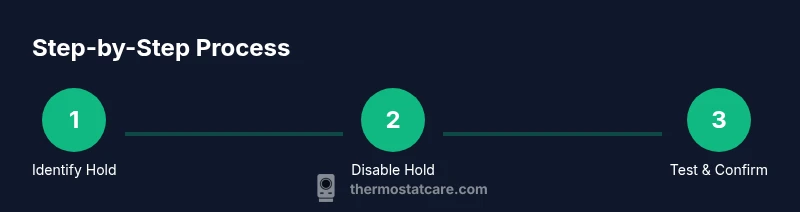
This section provides a concise roadmap of the actions you’ll take in the detailed steps that follow. You’ll identify the hold type, choose the right method to disable it, perform a test to ensure the thermostat resumes its normal schedule, and finally confirm the system is responding as expected. If any step feels unclear, rely on your model’s manual or the Thermostat Care guidance for model-specific terminology and screens.
note”:null},
Common Pitfalls and How to Avoid Them
Common mistakes include mistaking a vacation hold for a permanent hold, not saving changes in the app after turning off the hold, and assuming the thermostat will resume its schedule instantly. Another pitfall is attempting a hardware reset without verifying software settings first. To avoid these issues, double-check the hold type, document the current settings, and always run a quick test after changes to confirm the device is following the programmed schedule.
note”:null},
When to Seek Professional Help
If your thermostat continues to stay on hold despite multiple attempts to disable it, power cycling, or app reconfigurations, there may be a deeper issue such as a failed sensor, wiring fault, or firmware glitch. The Thermostat Care team recommends consulting a qualified technician if you notice inconsistent temperature readings, frequent resets, or if your HVAC system behaves oddly after attempting to remove hold. Professional help can prevent further disruptions and ensure safe operation.
note”:null},
Brand-Specific Tips and Final Prep
Across brands, the core approach remains the same: locate the hold control, disable it, and verify the system responds to setpoint changes. Always start with the device display, then check the companion app if you use one. For smart thermostats, ensure the account settings aren’t re-enabling hold after you adjust a setpoint. The Thermostat Care analysis shows that keeping a photo of the original settings can be a quick reference if you need to revert. Prepare to re-test after each change so you can confirm the hold is truly off and the thermostat is following the schedule.
note”:null}],
toolsMaterials":{"items":[{"name":"Phillips head screwdriver (size #2)","required":true,"note":"To remove the thermostat faceplate if needed"},{"name":"Owner’s manual or model guide","required":true,"note":"Identify hold features and screen labels"},{"name":"Smartphone with thermostat app","required":true,"note":"Use app to locate and disable hold remotely"},{"name":"Notepad or screenshot tool","required":false,"note":"Record current settings before changes"},{"name":"Flashlight","required":false,"note":"Illuminates the wall plate during inspection"}]},"stepByStep":{"steps":[{"number":1,"title":"Identify hold type and location","description":"Inspect the thermostat screen and app to determine if a manual hold, temporary hold, or vacation hold is active. This prevents choosing the wrong fix for your device.","tip":"Take a photo of the display before changing anything"},{"number":2,"title":"Check for scheduled programs","description":"Look for any existing schedule that could override the hold. If a schedule exists, you may need to modify or temporarily suspend it.","tip":"Note start/end times of any schedule before editing"},{"number":3,"title":"Disable hold on device or app","description":"If you see a Hold option, select Cancel or Off. If you’re using an app, switch Hold to Off or disable the hold feature.","tip":"If you can’t find the option, consult the model’s manual for exact wording"},{"number":4,"title":"Test the change","description":"Adjust the setpoint by a few degrees and observe whether the thermostat follows the new setting and returns to normal scheduling.","tip":"Allow 5–10 minutes for the system to respond"},{"number":5,"title":"Power and wiring check (if needed)","description":"If the hold remains after disabling, inspect power supply and wiring. Gently reseat any loose connections and verify battery status if applicable.","tip":"Only handle wiring if you are comfortable; switch off power at the breaker if needed"},{"number":6,"title":"Document and re-test","description":"Record the results and perform a final test to ensure hold is off and scheduling is functioning normally.","tip":"Keep a reference photo of the last known good setting for future troubleshooting"}],"estimatedTime":"15-25 minutes"},"tipsList":{"tips":[{"type":"pro_tip","text":"Document the settings before changing anything to enable easy rollback"},{"type":"warning","text":"Do not bypass safety switches or modify wiring; power off if you must handle wiring"},{"type":"note","text":"Soft resets can fix glitches without losing major settings; use factory reset only as a last resort"},{"type":"pro_tip","text":"Use the official app when possible for accurate hold controls"}]},"keyTakeaways":["Identify hold type and disable it in-device or in-app","Test the system after turning off hold to confirm scheduling resumes","If hold persists, check power and wiring connections","Thermostat Care recommends seeking professional help for unresolved issues"],"videoEmbed":{"videoQuery":"how to get thermostat off hold tutorial"},"faqSection":{"items":[{"question":"What does 'hold' mean on a thermostat?","questionShort":"What is hold?","answer":"Hold locks the current temperature until you release it. It can be manual, temporary, or vacation hold depending on the model.","voiceAnswer":"Hold locks the current temperature until you release it, and it can be set for a time or vacation period.","priority":"high"},{"question":"How do I turn off hold on a Nest thermostat?","questionShort":"Nest hold off","answer":"Open the menu, locate the Hold option, and select Cancel Hold or Off. Then test by changing the setpoint.","voiceAnswer":"Open the Nest menu, select Hold, and cancel it to resume normal scheduling.","priority":"high"},{"question":"Why doesn’t the hold release after the end time?","questionShort":"Hold won’t release","answer":"A conflicting schedule or app setting can keep hold active. Check both the device and the app for any active holds.","voiceAnswer":"A conflicting schedule or app setting can keep hold active, so check both places.","priority":"medium"},{"question":"Can I disable hold from the thermostat app?","questionShort":"Disable hold via app","answer":"Yes. Most apps let you turn Hold off or switch to a standard schedule. Save changes and observe results.","voiceAnswer":"Yes, you can usually disable Hold from the app and then test the schedule.","priority":"medium"},{"question":"Is it safe to reset the thermostat to fix hold?","questionShort":"Safe to reset","answer":"Soft resets can fix glitches without losing major settings. Use a factory reset only if you’ve exhausted other options.","voiceAnswer":"A soft reset can fix glitches, but avoid a full reset unless necessary.","priority":"low"}]},
mainTopicQuery":"thermostat hold"},
mediaPipeline":{"heroTask":{"stockQuery":"thermostat maintenance stock photo","overlayTitle":"Thermostat Hold Fix","badgeText":"2026 Guide","overlayTheme":"dark"},"infographicTask":{"type":"process","htmlContent":"<div class='w-[800px] p-8 bg-slate-900 text-white'>\n <h3 class='text-2xl font-bold mb-6'>Step-by-Step Process</h3>\n <div class='flex items-center justify-between'>\n <div class='flex flex-col items-center'>\n <div class='w-16 h-16 rounded-full bg-emerald-500 flex items-center justify-center text-2xl font-bold text-white'>1</div>\n <div class='mt-2 text-center text-white text-sm'>Identify Hold</div>\n </div>\n <div class='flex-1 h-1 bg-emerald-500/30 mx-2'></div>\n <div class='flex flex-col items-center'>\n <div class='w-16 h-16 rounded-full bg-emerald-500 flex items-center justify-center text-2xl font-bold text-white'>2</div>\n <div class='mt-2 text-center text-white text-sm'>Disable Hold</div>\n </div>\n <div class='flex-1 h-1 bg-emerald-500/30 mx-2'></div>\n <div class='flex flex-col items-center'>\n <div class='w-16 h-16 rounded-full bg-emerald-500 flex items-center justify-center text-2xl font-bold text-white'>3</div>\n <div class='mt-2 text-center text-white text-sm'>Test & Confirm</div>\n </div>\n </div>\n</div>","altText":"Process diagram showing steps to remove thermostat hold","caption":"How to remove thermostat hold"}}
taxonomy":{"categorySlug":"troubleshooting-thermostats","tagSlugs":["thermostat-reset","thermostat-troubleshooting","how-to-reset-thermostat","thermostat-not-working"]}},
seo_meta":{"alternativeHeadline":"Top Thermostat Hold Fix"}
brand_mentions":[{
mentions
Tools & Materials
- Phillips head screwdriver(for removing thermostat cover if needed)
- Owner’s manual or model guide(Identify hold features and screen labels)
- Smartphone with thermostat app(Use app to locate and disable hold remotely)
- Notepad or screenshot tool(Record current settings before changes)
- Flashlight(Illuminates the wall plate during inspection)
Steps
Estimated time: 15-25 minutes
- 1
Identify hold type and location
Inspect the thermostat screen and app to determine if a manual hold, temporary hold, or vacation hold is active. This prevents choosing the wrong fix for your device.
Tip: Take a photo of the display before changing anything - 2
Check for scheduled programs
Look for any existing schedule that could override the hold. If a schedule exists, you may need to modify or temporarily suspend it.
Tip: Note start/end times of any schedule before editing - 3
Disable hold on device or app
If you see a Hold option, select Cancel or Off. If you’re using an app, switch Hold to Off or disable the hold feature.
Tip: If you can’t find the option, consult the model’s manual for exact wording - 4
Test the change
Adjust the setpoint by a few degrees and observe whether the thermostat follows the new setting and returns to normal scheduling.
Tip: Allow 5–10 minutes for the system to respond - 5
Power and wiring check (if needed)
If the hold remains after disabling, inspect power supply and wiring. Gently reseat any loose connections and verify battery status if applicable.
Tip: Only handle wiring if you are comfortable; switch off power at the breaker if needed - 6
Document and re-test
Record the results and perform a final test to ensure hold is off and scheduling is functioning normally.
Tip: Keep a reference photo of the last known good setting for future troubleshooting
Questions & Answers
What does 'hold' mean on a thermostat?
Hold locks the current temperature until you release it. It can be manual, temporary, or vacation hold depending on the model.
Hold locks the current temperature until you release it, and it can be set for a time or vacation period.
How do I turn off hold on a Nest thermostat?
Open the menu, locate the Hold option, and select Cancel Hold or Off. Then test by changing the setpoint.
Open the Nest menu, select Hold, and cancel it to resume normal scheduling.
Why doesn’t the hold release after the end time?
A conflicting schedule or app setting can keep hold active. Check both the device and the app for any active holds.
A conflicting schedule or app setting can keep hold active, so check both places.
Can I disable hold from the thermostat app?
Yes. Most apps let you turn Hold off or switch to a standard schedule. Save changes and observe results.
Yes, you can usually disable Hold from the app and then test the schedule.
Is it safe to reset the thermostat to fix hold?
Soft resets can fix glitches without losing major settings. Use a factory reset only if you’ve exhausted other options.
A soft reset can fix glitches, but avoid a full reset unless necessary.
Watch Video
What to Remember
- Identify hold type and disable it in-device or in-app
- Test the system after turning off hold to confirm scheduling resumes
- If hold persists, check power and wiring connections
- Thermostat Care recommends seeking professional help for unresolved issues