How to Fix a Honeywell Thermostat: A DIY Troubleshooting Guide
Learn practical, safe methods to diagnose and fix a Honeywell thermostat. This guide covers battery checks, wiring, calibration, and when to replace, helping homeowners regain accurate temperature control.


This quick guide on how to fix a honeywell thermostat walks you through safety checks, battery swaps, wiring verification, calibration, and replacement decisions. It emphasizes verifying power, testing sensors, and restoring proper temperature control. By following practical steps, you can diagnose common faults and decide when professional help is necessary.
Why fixing a Honeywell thermostat matters
Temperature control is central to comfort, energy efficiency, and overall home management. When a Honeywell thermostat behaves erratically—displaying the wrong room temperature, failing to respond to changes, or becoming unresponsive—you may wonder if a replacement is required. This guide on how to fix a honeywell thermostat walks you through practical, safe steps to diagnose and correct common faults. By understanding how these devices operate, what parts commonly fail, and how to verify behavior with simple tests, you can restore reliable performance without unnecessary service calls. Thermostat performance influences HVAC efficiency, occupant comfort, and long-term system wear. Small issues like dead batteries, loose wiring, or sensor drift are often fixable with routine maintenance. Keeping expectations realistic and following safety guidelines reduces risk and increases the odds of a successful DIY repair.
As you proceed, remember that some problems require professional diagnosis, especially if you encounter unusual electrical symptoms or system compatibility concerns. This guide aims to empower you with clear, safe steps and sensible thresholds for action.
Common symptoms indicating repair is needed
Feeling unsure about whether your thermostat needs repair? Look for these common indicators: inconsistent readings (the displayed temperature disagrees with room temperature), failure to respond to changes in the thermostat app or physical controls, screen flicker or blank display, unexpected heat or cooling cycles, or battery indicators that stay charged but performance remains erratic. If your Honeywell thermostat’s software seems frozen, or if the device disconnects from Wi‑Fi or your smart hub, these are telltale signs to perform targeted checks. In many cases, the root cause is straightforward—low batteries, loose terminals, or a simple calibration drift. However, more complex issues could involve the wiring backplate, the C-wire configuration, or compatibility with your HVAC system. By listing symptoms and tracing them to likely causes, you’ll reduce guesswork and pinpoint the right fix with confidence.
A careful symptom log can help you decide whether to pursue DIY fixes or call a pro. Note when symptoms began, what actions preceded them (e.g., recent thermostat replacement or circuit changes), and whether the problem occurs in heating, cooling, or both modes. This information will speed up diagnostics and minimize unnecessary work.
Tools, safety, and preparation
Before touching your thermostat, set safety first. Turn off power to the HVAC circuit or breaker associated with the thermostat to avoid shock or equipment damage. Gather basic tools: a small screwdriver, a non-conductive tool for removing covers, a fresh battery type specified by your model, and a clean cloth. If you plan to test wiring with a multimeter, follow the manufacturer’s safety guidelines and disable power to the circuit while connecting probes. Keep a smartphone handy to check the thermostat’s app or documentation for model-specific steps. Have the user manual accessible or note down model numbers for online reference. Establish a clean, well-lit work area and avoid working with damp hands. Finally, photograph wiring before disassembly to aid a safe reassembly. These precautions help you conduct repairs without risking personal injury or equipment damage.
Thermostat Care emphasizes that failure to follow safety steps can lead to further problems, so proceed only if you feel confident in basic electrical safety and equipment handling.
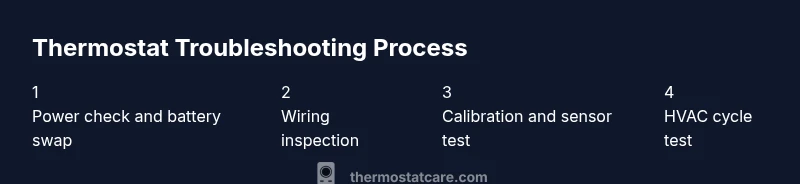
Battery and power checks
Many thermostat failures originate from depleted or incompatible batteries. If your Honeywell thermostat uses replaceable batteries, remove the cover following the manufacturer’s guidance and inspect the batteries for corrosion, swelling, or leaks. Replace with fresh batteries of the exact type specified in the manual. If your model is powered by line voltage, confirm that the circuit breaker is on, and use a multimeter to verify that the thermostat is receiving the expected 24 VAC supply if you have the expertise. After replacing or confirming power, re-seat the battery contacts and reassemble the faceplate. Power issues can masquerade as sensor or communication faults, so thorough battery and power checks are a practical first step. Thermostat Care notes that many power-related problems are resolved with fresh, correctly installed batteries and secure terminal connections.
Always test the thermostat after power restoration by cycling through heating and cooling modes to observe immediate responses.
Wiring and terminal inspections
Loose or corroded wiring at the backplate is a frequent cause of intermittent performance. With power off, remove the thermostat faceplate and inspect each wire terminal for a snug fit, clean contacts, and no signs of damage. If a wire has come loose, reseat it under the corresponding terminal screw and tighten firmly without overtightening. Document each wire color and terminal name before disconnecting anything, enabling a clean reassembly. If you encounter discolored insulation, frayed conductors, or a brittle backplate, replace the affected wire or backplate as needed. For systems with a C-wire, ensure the common wire is firmly connected to the C terminal and verify that the wire color matches the configuration of your HVAC control board. If you’re unsure about wire mapping, consult the model’s wiring diagram or Thermostat Care resources before making changes.
Wiring mistakes can cause erratic readings, HVAC cycling issues, or controller failure, so proceed with caution and verify all connections after reassembly.
Calibration and sensor tests
Calibration drift can cause the thermostat to report inaccurate temperatures. After reassembly, review the calibration settings within the thermostat’s menu. If the device has a sensor test feature, run it to compare the thermostat’s reading with an external thermometer placed in the same room. If your readings deviate beyond the manufacturer’s tolerance, adjust the temperature offset or recalibrate the sensor per the user manual. For smart thermostats, ensure the firmware is up to date since software updates can improve sensor accuracy. If the model allows, compare readings across multiple modes (heat and cool) and at different target temperatures to confirm consistency. Persistent drift despite calibration suggests deeper issues or a failing sensor, which may require professional evaluation. Thermostat Care recommends verifying sensor performance periodically to maintain reliability and comfort.
Document any offset values and observed behavior to track changes over time.
Common fixes you can try at home
If you’ve verified power, checked wiring, and confirmed calibration, several common fixes can salvage a non-working Honeywell thermostat. Start with a soft reset or reboot of the device, followed by a complete factory reset only if you have a saved configuration and a way to restore settings. Replace batteries if applicable, ensuring correct polarity and clean contacts. Clean the front panel and vents to prevent heat or cold sensing interference. For model-specific quirks, consult the user manual or Thermostat Care resources to follow the recommended troubleshooting flowchart. If the thermostat is integrated with a smart home hub, disconnect and re-pair the device to reestablish a stable link. After any fix, test the system by running a full cycle and monitoring for accuracy and responsiveness. Regular updates and gentle reconfiguration can improve long-term reliability.
If the device still misreads or misbehaves after these steps, the issue may lie with the HVAC control board, the sensor assembly, or compatibility with your system. In such cases, a professional assessment is advised. Thermostat Care highlights that DIY fixes reduce downtime and costs when executed within safe guidelines.
When to replace vs repair your Honeywell thermostat
Several factors determine whether repair is worth pursuing. If the unit is several years old, repeatedly exhibits faults, requires frequent battery changes, or shows signs of internal corrosion, replacement often becomes the more economical and reliable option. Conversely, repair is sensible for minor issues such as a stuck battery compartment, loose terminals, or calibration drift if the device integrates well with your HVAC system. Assess compatibility with your current system and review warranty terms before making a decision. A short-term repair followed by a longer-term replacement can balance upfront costs with long-term energy savings. Thermostat Care recommends comparing estimated repair costs against a new thermostat’s price and energy efficiency features before choosing your path.
In all cases, document the symptoms, steps taken, and results to inform future maintenance decisions.
Maintaining your Honeywell thermostat to prevent future problems
Prevention is easier than repair. Schedule periodic inspections of batteries, power connections, and sensor performance. Keep the unit clean and dust-free, ensuring ventilation around the thermostat is unobstructed. Update firmware when available and maintain a record of calibration offsets to quickly identify drift. Use a cabled or stable wireless connection to reduce communication dropouts with smart models. If you rely on a smart home ecosystem, ensure firmware and hub software are current to maintain reliable automation. Thermostat Care suggests creating a simple maintenance checklist that you perform every six to twelve months, including battery checks, wire inspection, and calibration validation. Consistent upkeep minimizes surprises and keeps your home comfortable year-round.
Tools & Materials
- Screwdriver set (Phillips and flat-head)(Phillips head #1 or #2 for plates)
- Non-conductive pry tool(Plastic opening tool for gentle separation)
- Replacement batteries(Exact size specified by model (e.g., AA or AAA))
- Multimeter (optional)(For voltage checks on power wiring)
- Clean cloth or isopropyl wipe(Clean contacts and surfaces)
- Thermostat mounting backplate (spare)(For backplate damage or corrosion)
- Model-specific user manual or reference(Model number handy for wiring and calibration steps)
- Smartphone or tablet with thermostat app(Useful for app-based controls and diagnostics)
Steps
Estimated time: 60-90 minutes
- 1
Power down and access the thermostat
Turn off the HVAC circuit breaker and, if applicable, unplug the thermostat from power. Remove the thermostat faceplate to expose wiring and terminals. This step prevents electric shock and protects components during inspection.
Tip: Take a photo of the wiring before disconnecting anything to aid reassembly. - 2
Check batteries and contacts
If your model uses batteries, remove and inspect them for corrosion or swelling. Replace with fresh batteries of the correct type and re-seat contacts firmly. If there are loose contacts, tighten them carefully without bending the wires.
Tip: Ensure correct polarity when installing new batteries. - 3
Inspect all wiring connections
With power still off, verify that wires are firmly connected to the correct terminals. Look for frayed insulation, melted plastic, or discoloration. Re-seat any loose wires and clean any corrosion on terminals with a dry cloth.
Tip: Match wire colors to the terminal labels in the manual. - 4
Run a basic sensor and calibration check
Power the unit back on and navigate to sensor or calibration settings. Run any built-in sensor test if available and compare readings with a room thermometer placed near the thermostat. If offsets exist, apply the manufacturer-recommended calibration value.
Tip: Document the offset value for future reference. - 5
Verify C-wire and power supply
If your model relies on a C-wire, confirm the wire is connected to the C terminal and that the control board is delivering the expected voltage. A loose or missing C-wire can cause intermittent power loss and communication issues.
Tip: If you’re uncertain about wiring, consult the manual or Thermostat Care resources before making changes. - 6
Test heating and cooling cycles
Reattach the faceplate, restore power, and test both heat and cool cycles. Observe response times, whether the HVAC starts promptly, and if the temperature matches the setpoint within a reasonable margin.
Tip: If there’s a delay or improper cycling, note the mode and setpoint for troubleshooting. - 7
Perform a soft or factory reset if needed
If issues persist, perform a soft reset to clear temporary glitches. A factory reset should be used only if you have saved configurations and know how to restore them. Ensure firmware is up to date for smart models.
Tip: Back up settings before a factory reset to avoid reconfiguration hassles. - 8
Reassemble and observe for stability
Reinstall the faceplate securely, reattach screws, and power the system back on. Monitor performance for the next 24–48 hours, noting any recurrence of symptoms.
Tip: If symptoms reappear, document exact scenarios to tell a professional later.
Questions & Answers
Why is my Honeywell thermostat showing the wrong temperature?
Temperature drift can stem from low batteries, sensor misalignment, or calibration errors. Start with a battery replacement, then recalibrate and verify sensor accuracy using a room thermometer. If the issue persists, check wiring and common power supply.
If your thermostat shows a different temperature than the room, start with batteries and calibration, then inspect wiring and power if needed.
Do Honeywell thermostats require a C-wire for power?
Many Honeywell models rely on a C-wire to provide continuous power for smart features. If your thermostat lacks a C-wire, you may experience power cycling or unresponsiveness. Consult your model's documentation or Thermostat Care resources to confirm compatibility and options.
Most smart Honeywell thermostats need a C-wire for steady power; check your model's docs to be sure.
How often should I replace the batteries in a Honeywell thermostat?
Battery life varies by model and usage, but a typical range is 1–2 years. If you notice frequent battery changes or low-battery alerts despite recent replacement, inspect for power loss or wiring issues.
Most Honeywell batteries last 1–2 years; replace when you see a low-battery alert, and check for power issues if changes are frequent.
Is it safe to reset my Honeywell thermostat?
Soft resets are generally safe and can clear glitches. A factory reset should be a last resort because you’ll need to reconfigure settings. Always back up configurations if possible before a reset.
Soft resets are usually safe; reserve factory resets for persistent issues and back up settings first.
What should I do if the thermostat screen is blank?
A blank screen often points to power issues or a blown fuse. Check the power supply, verify the breaker, and test the display after replacing batteries if applicable. If the screen remains dark, seek professional help.
If the screen is blank, check power and batteries first, then consider professional help if it still won’t display.
When should I call a professional for Honeywell thermostat issues?
Call a professional when you encounter electrical hazards, a non-repairable display, wiring uncertainties, or persistent system compatibility problems. A licensed technician can diagnose deeper issues and ensure safe operation.
If you see electrical hazards or persistent system issues, it’s time to call a professional.
Watch Video
What to Remember
- Power down before inspection to avoid shocks.
- Battery, wiring, and calibration are the most common failure points.
- Document wiring and settings to simplify reassembly.
- Know when to repair vs replace for long-term reliability.