Heat Blinking on Thermostat: Urgent Troubleshooting Guide
Urgent, step-by-step guide to fix heat blinking on thermostat. Identify common causes, safety tips, and when to call a professional for reliable heating control.


Heat blinking on thermostat usually signals an electrical or wiring issue, a dead battery, or a safety shutdown in your HVAC system. Start with the simplest checks, like battery replacement and power; if the blinking persists, power down the system and call a pro. This guide will help you diagnose quickly and safely.
What the heat blinking on thermostat means
When you see heat blinking on thermostat, it's telling you the thermostat detected a fault or is in a protective shutdown. This isn't a normal operating state, and it often points to power, battery, or wiring issues. The blinking pattern is your cue to pause and inspect before attempting another heating cycle. In many cases, the fix is simple—like replacing a dead battery or reseating a loose wire—but blinking can also indicate a more serious problem with the furnace safety switch or control board. If this pattern appears, treat it as a warning signal and work through a methodical check. For homeowners, documenting observations and steps can help determine whether the issue is with the thermostat, the wiring to the HVAC system, or the furnace itself. Remember: safety first, and when in doubt, seek professional guidance.
Common causes of heat blinking
There are several frequent culprits behind heat blinking on thermostat. A dead or weak battery (for models with wireless remotes) is a common, easily fixed issue. Loose or damaged wiring between the thermostat and the furnace is another frequent cause; even a small terminal wiggle can trigger a fault signal. Power supply problems—such as a tripped circuit breaker or a loose outlet connection—can also cause the thermostat to lose communication with the HVAC system. In some cases, a safety switch on the furnace or a clogged limit switch can trigger protective shutdowns that present as blinking indicators. Finally, misconfiguration after a power outage or an incorrect mode setting (heat vs. auto) can mimic a fault. Understanding these causes helps you triage quickly and stay safe.
Safety first: power and gas considerations
Before you touch anything, cut power to the thermostat and, if you have a gas furnace, ensure you know where the gas shutoff is located and how to access it safely. Do not bypass safety features or force components back into place. If you detect a gas smell, leave the area immediately and call emergency services. When working on electrical connections, use insulated tools and verify the circuit breaker feeding the thermostat is OFF. If you feel unsure at any point, stop and contact a licensed HVAC technician. This is especially important if your system includes a gas furnace, heat pump, or any high-voltage wiring. Prioritize safety over speed.
Quick checks you can perform safely
Start with low-effort, non-invasive checks that don’t require furnace access. Replace the thermostat batteries if your model uses them and confirm the display powers up normally. Check the thermostat’s power source—ensure the outlet is live or the 24V power supply to the HVAC is steady. Inspect the thermostat’s mounting and ensure the C-wire is connected properly and not loose. Look for any error codes on the thermostat screen and compare them to your model's manual. If you use a smart thermostat, verify the app shows the same mode (heating) and scheduling. These quick checks often resolve user-visible faults without touching furnace components.
Diagnostic hints and red flags
If replacing batteries and verifying power does not stop the blinking, note whether the blinking changes when you adjust settings or commands. A consistent blinking that persists after a reset often points to a wiring fault or a faulty thermostat. Rapid changes in the indicator after moving wires or reconnecting terminals deserve careful inspection, ideally with the power off. If you notice damage to wires, burnt smells, or scorching marks on the thermostat base or furnace control board, stop and contact a professional. These signals suggest a potential fire risk or dangerous electrical fault requiring equipment shutdown and expert service.
Preventive maintenance and future-proofing
Regular maintenance reduces the chances of heat blinking on thermostat. Keep batteries replaced on schedule, clean air filters, and ensure the furnace area is free of dust and debris. Schedule an annual HVAC check that includes thermostat wiring, furnace limit switches, and control board inspection. If you have a smart thermostat, keep the firmware up to date and review routine maintenance reminders. Document any blinking patterns and note which changes in temperature or time of day affect the indicator. Proactive checks can help you catch issues before they escalate.
How to interpret thermostat error codes and model differences
Different thermostat brands use distinct fault codes, so blinking patterns can vary. In general, blinking or flashing indicators correlate with communication errors, sensor faults, or safety trips. Always consult the user manual for your specific model to decode any codes shown on screen. If your thermostat sends a fault signal after a power interruption, a factory reset may help, but avoid resetting the unit multiple times in a short period. If the problem persists across different heating cycles, the issue is likely in the furnace or wiring rather than the thermostat alone.
Common mistakes to avoid during DIY troubleshooting
Avoid ignoring the blinking indicator or attempting rapid fixes without powering down first. Do not bypass safety features or tug on terminals to test for loose connections. Never try to bypass gas safety controls or disassemble the furnace components without proper training. If a fault persists after your initial checks, do not continue to troubleshoot—call a qualified HVAC technician. Proper documentation of symptoms, steps taken, and observed codes will help the technician diagnose the issue faster.
Steps
Estimated time: 30-45 minutes
- 1
Power down and confirm power source
Turn off power to the thermostat at the breaker or disconnect the battery if it’s battery-powered. This reduces the risk of electric shock while inspecting connections. Wait a few minutes, then restore power to test if the blinking persists.
Tip: Label the breaker for future reference and keep notes of what you test. - 2
Check thermostat battery and display
Replace the batteries if your model uses them and verify the display powers on clearly. If the screen remains dim or unresponsive, the issue may be in power delivery rather than the battery itself.
Tip: Use fresh batteries of the correct type to ensure reliable power. - 3
Inspect C-wire and wiring connections
Remove the thermostat from the wall plate and inspect the C-wire and other terminals for loose or corroded connections. Reseat wires firmly and replace any damaged conductors. Reattach the plate and power on the system to observe blinking behavior.
Tip: Take a photo of wire terminals before changing anything to guide reassembly. - 4
Verify HVAC power and control signals
Confirm the furnace or heat pump is receiving 24V control signals from the thermostat. Check the furnace's power switch and the breaker. If the furnace isn’t responding to heat requests, the fault may lie with the furnace circuitry.
Tip: If you’re unsure how to test 24V signals, skip ahead to professional help to avoid damage. - 5
Test a reset and simple mode change
If your thermostat supports a reset, perform a soft reset and reconfigure heating mode. After reset, recheck the blinking pattern. If it reappears, further investigation is required.
Tip: Avoid frequent resets; they can mask underlying issues. - 6
Check for safety concerns
If you smell gas, hear banging noises, or notice burnt components, shut off power and call a professional immediately. Do not attempt further DIY fixes in such cases.
Tip: Gas safety comes first—don't risk an explosion by probing unsafe components. - 7
Reassemble and test
Reconnect the thermostat plate, power the system, and test heating. If the heat blinking persists, document observed codes and test results and contact a licensed HVAC technician.
Tip: Keep a log of the dates, symptoms, and fixes applied for future reference.
Diagnosis: Heat blinking on thermostat
Possible Causes
- highLow or dead thermostat battery (where applicable)
- highLoose or damaged wiring between thermostat and HVAC
- mediumPower supply issues (outlet, breaker, or 24V supply)
- mediumSafety shutdown (furnace limit switch or gas safety)
- lowMisconfiguration or model-specific fault codes
Fixes
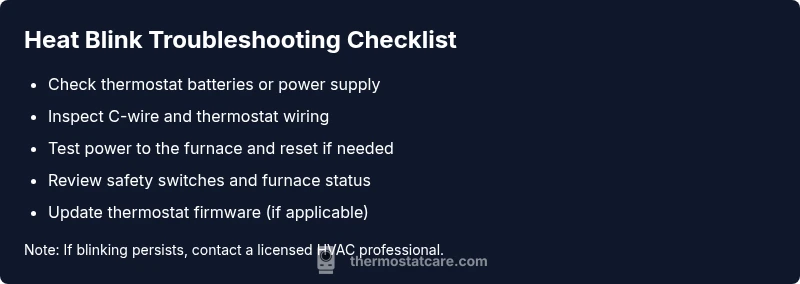
- easyReplace thermostat batteries or restore 24V power; ensure display comes back normally
- easyReseat or secure thermostat wiring; check for loose terminals at both ends
- easyReset circuit breakers and confirm power to the thermostat and furnace
- mediumInspect furnace safety switches and limit switches for proper operation
- mediumUpdate firmware on smart thermostats and consult manual for fault-code steps
Questions & Answers
What does heat blinking on thermostat mean?
Heat blinking on thermostat usually signals an electrical or safety fault. It triggers a protective shutdown to prevent damage. Check power, battery, and wiring first, then consider professional help if the blinking persists.
Heat blinking typically means a fault or safety shutdown. Start with power and battery checks, then reach out to a professional if it continues.
Is it safe to troubleshoot thermostat myself?
Basic checks like battery replacement and wiring reseating can be safe when power is off. Avoid opening furnace components or handling gas controls unless you have proper training. When in doubt, consult a licensed HVAC technician.
Some basic checks are okay with the power off, but don’t open furnace parts or gas controls unless you’re trained.
What should I do first when I see the blinking heat indicator?
First, power down the thermostat and furnace, then verify batteries, wiring connections, and power supply. After re-energizing, test the system carefully and monitor whether the blinking returns.
Power down, check batteries and wiring, restore power, then test and observe the blinking.
Can a blinking heat signal a gas furnace safety issue?
Yes. If you suspect a gas-related safety fault, do not attempt DIY fixes. Turn off gas supply if safe and contact a licensed professional immediately.
If it might be gas-related, stop DIY and call a pro right away.
How do I reset my thermostat to clear the blinking heat?
If your model supports it, perform a soft reset or factory reset per the manual. After reset, reconfigure settings and monitor for repeat blinking. Don’t reset repeatedly without diagnosing underlying causes.
Try a soft reset per your manual, then recheck settings and see if blinking returns.
When should I call a professional for heat blinking on thermostat?
Call a professional if blinking persists after battery/wiring checks, if you notice burnt smells, or if the furnace safety switches trigger. A pro can diagnose control boards, gas safety, and wiring safely.
If it keeps blinking after basic checks or you smell gas, call a pro.
Watch Video
What to Remember
- Identify the blinking pattern's root cause.
- Check power, battery, and wiring first.
- Prioritize safety and know when to call a pro.
- Document symptoms and actions for faster diagnosis.
- Maintain regular thermostat and furnace maintenance.