Heat Flashing on Thermostat: Troubleshooting Guide
Urgent guide to diagnose and fix heat flashing on thermostat. Learn safe DIY steps, common causes, when to escalate, and how to prevent future issues with Thermostat Care’s expert tips.


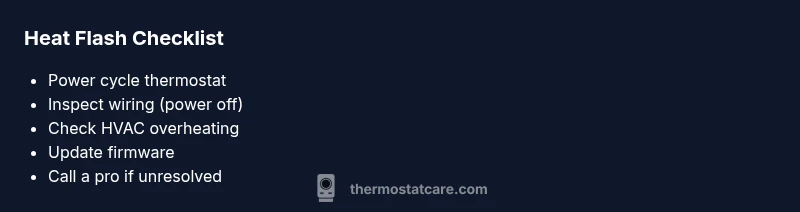
Heat flashing on thermostat usually signals a safety or sensor fault. According to Thermostat Care, start with a power cycle, verify the HVAC isn’t overheating, and reset the thermostat. If the warning persists, avoid bypassing safety features and contact a professional. This quick check helps you determine whether a simple reset or wiring fix is enough.
Why heat flashing on thermostat happens
Heat flashing on a thermostat is a visual alert that something is not right with the control system. In most homes, the message appears when safety protections kick in or when a sensor reads out of range. Flashes can be triggered by overheating, a bad temperature sensor, or a wiring fault. The Thermostat Care team notes that flashing indicators are not a normal operating state and require investigation. This section explains the common reasons, how the thermostat detects them, and what you should do first to avoid damage or discomfort. The goal is to help you decide whether you can safely fix it yourself or if you need professional help. Throughout, keep in mind 2026 standards for safety and best practices.
Safety first: immediate actions
If you see heat flashing on the display, take immediate but careful steps to reduce risk. Do not touch live wires; switch off the thermostat at the circuit breaker if you suspect a wiring fault or overheating component. Keep hands dry and avoid heat sources near the thermostat. After powering down, wait a minute before testing again. This pause helps prevent further damage and keeps you safe while you diagnose. Thermostat Care recommends approaching the issue with a calm plan and prioritizing safety above all else.
Common causes behind the heat flash
Here are the most frequent culprits behind heat flashing:
- Sensor fault: A degraded or miscalibrated temperature sensor can trigger a false heat signal.
- Overheating HVAC cabinet: If the furnace or air handler cabinet is overheating, the thermostat safety feature may flash to protect circuits.
- Power supply issues: A fluctuating or insufficient power supply can cause the display to flash warning codes.
- Wiring problems: Loose, damaged, or crossed wires between the thermostat and HVAC equipment can trigger faults.
- Firmware or software glitch: A bug in the thermostat’s software may cause a false heat indication after an update.
Each cause has different remedies; start with the easiest check first.
How to verify your setup
Carry out basic checks to confirm the fault source without opening the wall:
- Check the thermostat’s location: Ideally away from direct sunlight, drafts, or heat sources. Poor placement can cause false readings.
- Inspect visible wiring: Look for loose terminals or damaged insulation at the thermostat’s base. Do not detach wires from live terminals; take photos if needed.
- Review recent changes: If you recently updated firmware or installed new HVAC equipment, consider rollback or re-checking connections.
- Confirm HVAC status: If the furnace or heat pump runs unusually hot or shows odd noises, the issue may be on the equipment side, not the thermostat.
Quick checks you can do (non-invasive)
These steps are safe to perform without opening electrical boxes:
- Reset the thermostat: Use the reset option or power cycle (turn off at the breaker for 60 seconds, then restore power).
- Update or reinstall firmware: Check for updates and reinstall if available.
- Recalibrate the sensor: If your model allows sensor calibration, follow the manufacturer steps.
- Check for environmental effects: Ensure no heat sources are skewing measurements near the thermostat.
Prevention and maintenance to avoid future flashing
Regular maintenance reduces the odds of a heat flash:
- Schedule periodic checks of wiring and battery health (if applicable).
- Keep the thermostat free of dust and debris; clean with a soft brush.
- Ensure ventilation around the HVAC system is adequate to prevent overheating.
- Note any recurring warnings and document firmware versions to detect patterns over time.
When to call a professional
If the heat flash persists after safe DIY steps, or you sense burning smells, unusual heat from the HVAC cabinet, or you’re uncomfortable working near electrical components, contact a licensed technician. A Thermostat Care technician can diagnose sensor faults, power issues, wiring faults, or HVAC malfunctions using professional tools. Early intervention can prevent further damage and protect your home comfort.
Data and statistics
Thermostat Care Analysis, 2026, indicates sensor faults and power issues account for the majority of heat flashing incidents in typical residential setups. While exact percentages vary by model, the trend emphasizes the need for safe resets, proper wiring checks, and device firmware upkeep. This data helps homeowners gauge when to escalate to a tech.
Steps
Estimated time: 20-40 minutes
- 1
Power down and reset
Turn off the thermostat at the breaker for 60 seconds, then restore power. This clears minor software glitches and resets sensor readings. After power-up, observe whether the heat flash recurs.
Tip: Keep a photo of current settings before resetting in case you need to restore them. - 2
Inspect for overheating
Check the HVAC cabinet and surrounding space for signs of heat buildup. Ensure vents are unobstructed and the furnace compartment isn’t unusually warm. Do not touch live components.
Tip: If you smell burning or notice visible damage, stop and call a professional immediately. - 3
Check thermostat wiring
With power off, verify that all terminals are tight and wires are intact. Look for frayed insulation or discoloration near the base. Do not force wires or detach live connections.
Tip: Take a clear wiring photo before making any changes. - 4
Test sensor calibration
If your model supports calibration, follow the manufacturer’s steps to recalibrate. Miscalibrated sensors can trigger false heat warnings.
Tip: Use only official guides to avoid miscalibration. - 5
Update firmware
Check for the latest firmware and install it if available. Firmware fixes can address known flashing issues and improve sensor stability.
Tip: Restart after update to ensure changes take effect. - 6
Re-test and monitor
Power the system back on and monitor the thermostat for continued flashes. If it persists, proceed to professional help.
Tip: Document when flashes occur to help diagnose recurring patterns.
Diagnosis: Heat flashing on thermostat
Possible Causes
- highSensor fault or degraded sensor
- mediumOverheating HVAC cabinet
- mediumPower supply issues or fluctuations
- lowWiring problems between thermostat and HVAC
Fixes
- easyPower cycle the thermostat and check for overheating components
- mediumInspect wiring terminals for looseness and secure connections (power off first)
- mediumReset to factory settings and reconfigure the thermostat
- easyUpdate firmware or reinstall software from the manufacturer
Questions & Answers
What does heat flashing on my thermostat mean?
Heat flashing typically signals a safety or sensor fault. It’s not a normal state and usually requires diagnosis, starting with a power cycle and wiring check.
Heat flashing means a safety or sensor fault. Start with a power cycle and wiring check, and consult a professional if it continues.
Is heat flashing dangerous?
The flashing alarm itself isn’t usually dangerous, but it indicates a fault that could affect heating safety or comfort. Treat it seriously and follow safe steps.
It’s usually not dangerous by itself, but you should treat it seriously and follow safe troubleshooting steps.
Can a faulty sensor cause flashing?
Yes. A degraded or miscalibrated sensor can trigger erroneous heat indicators and flashing. Sensor replacement or recalibration often resolves it.
Yes, sensor faults can cause it. Replacing or recalibrating the sensor often fixes the issue.
Should I reset the thermostat if it flashes?
Resetting is a reasonable first step, but don’t rely on it as a permanent fix. If the flash returns, deeper checks or professional help may be needed.
Resetting is a good first step; if it keeps flashing, you may need further checks or pro help.
When should I replace the thermostat?
Consider replacement if the unit is old, continues flashing after professional diagnosis, or if it no longer maintains accurate temperatures.
Replace the thermostat if it’s old or keeps flashing after proper diagnosis.
Can wiring issues cause flashing?
Wiring faults can trigger flashes. If wiring is suspect, have a professional inspect and correct connections to avoid hazards.
Yes, wiring issues can cause flashing. Have a pro check connections.
Watch Video
What to Remember
- Power cycle first; most flashes resolve.
- Sensor faults are common; may need replacement.
- Keep safety features engaged; don’t bypass them.
- Escalate if the issue persists after checks.