Why Is My Thermostat Blinking? A Troubleshooting Guide
Urgent, practical guide to diagnose blinking indicators on thermostats, with a safe, step-by-step approach to power, wiring, and sensor issues. Learn when to DIY and when to call a pro.


Blinking on your thermostat almost always signals a power or sensor issue. The quickest fix is to power cycle the unit, then check for loose wires or a dead battery. If the blink persists, note any error codes in the manual and perform a safe reset before calling a pro.
Why the Blinking Happens: Reading the Warning
The blinking you see on a thermostat is not decorative—it’s a built-in signal that something in the control circuit needs attention. According to Thermostat Care, blinking indicators are most often power-related, tied to the 24-volt supply, the common wire (C-wire), or a worn battery in a battery-powered model. In some cases, blinking can indicate a sensor fault, a loose connection, or a firmware glitch that briefly interrupts communication with the HVAC system. Understanding the root cause requires checking the basics first before diving into more complex diagnostics. By starting with the simplest explanation, you minimize time and expense, and you stay safe while working near electrical components. This guide emphasizes a calm, methodical approach so you can stay in control and avoid guesswork when your comfort depends on a quick fix.
Common Blinking Patterns and What They Mean
There is no universal color or blink pattern for all thermostats, but many models use predictable cues. A rapid or irregular blink often points to a power issue—either a weak battery in a battery-powered thermostat or an unstable 24V supply from the furnace or power source. A steady blink that coincides with a display reset can indicate a sensor fault or a temporary communication error with the HVAC system. Some models flash a specific sequence that corresponds to an error code in the user manual; in that case, the number and order of blinks point you toward a particular fault (for example, a missing C-wire, a tripped breaker, or a loose wire). Regardless of color, always compare blinking patterns to your thermostat’s manual and notes from Thermostat Care analysis shows that most blinking problems are power or connection related rather than a mysterious defect. Also check if the blinking changes when you touch the display, as contact issues can create intermittent pulses. Finally, consider whether recent changes (new wiring, a moved thermostat, or a power outage) might have disrupted the setup.
Safety First: Power, Wiring, and Battery Checks
Safety is non-negotiable when inspecting a live electrical device. Start by turning off power to the thermostat at the breaker to avoid shocks or short circuits. If your thermostat is wired to the HVAC furnace, you should also turn off the furnace control power before touching any terminals. For battery-powered models, replace the batteries with fresh ones and inspect the battery compartment for corrosion. If you’re comfortable, remove the cover and gently reseat any loose wires behind the thermostat, ensuring all connections are tight and correctly labeled. Use a digital multimeter or a non-contact voltage tester to confirm that the 24V supply is present at the furnace control board when the power is on. If you discover damaged wires or signs of arcing, stop and call a professional rather than attempting a DIY fix. This section reminds readers to respect the risk and proceed with caution. Thermostat Care emphasizes safety as the foundation of any troubleshooting routine.
Quick Checks to Do Before Calling a Pro
Before dialing for help, run through a short list of checks that often resolve blinking: verify the display is not dim or unreadable due to low power, confirm the C-wire is sealed and properly connected at both the thermostat and furnace, inspect for tripped breakers or blown fuses in the HVAC panel, and remove and reinsert the thermostat’s faceplate to reestablish contact. If you have a battery-powered model, install new batteries and check for battery corrosion. Note any error codes shown on the screen or in the app, as those will guide the next steps. If a soft reset (power cycling) does not resolve the issue, you should document the exact blink pattern and consult the manual or Thermostat Care’s troubleshooting resources for pattern-based guidance. This section keeps you in control and prepared for the next steps. Thermostat Care’s guidance also recommends a calm, systematic process to prevent unnecessary damage or misinterpretation of signals.
Diagnostic Flow: From Symptom to Solution (Plain Language)
A practical, reader-friendly flow helps you decide what to test first and what to skip. Start with the symptom: blinking pattern, color, and whether it changes with touch. Move to a power check: is the 24V supply steady, is the C-wire present, and are there fresh batteries if applicable. If power checks pass but blinking persists, look for wiring issues at the thermostat and the furnace control board, and review any error codes. If still unresolved, perform a safe reset and re-link the thermostat to the HVAC system. Only after these steps should you consider firmware updates or professional service. By following a clear sequence, you reduce risk and accelerate resolution, as highlighted by Thermostat Care in their troubleshooting guidance.
Step-by-Step Fixes for the Most Common Cause: Power or C-Wire Issue
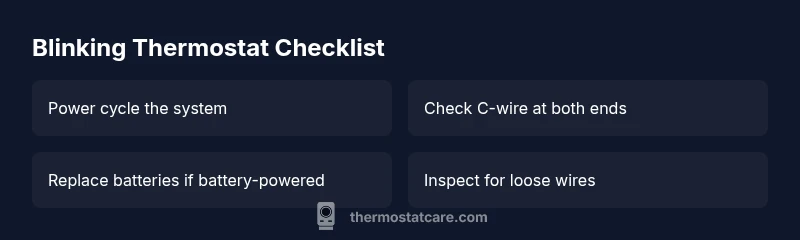
Step 1 — Power cycle the system: switch off the thermostat and the HVAC power at the breaker, wait 30 seconds, and turn everything back on. Step 2 — Check C-wire integrity: verify the C-wire is connected securely at both ends; reseat any loose wires and tighten terminals without over-stressing them. Step 3 — Inspect for battery issues (if applicable): replace with new, high-quality batteries and clean the battery contacts. Step 4 — Verify 24V at the furnace control board: use a multimeter or a test tool to confirm a stable supply; address any abnormal readings. Step 5 — Perform a firmware reset and re-pair the device with the HVAC system, following the manufacturer’s pairing steps. Step 6 — Test operation: set a comfortable temperature, observe the blink pattern, and listen for consistent cycling of the HVAC equipment. Tip: always work with power off when handling wires; label connections as you go to avoid confusion.
Prevention and Maintenance to Avoid Future Blinks
Keep dust from accumulating around the thermostat and vents; clean the faceplate and terminals gently with a dry brush. Schedule seasonal checks of the C-wire and furnace connections, especially after heavy storms or power outages. Replace batteries promptly and keep a spare set on hand. Regular firmware updates from the manufacturer can minimize glitches and improve reliability. Investing a few minutes in maintenance now can reduce unexpected blinks and keep your system running smoothly, which aligns with Thermostat Care’s preventive maintenance philosophy.
When to Seek Professional Help: Know Your Limits
If you cannot safely access the thermostat or furnace control board, or if you detect burning smells, buzzing sounds, or damaged wires, stop and contact a licensed HVAC technician. A pro can verify the 24V supply, inspect the control board for damage, and ensure the thermostat is compatible with your system. For more complex issues—like control board failures or sensor faults—that require specialized tools and expertise, professional intervention is the safest path. Thermostat Care emphasizes safety and accuracy; when in doubt, call a pro promptly to prevent further damage.
Common Mistakes to Avoid: Do Not Cut Corners
Don’t ignore blinking indicators or assume it’s a trivial glitch; it can mask a real power or wiring fault. Avoid DIY fixes that bypass safety practices, such as jumpering wires or bypassing fuses. Never force a reset if the device or wiring feels hot, and never work on live circuits without power removed. Finally, don’t mix incompatible batteries or ignore warning signs from the HVAC system. Following these cautions helps ensure you solve the problem without creating new hazards.
Steps
Estimated time: 30-60 minutes
- 1
Power down and back up
Turn off the thermostat and HVAC power at the breaker, then wait 30 seconds before restoring power. This can clear transient glitches and reset the control circuits.
Tip: Safety first: confirm power is off with a tester before touching wires. - 2
Check the C-wire and batteries
Ensure the C-wire is solidly connected at both ends. If your model uses batteries, install fresh ones and inspect contact points for corrosion.
Tip: Label wires as you disconnect to avoid miswiring later. - 3
Inspect wiring for looseness
Carefully examine all visible thermostat and furnace wires for loose terminals or damaged insulation. Reseat any loose connections and secure with the correct terminal screws.
Tip: Do not overtighten terminals; snug is enough. - 4
Verify 24V supply at the furnace
Use a multimeter to confirm a stable 24V supply to the thermostat circuit. Address any readings that are outside the expected range through appropriate repairs or professional help.
Tip: If you’re unsure about voltage readings, stop and call a tech. - 5
Reset and re-pair the thermostat
Perform a factory reset if recommended by the manufacturer, then re-link the thermostat to the HVAC system following the setup prompts.
Tip: Keep the pairing code handy and follow step-by-step prompts. - 6
Test operation and observe
Set a comfortable temperature and monitor if the blinking stops and the HVAC cycles normally. If blinking recurs, note the pattern and seek expert diagnostics.
Tip: Document the blink pattern for faster troubleshooting.
Diagnosis: Thermostat display blinking in patterns or colors without expected HVAC response
Possible Causes
- highPower supply issue (weak or unstable 24V)
- highDead or weak thermostat battery (if battery-powered)
- mediumLoose or damaged wiring at thermostat or furnace control board
- lowFirmware glitch or temporary sensor fault
Fixes
- easyCheck and restore proper power; test the circuit breaker and verify 24V at the furnace
- easyReplace batteries or secure the C-wire and re-seat all connections
- mediumInspect wiring for looseness or damage; re-seat wires and clean terminals
- mediumUpdate firmware and perform a full reset, then re-pair with HVAC
Questions & Answers
What does a blinking red light on my thermostat usually mean?
A blinking red light commonly signals a fault in the power supply or a sensor issue. Check the C-wire and power, review any error codes in the manual, and perform a safe reset. If the blinking persists, consult your thermostat manual or Thermostat Care for model-specific guidance.
A blinking red light usually means there’s a power or sensor issue. Try the power cycle and check the wiring, then reset if needed.
Can a dead battery cause blinking on a thermostat?
Yes, battery-powered thermostats can blink if the battery is depleted. Replace with fresh batteries, clean contacts, and re-test the unit. If blinking continues, the issue may be power-related on the C-wire or furnace side.
Absolutely. A dead battery can cause blinking, so replace them and test the unit again.
Is blinking dangerous or should I worry about fires?
Blinking itself is usually a signal rather than a hazard, but it can indicate unsafe wiring or a power fault. If you notice burning smells, swelling wires, or hot components, stop and call a professional immediately.
Blinking isn’t always dangerous, but if you smell something burning or see damaged wires, get help now.
Should I reset my thermostat when it blinks?
Resetting can clear temporary glitches, but it won’t fix a hardware fault. Use the manufacturer’s reset procedure after powering down, and re-pair the device if necessary. If blinking returns, move to a power and wiring check.
A reset can help, but only after a power check. If it keeps blinking, you’ll want a closer look at the wiring.
When is it time to call a professional?
Call a professional if blinking persists after power cycling and wiring checks, or if you notice signs of damage, electrical odor, or unsafe wiring. A licensed HVAC tech can verify power, wiring, and control board health.
If it keeps blinking after you’ve checked power and wiring, it’s time to get a professional. They can safely diagnose the control board and sensors.
Does blinking affect cooling or heating function right away?
Blinking can disrupt communication between the thermostat and HVAC system, causing delayed or lost control of heating or cooling. If blinking continues, you may not get expected temperatures or system cycles.
Yes, blinking can disrupt control, so don’t ignore it. Get the system checked if it persists.
Watch Video
What to Remember
- Identify power issues first
- Check batteries and C-wire before anything else
- Follow a proven diagnostic sequence
- Call a pro if you’re unsure or safety is a concern