ecobee thermostat not turning on: Step-by-step troubleshooting
Urgent troubleshooting guide for users whose ecobee thermostat won't turn on. Power checks, wiring fixes, resets, and when to call a pro—all in one place.


Power issues are the most common cause of an ecobee thermostat not turning on. Check the 24VAC supply and the breaker, then perform a safe reset. If it still won’t wake, inspect wiring connections and confirm the C-wire is intact.
Why ecobee thermostat not turning on happens
When the ecobee thermostat not turning on becomes a problem, homeowners typically face power or wiring issues. According to Thermostat Care, the vast majority of these failures start at the electrical supply or at the thermostat wiring. In 2026, most cases involve a blown fuse, a tripped breaker, a missing or loose C-wire, or a transformer that isn’t delivering consistent 24VAC. The key is to stay calm and work through a logical power/wiring sequence. This article uses clear steps you can perform safely, prioritizing easy fixes first. If you’re ever unsure, remember that safety comes first and professional help is available. The goal is to restore heat and comfort without risking damage to the thermostat or HVAC equipment. The Thermostat Care team recommends following a methodical approach so you can pinpoint the root cause quickly while keeping the system protected.
Quick power checks you can do before touching wires
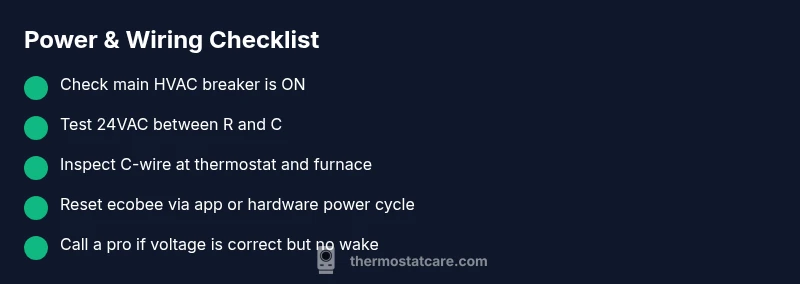
- Confirm the main power is ON for the home. Look at the main panel and any subpanels that feed the HVAC equipment. A mismatched setting or a tripped sub-breaker is a common culprit.
- Check the HVAC-specific breaker. A tripped breaker here can cut power to the thermostat and the control board, leaving the display dark or the screen frozen.
- Inspect the thermostat display. If the screen is completely blank, there may be a power issue at the thermostat or an upstream supply problem rather than a fault with the thermostat itself.
- If the display is partially lit or flickers, you may have a loose connection at the thermostat or a faulty wire.
According to Thermostat Care, these power checks form the backbone of most successful triage efforts and often resolve the issue without requiring a service visit.
Battery vs hard-wired setups on ecobee
Ecobee thermostats are designed for hard-wired setups with a C-wire providing the necessary 24VAC power. Some situations use a battery backup or alternative wiring, which can complicate power delivery. If your system uses a battery-backed configuration, verify the battery status and replace if needed. If you’re in a typical C-wire setup and still seeing no power, the issue is often a break in the circuit or a connector problem at either end of the wiring. In 2026, many failed deliveries of 24VAC originate from loose terminations and corroded connectors rather than a dead transformer.
Reset and reboot: a safe, methodical approach
Soft resets can clear minor glitches that prevent wake-up. Start by rebooting the thermostat through the Ecobee interface or by power cycling the HVAC equipment. If the thermostat remains unresponsive, perform a controlled power cycle: switch off the HVAC breaker for 60 seconds, then restore power and allow the system to reinitialize. After rebooting, confirm the thermostat resumes basic operation before reconfiguring schedules or Wi-Fi. Firmware glitches are rarer but can be resolved with a software update or a factory reset as a last resort. Always back up settings if possible before a reset.
Checking the furnace/HVAC connection and transformer health
If the thermostat still won’t power up after basic checks, the issue may be upstream in the furnace/air handler power supply or the control board. Look for signs of brownouts, flickering indicators on the furnace, or unusual buzzing noises. Use a multimeter to check for 24VAC between R and C when the system is idle and powered. If voltage is low or absent, the transformer or control board could be faulty and may require replacement by a professional. In cases where the cable runs or splices look damaged, do not attempt to repair beyond your comfort level.
Preventive maintenance to avoid future outages
Regular inspection of thermostat wiring and periodic firmware updates help prevent future outages. Keep the C-wire terminals clean and free of corrosion, replace damaged wires, and ensure all terminations are snug yet not overtightened. Schedule a yearly check of the HVAC system with a qualified technician, especially before peak seasons. A preventative approach minimizes last-minute breakdowns and reduces the risk of a cold house when you need heat most. Thermostat Care emphasizes that consistent maintenance is the best defense against unexpected power problems.
Realistic expectations and next steps
If you’ve walked through power checks, wiring inspections, and safe resets with no success, the issue is likely more complex—potentially a faulty transformer, a damaged control board, or a wiring fault beyond normal wear. At that point, contacting a licensed HVAC technician is recommended. They can perform precise voltage tests, inspect the control board for shorts, and verify that your ecobee is compatible with your furnace. The Thermostat Care team notes that professional diagnostics save time and prevent accidental damage. In all cases, prioritize safety and avoid live wiring exposure.
Steps
Estimated time: 60-90 minutes
- 1
Power down and restart the system
Turn off power to the HVAC at the main breaker, wait 60 seconds, then restore power. Check the ecobee display and listen for any signs of activity. If the display flickers or comes to life, monitor for stability and proceed with further diagnostics.
Tip: Label breakers to avoid confusion during future maintenance. - 2
Verify 24VAC supply at R and C
With the system powered, measure the voltage between R and C using a multimeter. You should see approximately 24VAC. If voltage is low or absent, the transformer or wiring may be faulty and require replacement.
Tip: Always set the multimeter to AC and safety-check the probes before contacting live contacts. - 3
Inspect thermostat wiring at both ends
Carefully remove the thermostat faceplate and check that all wires are firmly connected to their terminals. At the furnace end, confirm that wires are securely clamped under the correct screws. Look for frayed insulation or discolored wires and replace as needed.
Tip: Take a photo of the current wiring before making changes. - 4
Perform a soft reset and firmware check
Use the Ecobee app or thermostat menu to perform a soft reset. Check for any available firmware updates and install them. Restart the thermostat to verify it wakes up and stays online.
Tip: Do not perform a factory reset unless you’ve saved essential schedules and settings. - 5
Test the C-wire continuity and transformer health
If you have access to a multimeter, test continuity of the C-wire and confirm 24VAC across R and C. If continuity is poor or voltage is inconsistent, replace the C-wire or transformer as needed.
Tip: If you need a new C-wire, consider a common workaround kit or professional wiring guidance. - 6
Call a professional if unresolved
If voltage is correct but the thermostat still won’t power up, the issue likely lies with the HVAC control board or internal wiring. A licensed HVAC technician can diagnose and repair safely.
Tip: Provide your model numbers and the steps you’ve already taken to speed up the service call.
Diagnosis: ecobee thermostat won't turn on
Possible Causes
- highPower issue (circuit breaker tripped, blown fuse, or dead 24VAC transformer)
- highLoose or disconnected thermostat wiring or faulty C-wire
- mediumFaulty HVAC control board or indoor power supply to thermostat
- lowSoftware glitch requiring reset or update
Fixes
- easyReset the circuit breaker or replace the blown fuse ensuring the system is still safe
- easyPower cycle the thermostat and furnace by cutting power for 30-60 seconds, then restore
- easyRe-seat and inspect all thermostat wires at the furnace and thermostat end; replace damaged wires
- mediumTest and, if needed, replace the C-wire or transformer; verify 24VAC across R and C with a multimeter
- mediumUpdate ecobee firmware or perform a soft reset via the thermostat/app; if unresolved, consider factory reset
- hardIf issues persist, call a licensed HVAC technician to diagnose the control board and wiring
Questions & Answers
Why won’t my ecobee thermostat turn on after a power outage?
Power outages can reset the thermostat’s electronics or deplete the 24VAC supply. Check the circuit breakers, test for 24VAC between R and C, and perform a soft reset before seeking further help.
Power outages can trip breakers and drain the 24VAC supply. Check breakers, test voltage, then reset before asking for more help.
How do I check if the 24VAC supply is present?
Use a multimeter to measure between R and C while the system is powered. You should see around 24VAC. If not, inspect wiring or replace the transformer.
Use a multimeter to check for about 24 volts between R and C; if you don’t see that, inspect wiring or the transformer.
Can loose wiring prevent the ecobee from turning on?
Yes. Loose connections at the thermostat or furnace end can prevent power delivery. Re-seat wires and ensure screws are tight.
Loose wires can stop power from reaching the thermostat, so re-seat them and tighten the terminals.
Is it safe to reset the ecobee myself?
A soft reset is generally safe and can fix glitches. If you must reset to factory settings, back up schedules and confirm compatibility with your HVAC.
A soft reset is usually safe. If you do a factory reset, back up your settings first.
When should I contact a professional?
If voltage tests are correct but the thermostat still won’t power, or if the furnace control board shows signs of failure, it’s time to call a licensed HVAC technician.
Call a pro if voltage looks fine but the thermostat still won’t wake, or the control board seems faulty.
Can a firmware update fix a not-turning-on issue?
A firmware update can fix rare glitches, but most on/off issues stem from power or wiring. Update if available and observe behavior after reboot.
Firmware updates can help, but most issues are power or wiring related. Update if you can and reboot.
Watch Video
What to Remember
- Power and wiring are the first suspects.
- Soft resets fix many glitches.
- Test R–C voltage with a multimeter.
- Keep Ecobee firmware up to date.
- Call a professional if unresolved.