Does Thermostat Work? A Troubleshooting Guide for Homeowners
Urgent, expert guide to diagnose and fix thermostat not working issues. Learn power checks, wiring, sensor calibration, and when to call a pro. Thermostat Care helps homeowners restore comfort fast.


The quickest answer: most thermostat failures start with power, battery, or wiring issues. Check power, replace batteries, inspect wiring, and reset. If the problem persists, move to deeper diagnostics or contact a pro.
How a thermostat works and why it matters
A thermostat is the control center of your home heating and cooling system. It reads ambient temperature, compares it to your setpoint, and signals the furnace or AC to turn on or off. When you ask does thermostat work, you’re really asking if this small device reliably translates your comfort goals into HVAC actions. The short answer: a well-installed thermostat works consistently, but issues can creep in from power, wiring, location, or software. In this guide, Thermostat Care explains how to diagnose and fix the most common problems so you keep your home comfortable and efficient. We’ll cover power supply, battery health, wiring integrity, and firmware or app settings that influence performance.
Common signs your thermostat might be failing
If your thermostat is failing, you’ll notice symptoms you can’t ignore. The display may go blank or flicker, readings may drift away from room temperature, or your HVAC system may respond late or not at all after changing a setting. You might also see equipment running longer than needed, or the home never reaching the set comfort level. These signs don’t prove a specific failure, but they point to likely culprits such as power loss, dead batteries, loose wiring, or a miscalibrated sensor. Start here: confirm the thermostat is getting power, then rule out simple user errors like incorrect scheduling or hold settings that override your program.
Quick checks you can do before calling a pro
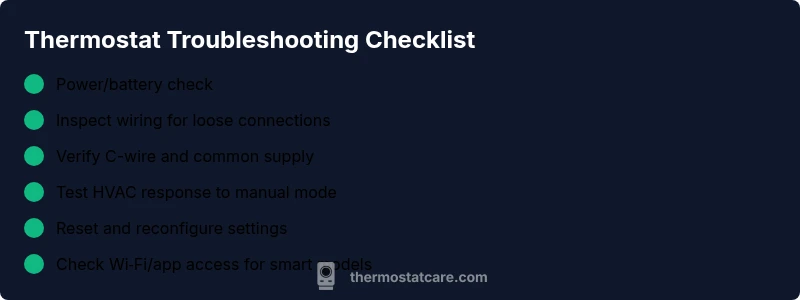
Start with the basics. Replace batteries if your thermostat is battery-powered, and reset the device if it seems unresponsive. Check the circuit breaker or fuse for the HVAC system; a tripped breaker will mimic a thermostat failure. Inspect the thermostat’s wiring at the wall plate for loose or damaged wires and ensure the C-wire (common) is connected if your system relies on it. Verify the thermostat is located away from heat sources, drafts, or direct sunlight, which can skew readings. Finally, confirm the HVAC system is actually calling for heat or cool and that you haven’t set a temporary hold that prevents automation.
Safety and basic precautions while troubleshooting
Working on electrical devices requires care. Always power down the thermostat and HVAC breaker before touching wiring. Wear safety glasses if you’re removing panels or exposing wiring, and never replace a high-voltage component with the system energized. If you smell burning insulation or hear buzzing, stop immediately and shut off power at the main panel. If you’re unsure about wiring, it’s safer to hire a licensed technician rather than risk shock or fire. Remember: a miswired thermostat can damage equipment.
Understanding the diagnostic flow for does thermostat work problems
This section maps symptoms to likely causes and practical fixes. Start with simple power and battery checks, then move to wiring integrity and sensor calibration. If the display is clear but the HVAC won’t respond, focus on communication between the thermostat and the control board. For smart thermostats, verify Wi-Fi connectivity and app authorization before advancing to internal settings. This flow keeps you grounded in safe, incremental steps and prevents unnecessary parts replacements.
Steps
Estimated time: 20-40 minutes
- 1
Check power and batteries
Power down the thermostat, then replace any batteries. If your model is hardwired, confirm the display lights up when power is restored. Observe for a moment to ensure the screen stabilizes before proceeding.
Tip: Always start with the simplest potential cause. - 2
Inspect wall wiring
Carefully remove the wall plate and inspect wires for loose connections, corrosion, or damaged insulation. If you see a loose wire, reseat it firmly and re-secure the plate. Do not tamper with high‑voltage components.
Tip: Take a photo of existing wiring before disconnecting anything. - 3
Verify C-wire and HVAC power
If you have a C-wire, ensure it is connected to the C terminal on both the thermostat and furnace control board. Check that the furnace/air handler is powered and the control board shows no fault LEDs.
Tip: If there’s no C-wire, your thermostat may rely on battery power only. - 4
Test with manual mode
Set the thermostat to manual or hold mode and trigger heat or cooling to see if the HVAC responds. Note any delay or failure, which helps isolate thermostat vs. system issues.
Tip: Document responses to compare with normal behavior. - 5
Reset and reconfigure if needed
If the unit still misbehaves, perform a factory reset (if supported) and re-enter your schedules and settings. Ensure firmware is up to date if your model supports updates.
Tip: Keep a record of your settings to avoid re-entry errors.
Diagnosis: Thermostat not responding to setpoints or showing inaccurate readings
Possible Causes
- highPower issue (dead battery or lost supply)
- mediumLoose or damaged wiring between thermostat and HVAC control board
- mediumTripped circuit breaker or blown fuse for HVAC
- lowSensor calibration drift or faulty temperature sensor
Fixes
- easyReplace batteries or restore power to the thermostat
- mediumTighten or replace thermostat wiring and ensure C-wire is connected
- easyReset the circuit breaker or replace the fuse; restore HVAC power
- hardCalibrate or replace the temperature sensor if fault persists
Questions & Answers
What is the first thing to check if a thermostat stops working?
Begin with power and battery status. If the display is blank, replace batteries or restore power and retry. Then verify basic settings.
Start by checking power and batteries, then verify basic settings.
Why is my thermostat screen blank?
A blank screen usually points to power issues, a dead battery, or a tripped HVAC fuse. Check the circuit and replace batteries if needed.
A blank screen often means power or fuse issues; check power and replace batteries if necessary.
Can Wi‑Fi affect thermostat performance?
Yes, for smart thermostats. A disconnected or misconfigured app can prevent controls from updating. Reconnect to Wi-Fi and reauthorize the device.
Smart thermostats depend on Wi-Fi; reconnect and reauthorize if control is lost.
Should I recalibrate the thermostat sensor?
If readings drift, recalibration or sensor replacement may be needed. Start with a factory reset, then test again.
If readings drift, you may need to recalibrate or replace the sensor.
When should I call a professional?
If wiring appears damaged, you smell burning insulation, or the thermostat still doesn’t work after basic checks, seek professional service.
If wiring looks damaged or the issue persists after basics, call a professional.
Does Thermostat Care offer troubleshooting guidance?
Thermostat Care provides practical troubleshooting guidance and emphasizes safety; for complex issues, professional service is recommended when needed.
Thermostat Care offers troubleshooting guidance and recommends professional help when needed.
What to Remember
- Start with power and battery checks
- Confirm wiring and C-wire connections
- Use the diagnostic flow to avoid unnecessary parts
- Call a professional for safety or complex wiring