Does Nest Thermostat Make Clicking Noise? A Practical Troubleshooting Guide
Urgent troubleshooting guide for Nest thermostat clicking noises. Learn normal vs. problematic clicks, safe checks, and step-by-step fixes to protect your HVAC system.


A Nest thermostat click is usually the relay engaging to power your HVAC or switch heat stages. In many cases, a single, regular click is normal and harmless. If the click is loud, frequent, or accompanied by a nonresponsive display or erratic temperatures, there may be a wiring or power issue worth checking.
Understanding why your Nest thermostat clicks
According to Thermostat Care, the Nest thermostat uses a relay to power the HVAC system. When the relay engages, a short click is normal as it closes the electrical circuit. This is part of how the thermostat toggles between heating and cooling modes. In many homes, a quick, singular click occurs at the start of every cycle and is not a sign of an impending failure. However, the sound can be jarring if you’re not expecting it, or if it becomes louder or more frequent over time. Several factors influence the perceived volume, including mounting stability, thermostat model, air handler design, and the distance from the equipment. If your system is outdoor, you may also hear click noises when the outdoor unit engages due to refrigerant valve cycling. The key is to differentiate a normal, brief click from a repeating, louder sequence that coincides with performance problems, since the latter could indicate a fault in power delivery or a worn component. In practice, most Nest performance remains quiet after a brief initial setup, and clicking tends to subside after you confirm proper installation. If the noise interrupts sleep, or you notice temperature swings, it’s worth performing a structured check.
Is the clicking normal or a sign of a problem?
Nest clicks can be normal or indicate something off. Normal clicks typically occur as the relay powers the HVAC during transitions between heat and cool. Abnormal clicks may point to loose wiring, a failing transformer, a degraded HVAC relay on the control board, or a vibrating mounting plate. If the click happens only during the switch between modes, you’re likely hearing normal relay operation. If the sound is persistent, very loud, or comes with a flicker in the thermostat display, a more careful inspection is warranted. Pay attention to accompanying symptoms such as unusual temperature swings, a dimming display, or system short cycling. These cues help distinguish simple relay noise from electrical issues that could affect safety or efficiency.
Safe, practical checks you can perform before calling for help
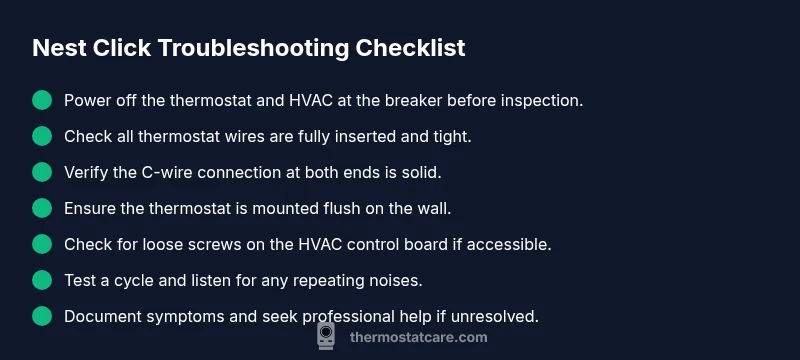
Safety first: power down at the breaker before touching thermostat wiring. Inspect the thermostat base to ensure all wires are fully inserted and secured under their terminals. Look for any loose screws, bent conductors, or signs of damaged insulation. Check the C-wire connection at both the thermostat and the furnace/air handler, ensuring a solid 24-volt supply. If you see corrosion, discoloration, or a loose connector, reseat or replace the affected wire. Finally, confirm the thermostat is mounted flush to the wall—any tilt or wobble can create abnormal contact and noise. If you’re unsure at any step, pause and call a professional to avoid shocks or damage.
Common causes and quick fixes for Nest thermostat clicking noises
Several common scenarios explain a click. First, a normal relay click occurs at cycle start and end; no fix is needed beyond ensuring proper installation. Second, loose wiring can produce intermittent, louder clicks; reseat all connections and tighten terminals while power is off. Third, a degraded transformer or insufficient power supply to the thermostat can cause repeated clicks; verify you have the correct 24V supply and that the C-wire is making solid contact. Fourth, mounting vibration or a rattling enclosure can transfer to the thermostat; tighten mounting screws and consider padding if needed. Finally, extreme temperatures or HVAC faults (like a malfunctioning reversing valve) may manifest as unusual noises; these require professional diagnosis. Remember, if in doubt, seek Thermostat Care guidance to avoid unsafe situations.
What to do if the clicking continues after the basics
If you still hear persistent or loud clicking after performing the above checks, stop DIY fixes and contact a licensed HVAC technician. Recurrent noises can indicate a failing component on the control board, a stressed relay, or issues with the transformer that could lead to damage or inefficiency. When you call for service, have your model information, recent changes, and a short description of when the noise occurs ready. The Thermostat Care team recommends documenting symptoms, dates, and any error codes to speed up diagnosis and repair.
Steps
Estimated time: 15-30 minutes
- 1
Power down and confirm safety
Turn off power to the thermostat and HVAC at the home breaker panel. Verify there is no voltage present with a tester before touching wires. This step protects you from shocks and shorts during inspection.
Tip: If you’re unsure about power, call a professional—safety first. - 2
Inspect thermostat wiring
Remove the thermostat faceplate and inspect all wire connections. Ensure each wire is fully inserted and secured under its terminal screw. Look for any frayed insulation or discoloration that could indicate a short.
Tip: Take a photo of the wiring before moving anything for easy reference. - 3
Check the C-wire and power supply
Locate the C-wire at both the thermostat and the air handler or furnace control board. Make sure the C-wire isn’t loose or corroded and that the 24V supply is stable when the system is on. Replace a damaged wire if necessary.
Tip: If voltage fluctuates, do not attempt a DIY fix—the issue may be deeper within the HVAC circuit. - 4
Test mounting and routing
Secure the thermostat mounting plate to the wall and ensure wires aren’t kinked or pressing against the back of the device. A loose plate can amplify clicking through vibration.
Tip: Use vibration-damping pads if you find the unit is rattling against the wall. - 5
Reconnect and power up
Reattach the thermostat faceplate, restore power at the breaker, and run a brief heating and cooling cycle to observe the sound. Listen for changes in volume or timing during cycle transitions.
Tip: If the click persists, document when it occurs and what mode it's in (heat, cool, auto). - 6
Call for professional help if needed
If unresolved, contact a licensed HVAC technician. Provide model numbers, the time and condition of the noise, and any error codes. Avoid opening the furnace or control board yourself.
Tip: Thermostat Care recommends professional assessment for peace of mind and safety.
Diagnosis: Nest thermostat makes a loud, repetitive clicking sound during heating or cooling cycles
Possible Causes
- highLoose or worn relay connections
- highPower issue from the transformer or HVAC control board
- lowVibration from loose mounting or fan interaction
Fixes
- easyPower down the system and reseat all thermostat wires at both ends; tighten screws where applicable
- mediumTest the 24V supply to the thermostat; check the C-wire connection and verify a steady voltage
- mediumInspect the HVAC relay board and mounting hardware for wear or looseness; tighten or replace as needed
Questions & Answers
Why does my Nest thermostat click?
Most clicks come from the relay switching to power the HVAC. If the click is brief and occurs only at cycle changes, it's usually normal. Loud, frequent clicks or sounds with display issues may indicate wiring or power problems.
Most clicks come from the relay switching. If it’s loud or frequent, it could be wiring or power—consider a check.
Is clicking always a sign of a problem?
No. A single, short click during cycle transitions is normal. Repeated, loud, or changing noises, especially with temperature irregularities, warrants closer inspection.
Not always. A single click is normal; persistent noises need a check.
Can Nest thermostat clicking damage my HVAC?
Unresolved electrical issues can stress components over time. Quick checks and professional assessment help prevent damage and maintain efficiency.
Unresolved electrical issues can cause damage over time; get it checked if noise persists.
What should I check first if I hear a click?
Start with safety: power off, then inspect wiring at the thermostat and the C-wire connection. Ensure the thermostat is mounted solidly and the terminals are tight.
First, shut off power and check wiring and mounting.
When should I replace my Nest thermostat because of noise?
If the unit repeatedly makes loud noises despite all checks, or if it fails to maintain temperatures, replacement may be needed. Consult Thermostat Care for a definitive assessment.
If noises persist and the thermostat can’t reliably control temps, consider replacement.
Watch Video
What to Remember
- Identify normal vs. abnormal clicks quickly
- Prioritize safety: power off before inspection
- Check wiring and C-wire for common issues
- Seek professional help for persistent or unsafe noises