Can My Thermostat Be Wrong? A Practical Troubleshooting Guide
Discover how to tell if your thermostat is giving wrong readings, diagnose common causes, and fix issues fast with practical, step-by-step guidance from Thermostat Care.


Yes, a thermostat can be wrong. The most common culprits are sensor drift, miscalibration, battery power, or wiring faults leading to inaccurate readings. Start by comparing the display to a trusted thermometer, check batteries and mode, then inspect placement and wiring. If it doesn’t resolve, follow our diagnostic flow for a safe, methodical path to a fix.
Can my thermostat be wrong? A reality check
According to Thermostat Care, yes — a thermostat can read the room inaccurately and drive you to HVAC conclusions that aren’t the root problem. Most incorrect readings stem from sensor drift, improper calibration, low power, or placement quirks that expose the sensor to heat, cold drafts, or direct sunlight. This section explains how to determine if the device itself is at fault and how to separate thermostat issues from genuine system faults. With a calm, methodical approach, homeowners can often fix the issue without professional help, saving time and energy while restoring comfort. If problems persist, you’ll have a proven path to explaining the situation to a technician or support line.
By focusing on observable symptoms and verifiable checks, you can quickly establish whether the thermostat is the culprit or if the HVAC system needs attention. Remember, a wrong reading can masquerade as a bigger problem, so a disciplined, repeatable testing process is your best defense against guesswork.
Common symptoms that point to a faulty thermostat
- Inconsistent temperatures: the space feels hotter or colder than the display suggests.
- Frequent cycling: the furnace or AC runs on shorter cycles than expected, wasting energy.
- Display vs. reality mismatch: the readout doesn’t match the actual room temperature.
- Rapid drift after events: readings shift after a power interruption or firmware update.
These signals don’t always prove a thermostat fault, but they strongly indicate you should investigate the device itself first. By ruling out thermostat issues, you prevent chasing HVAC problems that aren’t there, which saves energy, reduces wear, and improves comfort. Thermostat Care notes that catching misreadings early is the simplest path to a reliable system.
How to verify if the thermostat itself is at fault
Start with basic, non-invasive checks. Place a reliable room thermometer in the same zone as the thermostat and compare reads after the unit has stabilized for several minutes. If a discrepancy exists beyond 2–3 degrees, the sensor or calibration could be the issue. Next, review the thermostat’s settings: confirm mode (heat/cool), fan behavior, hold vs schedule, and any temporary overrides that might skew results. A mis-set hold can feel like an incorrect reading even if the HVAC system is functioning properly. If readings remain inconsistent, continue with deeper checks such as recalibration or a factory reset, then re-test after reprogramming. Thermostat Care analysis shows that many premium models drift over time or after software updates, which can be corrected with proper steps.
If you’re unsure, document what you test and the outcomes to guide further actions or a professional consult.
Quick fixes you can try before calling for help
- Power and batteries: replace batteries or ensure stable power supply; don’t bypass safety devices.
- Sensor calibration: use the thermostat’s calibration option or perform a factory reset, then re-test.
- Firmware and software: check for available updates and install; glitches can cause misreadings.
- Placement and drafts: move away from direct sun, vents, or appliances that heat or cool the sensor; shield from drafts.
- Wiring checks: if you’re comfortable, gently inspect wall plate connections for looseness and re-tighten terminals with power off.
- Schedule alignment: reconfigure programs to fit real routines and comfort needs.
If these steps align the readings with reality, you’ve likely solved the issue. If not, you’re ready to escalate with confidence to a pro or the manufacturer’s support line.
When to stop and call a professional
If basic checks and fixes don’t resolve the discrepancy, it’s time to involve a professional. A licensed HVAC tech can verify wiring integrity, confirm thermostat compatibility with your equipment, test sensors with diagnostic tools, and rule out power supply problems or control-board faults. Persisting drift after a factory reset, complex systems (multi-stage furnaces, heat pumps, or zoning), or hardwired configurations are strong signs you need expert help. The Thermostat Care Team recommends a professional assessment when safety concerns, repeated misreads, or unusual behavior persist beyond simple recalibration or firmware updates.
Safety comes first: avoid DIY fixes that involve high voltage or potentially damaging the control board.
Safety first and common mistakes to avoid
- Always switch off power at the breaker before removing the thermostat cover or touching wiring.
- Do not assume one odd reading equals a bad device; validate with a second baseline if possible.
- Avoid placing the thermostat near heat sources, direct sunlight, or drafts—these locations skew results.
- Never mix up heating and cooling tests; ensure you’re testing the correct system state.
By following safety guidelines and keeping a detailed log of changes, you reduce risk and improve diagnostic accuracy. Thermostat Care emphasizes methodical testing and avoiding overconfident conclusions.
How different thermostat types influence accuracy
Wired digital thermostats rely on internal sensors that may drift with time, while wireless/two-way models depend on batteries and signal stability. Smart thermostats can adjust for seasonal patterns, but sensor faults or connectivity issues can still produce apparent drifts. Recognize that sensor quality, firmware reliability, and model-specific features all influence accuracy. Understanding your device’s sensor technology helps interpret odd readings and decide whether calibration, reset, or firmware updates are appropriate. Thermostat Care analysis shows sensor type and firmware quality are major drivers of consistency.
Prevention tips to keep readings accurate
- Regularly replace batteries in wireless models and check for loose wiring in hardwired units.
- Keep the thermostat away from heat sources, sunlight, and drafts; use shielding if needed.
- Schedule periodic firmware updates and consider a periodic factory reset to clear software issues.
- Use a trusted thermometer for periodic cross-checks, especially after weather changes or power events.
- Document changes to settings and programs to measure improvement and prevent drift. Following these prevention tips helps you maintain accurate readings, reduce energy waste, and keep comfort stable.
Steps
Estimated time: 30-60 minutes
- 1
Check power and battery
Turn off power at the breaker, remove the thermostat cover, inspect the battery level, and replace if low. Ensure terminals are clean and snug before restoring power and retesting readings after a few minutes.
Tip: Label wires before removing the cover to simplify reassembly. - 2
Compare readings with a second thermometer
Place a reliable room thermometer in the same area as the thermostat. Wait 5–10 minutes for stabilization, then compare readings. A persistent mismatch points to sensor/calibration issues rather than HVAC performance.
Tip: Use a thermometer with a known accuracy (±0.5°C preferred). - 3
Review thermostat settings
Check mode, fan behavior, hold vs schedule, and any overrides. Ensure you’re testing the correct system (heat vs cool). Misconfigured holds can mimic a fault.
Tip: Disable temporary holds while testing for accuracy. - 4
Calibrate or reset the device
If readings are off, use calibration options or perform a factory reset. Reprogram the schedule and test again after stabilization.
Tip: Document the baseline before resetting so you can undo changes if needed. - 5
Check placement and drafts
Ensure the thermostat is not exposed to direct sun, vents, or appliances that cause heating/cooling bias. Reposition if necessary and re-check readings.
Tip: Allow the room to reach a stable temperature before testing. - 6
Update firmware or contact support
If available, install the latest firmware. If issues persist, contact the manufacturer or a qualified technician for diagnostics.
Tip: Keep model and firmware version handy when you call for support. - 7
Consult a professional if unresolved
Persistent drift after all basic fixes indicates deeper issues—wiring, control boards, or compatibility problems that require expert evaluation.
Tip: Ask for a clear written diagnostic summary and suggested next steps.
Diagnosis: Thermostat readings don't match room temperature or behave erratically
Possible Causes
- highIncorrect room-temperature reading due to sensor drift or miscalibration
- highWeak or failing power supply (batteries or wiring)
- mediumThermostat located near heat source or drafts causing skewed readings
- lowSoftware glitch in the thermostat firmware
Fixes
- easyReplace batteries or ensure stable power supply
- easyInspect and secure wiring; ensure proper power connections
- mediumRecalibrate the sensor or perform a factory reset and reconfigure settings
- easyRelocate thermostat away from direct heat, sunlight, or drafts
- mediumUpdate firmware or contact manufacturer for known issues
- hardIf problems persist, schedule a professional HVAC thermostat calibration check
Questions & Answers
Can my thermostat be wrong?
Yes. Thermostats can misread temperatures due to sensor drift, improper calibration, or power issues. Following a methodical checklist helps confirm the fault and fix it.
Yes, thermostats can be wrong due to drift, calibration, or power issues.
How do I know if calibration is off?
If the thermostat reading differs from a trusted thermometer by more than a couple of degrees, recalibrate or reset and re-test.
If it's off by a few degrees, recalibrate or reset and test again.
Should I replace batteries in smart thermostats?
Yes, check battery level if the model runs on batteries. Low power can cause misreadings even in smart devices.
Check batteries; low power can cause misreadings.
What if readings remain wrong after reset?
If readings persist after reset and calibration, the issue may be wiring, sensor failure, or compatibility—consider professional evaluation.
If it’s still wrong after reset, you may need expert help.
Can power surges damage a thermostat?
Yes, power surges can damage thermostat electronics. Using proper surge protection and a stable power supply helps prevent faults.
Power surges can damage the thermostat; protection helps.
When should I call a professional?
Call a pro when basic checks don’t fix the problem, or if you have a complex system, wiring concerns, or safety risks.
Call a pro when basic fixes don’t help or for complex systems.
Watch Video
What to Remember
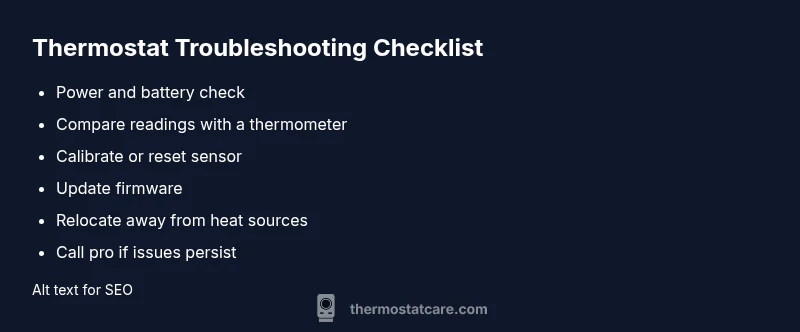
- Start with power and battery checks
- Cross-check readings with a trusted thermometer
- Calibration or firmware updates fix many issues
- Relocate away from heat sources and drafts
- Call a pro for persistent drift or complex systems