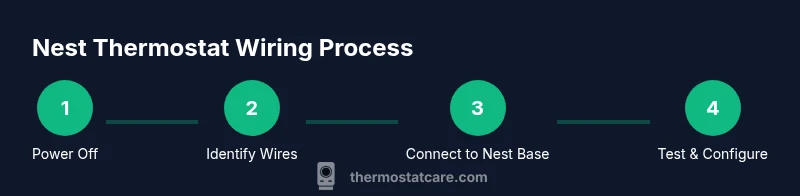
How to Wire in a Nest Thermostat: Step-by-Step Guide
Learn how to wire in a Nest thermostat safely with a step-by-step guide. Verify compatibility, identify wires, connect R, C, W, Y, G, and configure the Nest app for reliable comfort.


By following this guide you will wire in a Nest thermostat and get reliable heating and cooling control. You’ll confirm compatibility, shut power safely, identify each wire, and connect R, C, W, Y, and G to the Nest base. This quick path sets up proper power and a clean configuration in the Nest app.
Before you start: is your system compatible with a Nest thermostat?
According to Thermostat Care, most 24V heating and cooling systems are compatible with Nest thermostats, but some older or non-standard setups require adapters or a different model. Before you begin wiring, confirm there is a common 24V circuit and a usable C-wire for stable power. This is often where homeowners ask, how to wire in a nest thermostat, because compatibility determines whether you need a C-wire adapter or a power extender kit. Review your furnace control board to spot terminal labels such as R, C, W1, Y1, and G. If you see multiple transformers or unusual color-coding, you may need professional help. Check the thermostat’s diagrams to understand what each wire does and where it lands on the Nest base. Thermostat Care’s guidance emphasizes validating compatibility with your HVAC setup, including heat pumps and accessory stages. A quick compatibility check now can save time later.
Safety first: power down and confirm wiring diagrams
Safety should always come first when wiring in a Nest thermostat. Begin by turning off the circuit breakers that feed your HVAC system, then switch off any wall switches that control the unit. Use a non-contact voltage tester to ensure there is no live voltage on the wires you’ll touch. If you’re unsure about any step, pause and consult a professional. Thermostat Care stresses that a safe starting point reduces the risk of shocks or equipment damage. After you verify power is off, locate the thermostat wires at both the HVAC control board and the old thermostat, and compare colors with the manufacturer’s wiring diagram. Keep a photo record for reference during reassembly.
Identify wires and prepare for labeling
Carefully identify each wire by function rather than color alone. Common functions include R (24V power), C (common), W (heat), Y (cool), and G (fan). If your system uses Rc and Rh, note whether they’re bridged or require jumper removal. If you have a heat pump, you may see O/B and AUX terminals. Use tape and a labeling pen to mark each wire with its function before disconnecting anything. If a wire’s function isn’t obvious, refer to your HVAC’s wiring diagram or thermostat installation manual. Thermostat Care recommends labeling wires as you go to prevent cross-wiring and to make post-install testing smoother.
Wiring the Nest base: match wires to R, C, W, Y, G
Now it’s time to connect the wires to the Nest base. Attach R to the R terminal, C to C, W to W1, Y to Y1, and G to G. If you have jumper between Rc and Rh, leave or remove it according to your system’s diagram. For systems lacking a C-wire, install a Power Extender Kit (PEK) or use Nest’s built-in power-stealing mode with caution, understanding it may impact stability in some setups. Double-check all connections against the Nest wiring diagram and the control board’s terminal labels. Thermostat Care emphasizes verifying each wire lands on the correct Nest terminal before snapping the base to the wall.
Power on, configure, and test your Nest installation
With wires secured, reattach the Nest base to the wall plate and restore power at the breaker. Use the Nest app to complete the setup: select your system type, confirm wire mappings, and run through the app’s test sequences. Watch for the LED status indicators and listen for click sounds as you navigate the on-screen prompts. If the Nest app reports any wiring mismatch, power down again and re-check connections. Thermostat Care recommends performing a full test in both heat and cool modes to confirm the Nest discovers and controls all HVAC stages correctly.
Troubleshooting and common mistakes
Common issues include misidentified wires, a missing C-wire, or an overly long wire run causing voltage drop. If the Nest won’t power up, re-check the R and C connections and ensure the breaker is on. If you see power-sharing or no power to the Nest, confirm your system’s compatibility and consider using a PEK for a more reliable supply. Avoid mixing up color codes, and never force a wire into a terminal that doesn’t match its function. If your home uses unusual equipment, consult the wiring diagram or a professional for safe resolution.
What’s next: final checks and ongoing maintenance
Document your wiring map for future reference and create a quick running checklist for seasonal checks. Keep the Nest app updated and monitor system performance across seasons to catch any thermostat drift or sensor issues early. If you notice persistent misbehavior after setup, revisit each wire’s function and confirm your HVAC supports the Nest’s features. The goal is consistent comfort with minimal surprises, supported by regular verification.
Tools & Materials
- Screwdriver set (Phillips and flat-head)(Assorted sizes for base screws and terminal screws)
- Non-contact voltage tester(Verify no power before handling wires)
- Nest thermostat (gen matching your system)(Check compatibility with your HVAC before purchase)
- Wiring labels or tape(Label wires by function to prevent mix-ups)
- Optional: Power Extender Kit (PEK)(Use if there is no common C-wire or if instability occurs)
- Multimeter (optional)(For precise voltage checks if needed)
Steps
Estimated time: 30-90 minutes
- 1
Power down and verify
Turn off the HVAC breaker and switch off any wall controls for the system. Use a voltage tester to confirm there is no power on the wires you’ll touch.
Tip: Double-check the main breaker label to confirm you’re cutting power to the correct circuit. - 2
Remove old thermostat and photo wiring
Carefully remove the old unit and take a clear photo of the current wiring configuration before disconnecting anything. This reference helps when mapping to the Nest terminals.
Tip: If you’re unsure about a wire’s function, stop and consult the diagram or a professional. - 3
Label each wire by function
Label each wire with its function (R, C, W, Y, G, etc.) so you can map them accurately on the Nest base.
Tip: Avoid relying on color alone; colors can vary by installer. - 4
Check Nest compatibility
Verify that your HVAC is compatible with the Nest model you’re wiring. Ensure a 24V system and whether a C-wire is required or beneficial.
Tip: If in doubt, use Nest’s online compatibility checker. - 5
Attach wires to the Nest base
Connect R to R, C to C, W to W1, Y to Y1, and G to G on the Nest base. Handle any heat-pump terminals (O/B) according to your system’s diagram.
Tip: Keep wires taut but not stretched to avoid loose connections. - 6
Mount the Nest base and reassemble
Secure the Nest base to the wall plate and reattach the outer cover. Ensure wires aren’t pinched and the base sits flush against the wall.
Tip: A secure mount reduces vibration and potential wire looseness. - 7
Power up and configure in the Nest app
Restore power at the breaker and follow the app prompts to complete wiring mapping and system type selection.
Tip: Run a quick test for heat and cool modes within the app. - 8
Test operation and finalize
Set temperatures to verify heating and cooling cycles. Confirm all stages engage correctly and adjust settings as needed.
Tip: Document the wiring map for future reference and seasonal checks.
Questions & Answers
Do I need a C-wire for a Nest thermostat?
Most Nest installations work better with a C-wire to provide stable power, but some models can operate with power stealing on certain systems. If possible, add a C-wire or use the Nest PEK for a reliable power path.
A C-wire is generally recommended for Nest installs to ensure stable power; if you don’t have one, consider PEK or consult a pro.
Is it safe to install a Nest thermostat myself?
With proper steps and safety precautions, many homeowners can install a Nest thermostat. Always power down, follow the wiring diagram, and use the Nest app for guided setup. If you’re unsure at any point, seek professional help.
It can be safe if you follow the steps and safety tips; stop if you’re unsure.
Will Nest work with a heat pump system?
Nest supports many heat pump setups, including Y and AUX/O connections. Some configurations may require additional wiring or a C-wire for consistent power. Always check your system’s diagram and use the Nest compatibility checker.
Heat pumps are supported, but check the diagram and C-wire needs.
What should I do if I see 'power sharing not detected' on Nest?
This indicates the Nest isn’t detecting consistent power. Verify C-wire or PEK installation, confirm voltage is within range, and re-run the setup in the Nest app.
Make sure you have a reliable power source and try the setup again.
Can I install Nest on a boiler-only system?
Nest can work with some boiler-only setups if there’s a 24V control circuit and compatible wiring. If your boiler lacks standard thermostat terminals, professional wiring help may be needed.
Boiler setups vary; check compatibility before proceeding.
Watch Video
What to Remember
- Verify compatibility before starting
- Power off before handling wires
- Label each wire to prevent miswiring
- Test all HVAC modes after installation