How to Clean Thermostat Filter: A DIY Guide
Learn how to safely clean your thermostat filter, know when to clean vs replace, and follow a clear, step-by-step process to improve airflow and energy efficiency in your home. Thermostat Care offers practical, expert guidance for homeowners and DIY enthusiasts.


This quick guide shows how to clean a thermostat filter safely and effectively. You’ll learn to identify washable vs disposable filters, which tools you need, and a clear, step-by-step process you can follow to maintain airflow, efficiency, and comfort in your home.
What a thermostat filter does and why cleaning matters
Your HVAC air filter is the frontline barrier that traps dust, pollen, pet hair, and other airborne debris before it circulates through your home. A clean filter helps the furnace or air conditioner move air efficiently, reduces strain on the blower, and supports better indoor air quality. According to Thermostat Care, regular cleaning of the HVAC filter can maintain proper airflow and prevent buildup that forces the system to work harder. When filters get clogged, the system may run longer cycles, pull more energy, and lead to higher utility bills. Cleaning isn’t a replacement for a dirty filter; it’s part of proactive maintenance that keeps your thermostat functioning as designed and extends equipment life. Note that some filters are washable, while most disposable models are not; always follow the label on your specific filter to avoid damage. In many homes, the filter is located in the return air duct or behind the furnace compartment. If you’re unsure, consult your thermostat manual or a licensed technician.
Signs you should clean or replace the filter now
A dirty thermostat filter is often hiding in plain sight. Watch for consistently reduced airflow, longer cooling or heating cycles, noticeable dust around registers, or higher energy bills without an obvious cause. You may notice the thermostat running more frequently to reach setpoints, or you might feel warmer rooms during cooling season. Thermostat Care analysis shows that neglecting filters can reduce efficiency and increase energy use, especially in homes with pets or high dust levels. If you see sooty grime on the filter or notice smells when the system runs, it’s time to inspect and act. Remember, some filters are washable while others are disposable; mixing up these types can damage your system. If your system is older or you have a multi-zone setup, consider consulting a professional to avoid mis-sizing or bypass risks.
Before you begin: safety and setup
Safety first. Turn off power to the HVAC system at the thermostat and, if possible, at the main electrical panel to prevent the blower from activating unexpectedly. Wear gloves and a dust mask if you expect a dusty or moldy filter. Have a flashlight handy to inspect the filter housing and seal for any gaps. If your filter is behind a panel or grille, use the correct screwdriver to remove screws, keeping track of screws and parts. Make sure the area around the unit is dry before you start cleaning to minimize the risk of electrical shock.
Washable vs disposable: understanding your filter
Filters come in two broad categories: washable/reusable and disposable. Washable filters are typically made of durable materials like polyester or pleated fabrics and can be cleaned and reused multiple times. Disposable filters are made of non-washable paper or fiber media and must be replaced when dirty. Check the filter’s edge for labels indicating “washable” or “do not wash.” When in doubt, replace a suspect filter rather than attempting to wash it and risk damage to the blower or ducts. Correct orientation matters too—note the arrows on the filter frame to install it properly.
Step-by-step overview (link to the detailed steps later)
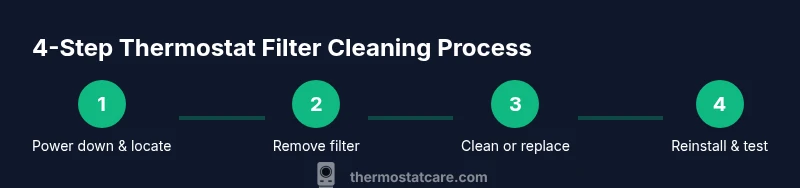
This overview highlights the core actions you’ll perform: locate the filter, remove it gently, determine if it’s washable, clean or replace as appropriate, dry a washable filter completely, and reinsert it with correct orientation. After reassembly, turn the system back on and observe that airflow improves and there’s no unusual noise. A quick photo can help you remember the exact orientation for future checks.
Airflow and energy savings after cleaning
A clean filter reduces resistance in the ductwork and ensures the blower doesn’t work overtime to push air through a clogged barrier. You may notice more even temperatures across rooms and a stabilization of your thermostat’s duty cycle. Cleaner air helpsHVAC components run cooler and can extend equipment life. While cleaning alone won’t solve all efficiency issues, consistent maintenance supports better performance and lower energy costs over time, particularly in homes with high dust or pet dander. Regular cleaning also reduces the accumulation of debris that can harbor mold growth in some ducts.
Troubleshooting after cleaning
If airflow remains weak after cleaning, recheck the filter orientation and verify the seal around the grille. Inspect the ductwork for leaks or partially closed dampers, and ensure there aren’t any obstructions in supply registers or return grills. If your home experiences persistent cold spots or uneven humidity after cleaning, it may indicate more complex duct or system issues requiring a pro. Document the filter type, model, and cleaning date if you plan to call in a technician.
Maintenance schedule and climate considerations
For most homes, inspect and clean or replace filters every 1-3 months, adjusting frequency based on dust levels, pets, and HVAC usage. In humid climates or during peak heating and cooling seasons, more frequent checks may be warranted. If you have a smart thermostat, you can pair maintenance reminders with your device to stay on track. In loosely regulated environments, a simple monthly visual check plus quarterly cleaning can be enough to maintain good airflow and efficiency.
What to avoid while cleaning
Avoid using harsh chemicals, bleach, or abrasive scrubbers on filters or housing, as these can degrade materials and seals. Do not operate the system with a wet filter or when the filter is partially removed, and never force a filter into a slot that doesn’t fit. If a filter is damaged, torn, or warped, replace it rather than attempting a risky repair. Finally, never bypass the filter; even temporary bypasses can allow dust and debris to reach the blower and coils, causing damage and reducing efficiency.
Conclusion: setting up a routine
Develop a simple maintenance routine that fits your schedule and climate. A repeatable approach—check monthly, deep-clean or replace every 1-3 months, and keep a spare filter on hand—will help you maintain airflow, indoor air quality, and energy efficiency. The Thermostat Care team recommends documenting maintenance dates and filter types to streamline future checks and ensure you always have the right filter on hand.
Tools & Materials
- Vacuum with brush attachment(To remove loose dust from grille and filter housing)
- Soft-bristled brush(For dislodging debris without damaging the filter)
- Microfiber cloth(For wiping and drying surfaces without leaving lint)
- Mild dish soap or gentle cleaner(For washing washable filters and housing surfaces)
- Warm water(For rinsing washable filters; avoid hot water)
- Replacement HVAC filter (optional)(Keep a compatible size on hand in case of non-washable filters)
- Gloves(Protect hands from dust and sharp edges)
- Dust mask(Optional for dusty environments)
- Screwdriver (Phillips/flathead)(To access filter housing if panels are screwed in place)
- Container or tray(Catch water and debris during cleaning)
Steps
Estimated time: 20-40 minutes
- 1
Power down and locate the filter
Turn off power to the HVAC system at the thermostat and at the main breaker if possible. Locate the return air grille or furnace panel to find the filter. Use a flashlight to inspect the filter and housing for obvious dirt and seal integrity.
Tip: Shut off both the thermostat and the breaker to prevent the blower from starting unexpectedly. - 2
Remove the filter
Carefully slide the filter out of its slot without bending the frame. Take note of the orientation marks so you can reinstall it correctly. If the filter is in a panel, use the appropriate screwdriver to remove access screws.
Tip: Take a quick photo of the filter orientation to ensure you reinstall it properly. - 3
Assess washable vs disposable
Look for labels indicating whether the filter is washable. If it’s disposable, place it in a trash bag for disposal. If washable, proceed to clean using the steps below without removing the frame. Inspect the gasket or seal for signs of wear.
Tip: Never wash a filter that is clearly labeled disposable. - 4
Clean or replace
Wash washable filters with warm water and a mild soap, then rinse until clean and completely dry before reinserting. For non-washable filters, replace with an exact size and type. Do not bend or twist the filter frame during cleaning.
Tip: Allow a washable filter to dry completely—this prevents mold and odors. - 5
Reinstall and test
Reinsert the filter in the correct orientation, reseal the grille or panel, and power the system back on. Observe airflow at registers and listen for unusual noises. If airflow remains weak, verify seal integrity and duct obstructions.
Tip: Run the system for a few minutes and check for consistent airflow across rooms. - 6
Schedule ongoing maintenance
Set a reminder to inspect and clean or replace every 1-3 months, adjusting for seasonality and dust levels. Keep a log of filter types and maintenance dates for reference.
Tip: Use a calendar reminder or smart thermostat alerts to stay on track.
Questions & Answers
Can I clean a disposable filter?
Disposable filters are not designed to be washed. Cleaning can damage the media and reduce filtration effectiveness. If in doubt, replace the filter rather than attempting to clean it.
Disposable filters should be replaced; washing them can harm their filtration capability.
How often should I check the filter?
Most homes should check every 1-3 months, with more frequent checks in dusty environments or households with pets. Regular checks prevent reduced airflow and higher energy usage.
Check the filter every one to three months, adjusting for dust and pets.
What if the air smells dusty after cleaning?
A lingering dust smell can indicate trapped dust or mold and may require deeper cleaning or replacement of the filter. Ensure the area is dry and the ducts are unobstructed.
If smell persists after cleaning, consider replacing the filter and inspecting for moisture issues.
Is it safe to handle the filter without turning off power?
No. Always power down at the thermostat and, if possible, at the main breaker to avoid accidental fan operation or electric shock.
Always switch off power before touching the filter.
Do I need a professional for filter maintenance?
For simple cleaning and replacement, DIY is usually fine. If you have duct issues, old wiring, or persistent airflow problems, consult a licensed technician.
DIY is fine for basic cleaning, but call a pro if you’re unsure.
What’s the difference between washable and disposable filters?
Washable filters are designed to be cleaned and reused. Disposable filters are single-use and should be replaced when dirty.
Washable means you can clean and reuse; disposable means you replace.
Watch Video
What to Remember
- Turn off power before inspecting or handling the filter
- Identify whether your filter is washable or disposable
- Clean or replace to maintain airflow and efficiency
- Dry a washable filter completely before reinstall
- Thermostat Care recommends regular maintenance to protect system health