Sensi Thermostat Installation Manual: A Step-by-Step Guide
A practical, brand-guided guide to installing your Sensi thermostat. Learn safety checks, wiring, mounting, Wi-Fi setup, and troubleshooting with Thermostat Care.


By following the official Sensi thermostat installation manual, you’ll safely wire the thermostat, calibrate the sensors, and complete Wi‑Fi setup in one cohesive process. This quick guide confirms essential steps, required tools, and safety reminders, so homeowners can install with confidence and minimize common wiring errors. It also highlights where to find model-specific diagrams and when to seek professional help.
Why the Sensi Thermostat Installation Manual Matters
The Sensi thermostat installation manual is more than a set of directions; it’s a safety and reliability framework for homeowners. When you follow the official manual, you reduce common mistakes—like misidentified wires or loose connections—that can lead to erratic temperature control or, in worst cases, electrical issues. Thermostat Care emphasizes that using the manufacturer’s guidance ensures compatibility with your HVAC system and your home’s wiring standards. By aligning with this manual, you also create a solid baseline for future maintenance, software updates, and energy-saving adjustments. In this guide, we’ll translate that official content into practical, user-friendly steps and explain why each action matters for long-term performance.
Safety First: Power, Breakers, and Electrical Basics
Before touching any wires, understand that power hazards are real. The official installation manual requires you to shut off power to the HVAC system at the main breaker and, where applicable, to the dedicated thermostat circuit. Use a non-contact voltage tester to confirm no current is present on the wires you’ll handle. This precaution protects you from shocks and protects your equipment from accidental shorts. Thermostat Care recommends taking a quick photo of the existing wiring before you disconnect anything, so you can reference the original configuration if needed.
When in doubt, pause and verify: a wrong connection can damage the control board or void warranties. If your system uses a common wire (C-wire) and you’re unsure about its presence, consult the manual’s wiring diagram and your furnace control board.
Understanding Wiring: C, G, Y, R, and W—What They Do and Why It Matters
Wiring conventions vary by system, but the Sensi thermostat relies on standard low-voltage 24V controls. The C-wire provides a continuous return path for power, which helps the thermostat stay operational without stealing power from other circuits. The R (or Rc/Rh) wires supply power from the transformer, while G, Y, and W control fan, cooling, and heat respectively. The installation manual helps you identify each conductor by color and terminal label. If a wire is uncolored or ambiguous, you’ll need to trace it with a multimeter or consult the furnace schematic. Thermostat Care notes that aligning each wire to its corresponding terminal is crucial to avoid cross-wiring and miscommunication with the HVAC system.
Tools and Prep: What You Need to Have Ready
Before starting, gather the items listed in the tools and materials section and ensure you have a clean, well-lit workspace. A mounting plate or wall bracket, the correct screwdriver bits, and a sturdy step stool are essential. Be sure the new Sensi base is compatible with your existing wiring. If your old thermostat used a nonstandard wire or a jumper between Rc and Rh, the official manual explains whether you should maintain or remove the jumper. Having a small flashlight and wire labels helps prevent confusion during wire labeling.
Thermostat Care reminds readers that preparing the wall surface—filling holes, cleaning dust, and measuring alignment—improves both installation quality and long-term appearance.
Step-by-Step Overview: From Power to Wi‑Fi
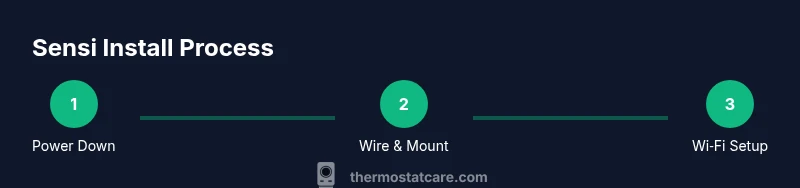
The core sequence is straightforward but must be followed in order to avoid mistakes. Start with power-down, remove the old device, and inspect the wires. Then mount the base, connect the wires to their labeled terminals, and attach the thermostat body. Finally, restore power, test basic functions, and complete Wi‑Fi configuration in the Sensi app. The official manual emphasizes checking that the system turns on after wiring and that the display responds correctly to button presses. Thermostat Care recommends documenting any unusual wire colors and consulting the wiring diagram for your specific HVAC model.
Wi‑Fi Setup and App Integration: Getting Connected
Connecting the Sensi thermostat to your home network is often the most scrutinized step because it enables remote monitoring and scheduling. The manual provides a step-by-step sequence to connect to your Wi‑Fi network using the Sensi app. Make sure your router is broadcasting the correct band (2.4 GHz is common for many devices), and note that some units may require temporary desktop software or a smartphone hotspot for initial setup in challenging network environments. Thermostat Care highlights that keeping your firmware up to date improves security and stability, so plan a post-install update window after the initial connection.
Testing, Calibrations, and Final Adjustments
After wiring and power restoration, run through a quick system test: verify that heating and cooling respond to thermostat commands, confirm fan operation, and check for any error messages on the display. The manual guides you through sensor calibration checks and comfort calibration for typical rooms. If the readings seem off, consider recalibrating, rechecking wire connections, or performing a minor HVAC system reset as a last resort. Thermostat Care notes that recording successful readings helps diagnose future temp drift and improves energy savings.
Model-Specific Notes and Common Troubleshooting
No two installations are identical. The Sensi installation manual provides model-specific diagrams—use them to confirm terminal labels and wire counts. If you encounter a blank screen, an unresponsive button, or a mismatch between app and device readings, consult the troubleshooting section: verify power, confirm wire integrity, and re-check the jumper configuration if applicable. Thermostat Care recommends keeping the original wiring photo handy, so you can compare labels at a glance and avoid swapping two wires by mistake.
Long-Term Care: Maintenance, Battery Status, and Scheduled Checks
A well-installed Sensi thermostat should operate for years with minimal maintenance. Perform periodic checks of wire insulation, wall plate stability, and the presence of dust around the unit. Monitor the thermostat’s battery status if your model uses battery backups, and replace batteries as recommended by the manual. Thermostat Care suggests scheduling a yearly review of wiring connections and firmware updates to sustain performance and energy efficiency.
Tools & Materials
- Sensi thermostat (model compatible with your HVAC system)(Ensure you have the correct model for your system and that it supports Wi‑Fi if desired)
- Phillips head screwdriver (size #2)(For mounting plate and terminal screws)
- Voltage tester / non-contact tester(Confirm power is off before handling wires)
- Wire stripper/cusher(Prepare wire ends for clean connections)
- Multimeter (optional)(For verifying wire continuity if necessary)
- Electrical tape(Secure wire ends and label if needed)
- Wall mounting plate or new wall plate screws(Ensure plate aligns with wall and thermostat base)
- Scissors or a small utility knife(Trims wires or shaves insulation as needed)
- Labeling tags(Label wires to prevent misconnection during reassembly)
Steps
Estimated time: 45-60 minutes
- 1
Power down and safety check
Switch off power at the HVAC disconnect and the thermostat’s circuit breaker. Use a non-contact tester to confirm no voltage on wires. This step prevents shocks and protects the control board during removal.
Tip: If you’re unsure about the exact breaker, label and test the circuit before touching any wires. - 2
Remove old thermostat and take photos
Carefully remove the faceplate and take clear photos of the existing wiring from multiple angles. This provides a reference if a wire color differs from the label. Document terminal labels and wire positions.
Tip: Photos help you map wires accurately to the new base terminals. - 3
Label and identify wires
Label each wire with its function (R, G, Y, W, C, etc.) and note color if it’s non-standard. If a wire is unneeded for the Sensi model, cap it and tuck it away. Confirm that every wire has a dedicated terminal on the new base.
Tip: Use the original photos as your cross-check against labels. - 4
Mount the mounting plate
Attach the mounting plate to the wall at a level line using the screws provided. Run the wires through the plate’s opening and ensure there’s no excess wire strain. This creates a stable foundation for the thermostat.
Tip: Check for level alignment before fully tightening screws. - 5
Connect wires to labeled terminals
Insert each wire into the matching terminal on the Sensi base (R to R, G to G, etc.). Avoid overtightening screws. If a wire doesn’t reach, consider using a longer wire with proper insulation.
Tip: Double-check that no bare wire is exposed beyond the terminal clamp. - 6
Attach the thermostat body and wall plate
Snap or screw the thermostat onto the base, secure the faceplate, and ensure the display powers on. If the base requires a terminal jumper (Rh–Rc), keep or remove per the manual instructions.
Tip: A loose attachment can cause intermittent connectivity; press firmly but avoid over-tightening. - 7
Power up and configure Wi‑Fi
Turn the power back on and follow the Sensi app prompts to connect to Wi‑Fi. Select your network, enter the password, and complete any firmware updates. This ensures remote control and scheduling features work correctly.
Tip: Use a strong, consistent 2.4 GHz Wi‑Fi network for reliability.
Questions & Answers
Do I need a C-wire for a Sensi thermostat?
Most Sensi models require a proper C-wire for stable power, though some installations may operate with alternatives. Always reference the manual and your HVAC system diagram to confirm compatibility.
Most Sensi models need a C-wire for stable power. Check your HVAC diagram and the manual to confirm.
Can I install a Sensi thermostat myself without a professional?
Yes, many homeowners install Sensi thermostats using the official manual. Ensure you follow safety steps, verify power, and use labeled wiring to avoid errors. If your system has uncommon wiring or fuel types, consider professional help.
Yes, but follow safety steps and the wiring guide closely. If in doubt, hire a pro.
How do I connect the Sensi thermostat to Wi‑Fi?
Open the Sensi app, select your thermostat, choose your network, and enter the password. Follow on-screen prompts for firmware updates and test the connection with a temperature change.
Open the app, connect to your network, and follow prompts to finish setup.
What should I do if the display stays blank after installation?
First, verify power at the HVAC disconnect and the thermostat base. Check wire connections for any loose or exposed conductors, and ensure the mounting plate is firmly attached. If needed, reset the device according to the manual.
Check power, wires, and mounting. Reset if necessary.
Is jumper wiring between Rc and Rh required for Sensi?
Some configurations require a jumper between Rc and Rh; others do not. Follow the model-specific diagram in the manual to determine whether to use or remove a jumper.
Follow the model diagram to decide on the Rc–Rh jumper.
Watch Video
What to Remember
- Follow the official manual for safe wiring.
- Label wires and verify power before starting.
- Mounting and wiring accuracy prevent future issues.
- Wi-Fi setup enables remote control and energy savings.