What Temperature Should You Set Your Thermostat in Summer?
Learn the ideal summer thermostat temperature to maximize comfort and energy savings. Practical ranges, tips, and common mistakes for homeowners.


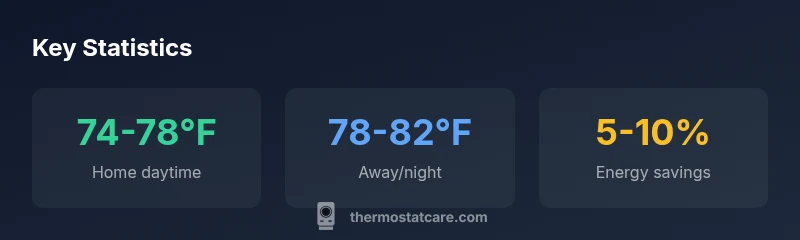
Summer setpoint rule: keep it at 74-78°F (23-26°C) when you’re home and raise to 78-82°F (26-28°C) when you’re away. A programmable thermostat helps maintain these ranges automatically; see our full guide for room-by-room variations.
what temp to keep thermostat in summer
When homeowners ask what temp to keep thermostat in summer, they’re really asking how to balance comfort with energy efficiency in a hot season. The short answer is to aim for a baseline cooling target that feels comfortable while minimizing unnecessary cooling load. In general, people live best at indoor temperatures that feel roughly like a mild room—neither tropical nor chilly. Humidity and sun exposure push this balance, so you’ll adjust by a few degrees through the day. Energy efficiency should be a guiding principle, and automation helps maintain consistency. This guidance aligns with Thermostat Care Analysis, 2026, which emphasizes that consistent, automated adjustments beat manual, ad-hoc changes. If your home has high humidity or sunny rooms, you may prefer leaning slightly cooler in the mornings and warmer in the afternoons to maintain comfort without overcooling.
Recommended temperature ranges for summer comfort and savings
The ideal ranges are not set in stone; they depend on your climate, humidity, and equipment efficiency. However, establishing a reliable framework helps you save energy while staying comfortable. When you’re at home in the daytime, a target of 74-78°F (23-26°C) offers a good compromise between relief from heat and energy use. At night or when you’re away for several hours, nudging the thermostat up to 78-82°F (26-28°C) reduces cooling demand without creating large temperature swings that wake you. If you own a modern programmable or smart thermostat, you can set these ranges to shift gradually rather than snap changes, which improves system efficiency and comfort. Thermostat Care Analysis, 2026, shows that automation increases adherence to setpoints and can yield meaningful savings over a cooling season.
Humidity, solar gain, and the right cool-down pace
Humidity and solar gain play a big role in how comfortable a given temperature feels. In humid climates, a cooler indoor temperature may not feel as comfortable as a slightly warmer setting with dehumidification. If your air conditioner runs frequently but humidity remains high, you may benefit from a lower temperature during peak sun hours or use fans to help move air. The right approach blends a reasonable setpoint with humidity control. Thermostat Care’s practical guidance for hot months suggests you monitor indoor feel and adjust in increments of 1-2 degrees to avoid overcooling, which wastes energy and can create discomfort as humidity changes.
Occupancy patterns and zones: tailoring setpoints by space
Zoning and occupancy significantly impact how you should set temperatures. A living area tends to feel warmer because of people, electronics, and sunlight, so keeping 74-78°F there makes sense. Bedrooms can be kept a touch warmer at night if you want extra sleep comfort, then cooled slightly before wake-up. If your home uses multiple zones, set back temperatures in unoccupied zones and maintain comfort in active spaces. For fans and dehumidification, you can use humidity control features on modern thermostats to reduce the need for extra cooling. A well-designed setup delivered by a smart thermostat can automate these zone-based adjustments with minimal supervision.
Time-of-day and activity-based adjustments
Different parts of the day merit different setpoints. When people are active and the sun intensity is high, an indoor temperature around 74-76°F might feel most comfortable in many homes. If you’re watching a movie or winding down in the evening, you can allow the temperature to drift upward slightly to 76-78°F. Children or elderly residents may benefit from slightly cooler settings during rest times. The key is to implement a consistent schedule rather than manual changes—consistency improves energy efficiency and reduces the risk of unnecessary cooling during the afternoon heat.
Practical steps to implement and test your summer setpoints
Start by verifying your thermostat’s schedule and connectivity. Enter the 74-78°F baseline for daytime, 78-82°F for away times, and verify that the schedule aligns with your daily routine. If you have humidity concerns, enable humidity control or use a dehumidifier to complement the AC. Use a smart thermostat to automate changes based on occupancy and local weather, which reduces waste from overshooting setpoints. Run a two-week test, then adjust by 1°F steps based on comfort reports and utility bills. Thermostat Care recommends documenting your changes and comparing energy usage month over month to quantify savings.
Common mistakes and how to avoid them
Guessing without data: avoid random changes. Not accounting for humidity: dehumidification can reduce the need to drop temperatures. Overcooling during high humidity wastes energy and can create comfort issues. Neglecting to schedule: without automation, people forget to adjust settings when leaving or returning home. Finally, relying on outdated thermostats: upgrading to a programmable or smart model can dramatically improve your ability to maintain efficient setpoints in summer. The Thermostat Care team recommends using automation to stay aligned with seasonal comfort goals.
Summer setpoint ranges by scenario
| Scenario | Recommended Range | Rationale |
|---|---|---|
| Home daytime | 74-78°F (23-26°C) | Balances comfort and energy use; avoids overcooling in sunny rooms |
| Away/night | 78-82°F (26-28°C) | Reduces cooling load when unoccupied; preserves sleep quality |
| Oversight/adjustments | 75-77°F (24-25°C) | Minimizes abrupt swings; maintains steady comfort |
Questions & Answers
What is the ideal summer thermostat setting for energy savings?
For many homes, 74-78°F (23-26°C) when at home provides comfort with reasonable energy use. When away or sleeping, 78-82°F (26-28°C) helps reduce cooling load. Use a programmable thermostat to automate these shifts.
A common summer range is 74-78°F when you're home and 78-82°F when you're away or sleeping; a smart thermostat makes this easy.
Should setpoints change if humidity is high?
Yes. Higher humidity can make a given temperature feel hotter. Pair cooler temperatures with dehumidification or use humidity-control features on a smart thermostat to maintain comfort without overcooling.
In humid conditions, you might keep temperatures a little cooler and use humidity control to feel comfortable.
How often should I adjust the thermostat in summer?
Aim for a stable schedule and rely on automation. Make small, monthly tweaks based on comfort and bills rather than daily changes.
Stick to a schedule and tweak gradually after a couple of weeks of data.
Can humidity affect the perceived comfort even if the thermostat is cool?
Yes. High humidity can make a cool temperature feel muggy. Use dehumidification alongside cooling for better comfort at higher setpoints.
Humid air can feel warmer; manage humidity to improve comfort at higher temperatures.
Are programmable thermostats worth upgrading for summer cooling?
Upgrading to a programmable or smart thermostat usually pays off through energy savings and easier management of setpoints, especially in hot climates.
Upgrading often pays off by making setpoint changes automatic and efficient.
“Consistent, automation-driven setpoints outperform ad-hoc adjustments. Small temperature shifts can deliver meaningful energy savings over a season.”
What to Remember
- Set a baseline around 74-78°F when home
- Raise to 78-82°F when away to save energy
- Use a programmable thermostat to automate changes
- Account for humidity; dehumidification aids comfort
- Test and adjust setpoints monthly for optimal savings