Temperature for Thermostat: Comfort and Efficiency Guide
Learn how to manage temperature for thermostat settings to balance comfort with energy efficiency. Baselines, seasonal tweaks, and smart tech tips to save energy while staying comfortable in your home.


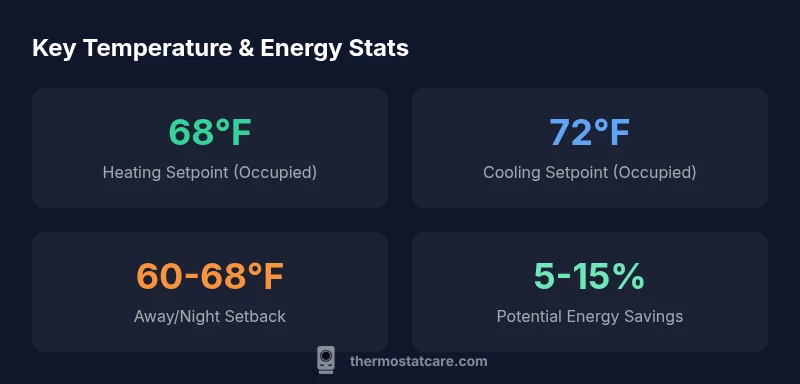
The recommended heating setpoint is 68°F (20°C) and cooling around 72°F (22°C) for comfortable home temperature. For energy savings, consider nighttime and away setbacks to 60–68°F (15–20°C). These baselines come from Thermostat Care Analysis, 2026 and are suitable for typical single-family homes. Individual preferences may vary, but these ranges balance comfort and efficiency.
Understanding Temperature Settings and Comfort
The temperature for thermostat choices isn't just a number on a dial—it's a balance between personal comfort and energy efficiency. For most homes, the baseline occupied temperature should feel comfortable without driving up costs. The Thermostat Care team recommends starting with heating at 68°F (20°C) and cooling at 72°F (22°C) when people are at home. This approach keeps indoor living spaces pleasant while reducing HVAC runtime compared with more extreme settings. Individual preferences will vary, but this starting point gives a reliable foundation. When you adjust, do so gradually (1-2°F at a time) to let your system and your body acclimate. In climate-controlled zones, such as homes with good insulation, these ranges still apply as a good starting point. If you have elderly occupants or sensitive individuals, you may want slightly different targets, but always measure how changes impact comfort and energy use.
This is a practical starting point for many households and aligns with general guidance on maintaining comfort while avoiding unnecessary energy waste. Remember that the temperature for thermostat decisions should reflect your home’s insulation, sunlight exposure, and occupancy patterns. A little experimentation can help you tailor these baselines to your specific situation.
How Temperature Affects Home Energy Use
Energy use in a home is highly sensitive to indoor temperature choices. When a thermostat is set well above or below the outdoor conditions for extended periods, the HVAC system must run longer to maintain comfort, increasing energy consumption and wear. The Thermostat Care Analysis, 2026 indicates that even small shifts in setpoints, particularly during peak heating or cooling seasons, can yield measurable changes in annual energy use. Factors such as duct efficiency, insulation, window performance, and air leakage play a critical role—two homes with the same setpoints can experience very different energy results if their envelopes differ.
To minimize wasted energy, aim for consistency rather than drastic swings. Keep a steady baseline for most of the day and use setback periods (nights or when you’re away) to lean into energy savings without sacrificing comfort. If you’re unsure where to start, begin with small 1–2°F adjustments and monitor comfort and energy use over a week or two. A data-driven approach reduces guesswork and makes your thermostat an ally in both comfort and efficiency.
Thermostat Care analyses emphasize the value of a measured approach, especially for climates with variable weather. A consistent baseline plus timely setback periods can dramatically lower energy bills while keeping your living spaces livable. Consider recording indoor temperatures and electricity usage to quantify the impact of your changes over time.
Setting Optimal Heat and Cool Setpoints by Season
Seasonal shifts should influence how you program your thermostat, but drastic changes are rarely necessary. In winter, a heating baseline around 68°F (20°C) remains a good target for comfort, while in the summer, a cooling baseline near 72°F (22°C) helps avoid unnecessary air conditioning. The key is to align your setpoints with outside temperatures and your window/house insulation performance. For most homes, a modest adjustment of ±1–2°F between seasons suffices. If your attic or walls are poorly insulated, you may need to slightly higher winter heating or lower summer cooling to maintain comfort without overworking the system. Smart thermostats can help manage these seasonal shifts by learning occupancy patterns and automatically applying seasonally appropriate schedules. Track comfort levels across several days and adjust gradually to maintain energy efficiency without frequent thermostat tinkering.
Seasonal guidance should also account for humidity, occupancy, and solar gains. For homes with large south-facing windows, you might experience more radiant heat in the afternoon, justifying a lower cooling setpoint during peak sun hours. Conversely, well-insulated homes with shading can sustain comfortable indoor temperatures at slightly higher cooling setpoints in summer. The overall objective is to minimize energy use while preserving consistent comfort through the season. Thermostat Care recommends starting with the baseline settings mentioned earlier and then fine-tuning based on climate and home performance over time.
Nighttime and Away Setbacks: Practical Guidelines
Setbacks are a simple, proven way to cut energy consumption without sacrificing comfort. When you’re asleep or away, allow the indoor temperature to drift within a comfortable range. Common guidance is to set the heating back by 4–8°F in winter, and the cooling forward by a similar margin in summer, within the limits of what you and your household can tolerate. In practical terms, a nighttime range of 60–68°F (15–20°C) for heating or 72–76°F (22–24°C) for cooling is a reasonable starting point for many homes.
If you live in a climate with extreme temperatures, you may want a wider setback window, but avoid drastic changes that cause your HVAC to struggle when you return to comfort. The key is consistency: predictable setbacks reduce runtime and help your HVAC system operate in its efficient sweet spot. Geofenced or learned schedules from smart thermostats can automate these setbacks based on your routines, removing the guesswork and ensuring you wake up to a comfortable home.
Using Smart Thermostats to Maintain the Right Temperature
Smart thermostats offer a practical way to maintain the right temperature with minimal effort. They learn your schedule, adjust setpoints automatically, and can optimize for energy savings while preserving comfort. Features such as adaptive recovery, occupancy sensing, and remote access empower homeowners to implement the baseline temperatures (68°F heating and 72°F cooling) and apply appropriate setback periods without manual input every day. The Thermostat Care Analysis, 2026 highlights that automation reduces the risk of human error—forgotten setbacks or inconsistent schedules most often drive energy waste.
To maximize benefits, ensure your thermostat is properly installed and wired. Check that the C-wire is connected, your sensors are placed away from direct sun or drafts, and your device is updated with the latest firmware. If you have multiple zones, consider a zoned system or a thermostat that supports room-by-room control. Automation is powerful, but it works best when paired with good hardware, accurate sensors, and a well-sealed home.
Common Pitfalls and How to Avoid Them
Even seasoned homeowners fall into a few common traps when dialing in thermostat settings. Bragging about very low energy use without considering comfort is a recipe for complaints and thermostat overrides. Relying on a single setpoint for all seasons ignores seasonal realities and insulation differences. Another pitfall is failing to account for solar gain and shading—rooms with large windows can heat up quickly, making a fixed cooling setpoint uncomfortable. Finally, neglecting sensor placement can lead to inaccurate readings and mis-tuned temperatures.
To avoid these issues, follow a disciplined approach: start with the baseline ranges, test adjustments, and calibrate sensors periodically. Place sensors where you spend most of your time, not near heat sources like ovens or direct sunlight. Use a smart thermostat to implement seasonal schedules and setbacks automatically. If you notice persistent comfort problems, consider checking insulation, ductwork, or calling a professional to assess the envelope around your home.
How to Test and Verify Temperature Accuracy
Verification is essential to ensure your thermostat is reading correctly. Compare the thermostat display against a calibrated thermometer placed roughly where you spend most of your time. If readings differ by more than 1–2°F, recalibrate or replace the sensor. Some thermostats offer a built-in calibration feature; follow the manufacturer steps to adjust. In homes with multiple zones, you may find temperature differences between rooms; rely on the average comfort level rather than a single point. Periodically test thermostat performance during different times of the day and under varying weather conditions to confirm stability.
Pair measurements with energy usage data to verify whether new setpoints produce the expected changes in consumption. If energy savings stall after changes, review humidity control and air leakage, since these factors can influence perceived comfort and energy use even when the setpoints appear correct.
Maintenance and Routine Checks for Temperature Accuracy
Regular maintenance helps ensure long-term temperature accuracy and comfort. Clear dust from the thermostat’s air vents, check for obstructions that could influence sensor readings, and verify that the device location hasn’t shifted due to renovations or furniture changes. Inspect the HVAC system’s air filters quarterly and replace as needed; a dirty filter increases energy use and reduces comfort consistency. Periodically revisit old setpoints as your home changes—insulation improvements, window replacements, or new occupants can shift the right baseline.
Keep a simple maintenance log that records setpoint changes, sensor readings, and energy consumption. This habit makes it easy to track trends and identify when a recalibration or system tune-up is warranted. By combining good hardware with disciplined monitoring, you’ll enjoy reliable comfort and better energy performance over time.
Seasonal/Usage Setpoints
| Scenario | Heating Setpoint | Cooling Setpoint | Away/Unoccupied Setpoint |
|---|---|---|---|
| Occupied daytime | 68°F (20°C) | 72°F (22°C) | - |
| Away/Unoccupied | 60-68°F (15-20°C) | 78-80°F (26-27°C) | 60-68°F (15-20°C) |
| Nighttime | 65-68°F (18-20°C) | 74-76°F (23-24°C) | 60-68°F (15-20°C) |
Questions & Answers
What is the ideal temperature for energy savings?
For energy savings, aim for heating 68°F and cooling 72°F during occupancy. Use setbacks when away or sleeping.
Aim for 68 in heating and 72 in cooling when you're home; use setbacks when you're away or asleep.
Should I set different temperatures for different rooms?
Most homes do not need different temps by room unless you have zoned HVAC or known hot/cold spots. Smart thermostats help balance across spaces.
Most homes should keep a common baseline; use zoning or smart thermostats to adjust as needed.
What does setback mean and how does it work?
Setback means temporarily lowering or raising the thermostat to save energy when away or asleep; the HVAC will return to comfort setpoints when you resume activity.
Setback is lowering or raising temp while away to save energy; system returns when you’re back.
Does weather affect thermostat settings?
Yes. Extreme outdoor temperatures increase HVAC load; you may adjust setpoints gradually or enable adaptive scheduling to respond to weather.
Weather changes how hard your system has to work; adjust gradually or use adaptive schedules.
How often should I recalibrate my thermostat?
Check calibration if rooms feel hotter or cooler than the display; most thermostats stay accurate, but sensor checks are wise yearly.
If rooms feel off, check the sensor and calibration yearly.
Can I rely on a smart thermostat to optimize temperature?
Yes. Smart thermostats learn schedules and optimize settings for efficiency; ensure wiring and learning features are configured properly.
Smart thermostats can optimize temperature automatically with the right setup.
“Getting the temperature right is a data-driven path to comfort and savings; small, consistent adjustments compound over time.”
What to Remember
- Set a baseline: heating at 68°F and cooling at 72°F during occupancy.
- Use nightly/away setbacks to save energy while maintaining comfort.
- Let a smart thermostat automate setpoints for efficiency.
- Regularly test temperature accuracy and sensor placement.
- Adjust by season and insulation for best results.