How Low Should You Set Your Thermostat on Vacation? A Practical Guide
Learn safe, energy-saving vacation thermostat setback ranges and step-by-step tactics to protect your home. This guide covers smart features, climate considerations, and common mistakes for homeowners and DIY enthusiasts.


By vacation, you can safely lower your thermostat to a winter setback that saves energy while protecting plumbing and equipment. This guide shows recommended ranges, how to handle extreme heat or cold, and when to rely on smart features or alerts. Follow practical steps to set, monitor, and adjust remotely so you return to a comfortable home.
Why vacation temperature matters
Setting the thermostat while you are away is not just about energy savings; it is a balance between protecting your home and avoiding discomfort or damage on return. According to Thermostat Care, a well-planned vacation setback reduces energy use while keeping essential systems safe. The Thermostat Care team notes that extreme indoor temperatures can stress HVAC components and pipes, especially in cold climates. A moderate setback helps conserve heat while ensuring that pipes in unheated spaces don’t freeze. In homes with heat pumps or boilers, the response to a setback depends on equipment and outdoor conditions. Use climate awareness as your guide and avoid drastic swings.
In addition, consider the layout of your home. Unheated spaces like garages, attics, and crawl spaces can influence how quickly temperatures drift, so tailor your setback to those zones. If you rely on a multi-zone system, you may be able to keep living areas at a comfortable temperature while saving energy in peripheral spaces.
Pro tip: keep a quick note in your thermostat app about your departure date and expected return; this helps ensure the system re-adjusts automatically when you come home.
Safe setback ranges for winter vacations
If you are traveling during winter, the goal is to prevent frozen pipes while avoiding excessive heating that wastes energy. A common starting point is to set the thermostat to about 50-60°F (10-15°C). If you have well-insulated pipes and your climate is milder, you may set closer to 60°F (15°C). For homes with higher pipe risk or in very cold environments, you might choose to keep it around 55°F (13°C). These ranges are guidelines and should be adapted to your home’s insulation, pipe exposure, and the presence of pets. The goal is to minimize energy use without compromising the house’s safety.
Thermostat Care guidance suggests using climate-aware adjustments rather than a fixed rule, and to verify unheated spaces are insulated when possible. If you have a smart thermostat, you can implement a time-based schedule that respects daily temperature cycles even when you are away.
Safety note: do not drastically plunge temperatures in areas with water pipes or those exposed to freezing risks. When in doubt, start higher and gradually reduce.
How to implement a setback with different thermostat types
Different thermostat types require slightly different approaches, but the underlying principle is the same: establish a safe, energy-conscious baseline and maintain it with reliable controls. For simple manual thermostats, dial in the approximate setback, then monitor from your phone if you can. Programmable thermostats let you schedule a fixed Away setting, ensuring the system automatically returns to normal when you are back. Smart thermostats offer the most flexibility, letting you set geofencing, occupancy-based schedules, and remote overrides.
If you have a heat pump, confirm the system will not switch to emergency heat during the setback, and adjust fan operation to minimize energy use without compromising dryness or humidity. For boiler-based systems, ensure the setpoint is not so low that it strains the equipment during cold snaps. Always test the transition before you leave and verify that the system responds to the new setpoint within a reasonable timeframe.
Remote control and monitoring options
Remote access is a powerful ally when you are away. Most modern thermostats connect to a mobile app, allowing you to adjust setpoints, check current temperatures, and receive alerts if temperatures drift outside safe ranges. Enable push notifications for temperature spikes, power outages, or sensor faults. If you use a smart home hub, you can integrate your thermostat with routines that automatically adjust settings when your location changes or when your home’s weather is forecast to dip.
Security tip: ensure your accounts have strong passwords and two-factor authentication to prevent unauthorized changes while you are away.
Common mistakes and how to avoid them
People often under- or over-set the thermostat when leaving home. A freezing risk can occur if the setback is too aggressive or if unheated spaces are poorly insulated. Another mistake is disabling notifications; without alerts you might miss a malfunction. Some homeowners forget to confirm that the Away setting remains active during longer trips, or fail to test the system before departure. By planning in advance, validating the HVAC response, and enabling remote monitoring, you reduce the chances of waking up to an uncomfortable or compromised home upon return.
Thermostat Care recommends documenting your departure window and expected return in the thermostat app to trigger automatic reversion when you arrive home.
Safety considerations and exceptions
If your home has pets, plants, or sensitive equipment, you may need to adjust the setback. In wildfire-prone or extremely cold climates, you might adopt a higher baseline to minimize humidity fluctuations and protect pipes. If you rely on a heated garage or other auxiliary spaces, verify these settings to prevent condensation or freezing. If you notice any unusual sounds or if the thermostat fails to maintain the setpoint, avoid relying solely on the device and consider a temporary protective measure or professional advice. If you have doubts about your equipment, consult the thermostat manufacturer’s guidance or a local HVAC professional.
Quick maintenance checks before leaving
Before departure, run a final check to ensure settings align with your planned temperatures. Confirm that the current setpoint matches your intended setback and that the Away mode remains active. Inspect exposed pipes in unheated areas for signs of wear or poor insulation, and ensure windows and doors are sealed to prevent drafts. If feasible, enable a remote alert so you’ll be notified if the home’s temperature drops unexpectedly. A brief checklist in your thermostat app can help you stay organized and confident about your plan.
Tools & Materials
- Smartphone or computer with thermostat app(Ensure you can access settings remotely and receive alerts)
- Stable internet connection(Wi-Fi or cellular data to reach the thermostat remotely)
- Thermostat user manual(Helpful for model-specific setback steps and features)
- Unheated-space insulation review(Check pipes in garages, basements, and crawl spaces)
Steps
Estimated time: 30-60 minutes
- 1
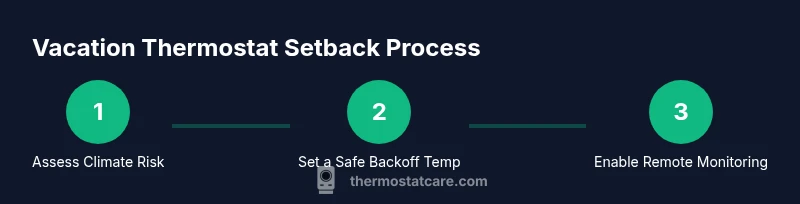
Assess climate risk and baseline
Review your home design, especially pipes in unheated spaces and the local outdoor climate. Mark a target baseline temperature that balances energy savings with safety. This initial assessment informs all subsequent steps.
Tip: Note any areas with poor insulation and plan to protect them first. - 2
Choose a safe setback temperature
Decide on a minimum setback temperature within the recommended winter ranges. Start with 50-60°F (10-15°C) and adjust according to pipe exposure, insulation, and whether pets stay home.
Tip: Begin with a milder setback and test the response over 24–48 hours if possible. - 3
Program the thermostat
If you have a programmable thermostat, set an Away schedule that aligns with your chosen setback. For smart thermostats, configure a vacation mode with automatic reversion near your return date.
Tip: Double-check time zones and return dates to avoid mismatch. - 4
Enable remote monitoring
Turn on remote access and notifications so you can monitor temperatures and get alerts if temperatures drift or power outages occur.
Tip: Test a remote adjustment before you leave. - 5
Test the system response
Before departure, simulate a temperature change and observe how quickly the HVAC responds. This helps confirm the setpoint is effective and safe.
Tip: If you hear unusual noises, stop and reassess the setup. - 6
Add safety backups
Consider extra measures such as pipe insulation and weatherstripping to reduce heat loss in vulnerable zones. Protect vulnerable electronics and electronics around the home.
Tip: Pipes in exposed locations benefit from foam insulation sleeves. - 7
Finalize the plan and depart
Review all settings one final time, confirm Away mode is active, and log departure details in your thermostat app. You’re now prepared to leave with confidence.
Tip: Keep a quick reference note in the app about your travel dates.
Questions & Answers
How low should I set my thermostat when on vacation in winter?
A common starting point is 50-60°F (10-15°C). Adjust based on pipe exposure, insulation, and whether pets remain at home. Avoid going below 50°F if you have exposed pipes; always prioritize safety and system compatibility.
A typical winter setback is around 50 to 60 degrees Fahrenheit, but tailor it to your pipes and insulation.
Will lowering the thermostat always save energy?
Lowering the setpoint generally saves energy, but savings depend on climate, home insulation, and equipment. Smart thermostats with remote control can optimize savings by re-activating comfort schedules near your return date.
Yes, lowering the temperature usually saves energy, especially with a smart setup that reactivates when you return.
What if I have a heat pump or boiler system?
Heat pumps and boilers respond differently to setbacks. Ensure the setpoint does not trigger emergency heat or unsafe cycling, and test transitions before leaving.
Check that your heat pump or boiler handles the setback without triggering extra energy use.
Should I rely on Away mode if I have pets at home?
Away mode can still work if you select a humane setback for pets. Consider a higher minimum if your pet needs a comfortable environment.
Away mode can work with pets, but make sure their comfort is preserved.
What should I do if the thermostat loses power while I’m away?
Rely on the thermostat’s backup memory and your remote alerts. If possible, have a neighbor check in case of extended outages.
If power is cut, rely on alerts and consider neighbor checks for extended outages.
Is it safe to adjust temperatures in unheated garages or basements?
Yes, but be mindful of pipe risk and insulation. Keep those areas above critical temperatures to prevent freezing.
You can adjust unheated spaces, but avoid freezing temperatures in pipes.
Watch Video
What to Remember
- Set a safe winter setback before leaving.
- Use Away or vacation modes to automate settings.
- Enable remote monitoring and alerts to catch issues early.
- Customize setbacks by climate and insulation for best results.