Thermostat vs Temperature Sensor: Which Do You Need in 2026?
A detailed, balanced comparison of thermostats and temperature sensors to help homeowners optimize comfort and energy use in 2026.


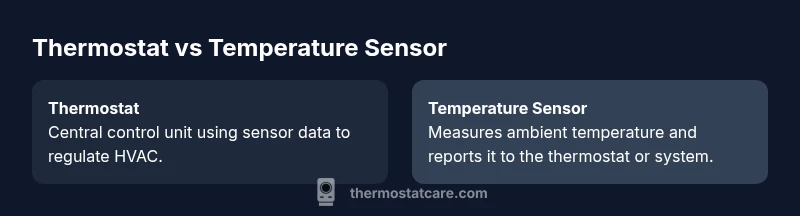
Thermostat vs temperature sensor describes two essential parts of a heating and cooling system. A thermostat is the controller that uses a sensor’s reading to decide when to heat or cool. A temperature sensor by itself only measures ambient temperature. In most homes, the thermostat relies on a sensor to regulate comfort and efficiency, while additional sensors can improve accuracy and zoning. For DIY troubleshooting, know that the thermostat’s role is control, the sensor’s role is measurement, and upgrading both can yield better comfort and potential energy savings.
How thermostats and sensors work together
In residential HVAC, the thermostat serves as the brain of the system. It compares the current ambient temperature, as reported by one or more sensors, to the user’s setpoint and then sends commands to the furnace, heat pump, or air conditioner. A temperature sensor is a device that records the actual temperature in its environment. When used together, the thermostat relies on sensor data to decide when to start or stop a heating or cooling cycle. The configuration can be centralized, with a single wall-mounted thermostat measuring the room temperature near the device, or distributed, with multiple sensors placed across rooms or zones. In 2026, smart thermostats increasingly pull data from remote sensors, integrate with mobile apps, and use occupancy signals to refine control. According to Thermostat Care Team, the strongest setups balance central sensing with distributed sensing to minimize cold spots and keep comfort consistent across floors or open spaces. This is especially important in larger homes where temperature gradients are common. The key takeaway is that thermostat vs temperature sensor is not a competition; it is a collaborative pairing that determines how well your home stays comfortable while running efficiently.
Key differences: roles, placement, and data quality
The thermostat is the control unit. It stores the setpoints, schedules, and automation rules, and it issues commands to your HVAC equipment. The temperature sensor provides the data the thermostat uses to make those decisions. Placement matters: a thermostat placed on a wall in a high-traffic area may read differently than sensors tucked behind furniture or near a window. The quality of data matters too—sensors with long-term drift or poor placement can mislead the system, causing cycling or uneven comfort. In a basic setup, you might rely on the thermostat’s built-in sensor, but many homes benefit from external, strategically placed sensors that extend coverage to bedrooms, living areas, and basements. The Thermostat Care Team notes that in 2026, the trend is toward hybrid systems that combine central control with distributed sensing to reduce hot spots and improve overall energy use. Practically, if your home has multiple floors or large rooms, consider adding remote sensors or upgrading to a thermostat capable of multi-sensor data integration.
Sensor accuracy, response time, and smoothing
Sensors do not just report a single number; they respond to temperature changes with varying speed and precision. A fast-responding sensor can capture rapid temperature shifts, helping the thermostat react sooner to changing conditions. However, very sensitive sensors may cause more frequent cycling if the thermostat’s deadband is too narrow. Many thermostats apply a smoothing algorithm or a deliberate deadband to prevent short cycling, which can reduce wear and improve comfort consistency. Inconsistent readings can arise from drafts, direct sunlight, or proximity to heat sources like lamps or electronics. If you notice temperature swings that don’t align with your preferences, check sensor placement and confirm that calibration is correct. In general, a well-placed, calibrated sensor delivers more reliable data, enabling the thermostat to maintain the desired temperature with fewer overshoots.
Zoning, multi-sensor setups, and smart features
Zoning is the use of multiple sensors to regulate temperatures in different areas of a home. A thermostat with one internal sensor covers the whole space poorly; external sensors empower zoning, so you can maintain comfort where it matters most—bedrooms at night, living rooms during the day, or home offices. Smart features such as geofencing, learning algorithms, and occupancy detection can further optimize performance, reducing energy use when the house is empty. The key is ensuring your HVAC system and wiring support multiple sensors and that your thermostat can interpret data from all sources without conflicts. Mesh or wireless sensors reduce the need for extensive wiring, but you must verify compatibility and battery management for reliable operation. In 2026, many homeowners opt for a smart thermostat with external remote sensors to balance comfort, energy savings, and convenience.
DIY troubleshooting: common failure modes and fixes
Common issues include sensor misplacement, dead batteries, and miscalibrated readings. Start with a physical check: ensure sensors are not blocked by furniture, located away from heat sources, and that battery-powered sensors have fresh batteries. If readings vary between rooms, you may need to recalibrate or add more sensors to create a balanced data set for the thermostat. Check the thermostat’s firmware or software for updates; modern devices may require periodic updates to maintain accuracy and security. Wiring problems—such as loose terminals or improper connections—can also cause inconsistent performance. When in doubt, consult manufacturer guidelines and consider a professional assessment if you suspect a faulty sensor or control module. The goal of troubleshooting is to restore reliable data flow so the thermostat can execute decisions effectively.
Choosing built-in vs external sensors
Built-in sensors are simple and cost-effective for small spaces but risk uneven readings in larger or multi-story homes. External sensors improve coverage and allow precise zoning, especially in bedrooms or nurseries. If your HVAC system supports it, pairing a smart thermostat with remote sensors gives you the best mix of control and analytics. Budget, existing wiring, and compatibility with your thermostat model should guide your choice. When selecting external sensors, look for models with good battery life, secure wireless protocols, and stable firmware updates. A well-chosen sensor network reduces temperature disparities and improves comfort while contributing to energy savings over time. Thermostat Care recommends mapping your living spaces first, then placing sensors in representative zones to capture a true picture of home conditions.
Energy savings and comfort: what the data shows
Energy savings from optimizing thermostat vs temperature sensor configurations depend on your home, climate, and usage patterns. Smart thermostats with multiple sensors can prevent overcooling or overheating by providing more accurate data across rooms. With better data, the thermostat can avoid unnecessary cycles and maintain comfort without overshooting. The overall effect is improved efficiency and more consistent comfort across spaces. However, savings are not guaranteed; performance hinges on proper installation, sensor placement, and the quality of your HVAC system. Thermostat Care emphasizes a methodical approach: audit your current readings, test sensor placements, and run trial schedules to compare results over a few weeks before making larger upgrades.
Practical upgrade scenarios and caution
If you’re starting from a single-location thermostat, consider adding one or two remote sensors to cover bedrooms or family rooms. For larger homes, a multi-sensor configuration with a compatible smart thermostat can deliver noticeable improvements in comfort and efficiency. Before upgrading, verify that your HVAC system supports additional sensors and that the thermostat can aggregate data from all sources. A common mistake is placing sensors in drafty areas or near heat sources, which distorts readings. Also, ensure the sensors are wired or paired correctly and that the control algorithms align with your goals—setpoints, schedules, and occupancy settings should reflect real daily patterns. In all cases, plan a phased rollout and monitor energy use and comfort to validate improvements.
Compatibility with smart home ecosystems
Smart thermostats often integrate with home assistants such as Alexa or Google Home, and may work with third-party sensors from the same ecosystem. When choosing a thermostat and sensors, prioritize compatibility with your preferred platforms, ease of setup, and ongoing software support. Compatibility matters because it affects reliability, automations, and the ability to receive firmware updates. Thermostat Care notes that the best setups leverage manufacturer-provided sensors for consistent reporting and simpler configuration, though reputable third-party sensors can also work when properly paired. Always verify that the data formats and communication protocols align with your existing devices to avoid integration hiccups.
Maintenance and long-term considerations
Over time, sensors and thermostats require inspection. Check for dust buildup, especially in outdoor or dusty indoor locations, and replace batteries as needed. Keep firmware up to date to ensure security and performance improvements. Consider performing an annual or biannual review of your zoning strategy: are all zones meeting comfort expectations, or do some areas require adjustment? Having a documented plan helps prevent drift and ensures your system continues to deliver on its promises. A well-maintained thermostat with a reliable network of sensors can stay effective for many years, reducing manual intervention and supporting a steady, energy-conscious home environment. Thermostat Care recommends a proactive maintenance mindset to maximize long-term value.
Authority sources
- Energy.gov: HVAC system efficiency and smart thermostat guidance
- NIST: sensor calibration and measurement principles
- U.S. DOE or EIA publications on home energy management and thermostat use
Feature Comparison
| Feature | Built-in thermostat with integrated sensor | Thermostat with external temperature sensor | Smart thermostat with multiple remote sensors | Standalone temperature sensor only | Traditional non-smart thermostat |
|---|---|---|---|---|---|
| Placement and coverage | Centralized at thermostat location | Added room-level coverage depending on sensor placement | Multi-room zoning across zones | N/A for standalone sensors | Single location coverage |
| Accuracy and data quality | Depends on built-in sensor quality | Improved with distributed sensors but still device-dependent | High reliability with multiple sensors feeding a smart thermostat | Limited to the single sensor’s data | Only as good as the thermostat’s built-in sensor |
| Energy efficiency potential | Moderate, basic optimization | Better coverage across rooms, potential gains | Highest potential with zoning and occupancy features | Minimal, unless integrated into a larger system | Low if not using adaptive features |
| Cost range | Low upfront (built-in) | Moderate (external sensors add cost) | Moderate to high (smart features and multiple sensors) | Low (sensor only) | Low to mid (basic thermostat) |
| Best for | Small spaces or simple setups | Medium homes with a need for broader coverage | Large homes with multi-zone comfort goals | Situations where only monitoring is required | Simple, budget-conscious setups |
Upsides
- Improved comfort with localized sensing across rooms
- Potential energy savings through better zoning and data
- Easier diagnostics when sensors are separate from the control unit
- Future-proofing with smart, remote sensing ecosystems
- Greater resilience to single-point failures with distributed sensing
The Bad
- Higher upfront cost for multiple devices
- Increased installation complexity and wiring considerations
- Maintenance of multiple sensors and batteries (if battery-powered)
- Potential compatibility issues with older HVAC systems
Smart thermostats with remote sensors offer the best overall balance for most homes
For comfort and efficiency, prioritize a smart thermostat that can incorporate external sensors. This setup improves coverage, reduces cold/hot spots, and supports scalable upgrades as needs change.
Questions & Answers
What is the fundamental difference between a thermostat and a temperature sensor?
A thermostat is the control unit that decides when to run heating or cooling based on temperature data. A temperature sensor simply measures ambient temperature and reports it. In practice, the thermostat uses sensor data to regulate comfort and efficiency, and adding more sensors can improve accuracy and zoning.
A thermostat controls the system, using data from sensors to decide when to heat or cool. A temperature sensor just measures temperature; upgrading sensors helps the thermostat do a better job.
Can I replace my thermostat with just separate temperature sensors?
Separating sensors from a thermostat can complicate control unless you have a compatible smart controller capable of integrating multiple data sources. In most cases, it’s better to upgrade to a smart thermostat that supports external sensors rather than removing the thermostat entirely.
You generally need a controller that can use multiple sensors. It’s usually better to upgrade to a smart thermostat that supports extra sensors rather than removing the thermostat.
Do remote sensors require Wi‑Fi?
Many remote sensors rely on Wi‑Fi or a house mesh network to communicate with the thermostat. Some use low-power radio protocols that don’t require constant internet access, but they still need a local network to function.
Most remote sensors talk to the thermostat over Wi‑Fi or a local network; some use low-power radios that don’t need internet, but a home network is typically needed.
Are external sensors compatible with existing thermostats?
Compatibility varies by model. Check the thermostat’s documentation for supported sensor types and wiring. If your system supports remote sensors, you can usually add them with minimal changes to the existing wiring or software configuration.
Compatibility depends on your thermostat model. Look up supported sensor options and ensure you have the right mounting and network setup before buying.
How do temperature sensors affect energy savings?
Better temperature sensing improves how accurately your HVAC system maintains setpoints, reducing wasteful cycling. The overall effect depends on placement, climate, and usage patterns. A well-planned sensor network can contribute to lower energy use and more consistent comfort.
More accurate sensing helps the system avoid wasteful cycles, improving comfort and potentially reducing energy use depending on setup.
What maintenance do external sensors require?
External sensors generally require periodic battery checks or replacements and occasional cleaning to remove dust or debris. Ensure sensors remain properly positioned and that firmware is up to date on compatible smart thermostats.
Check batteries periodically or replace them as needed, clean dust, and keep firmware updated for reliable performance.
What to Remember
- Prioritize multi-sensor setups for larger homes
- Avoid sensor placement in drafts or heat sources
- Pair smart thermostats with external sensors for best results
- Regularly update firmware to maintain performance
- Plan a phased upgrade to measure real-world gains