Thermostat and Thermometer: A Practical Home Comparison
Compare thermostats and thermometers to understand roles, placement, accuracy, and smart features. This Thermostat Care guide helps homeowners choose, install, and verify climate readings effectively.


Thermostat vs Thermometer: you are comparing a control device with a temperature sensor. The thermostat manages heating and cooling by setting schedules and responding to readings, while a thermometer only reports ambient temperature. For practical home climate decisions, a smart thermostat delivers automation and energy savings, while a thermometer helps verify actual room conditions. See the full comparison for detailed use cases.
Introduction: thermostat and thermometer in home climate planning
In the world of home climate control, many homeowners encounter the terms thermostat and thermometer. While both revolve around temperature, they serve different core purposes: one controls and optimizes HVAC operation, the other measures and reports ambient temperature. According to Thermostat Care, understanding this distinction is essential for achieving consistent comfort and energy efficiency. The Thermostat Care team found that many households struggle with misinterpreting readings or placing sensors in inaccurate spots, which can lead to energy waste and uneven comfort. This guide uses a practical, analytical lens to help you decide when each device matters, how to position them for accuracy, and how to leverage them together for better home climate management.
Definitions and Core Roles: What each device does
A thermostat is a control device that senses temperature and triggers the HVAC system to maintain the chosen setpoint. It stores schedules, learns patterns (in smart models), and can interface with Wi‑Fi for remote adjustments. A thermometer, by contrast, is a measurement device that reports the current ambient temperature without controlling the environment. Thermometers come in analog and digital varieties, including infrared and medicinal-grade forms, but their primary job is to provide an accurate temperature reading. In practical terms, you use a thermostat to decide how warm or cool your home should be and let the HVAC do the work; you use a thermometer to verify that the space actually sits at the target temperature. This distinction matters for energy efficiency and comfort consistency, especially in homes with multiple rooms and varied sun exposure.
Core Differences: Control vs Measurement
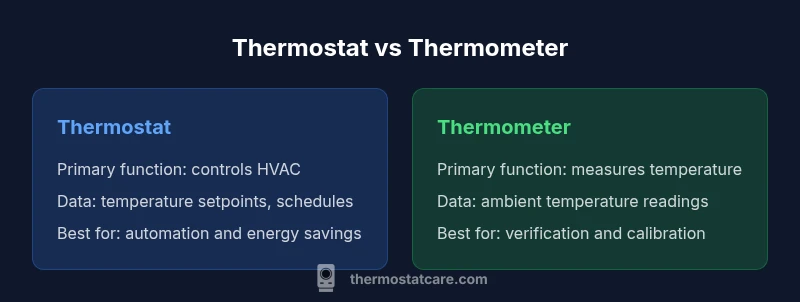
- Primary function: Thermostat controls HVAC operation; thermometer measures ambient temperature.
- Data vs decision: Thermostats store setpoints and schedules; thermometers provide current readings for verification.
- Feedback loop: Thermostats respond to temperature data to adjust heating/cooling; thermometers feed data that may be used for calibration or manual checks.
- Automation potential: Thermostats (especially smart models) enable automation, energy reporting, and remote control; thermometers typically do not automate actions.
Types and Capabilities: What you can buy
Thermostats range from simple non-programmable units to programmable and smart systems that connect to apps and voice assistants. They may support zoning, occupancy sensing, and energy boosting features. Thermometers span basic mercury or digital pocket models to wall-mounted or digital indoor/outdoor versions, infrared sensors, and medical-grade options. When choosing, consider how much automation you want, whether you need remote access, and how accurate the readings must be for your space. Alignment between the thermostat’s expectations and the thermometer’s readings improves overall comfort and energy performance.
Placement, Accuracy, and Calibration
Placement matters for both devices. A thermostat should be installed in a location that represents the overall indoor environment (not in direct sunlight, near drafts, or above heat sources like lamps). A thermometer’s accuracy depends on placement as well: keep it away from heat sources, vents, and direct sunlight. For best results, use a digital thermometer with a known calibration, and compare readings against the thermostat’s reported temperature at the same time. Calibration should be performed according to manufacturer instructions, and if readings diverge consistently, consider relocating the thermometer or upgrading to a higher-precision model. Thermostat Care recommends periodic checks to ensure readings reflect the space rather than transient conditions.
Use-Case Scenarios: When to rely on which device
- Scenario A: You want automated temperature control and energy savings. Choose a smart thermostat with reliable scheduling and occupancy features. Pair it with a well-placed thermometer to verify that readings align with your setpoints.
- Scenario B: You simply need to know the current room temperature. A thermometer provides quick, independent readings without affecting HVAC behavior.
- Scenario C: You have multiple zones (living area, bedrooms, attic). A thermostat system with zoning plus additional room sensors can maintain consistent comfort; a thermometer in each zone helps you confirm that readings match your expectations.
How to Compare: Criteria that matter for homeowners
When evaluating thermostat and thermometer options, focus on:
- Accuracy and calibration capabilities
- Integration with your HVAC system and smart home ecosystem
- Ease of installation and maintenance
- Cost relative to expected energy savings
- Data access and privacy considerations for connected devices A balanced setup often includes a reliable thermostat for control and at least one accurate thermometer for spot checks, especially in rooms with unusual temperatures or radiant heat exposure. Thermostat Care highlights that alignment between reported temperatures and actual conditions reduces the likelihood of over-cycling and uncomfortable swings.
A Practical 6-Step Selection Guide
- Define your goals: automation, energy savings, or simple temperature verification. 2) Confirm HVAC compatibility with a new thermostat, including wiring (C-wire presence) and compatibility with existing equipment. 3) Choose a thermometer type based on the space: ambient room measurement, wall-mounted, or infrared for quick spot checks. 4) Assess installation complexity and professional support needs. 5) Compare total cost, including potential energy savings over time. 6) Plan placement for both devices to maximize accuracy and usability while avoiding heat sources and drafts. Thermostat Care notes that a thoughtful setup yields the best long-term results.
Common Myths and Misconceptions
- Myth: A thermometer can control HVAC if it’s smart. Reality: Thermostats are built to control HVAC; thermometers report temperature. Some systems may share data, but the thermostat makes the decisions.
- Myth: Reading the thermostat display is enough to understand home comfort. Reality: Display readings may reflect sensor location; cross-check with a thermometer placed in representative zones.
- Myth: All smart thermostats guarantee energy savings. Reality: Savings depend on usage patterns, insulation, and climate; correct setup and consistent use are essential.
Maintenance, Calibration, and Longevity
Regular calibration checks help ensure both devices remain accurate. For thermostats, confirm that firmware is up to date and that wiring connections remain secure. For thermometers, replace batteries as needed in digital models, test accuracy with reference readings, and avoid exposure to moisture or extreme temperatures that could affect sensors. Thermostat Care emphasizes annual reviews of settings and sensor placements, especially after seasonal changes or major HVAC maintenance. Simple audits can prevent comfort gaps and inefficient cycling.
Smart Home Integration and Data Privacy
Smart thermostats connect to Wi‑Fi and apps, offering energy reports and remote control. While this adds convenience, it also introduces data privacy considerations. Review device permissions, cloud data handling, and whether the manufacturer offers local control options. If privacy is a priority, choose models with transparent data policies, robust on‑device processing, and opt‑out options for sharing usage data. A thermometer that is not connected or is only intermittently connected minimizes data exposure while still providing temperature verification.
Quick-Start Checklist for a Practical Setup
- Define goals: automation vs verification or both.
- Verify HVAC compatibility and wiring needs (C-wire presence).
- Select a thermostat with required features (schedules, sensors, app access).
- Pick a thermometer type suitable for your spaces (ambient, wall-mounted, infrared).
- Plan placements to minimize heating/Cooling bias: avoid direct sun, vents, and drafty areas.
- Calibrate readings and schedule periodic checks.
- Review privacy settings for any connected devices and keep firmware updated.
Comparison
| Feature | Thermostat | Thermometer |
|---|---|---|
| Primary function | Controls HVAC operation via setpoints and schedules | Measures ambient temperature for display and verification |
| Power source | Hardwired or battery-powered; often requires C-wire | Battery-powered or standard power for wall/ambient models |
| Typical placement | Wall location representing overall room conditions | In-room or wall-mounted, away from heat sources and vents |
| Automation & connectivity | Smart thermostats offer automation, routines, and energy reporting | Most thermometers are standalone; some digital models offer IoT readouts |
| Usage scenario | Best for climate control, energy optimization, multi-zone setups | Best for spot checks, calibration, and independent monitoring |
| Cost range | Moderate to high upfront (depends on features and brand) | Low to moderate upfront for basic models; higher for advanced sensors |
Upsides
- Clarifies control vs measurement roles for clear decision making
- Supports energy savings through automation and precise setpoints
- Enables cross-checking readings to improve comfort accuracy
- Integrates with smart home ecosystems for convenience
The Bad
- Thermostats require safe installation and potential wiring work
- Smart models introduce privacy considerations and dependency on connectivity
- Thermometers may require calibration and placement care for accuracy
Thermostats drive control and automation; thermometers provide essential verification
For most homes, pair a capable thermostat with a reliable thermometer. The thermostat handles climate control and energy management, while the thermometer ensures accurate readings in key zones. This combination yields better comfort, efficiency, and peace of mind, per Thermostat Care.
Questions & Answers
What is the difference between a thermostat and a thermometer?
A thermostat controls HVAC operations based on setpoints and schedules, while a thermometer measures ambient temperature. The thermostat makes decisions and actuates the system; the thermometer simply reports temperature readings. Understanding this distinction helps in optimizing comfort and energy use.
A thermostat controls the heating and cooling, and a thermometer measures temperature. Use both to manage comfort and verify readings.
Can a thermometer be used to control an HVAC system?
Typically, no. HVAC control is the job of a thermostat. Some devices can report temperature data to a smart home hub, but the thermostat is what triggers heating or cooling. In most setups, you need a thermostat to control the system.
No, thermometers don’t control HVAC. Use a thermostat to manage heating and cooling; thermometers provide temperature data.
Are smart thermostats worth it for energy savings?
Smart thermostats can offer meaningful energy savings when used with schedules and adaptive features. Savings depend on climate, insulation, and user habits. Pairing with room sensors can improve comfort, but results vary by home.
Smart thermostats can save energy, especially with good schedules and room sensors, but results depend on your home.
Where should I place a thermostat for accurate readings?
Place the thermostat away from direct sunlight, drafts, heat sources, and exterior doors. It should represent typical living conditions rather than a single corner. If you have multiple zones, consider a central thermostat plus additional sensors.
Avoid sun and drafts. Place it where representative room conditions are detected.
How accurate are common home thermometers?
Accuracy varies by device type and build quality. Digital thermometers with good calibration and proper placement offer reliable readings in typical home environments. For high-stakes readings, medical or calibrated infrared devices may be required.
Most home digital thermometers are reliable when properly placed and calibrated.
What maintenance do thermostats and thermometers need?
Keep firmware up to date on smart thermostats, verify wiring connections, and calibrate as needed. For thermometers, check battery life, test accuracy periodically, and replace devices that drift over time. Regular checks help sustain accuracy and performance.
Update firmware on thermostats, check batteries on thermometers, and recalibrate as needed.
What to Remember
- Define goals: automation, verification, or both
- Place sensors away from vents and direct sun for accuracy
- Choose smart thermos tats for automation; use thermometers for validation
- Balance upfront cost with potential energy savings
- Regularly calibrate devices and review privacy settings