Will Thermostat Cause Heat Not to Work? A Troubleshooting Guide
A practical, step-by-step troubleshooting guide for homeowners to diagnose thermostat-related heat issues, with safety tips, diagnostic flow, and a clear path to quick fixes.


Will thermostat cause heat not to work? The short answer is yes, but usually it’s a thermostat misconfiguration rather than a furnace failure. Step 1: confirm mode is heating, setpoint is above room temp, and power is on. Step 2: replace batteries or reset, and test. If heating still won’t start, call a pro.
Will Thermostat Misconfiguration Be the Culprit? What Homeowners Should Know
When homeowners ask, will thermostat cause heat not to work, the typical answer is that the thermostat is signaling the system incorrectly rather than the furnace failing. The thermostat is the gateway between your living space and the heating equipment. If it miscommunicates—through the wrong mode, a too-low setpoint, or dead power—the furnace may stay quiet even though it otherwise works. According to Thermostat Care, addressing thermostat problems early can save time, avoid unnecessary service calls, and prevent needless wear on your heating system. In many homes, a simple adjustment or a battery replacement restores heat within minutes. This guide focuses on diagnosing thermostat-related heat issues and distinguishing them from genuine furnace faults. Expect practical steps, clear checks, and safety reminders so you can fix the issue confidently.
Common Thermostat-Related Causes for Heating Not Working
There are several thermostat-related reasons you may experience heat not turning on. The most frequent culprits are simple: the thermostat is set to the wrong mode (e.g., OFF or COOL rather than HEAT), the setpoint is too low, or the thermostat lacks power (dead batteries or a tripped circuit). Less obvious problems include loose or corroded wiring between the thermostat and furnace, a nonstandard or incompatible thermostat model, and a miswired C-wire that prevents the thermostat from drawing power when it needs it most. In Thermostat Care analyses, these issues account for a large share of thermostat-related heating calls. By systematically checking settings, power, and connections, many cases can be resolved without professional service.
Quick Checks You Can Do Before Calling a Pro
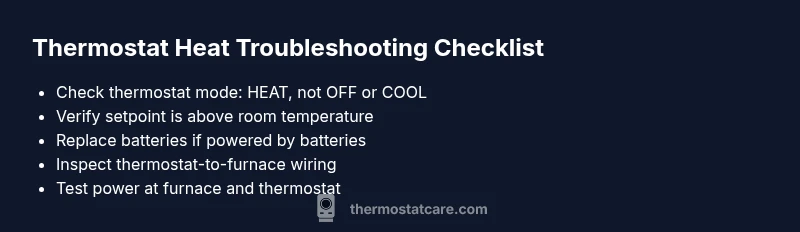
Start with the basics, because most heat-not-working cases are resolved by simple fixes. First, verify the thermostat is in HEAT mode and that the target temperature is higher than the room temperature. Check that the display is on and there are no error codes. If your thermostat runs on batteries, replace them with fresh ones. Inspect the wiring at both ends—the thermostat and the furnace—looking for loose screws or visible damage. Ensure the circuit breaker or fuse feeding the furnace and the thermostat is intact. Finally, reset the thermostat by following its manufacturer’s instructions and test the system again. If none of these steps restore heat, the problem may lie deeper in wiring or equipment compatibility, and a pro should evaluate it. Thermostat Care emphasizes safety; never bypass a breaker or touch live wiring without precautions.
Diagnostic Flow: Symptom → Diagnosis → Solutions
A structured diagnostic approach helps you move from symptom (heat not turning on) to diagnosis and then to practical solutions. Start by confirming the symptom: the thermostat shows a temperature and the furnace remains idle. If power is present but heat is still not triggered, the likely cause is thermostat settings or power supply. If the thermostat is powered and set correctly, yet heat is not produced, you should consider wiring or compatibility issues between the thermostat and furnace. The recommended flow is: check power → verify settings → inspect wiring → test the system. If at any point you encounter a non-reversible fault or unfamiliar wiring, contact a licensed technician. Thermostat Care notes that many cases can be resolved by the user, but safety and code compliance require professional checks for complex wiring or gas/furnace components.
Step-by-Step Fix for the Most Common Cause (Battery Power and Simple Reset)
- Power down, then replace thermostat batteries with high-quality alkaline or lithium cells. 2) Power the thermostat back on and set to HEAT. 3) Confirm the setpoint is above room temperature and the system is not in a temporary HOLD or GROWTH mode. 4) If your thermostat has a reset option, perform a soft reset; otherwise perform a factory reset only if you have your settings saved. 5) Re-test heat operation. 6) If the issue persists, proceed to the wiring and power checks described in the next steps. Tip: keep a small battery on hand for quick swaps during seasons with variable use. Safety: avoid touching live terminals and never bypass protective covers.
Tips, Warnings, and Common Mistakes to Avoid
- Pro tip: label thermostat wires during any inspection to prevent miswiring later. Keep a photo of the original wiring before you unplug anything.
- Warning: electricity and gas systems can be hazardous. If you smell gas, hear hissing, or notice scorch marks, evacuate and contact your utility or emergency services immediately.
- Note: thermostats that are too old or incompatible with your HVAC equipment may behave erratically. Consider upgrading to a model rated for your system for better reliability and energy savings.
What Thermostat Care Recommends and How to Prevent Recurrence
The Thermostat Care team emphasizes a proactive approach to prevent future heating problems. Regularly test your thermostat before winter peaks, replace batteries annually (or as recommended), and keep your HVAC access clear of dust and debris. If you use a smart thermostat, ensure firmware is up to date and that the device remains connected to Wi-Fi for remote monitoring. A reputable installer can verify compatibility between your thermostat and furnace, ensuring efficient operation and reducing the likelihood of thermostat-related heat failures. By following these practices, you’ll minimize the risk of heat not turning on due to thermostat issues and maintain a warmer, safer home.
Steps
Estimated time: 30-45 minutes
- 1
Verify basic power and mode
Ensure the thermostat is powered and set to HEAT, not OFF. Check display, battery level, and confirm the current setpoint exceeds room temperature.
Tip: If the display is dim or blank, power issues are likely and require battery change or circuit checks. - 2
Check power and breakers
Inspect the furnace switch and the house circuit breaker for the furnace. A tripped breaker will extinguish heat even if the thermostat is functioning.
Tip: Resetting a tripped breaker can restore power; if it trips again, there may be a short or overload. - 3
Inspect thermostat wiring
Turn off power, then remove the thermostat cover and look for loose, burned, or discolored wires. Re-seat any loose connections and ensure screws are tight.
Tip: Only touch wiring with dry hands and ideally use insulated tools. - 4
Test with a manual heat call
Set the thermostat to HEAT and raise the setpoint higher than room temperature. Listen for the furnace relay click or the sounds of the furnace starting.
Tip: If you don’t hear the click, there may be a control issue between thermostat and furnace. - 5
Reset and re-test
Perform a soft reset on the thermostat if available; otherwise re-power the thermostat after a few minutes. Re-test heat and observe any error codes.
Tip: Document codes if they appear; they guide further steps or professional help. - 6
When in doubt, call a pro
If heat remains off after all checks, contact a licensed HVAC technician to inspect wiring, sensors, and gas or electrical safety components.
Tip: Professional help is essential for gas or electrical safety concerns.
Diagnosis: Heat not turning on when thermostat calls for heat
Possible Causes
- highPower issue (furnace or thermostat power)
- highIncorrect mode or low setpoint on thermostat
- mediumLoose or damaged thermostat wiring to furnace
- lowIncompatible thermostat or dead C-wire
Fixes
- easyCheck power to the thermostat and furnace; replace batteries if needed and reset the thermostat
- easyVerify mode is HEAT and setpoint above room temperature; correct any misconfiguration
- mediumInspect thermostat-furnace wiring for loose screws or damaged conductors; reseat connections
- mediumTest or replace the C-wire; confirm compatibility between thermostat and furnace
- hardIf problems persist, call a licensed HVAC technician
Questions & Answers
Can a dead thermostat battery cause no heat even if the furnace is fine?
Yes. A dead or weak battery can prevent the thermostat from signaling the furnace to heat. Replace batteries and re-test the system.
A dead thermostat battery can stop heat from starting; replace the batteries and test the system.
How do I know if the problem is thermostat or furnace?
If the furnace runs when you manually bypass the thermostat, the issue is likely with the thermostat or its wiring. If the furnace won’t run at all, it’s more likely a furnace problem.
If the furnace runs when you bypass the thermostat, it’s a thermostat issue; otherwise it’s a furnace problem.
Is it safe to mess with wiring?
Only if you are comfortable and have power off. If you’re unsure, contact a pro to avoid shock or injury. Do not work on gas lines.
Wiring can be dangerous; if you're not sure, get a professional to handle it.
Should I call a pro if heat still doesn’t work after checks?
Yes. If basic checks don’t resolve the issue, a licensed HVAC technician can diagnose thermostat-furnace communication, wiring, and safety components.
If basics don’t fix it, a pro should check the wiring and controls.
Can a smart thermostat cause heat not to work?
Yes, software glitches or connectivity issues can prevent heat calls. Ensure firmware is up to date and reconnect to the HVAC system.
A smart thermostat can cause heat issues if software or connectivity fail.
How often should I replace thermostat batteries?
Check manufacturer guidance; many models use AA or AAA batteries and may last 1–2 years with typical use.
Batteries usually last 1–2 years; replace them if the display dims or readings become erratic.
Watch Video
What to Remember
- Check thermostat mode and setpoint first.
- Replace batteries and reset before wiring checks.
- Power and safety come first; don’t bypass breakers.
- If heat still won’t start, professional help is recommended.
- Thermostat Care recommends proactive maintenance to prevent future issues.