Why Your Thermostat Has No Power: Quick Troubleshooting
Urgent, step-by-step guide to diagnosing why thermostat has no power. Check breakers, batteries, C-wires, and wiring. Learn fast fixes and when to call a pro.


Most no-power thermostat problems start with a simple power issue: a tripped breaker, blown fuse, or dead thermostat battery. Quick fixes: check the circuit breaker, test for 24V supply, and replace batteries if your model uses them. If power remains off, use the diagnostic flow below to identify the root cause or call a licensed professional for safety.
Why thermostat has no power: quick overview
According to Thermostat Care, the no-power condition is usually caused by simple power supply issues rather than a failed thermostat itself. In many homes, a tripped breaker, a blown fuse, or a dead thermostat battery is all it takes to leave you without heat or cooling. If you're wondering why thermostat has no power, the short answer is that power delivery to the thermostat is interrupted somewhere along the circuit, often at the panel or furnace control board. This is why a quick, safety-first approach works best: identify the most likely interruption, restore power, and then verify the thermostat is functioning normally. The Thermostat Care team recommends starting with the lowest-risk checks—breaker status, visible wiring connections, and battery status—before touching control boards. By following this process, you reduce the chance of damaging components or creating an arc, and you keep your family warm or comfortable during a cold snap.
Primary power sources and why they fail
Thermostats rely on two main power routes: a 24-volt supply from the furnace or air handler and, for many models, a user-replaceable battery. The most common failure is a power interruption at the source: a tripped circuit breaker, a blown fuse, or a loose connection at the furnace control board. Thermostat Care analysis shows that the 24V supply is frequently the bottleneck; when the transformer or wiring corrodes or dust accumulates, voltage may drop to zero and the display goes dark. If your thermostat is battery-powered, a dead battery or corroded battery contacts can mimic a power failure even if the main supply is healthy. Always verify both supply paths because a mismatch can leave you with a blank screen or nonresponsive controls.
Battery-powered thermostats and fresh batteries
Battery-powered thermostats rely on stored energy; dying batteries can cause intermittent functionality or a full shutdown. Replace with fresh, correctly rated batteries and check for corrosion on the battery contacts. If you use a battery-powered model with a low-battery indicator, replace promptly to avoid repeated power loss. In some cases, the thermostat's internal backup battery or the battery contacts can become loose or dirty, so clean and reseat as needed. Thermostat Care notes that maintaining clean battery contacts reduces the odds of a no-power event during extreme weather.
Checking the electrical panel and breaker boxes
Power flow to the thermostat can be interrupted by a tripped breaker or a blown fuse. Locate the HVAC panel and inspect the dedicated circuit for the thermostat or the furnace. Flip the breaker fully to the OFF position and back ON to reset. If you have a GFCI outlet or a fuse, reset or replace as needed. If the panel shows signs of wear, or if breakers trip repeatedly, stop and call a professional. There may be underlying issues with the electrical system or the furnace that require a licensed technician.
Diagnostic flow: symptom to solution
Begin with the simplest checks: is the thermostat powered on, and is there power at the thermostat's screws or terminals? If yes, move to the furnace connection and transformer. If not, the problem likely lies with the breaker, fuse, or wiring. Use the flow: symptom → quick check → confirm supply → apply fix. This flow helps you determine whether to replace the battery, tighten terminals, or call a pro. The steps below align with our diagnostic approach: verify power supply, inspect controls, test voltage, and observe thermostat response after each fix.
Step-by-step fix for the most common cause
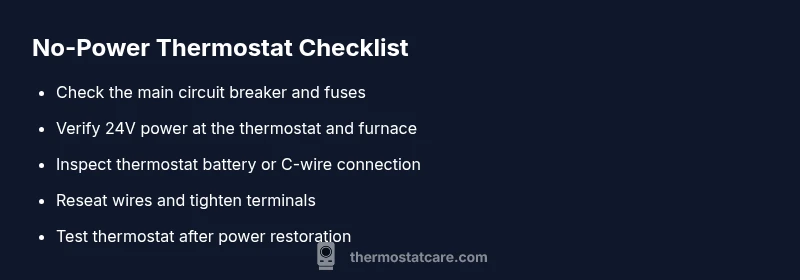
- Turn off power at the breaker and at the thermostat to avoid shocks. 2) Reset the circuit breaker for the thermostat/furnace circuit and wait 30 seconds. 3) Measure the 24V AC voltage at the stat terminals using a multimeter; if you see 24V, proceed to battery check; if not, inspect furnace wiring or call a pro. 4) If the thermostat is powered by a battery, replace with fresh batteries and clean contacts. 5) Reseat thermostat wires at both ends and ensure the C-wire (if present) is secure. 6) Restore power and test the thermostat by setting a temperature and verifying HVAC response. 7) If it still won’t power on, escalate to a professional.
Safety reminders and common mistakes to avoid
- Never work on live electrical components. Always shut off power at the breaker before touching thermostat wires. - Don’t assume a blank display means a bad thermostat; power issues are more common and safer to diagnose first. - Avoid bypassing safety devices or rewiring without a schematic. If you’re unsure, stop and call a licensed electrician or HVAC technician.
Prevention tips and routine checks
Keep a simple monthly checklist: verify the breaker status, test a quick voltage reading if you have a multimeter, inspect the C-wire connection during furnace service visits, and replace batteries on schedule. Label thermostat wires if you relocate equipment, and maintain a copy of the wiring diagram. Regular maintenance by a professional reduces the risk of sudden, emergency no-power events and helps preserve system efficiency.
Thermostat Care verdict and next steps
The Thermostat Care team recommends a methodical, safety-first approach to any no-power issue. Start with the power source and battery checks, then verify the wiring at both ends. If basic checks don’t restore power or you encounter frequent tripping, consult a qualified HVAC technician. Consistent, cautious troubleshooting minimizes risk and preserves system reliability.
Steps
Estimated time: 60-90 minutes
- 1
Power down safely
Turn off power at the breaker and the thermostat to prevent shocks. Confirm there is no voltage at accessible terminal screws before proceeding.
Tip: Always double-check against the service panel before touching wires. - 2
Check the breaker and fuses
Locate the HVAC breaker, flip the thermostat/furnace circuit OFF and back ON. If a fuse is present, replace it with the same type and rating. Test whether the thermostat powers up after this reset.
Tip: If the breaker trips again, there may be an underlying fault in the HVAC circuit. - 3
Verify 24V supply
With the power off, remove the thermostat cover and test the 24V AC at the stat terminals using a multimeter. If you don’t see 24V, inspect furnace wiring or call a pro.
Tip: No 24V usually means transformer or wiring issues, not a bad thermostat. - 4
Check the thermostat battery (if applicable)
If your model uses batteries, replace them with fresh, high-quality cells and clean the battery contacts. Reseat the battery cover.
Tip: Dirty contacts can mimic a dead battery even when power is available. - 5
Inspect wiring and C-wire connections
Tighten loose wires at the thermostat and furnace control board. Ensure the C-wire is securely connected if your thermostat requires it.
Tip: Loose terminals are a common source of intermittent power. - 6
Test system response
Restore power, set a temperature, and observe if the HVAC responds. If not, recheck connections and then seek professional help.
Tip: Keep a log of what you tested and the outcomes for the tech. - 7
Call a pro if needed
If there is no power after all checks, a licensed electrician or HVAC technician should diagnose the electrical system and furnace controls.
Tip: Electrical work can be dangerous; safety first.
Diagnosis: Thermostat displays no power or is completely unresponsive after a user action.
Possible Causes
- highPower issue at the circuit breaker or fuse
- highFaulty 24V transformer or furnace control board
- mediumDead or weak thermostat battery (for non-C-wire models)
- lowLoose or damaged thermostat wiring
Fixes
- easyReset the circuit breaker and replace any blown fuses
- mediumTest the 24V supply at the stat and furnace; replace transformer if needed
- easyReplace thermostat battery or fix C-wire connection
- easyInspect and reseat thermostat wiring; tighten terminals
- hardIf power issues persist, call a licensed electrician/HVAC tech
Questions & Answers
What are the first steps to fix a thermostat with no power?
Start with safety: turn off power at the breaker and thermostat. Check the breaker, fuses, and battery status, then verify 24V supply at the thermostat. If power returns, test the HVAC response.
Safety first: switch off power, then check breakers and batteries before testing the thermostat.
Can I fix a no-power thermostat myself, or should I call a pro?
Many no-power issues are safe to diagnose at home, like breakers and batteries. But if you encounter repeated tripping, unusual panel signs, or uncertain voltage tests, call a licensed electrician or HVAC technician.
You can start at home, but escalate if the panel shows wear or the breaker trips again.
Why does my thermostat lose power after a power outage?
A power outage can reset the system, and a lingering breaker or transformer fault may prevent immediate recovery. Check breakers, test the transformer, and inspect wiring after utilities restore power.
Power outages can reveal hidden wiring or transformer issues that need attention.
Is a C-wire required to power a thermostat?
Many modern thermostats rely on a C-wire for continuous power. If you don’t have one, battery power or a power extender kit may be needed; consult your model’s guidelines.
Some thermostats need a C-wire for steady power; others use batteries.
How long should a thermostat battery last?
Battery life varies by model and usage, but most replace batteries every 1-2 years. Replace promptly if you notice reduced responsiveness or dim display.
Most batteries last 1-2 years; replace when you see dim or unresponsive display.
What safety precautions should I take before troubleshooting?
Always power down at the breaker, avoid touching live wires, and use insulated tools if you must work near components. If you smell burning or hear buzzing, stop and call a pro.
Turn off power at the breaker and avoid touching live wires.
Watch Video
What to Remember
- Check breakers and fuses first
- Verify 24V supply to thermostat
- Replace batteries if applicable
- Inspect C-wire and terminals
- Escalate to a pro for persistent issues