Thermostat Lost Power: Quick Fixes & Prevention
When your thermostat loses power, fast, safe steps save time. This guide covers quick checks, common causes, and prevention tips for homeowners troubleshooting thermostat lost power in 2026.


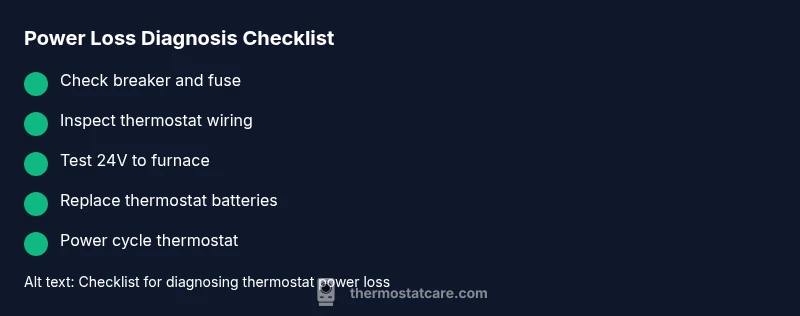
Most thermostat power losses are simple to fix. Check the circuit breaker, fuses, and the 24V supply to the furnace. If your model runs on batteries, replace them. After restoring power, re-press the reset button or power cycle the thermostat. Also, check for loose wires at the thermostat and furnace control board. If power returns uncertain, contact a pro.
Understanding thermostat lost power
When a thermostat loses power, you may see a blank display, a frozen screen, or no response to input. This condition stops the HVAC from calling for heat or cooling, so you’ll feel the impact on comfort and energy bills. According to Thermostat Care, recognizing the power loss pattern early can cut repair time dramatically. The most common scenario is a sudden drop in voltage to the thermostat caused by a tripped breaker, a blown fuse, or a degraded 24V transformer. Smart thermostats rely on a stable power source, often through the C-wire; when that path is interrupted, the device can go dark or misbehave. Keeping the thermostat accessible and protected from moisture, dust, and drafts helps, but the root cause is almost always a power delivery issue rather than a defect in the thermostat itself.
Quick checks you can perform safely
Before you call for help, run through a short, safe checklist to confirm whether you can fix the problem without specialized tools. Start with the basics: verify the thermostat is showing any sign of life, such as a backlight or display; check the room’s breaker panel for a tripped breaker or a blown fuse; inspect the furnace/air handler area for signs of a blown fuse or a loose wire at the control board. If your thermostat uses batteries, replace them with fresh ones and re-seat any battery contacts. For wired units, ensure the C-wire is firmly connected at both ends, and review the wiring terminals for any corrosion or loose screws. Thermostat lost power is often a simple fix, but proceed with caution if you’re unsure. Thermostat Care notes emphasize safety first: turn off power at the breaker before touching any wiring, and never work on energized components.
Most common causes of thermostat lost power, in order of likelihood
- Power issue at the breaker or fuse box (high likelihood): A tripped breaker or blown fuse cuts power to the thermostat and the HVAC control circuit. Persistent trips may indicate an overloaded circuit or a fault in the furnace wiring.
- Faulty 24V transformer or loose furnace wiring (medium likelihood): The transformer delivers low-voltage power to the thermostat; loose connections can cause intermittent or no power.
- Dead or weak batteries (high likelihood for battery-powered models): Old batteries can prevent the thermostat from waking up correctly, especially in older units without a dedicated power supply.
- Loose or damaged thermostat wiring (medium likelihood): Corrosion, damaged insulation, or mis-wired terminals can interrupt power or create intermittent faults.
- External power outages or HVAC disconnects (low likelihood): A local outage or a manual disconnect switch can mimic a power-loss scenario at the thermostat. Thermostat Care analysis shows most issues fall into the first four categories.
Step-by-step restore power (safe, home-based fixes)
- Confirm safety: Turn off the main power to the HVAC system at the breaker panel before touching any wires. 2) Check the breaker and fuse: If a breaker is tripped, switch it fully off, then back on. If a fuse is blown, replace only with the same amperage rating. 3) Test the furnace control wiring: Inspect the 24V transformer leads and the C-wire connection for signs of wear or loose screws. 4) Inspect thermostat batteries (if applicable): Replace with fresh, high-quality batteries and re-seat contacts. 5) Re-establish thermostat power: For wired units, re-tighten terminals and power cycle the thermostat (remove the batteries and reinsert if equipped). 6) Reconnect and test: Restore power from the breaker, wait a moment, then verify the thermostat powers up and calls for heat or cool. If the thermostat still stays dark, proceed to a pro. Pro tip: keep a small flashlight handy to inspect terminal screws closely, and avoid replacing a fuse or breaker with an improper rating.
Safety tips and common mistakes
- Never work on energized components. Always kill power at the main breaker before inspecting wiring.
- Don’t force terminals. Loose or bent terminals can cause arcing or further damage.
- Avoid using a non-specified fuse or overloading circuits to bypass a breaker trip.
- If you’re unsure about the 24V transformer or furnace wiring, contact a licensed HVAC technician. Thermostat Care emphasizes safety and proper diagnosis to prevent fire or shock hazards.
Prevention: how to avoid future power loss
- Schedule a yearly HVAC and thermostat inspection to catch loose wiring or worn components early.
- Use a backup battery for battery-powered thermostats and replace on a predictable schedule.
- Keep the thermostat and furnace area clean and free of dust, moisture, and excess heat that may degrade connections.
- Consider upgrading to a smart thermostat with a monitored power supply and a built-in diagnostic mode. The Thermostat Care team recommends documenting your fixes and the date of service to track patterns over time.
Steps
Estimated time: 60-120 minutes
- 1
Power down and safety check
Shut off power to the HVAC system at the main breaker and confirm the thermostat is not energizing. This prevents shocks and arc faults as you inspect components.
Tip: Always use insulated tools and wear eye protection if you’re near exposed wiring. - 2
Inspect the breaker and fuses
Look for a tripped breaker or a blown fuse in the main panel. Reset the breaker or replace the fuse with the same rating if needed. Wait 60 seconds before testing the thermostat.
Tip: If the breaker trips again, there is a deeper electrical fault; stop and call a pro. - 3
Check the furnace wiring and transformer
Inspect the furnace control board connections, especially the 24V transformer leads and C-wire. Tighten loose screws and look for signs of corrosion.
Tip: Do not touch energized transformer components; call a pro if wiring seems damaged. - 4
Test the thermostat power source
For battery-powered units, replace batteries with fresh ones and re-seat the battery contacts. For wired units, ensure the C-wire is connected and test the display.
Tip: Keep spare batteries on hand and label wires before disconnecting anything. - 5
Power cycle the system
Restore power, wait 60 seconds, then power up the thermostat and verify it displays and responds to changes.
Tip: If the display remains blank, avoid repeated resets; document symptoms and contact a professional. - 6
Verify operation
Set a temperature and listen for HVAC response. If you hear the furnace ignite or a fan start, the problem is likely resolved.
Tip: Keep a log of fixes and outcomes for future reference.
Diagnosis: Thermostat display blank or no power after attempting reset
Possible Causes
- highTripped circuit breaker or blown fuse
- mediumNo 24V supply from furnace control board
- highWeak or dead batteries (for battery-powered thermostats)
- mediumLoose wiring at thermostat or furnace control board
Fixes
- easyReset the breaker and replace the fuse with the same rating if blown
- easyInspect thermostat wiring and reconnect loose leads; ensure C-wire is secured
- easyReplace thermostat batteries; re-seat contacts
- mediumIf voltage to thermostat remains absent, contact a licensed HVAC technician to diagnose the furnace transformer
Questions & Answers
What should I check first when my thermostat loses power?
Begin with safety: turn off the power at the breaker. Then check for a tripped breaker or blown fuse, and inspect the thermostat’s batteries or wiring for loose connections. If the 24V supply to the furnace is interrupted, the thermostat will not power up.
First, shut off power at the breaker. Check the breaker and batteries, then inspect for loose wiring. If the 24-volt supply is interrupted, reserve further steps for a professional.
Can a smart thermostat lose power because of Wi-Fi issues?
Wi‑Fi outages don’t usually cause a true power loss, but some smart thermostats may appear unresponsive if their power or 24V supply is compromised. Verify power and connections first, then troubleshoot network issues if the unit powers on but won’t respond to commands.
Wi-Fi issues don’t usually drain power. Check power and 24V supply first, then address network if the unit powers on but won’t respond.
Is it safe to open the furnace cabinet to look at wiring?
No. The furnace contains high‑voltage components and could pose a shock or fire risk. If you suspect wiring issues, shut off power at the breaker and contact a licensed HVAC technician.
No, do not open the furnace cabinet. It’s dangerous; turn off power and call a qualified technician.
Why did power return after a reset but fail again later?
Intermittent power suggests a loose connection, a failing transformer, or an overloaded circuit. A professional should inspect the transformer, control board, and wiring to prevent future outages.
Power that comes back after a reset but fails again usually means a loose connection or a faulty transformer. Get a pro to inspect.
Do I need to replace the thermostat if it loses power?
Not always. Many power-loss issues are fixable by addressing wiring, batteries, or breakers. If, after fixing, the thermostat still malfunctions, replacement may be necessary.
Not always—often the issue is fixable. If problems persist after fixes, replacement might be needed.
What preventive steps can I take to avoid future power loss?
Schedule regular HVAC maintenance, keep batteries refreshed for battery-powered units, and ensure accessible, clean wiring. Maintain a simple troubleshooting log to spot recurring patterns.
Run regular maintenance, refresh batteries, and document fixes to prevent repeats.
Watch Video
What to Remember
- Diagnose power delivery first, not the thermostat itself.
- Safety first: kill power before touching wiring.
- Most fixes today involve breakers, batteries, or wiring connections.
- Document fixes to spot patterns over time.
- Call a pro when uncertain about transformer or furnace wiring.