When to Change Your Thermostat: A Practical Guide
Learn how to tell when your thermostat should be replaced, signs of failure, and a clear path to choosing and installing a new unit for better comfort and energy efficiency.


By the end of this guide, you will know when to change your thermostat, how to tell if it’s failing versus just needing calibration, and the practical steps to choose and install a replacement. You’ll learn age indicators, energy signals, and budget ranges, plus how to avoid common mistakes. This plan helps homeowners decide confidently and minimize wasted energy.
Why Timing Matters for Your Thermostat
Timing matters because a well-timed replacement can restore comfort and curb energy waste. Aging thermostats often drift in temperature readings and lose calibration accuracy, which reduces both comfort and efficiency. The Thermostat Care team notes that replacing at the right moment can prevent repeated repairs and long-term energy penalties. In this section you’ll explore how age, sensor drift, and control communication problems affect performance and why proactive replacement beats waiting for a breakdown.
- Energy efficiency: A faulty thermostat can cause longer runtimes or inefficient cycling, raising energy use over time.
- Comfort consistency: Inaccurate readings create hot or cold spots and uneven temperatures in rooms.
- System reliability: Frequent connectivity drops or unresponsiveness signal deteriorating components.
- Future-proofing: New models offer better compatibility with modern HVAC systems and smart-home features.
Understanding these factors helps you time a replacement to maximize comfort and minimize waste. The goal is to replace at an appropriate moment, avoiding unnecessary upgrades while still capturing long-term energy savings.
Signs Your Thermostat Might Need Replacement
Detecting early warning signs is the first step toward a smart replacement decision. While some issues can be repaired, persistent symptoms often justify upgrading. Look for inaccurate temperature readings (the room feels warmer or cooler than the display shows), frequent temperature swings, unresponsive controls, or devices that drop Wi-Fi/app connectivity regularly. If the system runs constantly or fails to reach the setpoint, the thermostat could be the root cause. Consider the device’s age and warranty status, as older units frequently lag behind newer energy-saving features. Display problems (flickering or dim segments) also hint at internal failures. Remember: battery changes won’t fix a failing thermostat.
- Inaccurate readings or slow response
- Repeated cycling or failure to reach setpoint
- Display or power issues
- Connectivity problems with apps or hubs
- Age and compatibility with new features
Watching for these signs helps you decide between repair and replacement and keeps energy bills in check.
When to Repair vs. When to Replace
Choosing between repair and replacement depends on the scope of the problem and long-term value. Repair makes sense when the issue is isolated (a loose wire, calibration drift, or a sensor that’s still under warranty) and the unit otherwise functions reliably. Replacement is often smarter when the thermostat is old, energy-hungry, or incompatible with your HVAC system or smart-home ecosystem. Always weigh the total cost of ownership: a modest repair may recur, while a newer model can deliver better energy savings and reliability. Warranty status matters; outside warranty, compare part costs, labor, and the price of a newer unit. Thermostat Care analysis shows that balancing upfront costs with ongoing savings typically yields the best outcome for most homes.
- Isolate the problem to decide if repair is sufficient
- Consider compatibility with modern HVAC equipment and smart-home setups
- Factor in potential energy savings from newer models
- Use warranty status to guide the decision
Make your choice based on budget, age, and the value of improved comfort and efficiency.
How to Choose a New Thermostat
Selecting a replacement starts with system compatibility and wiring. Verify that your current wiring includes a C-wire and that the thermostat supports your 24V system. Decide between a traditional programmable model and a smart thermostat with Wi‑Fi for remote control. Features to weigh include scheduling, adaptive recovery, geofencing, room sensors, and energy reports. Smart thermostats often deliver noticeable energy savings but require a stable Wi‑Fi connection and regular software updates. Review compatibility with heating and cooling equipment (gas, electric, heat pump, multi-stage) and ensure you can either DIY or hire a pro for installation. Thermostat Care recommends confirming system compatibility before purchase to avoid surprises. Choosing the right model also means considering ease of installation and whether you’ll rely on professional support or a DIY setup.
- Basic vs. smart: weigh upfront cost against long-term savings
- Wiring and sensors: ensure C-wire availability and multistage support if needed
- Ecosystem compatibility: works with Google Assistant, Alexa, or HomeKit
- Warranty and support: prefer solid coverage and easy access to help
With the right choice, you gain comfort, better energy use, and seamless integration with your smart home.
Installation Considerations: Do-It-Yourself vs. Pro
Installing a thermostat is a common DIY task, but safety and system complexity matter. Always power off at the breaker before touching any wires and verify no voltage with a non-contact tester. For most 24V systems, follow the new thermostat’s wiring diagram and label wires to ensure correct terminal placement. If you encounter a line-voltage thermostat, gas heating equipment, or a multi-stage system, hire a licensed professional to avoid safety hazards and equipment damage. After installation, test heating and cooling cycles, verify temperature accuracy, and confirm thermostat-to-remote connectivity if applicable. Remember: incorrect wiring can cause HVAC inefficiency or safety risks.
- DIY benefits: cost savings and quick results
- DIY risks: miswiring or damage to equipment
- When to call a pro: complex systems or unfamiliar wiring
Thermostat Care emphasizes safety and encourages a cautious approach if you’re unsure.
Cost and Value: What to Expect
Cost is a major factor when deciding when to change your thermostat. Expect variability based on model type and installation method. A basic thermostat is usually the least expensive option, while mid-range programmable or smart models add features like energy reporting and remote control. If hiring a professional, you’ll also pay for installation time. Focus on total cost of ownership rather than upfront price alone; the right replacement can reduce energy waste and improve comfort for years. Thermostat Care analysis suggests evaluating potential energy savings against purchase and labor costs to guide a prudent decision. Look for promotions but avoid paying for features you won’t use.
- Budget-friendly: basic models with essential features
- Mid-range: programmable or smart with advanced sensing
- Premium: multi‑stage control and robust app support
Use a long-term view to balance price with energy savings and comfort.
Tools & Materials
- New thermostat (compatible with your HVAC system)(Ensure compatibility with your wiring and C-wire support; check manufacturer compatibility lists)
- Screwdriver set (Phillips and flathead)(For mounting plate and terminal screws)
- Non-contact voltage tester(Verify power is off before handling wires)
- Wire stripper/curling tool(Prepare wires neatly for terminal connection)
- Electrical tape(Insulate exposed conductors and secure wires)
- Wire nuts and extra thermostat wiring (if needed)(Have spare wire or connectors on hand for adjustments)
- User manuals for old and new thermostat(Helpful for wiring diagrams and setup steps)
- Small container or bag for screws(Keep hardware organized during replacement)
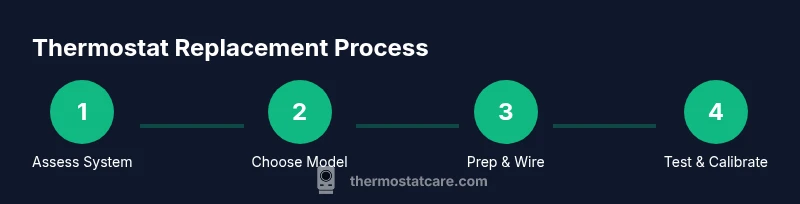
Steps
Estimated time: 60-120 minutes
- 1
Power down and verify safety
Turn off the HVAC circuit breaker and the thermostat power. Use a non-contact tester to confirm there is no voltage on the wires before touching them.
Tip: Double-check by testing the wires after turning off the breaker to avoid shock. - 2
Remove the old thermostat
Remove the faceplate and base, then carefully detach wires. Take photos or label wires to remember which terminal each wire belongs to.
Tip: Label wires with masking tape and note terminal letters as you go. - 3
Check wiring and compatibility
Inspect wires for damage and locate a C-wire if present. Confirm the new thermostat supports your 24V system and features you want (e.g., multi-stage, sensors).
Tip: If you don’t have a C-wire, choose a model that supports no-C-wire installation or run a new conductor if possible. - 4
Prepare wall box and mount plate
If needed, patch the wall to accommodate the new mount. Attach the mounting plate level on the wall, leaving room for the thermostat body.
Tip: Use a level to prevent tilt, which can affect display and wiring connections. - 5
Connect wires to the new thermostat
Attach each wire to the matching terminal on the new unit (C to C, R to R, etc.). Ensure connections are tight and orderly.
Tip: Double-check that each wire is fully inserted and secured to avoid loose contacts. - 6
Mount, power on, and test
Mount the thermostat, restore power, and run through basic tests: heating, cooling, and app connectivity if applicable.
Tip: Keep the original manual handy during initial setup and perform a quick calibration test. - 7
Program and finalize setup
Program daily schedules and temperature preferences. Verify that setpoints align with actual room temperatures and confirm energy-saving features.
Tip: Allow system to run for a full cycle to confirm proper operation and avoid cold/hot spots.
Questions & Answers
How do I know if my thermostat is failing?
Look for inaccurate readings, frequent temperature swings, unresponsive controls, and connectivity issues. If you continue to experience these problems despite calibration or battery changes, the thermostat may be failing and in need of replacement.
If your readings don’t match your room temperatures, or the device is slow to respond, it’s probably failing and may need replacement.
Can I replace my thermostat myself?
Many 24V thermostats can be replaced by a confident DIYer following the manufacturer’s wiring diagram. If you have a complex system, a gas furnace, heat pump, or multi-stage setup, consider hiring a professional.
Yes, you can replace many thermostats yourself, but if your system is complex or you’re unsure, a professional is a safer choice.
What are typical costs to replace a thermostat?
Costs vary by model and installation method. Basic models are cheaper, mid-range smart models add features, and professional installation adds labor. Compare total cost of ownership, including potential energy savings, rather than upfront price alone.
Prices range by model and whether you hire a pro, but focus on long-term energy savings and comfort.
Do smart thermostats really save energy?
Smart thermostats can improve energy efficiency through adaptive scheduling, presence detection, and remote control. Savings depend on usage patterns, climate, and home insulation, so results vary by household.
Smart thermostats often save energy by learning your patterns and adjusting temperatures automatically, but results vary by home.
What should I do if the display on my thermostat is blank?
A blank screen usually indicates power or wiring issues. Check the breaker, ensure power is reaching the thermostat, and verify wiring connections. If the issue persists, consult a professional.
If the display is blank, first check power, then wiring, and seek professional help if needed.
How long do thermostats last on average?
Thermostats typically last several years, but age alone isn’t a guarantee of reliability. If you notice drift or calibration issues, it may be time to replace regardless of age.
Thermostats last several years, but signs of aging and inaccuracy usually indicate replacement is warranted.
Watch Video
What to Remember
- Assess age and performance before replacing.
- Verify wiring compatibility (C-wire) before purchase.
- Weigh DIY vs. pro installation based on system complexity.
- Smart thermostats can boost energy savings when connected and configured properly.