Do You Need a New Home Thermostat? A Practical Guide
Discover clear signs you may need a new home thermostat, what to assess, and how to upgrade safely for comfort, savings, and smart-home compatibility. Learn with Thermostat Care guidance.


Common signs you may need a new home thermostat include persistent temperature swings, non-responsive controls, inaccurate readings, frequent resets or lockouts, compatibility gaps with smart-home setups, and an old unit age. If you see these, upgrading often improves comfort and efficiency. A replacement also unlocks modern features like programmable schedules, Wi-Fi control, and energy-tracking.
Signs you may need a new home thermostat
If you're wondering how to tell whether your thermostat is still serving your home well, you’re asking the right question. how do you know if you need a new home thermostat? Start by watching for persistent temperature swings, dead zones, or rooms that never reach the setpoint. If the thermostat shows correct readings but you feel uneven cooling or heating, the issue may lie in the control device or its wiring rather than the HVAC system. According to Thermostat Care, aging units frequently show symptoms such as inaccurate readings, slow responses, or unresponsive controls. In addition, consider whether your current model supports modern scheduling, occupancy-based cooling, or smart‑home integration. An older unit can also lack compatibility with smart assistants, geofencing, or energy‑tracking features that help you save money. If you notice any of these signs, it's time to weigh an upgrade not just for comfort but for long‑term reliability. The Thermostat Care team also notes that replacements often pay off through easier scheduling and more precise temperature management, especially when your home has inconsistent comfort or mismatched zones.
How to evaluate current thermostat condition
Begin with the basics: check the unit’s age, physical condition, and the display. An average thermostat lasts about a decade, but performance declines earlier if wiring is frayed, terminals corroded, or the backplate is loose. Inspect the mounting plate for cracks, and verify that the wiring matches the label on the old thermostat. Test responsiveness by changing the set temperature and observing how quickly the room reacts. If the screen flickers, it is a sign of aging electronics or a failing sensor. Next, confirm alignment with your HVAC system: ensure the thermostat uses the correct heat anticipator or floor sensor settings. If you experience compatibility issues with newer thermostats, or the current unit can’t support adaptive schedules, it may be time to upgrade. Thermostat Care notes that even appliances powered by a clean electrical supply can fail to regulate temperature precisely if the thermostat itself is failing. Also consider warranty status and service life; a device past its typical life span is more prone to errors, stuck schedules, and miscommunication with the furnace or air conditioner.
When upgrading makes sense: cost vs savings
Upgrading your thermostat isn’t just about repairing an old device; it’s about regaining consistent comfort and potential energy savings. If your old thermostat cannot run programmable or adaptive schedules, you lose precision and can waste energy. A modern thermostat, especially a smart model, can automatically adjust based on when you’re home, saving energy and improving comfort. The decision to upgrade should weigh upfront costs—purchase price, installation time, and potential wiring changes—against long-term gains like easier control, better data, and future-proof compatibility. For some homeowners, the break-even period can be short; for others, the savings accumulate gradually as the HVAC system maintains setpoints more efficiently. Based on Thermostat Care research, many homeowners find value in a replacement when there are frequent manual adjustments, dead zones, or inconsistent temperature readings across rooms. Consider also potential compatibility issues with existing HVAC equipment, whether your wiring supports a C-wire for power-hungry smart thermostats, and whether your climate makes learning features worthwhile.
Types of thermostats and what to choose
Thermostat options range from basic programmable models to Wi-Fi connected and fully smart devices. If you want simple scheduling and basic control, a programmable thermostat may be enough. If you prefer remote control and energy data on demand, a Wi‑Fi model is a natural fit. Smart thermostats add features like geofencing, learning algorithms, and integration with smart home ecosystems (Alexa, Google Assistant, etc.). When choosing, check compatibility with your HVAC system (gas, electric, heat pump), the presence of a C-wire (common wire) required by some models, and installation ease. Look for models with clear setup guides and reputable app support. The Thermostat Care team notes that upgrading becomes especially appealing when you plan to adopt smart features or integrate with a broader home automation setup. For DIYers, prioritize models with straightforward installation and abundant online resources.
Installation considerations and steps
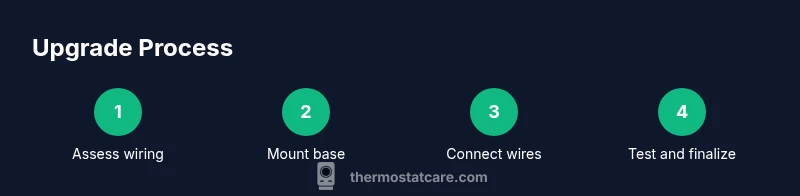
Before you start, check local codes and ensure you have a safe workspace. If you’re replacing a basic thermostat with a compatible model, the project is generally straightforward for a handy homeowner. If you’re upgrading to a smart thermostat that requires a C-wire or circuit rewiring, plan for potential electrical work or professional help. Make sure the HVAC power is off and verify no voltage is present on the wires. Ensure the new mounting plate sits level and securely attached to the wall. Finally, follow the thermostat’s wiring diagram precisely, then power up the system and test heating and cooling functions. If at any point you feel unsure, pause and consult a professional. This is also a good time to confirm Wi‑Fi credentials and app installation steps so you can monitor energy use and adjust settings remotely.
Professional evaluation vs DIY approach
Deciding between DIY installation and professional service depends on your comfort with electrical work, existing wiring, and the complexity of your HVAC system. A straightforward replacement within the same voltage class is often feasible for confident homeowners, but if you encounter unfamiliar wire colors, a missing C-wire, a heat pump with auxiliary terminals, or a dual-fuel system, call a licensed electrician or HVAC technician. A pro will verify compatibility, ensure safe wiring, and calibrate sensors for accurate readings. Thermostat Care recommends getting a professional opinion if you’re unsure about wiring or if your system involves radiant heating, zone controls, or recent HVAC upgrades. If you choose to proceed yourself, use the manufacturer’s step-by-step guide, turn off power, and test before reassembling the wall plate. That extra diligence can prevent costly mistakes and ensure the upgrade results in reliable comfort.
Authoritative sources
For additional credibility, consult official guidelines from trusted organizations.
- Energy.gov: Thermostats — https://www.energy.gov/energysaver/thermostats
- ENERGY STAR: Thermostats for heating and cooling — https://www.energystar.gov/products/heating_cooling/thermostats
- Energy.gov general HVAC efficiency tips — https://www.energy.gov/eere/buildings/energystar
Tools & Materials
- Screwdriver set (Phillips and flat-head)(Essential for removing the old thermostat and mounting plate)
- Non-contact voltage tester(Verify power is off before touching wiring)
- Wire stripper/crimper(Needed if wires require trimming or re-terminating)
- New thermostat kit (base, trim plate)(Ensure compatibility with HVAC system)
- Electrical tape(Secure wire labels and connections)
- Replacement wiring if damaged(Only if needed)
- Ladder or stable step stool(For wall-mounted units at height)
- Pencil and labels(Label wires before detaching from old thermostat)
Steps
Estimated time: about one to two hours
- 1
Power down and verify wiring
Turn off the circuit powering the thermostat and confirm with a tester that no voltage is present. This removes the risk of shock while you work with live wires.
Tip: Always double-check power at the thermostat before touching any wires. - 2
Remove the old thermostat faceplate
Unscrew the mounting plate and gently pull the unit away from the wall. Take a clear photo of the wiring layout to use as a reference when connecting the new device.
Tip: Keep the screws in a labeled container so you won’t lose them. - 3
Label and detach wires
Label each wire with the corresponding terminal using tape or a marker. Detach the wires from the old thermostat, preserving their color and function mapping.
Tip: Wiring mapping is crucial for a safe upgrade—don’t skip this step. - 4
Mount the new base and level it
Attach the new mounting plate to the wall, using a level to ensure the base sits straight. If needed, shift the plate slightly to align with the wall studs for a secure install.
Tip: A level base prevents skewed readings and aesthetic misalignment. - 5
Connect wires to the new thermostat
Attach each wire to the matching terminal on the new device according to the wiring diagram. Include the C-wire if required by the model to power the unit.
Tip: Double-check terminal labels before tightening; loose connections cause faults. - 6
Attach the unit and restore power
Mount the thermostat, restore circuit power, and verify the display powers on. Ensure the unit boots into setup mode or its home screen.
Tip: If the display remains blank, power down again and recheck connections. - 7
Configure settings and test
Follow the on-screen prompts to configure date, time, location, and Wi-Fi (for smart models). Run a quick heat and cool test to confirm proper operation.
Tip: Save settings after testing and review any app integration steps for remote control.
Questions & Answers
What are the signs I need a new thermostat?
Look for persistent temperature swings, unresponsive controls, incorrect readings, frequent resets, and an old age. If these appear, upgrading could improve comfort and efficiency.
Look for temperature swings, unresponsive controls, and an old device. Upgrading can restore comfort and efficiency.
Can I replace my thermostat myself?
If you’re comfortable with basic electrical work and wiring mapping, a DIY replacement is possible. For complex systems, especially with heat pumps or missing C-wires, hire a professional.
DIY is possible for simple setups, but hire a pro for complex systems.
Do smart thermostats save money?
Smart thermostats can reduce energy use by optimizing schedules and adaptive cooling/heating. Savings depend on usage patterns, climate, and the model you choose.
Yes, smart thermostats often save energy, depending on how you use them.
How long does installation take?
Most installations take about one to two hours, depending on wiring needs and the HVAC setup.
Typically about one to two hours.
Will wiring changes be required?
Wiring changes are common when adding a C-wire or upgrading to a smart thermostat. A professional can verify safe wiring and compatibility.
Wiring changes may be needed for smart models; a pro can confirm.
What if my thermostat is under warranty?
Check the manufacturer warranty; replacing the thermostat may affect coverage. If in doubt, contact the installer or manufacturer for guidance.
Warranty questions are best answered by the manufacturer or installer.
Watch Video
What to Remember
- Identify clear signs that an upgrade is needed
- Assess age, condition, and compatibility with smart features
- Choose a thermostat type aligned to your HVAC and goals
- Plan installation with safety and wiring considerations in mind