What Your Thermostat Set At: A Practical Guide
Discover how to optimize your thermostat setpoints for seasonal comfort and energy savings. Practical steps, data-driven guidance, and expert tips from Thermostat Care to help homeowners tune their homes efficiently.


According to Thermostat Care, the starting point for most homes is to set the thermostat around 68-72°F in winter and 74-78°F in summer. Small 1-2°F adjustments can yield noticeable energy savings without sacrificing comfort, especially when paired with occupancy schedules and smart thermostats that learn your patterns. For most households, consistency with routine matters more than heroic temperature swings.
What does 'what your thermostat set at' really mean?
In plain terms, it tells the thermostat what temperature to hold when you or your family are home, away, or asleep. The question is not simply a number; it's about how that number translates into comfort, energy use, and system load. According to Thermostat Care, the most effective starting point for many homes is to set the thermostat around 68-72°F in winter and 74-78°F in summer. These ranges balance warmth and cooling with sensible energy use, and they create a framework you can refine over time. When you ask what your thermostat set at, you're really asking: how can I align my comfort needs with my energy goals without constantly fiddling with the controls? The Thermostat Care team emphasizes that the key is consistency and alignment with occupancy patterns, not heroic temperature swings. If your schedule changes, the setpoint should follow, not fight your routine. In this article, we’ll explore how to interpret and adjust setpoints, what data to track, and practical steps to optimize your home climate.
Before you tweak anything, document your current settings and note how many hours per day you feel comfortable. Small changes, tested over a week, yield clearer results than dramatic swings. With the right approach, you can improve comfort while trimming energy use without making your home uncomfortable.
How setpoints affect comfort and energy use
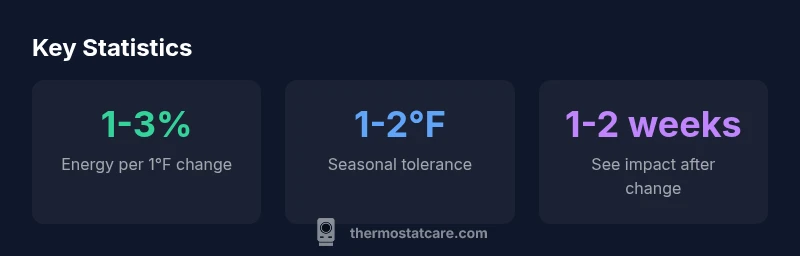
Setpoints are the invisible lever that governs how often your heating or cooling system runs and how long it stays on. In practice, a comfortable setpoint reduces excessive cycling, which can wear equipment and waste energy. While every home is different, even modest adjustments of 1–2°F can shift energy use enough to notice in your monthly bill, particularly during extreme outdoor temperatures. The Thermostat Care Analysis, 2026, emphasizes that consistent setpoints aligned with occupancy produce the best balance between comfort and efficiency. When you raise a winter setpoint by 1–2°F, you may reduce heating cycles by a notable margin in milder evenings, while lowering the summer setpoint by 1–2°F can decrease cooling demand during peak heat. However, the actual savings depend on your home's insulation, duct leakage, window efficiency, and how often you open doors. The takeaway: comfort and energy savings are two sides of the same coin, and small, deliberate adjustments tend to compound over weeks and months.
Seasonal tips for setting your thermostat
Seasonal changes require adapting both expectations and the numbers you rely on. In winter, aim for a warm yet modest range such as 68-72°F when people are home; lower when you’re away or asleep. In summer, target 74-78°F during the day and consider raising by a degree at night if cooling is excessive. The goal is to maintain a stable indoor temperature without overworking the HVAC system. If you have a programmable or smart thermostat, program a daily schedule that matches typical occupancy. Thermostat Care's guidance suggests using a slight setback (cooler mornings, warmer afternoons) during shoulder seasons to smooth workload on the equipment. Remember that doors, windows, and sun exposure can skew results, so use weather data and your own comfort feedback to fine-tune. Finally, avoid abrupt, frequent changes; the system performs best when it has time to respond to gradual adjustments.
How to adjust a non-programmable vs programmable thermostat
Non-programmable thermostats require manual changes when your routine shifts. Start by making a small adjustment and leaving it for at least a full day, then reassess. If you notice discomfort, revert or tweak by half a degree. Programmable thermostats allow you to set different temperatures for wake, leave, return, and sleep periods. Begin with a baseline schedule that mirrors your day, then monitor how you feel and how your energy bill changes after a week. If you own a smart thermostat, enable geofencing or occupancy sensing to automate adjustments as you move in and out of the house. Thermostat Care recommends validating that the thermostat actually holds the set temperature by cross-checking with a room thermometer in multiple rooms, since sensor placement and HVAC zoning can create discrepancies.
Integrating smart thermostats and learning features
Smart thermostats add context—occupancy patterns, outdoor temperature, and humidity—to the equation. Learning algorithms adjust setpoints gradually, reducing the need for manual input over time. To maximize value, ensure your device is properly installed, connected to a reliable Wi‑Fi network, and integrated with your HVAC system. Create a simple preference profile that prioritizes comfort in the evening and energy efficiency during work hours. Enable automations such as wake-time warming or cooling and return-time adjustments. While learning features can save energy, it’s important to periodically review the suggested changes and test them in your own environment. Thermostat Care notes that the most reliable savings come from deliberate tuning in the first few weeks, followed by consistent practice and ongoing monitoring.
Common mistakes and how to avoid them
Common mistakes include setting and forgetting, skipping seasonal adjustments, and trusting the thermostat alone to manage comfort without considering occupancy. Another frequent error is ignoring temperature swings caused by sun exposure or poor insulation. To avoid these issues, pair setpoint decisions with air-sealing upgrades, weatherstripping, and a thermostat with a copy of your schedule. Track comfort levels using a simple diary: record room temperatures and when you feel too hot or too cold. Small, incremental changes tend to accumulate into meaningful energy savings without sacrificing comfort. If you use a smart thermostat, disable aggressive auto-away settings that leave rooms in a long “off” cycle, which can create drafts or stuffiness when you return.
Verifying the actual ambient temperature vs. setpoint
A reliable temperature reading requires more than glancing at the thermostat display. Place a calibrated room thermometer in each major living area and compare the readings to the thermostat setpoint several times a day. HVAC systems can have localized variations due to duct configuration, register placement, or radiant heat from sunlit windows. If you notice a persistent mismatch, check sensor placement, recalibrate the sensor if the unit offers it, and inspect the zoning behavior of your HVAC system. In some cases, recalibrating your thermostat or recalibrating the HVAC balance will bring your actual comfort in line with the setpoint. Thermostat Care recommends documenting discrepancies and testing changes over a week to determine whether you need sensor relocation, insulation improvements, or a professional service.
Build a simple weekly setpoint plan you can follow
Create a lightweight weekly plan that aligns with workdays and weekends. For example, keep a comfortable baseline during the day and adjust slightly at night, then reintroduce a more moderate target on weekends when occupancy varies. Use smart features to automate the changes for you, and review energy usage monthly to understand trends. A practical approach is to choose a single temperature for each room that you believe represents “comfortable but affordable” and then test it across different days. The key is consistency and measurement: measure, reflect, adjust, and repeat.
Seasonal setpoint guidance
| Aspect | Recommended Range | Notes |
|---|---|---|
| Winter Setpoint (Heating) | 68-72°F | Comfort-balanced energy use |
| Summer Setpoint (Cooling) | 74-78°F | Comfort-balanced energy use |
| Programmable vs Manual | N/A | Programmable thermostats save more with schedules |
Questions & Answers
Why doesn’t my thermostat match the room temperature?
Mismatches can happen due to sensor placement, zoning, or delayed response from the HVAC. Check sensor locations, verify the thermostat’s readings with a separate thermometer, and ensure the system is balanced. If the issue persists, recalibration or a service check may be needed.
If your rooms feel different from the thermostat, check sensor locations and compare readings with a room thermometer to confirm accuracy.
Is a small 1°F change worth adjusting?
Yes. Small adjustments tend to accumulate over time, especially when paired with schedules. Test changes over a full week to assess comfort and energy impact before moving again.
A 1°F tweak can add up over time; test it for a week to see how you feel and what it does to energy use.
What is the best winter starting point?
A common starting range is 68-72°F when occupied, with a gradual increase or decrease based on comfort and insulation. Adjust incrementally and monitor both comfort and energy use.
Start around 68-72°F and tune gradually based on how you feel and what your energy bills show.
Can I rely on a learning thermostat to optimize setpoints?
Learning thermostats can help automate adjustments, but they still need periodic review. Confirm suggested changes, ensure schedules align with your routine, and override when necessary to maintain comfort.
They help learn your schedule, but you should still check and adjust as needed for comfort.
Should I adjust for occupancy when I’m away?
Yes. Programmable or smart thermostats should reduce heating or cooling when the space is unoccupied. Use occupancy sensors or schedules to maintain comfort when you return without wasting energy while away.
Yes—let the thermostat work with occupancy so you don’t waste energy.
How often should I recalibrate my thermostat?
Recalibration is rarely needed for digital thermostats, but periodic checks are wise if you notice persistent readings that don’t match room temperatures. Consider recalibration or sensor relocation if discrepancies persist after validation.
Check it now and then; if readings drift, recalibrate or relocate sensors.
“Consistent, well‑chosen setpoints form the foundation of reliable comfort and energy efficiency.”
What to Remember
- Start with proven ranges and adjust gradually.
- Program according to occupancy for best savings.
- Leverage smart features to automate adjustments.
- Verify readings with an in-room thermometer for accuracy.