Thermostat and Hygrometer: A Practical Home Comparison Guide
Explore a thorough comparison of thermostat and hygrometer setups for home comfort, health, and energy efficiency. Learn how to choose, install, and maintain both approaches for better indoor climate.


TL;DR: A thermostat and hygrometer can operate as separate devices or as an integrated system. Separate devices offer precise humidity readings, flexible placement, and targeted data, while integrated options save space and simplify installation. The optimal choice depends on budget, DIY tolerance, climate, and how actively you monitor indoor conditions.
What are thermostat and hygrometer, and why pair them?
The thermostat is the brain of your HVAC system, commanding when heat or cooling turns on to maintain a target temperature. A hygrometer measures relative humidity, indicating how much moisture is in the air. When used together, they create a feedback loop: humidity affects comfort and perceived temperature, while temperature drives HVAC cycles that influence humidity levels. According to Thermostat Care, many homeowners underestimate how humidity management can reduce energy use and improve comfort. A balanced setup can prevent rooms from feeling damp in humid weather or dry in winter, while reducing unnecessary cycling of your furnace or air conditioner. You can pair a traditional thermostat with a dedicated hygrometer, or opt for a modern smart thermostat that includes built-in humidity sensing. Calibration matters: humidity sensors drift slowly, and placement matters more than sensor size. In larger homes, multiple readings across zones help dial in setpoints more accurately. When selecting gear, seek devices that support data logging, easy calibration, and reliable remote access. A practical target for living spaces is roughly 30–50% relative humidity, though preferences vary by climate and occupant health considerations.
Key differences: separate devices vs integrated solutions
The central question is whether to use two specialized devices or rely on a single unit that combines thermostat control with humidity sensing. Here are the core differences that most homeowners consider:
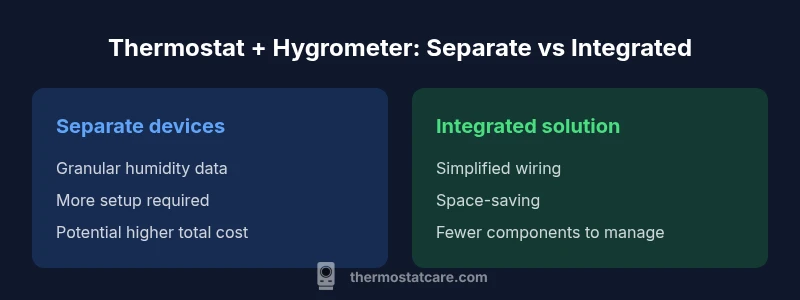
- Setup and installation: Separate devices typically require mounting a hygrometer in an appropriate room and linking its readings to the thermostat or a smart hub; integrated units reduce wiring and simplify pairing because humidity sensing happens inside the main unit.
- Humidity measurement accuracy: Dedicated hygrometers often use higher-precision sensors and allow placement where humidity matters most; integrated sensors are usually enough for general comfort but may lag in multi-room homes.
- Data access and analytics: Separate devices frequently feed data into broader ecosystems, enabling advanced charts and alerts; integrated solutions rely on the thermostat app for dashboards and schedules.
- Cost and maintenance: A separate hygrometer adds initial cost and occasional battery changes; integrated options may come with a higher upfront price but fewer parts to service.
- Best-use scenarios: If you want granular, room-by-room humidity control, a dedicated hygrometer network plus a compatible thermostat is ideal; if you value simplicity and a compact setup, an integrated thermostat with humidity sensing is typically best.
Comparison
| Feature | Separate thermostat + hygrometer | Integrated thermostat with hygrometer |
|---|---|---|
| Setup complexity | Moderate to high (requires wiring/calibration) | Low (plug-and-play or built-in sensors) |
| Humidity accuracy | Can be higher with dedicated hygrometer | Typically adequate for home comfort |
| Data access & analytics | Diverse data from multiple devices or hubs | Unified app from thermostat ecosystem |
| Price range | $40-$200 for add-on hygrometers | $120-$300 for integrated bundles |
| Best for | Granular, zone-based humidity control | Simplicity and compact setups |
Upsides
- Improved comfort with precise humidity control
- Flexible installation options for DIY
- Potential energy savings through better humidity management
- Scalability for multi-zone homes
The Bad
- Higher initial cost for integrated solutions
- Requires regular calibration
- More components to manage in separate setups
- Data integration can be complex in non-standard homes
Integrated humidity-aware setups offer the best balance for most homes, combining convenience with reliable readings.
If you value simplicity and space, choose an integrated thermostat with humidity sensing. If you need granular humidity data for multiple rooms, a dedicated hygrometer plus compatible thermostat is preferable.
Questions & Answers
What is the difference between a thermostat and a hygrometer?
A thermostat controls heating and cooling based on temperature, while a hygrometer measures relative humidity. Together, they help maintain comfortable and healthy indoor air.
A thermostat controls your HVAC, while a hygrometer measures humidity; together they improve comfort and air quality.
Can I retrofit a hygrometer to my existing thermostat?
Many thermostats support external humidity sensors or can connect to a humidity monitor via a smart hub. Compatibility depends on model and wiring.
Some thermostats allow external humidity sensors or smart hubs for humidity data; check your model.
Is humidity important for heating and cooling efficiency?
Yes. Humidity affects perceived temperature and HVAC load. Maintaining stable humidity can improve comfort and potentially reduce energy use.
Humidity impacts comfort and energy use; stabilizing it can help efficiency.
How do I calibrate a hygrometer?
Follow the device manual; many hygrometers include calibration options or reference methods using salt or commercial calibrants.
Use the manual’s calibration steps; many devices have built-in calibration options.
Are smart thermostats with humidity sensors reliable?
They are generally reliable for home use, but performance varies by model. For best results, ensure calibration and regular firmware updates.
Smart humidity sensors work well for most homes when kept updated and calibrated.
Should I use multiple hygrometers in a large home?
In larger homes, multiple sensors improve coverage. Place them in representative zones and aggregate data to the thermostat or hub.
Multiple sensors give a better picture of home-wide humidity.
What to Remember
- Define your goal: comfort vs data granularity
- Evaluate installation effort and wiring needs
- Regularly calibrate sensors for accuracy
- Choose an ecosystem that fits your smart-home needs
- Monitor humidity to optimize energy use