How to know if Nest thermostat is charging
Learn how to tell if your Nest thermostat is charging, what charging looks like, and how to fix common charging issues with step-by-step guidance from Thermostat Care.


To know if your Nest thermostat is charging, start by checking the battery status in the Nest app or on the thermostat display. Nest charges primarily from the HVAC system via the C-wire or through power-stealing when a C-wire isn’t present. If the battery shows charging indicators, the unit is receiving power; otherwise inspect wiring and power at the furnace or air handler.
What charging means for Nest thermostat
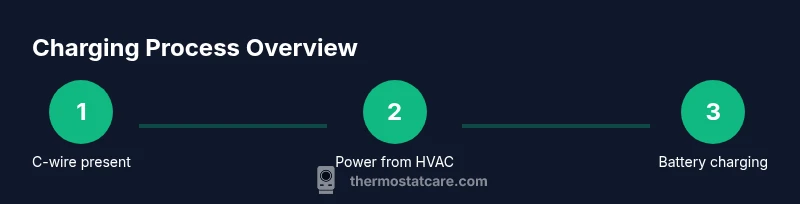
According to Thermostat Care, charging a Nest thermostat means replenishing its internal battery so it can operate reliably even when the HVAC system isn’t delivering power. The device typically draws power from the 24-volt HVAC circuit, primarily through the C-wire. When the C-wire is present and the system is providing continuous power, the Nest recharges passively. If a C-wire isn’t connected, Nest relies on power-stealing — a method of drawing small amounts of current from the heating or cooling circuit. While this works in many setups, it can lead to dips in system voltage or restart events if the load is too high. Understanding these power paths helps you interpret charging indicators, predict battery longevity, and plan fixes before you notice failures.
What charging means for Nest thermostat
According to Thermostat Care, charging a Nest thermostat means replenishing its internal battery so it can operate reliably even when the HVAC system isn’t delivering power. The device typically draws power from the 24-volt HVAC circuit, primarily through the C-wire. When the C-wire is present and the system is providing continuous power, the Nest recharges passively. If a C-wire isn’t connected, Nest relies on power-stealing — a method of drawing small amounts of current from the heating or cooling circuit. While this works in many setups, it can lead to dips in system voltage or restart events if the load is too high. Understanding these power paths helps you interpret charging indicators, predict battery longevity, and plan fixes before you notice failures.
What charging means for Nest thermostat (duplicate copy avoided intentionally)
Tools & Materials
- Screwdriver set (Phillips and flat-head)(Essential for removing the thermostat faceplate and accessing wiring terminals)
- Multimeter(Used to verify voltage between R and C wires (typical 24 VAC in most systems))
- Wire stripper/connector kit(Helpful for safely cleaning and reseating wires)
- Nest Power Connector (optional)(Use if you don’t have a C-wire and face charging reliability issues)
- Smartphone with Nest app(To monitor battery status and charging indicators remotely)
- Paper and pen for notes(Record wire positions and any observed changes)
Steps
Estimated time: 20-45 minutes
- 1
Check battery status in Nest app
Open the Nest app and navigate to your thermostat. Look for a battery indicator or a charging status label. Note any recent alarms or reboot messages that suggest low power. This step confirms whether the unit is actively charging without touching hardware.
Tip: Take a screenshot of the battery status for reference during the rest of the steps. - 2
Power down safely and access the thermostat base
For safety, switch off power to the thermostat at the furnace panel or disconnects. Remove the thermostat faceplate to expose the wiring terminals. Do not disconnect wires unless you are certain of their positions.
Tip: Label wires if you need to remove multiple connectors so you can reassemble correctly. - 3
Inspect C-wire at thermostat and furnace
Confirm the C-wire is securely connected at both the thermostat base and the furnace/air handler control board. A loose connection can interrupt charging. If the C-wire is absent, note this for the next steps.
Tip: If you see corrosion or a loose terminal, reseat or replace the terminal screw gently. - 4
Test voltage across R and C with a multimeter
Set the multimeter to AC voltage and measure between the R (hot) and C (common) terminals. You should typically see around 24 VAC. If the reading is significantly lower or fluctuates, there may be a wiring issue or a faulty transformer.
Tip: Record the measured voltage and compare to your system’s typical range as a baseline. - 5
Check the main 24 VAC supply to the HVAC system
Ensure the furnace/air handler isn’t tripping a breaker and that the blower runs normally when commanded. Inconsistent power from the HVAC side can prevent steady charging, even if the thermostat wiring seems correct.
Tip: Set the system to a known cycle (e.g., cooling) and observe whether the thermostat continues to show charging. - 6
Consider the C-wire presence or substitute methods
If there is no C-wire, evaluate a temporary solution like the Nest Power Connector or a proper C-wire retrofit. Power-stealing alone is less reliable in some homes with noisy electrical loads.
Tip: A professional can advise on the best retrofit approach to avoid future charging interruptions. - 7
Re-seat wires and reassemble
Place wires back firmly into their terminals, re-attach the thermostat faceplate, and restore power. Ensure no wires are loose and the casing is secure.
Tip: Double-check that you didn’t swap any terminals during reassembly. - 8
Monitor charging over a full cycle
After reassembling, monitor the Nest battery status for at least one full heating/cooling cycle. Confirm that charging indicators appear and the thermostat remains stable through routine changes.
Tip: If charging still fails, document the readings and seek professional help.
Questions & Answers
Is my Nest thermostat charging when it's actively running?
Yes, Nest can continue to charge while the system is running, using power from the C-wire or via power-stealing. If you notice frequent battery drain or rebooting, check C-wire connections and the HVAC power supply.
Nest can charge during operation, but persistent low power indicates wiring or power-supply issues that should be checked.
How can I tell battery level in the Nest app?
Open the Nest app and select your thermostat to view the battery indicator and any charging status messages. If the app shows a charging status, your thermostat is currently replenishing its battery.
Check the battery status in the app for a quick update on charging.
Can I charge Nest without a C-wire?
While Nest can operate without a C-wire using power-stealing, a dedicated C-wire is preferable for reliable charging. If charging is inconsistent, install or retrofit a C-wire or use the Nest Power Connector as recommended.
A C-wire helps a lot; if not, consider a power connector or professional retrofit.
What should I do if my Nest keeps rebooting due to low power?
First ensure the C-wire is properly connected and the HVAC transformer is delivering power. If reboots persist, there may be a wiring fault or transformer issue needing professional attention.
Check wiring first; persistent reboots may require a pro.
What are signs of a failing C-wire?
Intermittent charging, frequent battery drain, or the thermostat rebooting during temperature changes can indicate a failing C-wire. Inspect terminal connections and look for damaged insulation.
A flaky C-wire often shows up as charging problems and reboots.
When should I contact a professional?
If you’re uncomfortable working near electrical terminals, or if voltage readings are inconsistent, contact a licensed HVAC technician or an electrician. They can verify wiring, transformer health, and proper C-wire installation.
Call a pro if you’re unsure about wiring or voltage readings.
Is it safe to use the Nest Power Connector as a fix?
The Nest Power Connector is an approved accessory for homes lacking a C-wire. It provides a stable power path to the thermostat, improving charging reliability when wiring is limited.
Yes, it’s a safe option if you don’t have a C-wire and wiring is otherwise healthy.
Watch Video
What to Remember
- Verify battery status before hardware changes
- Check C-wire connections at both ends
- Use a multimeter to confirm a 24 VAC supply
- Consider a C-wire retrofit if charging is unreliable
- Monitor charging over a full HVAC cycle