How Often to Charge Nest Thermostat: Practical Guidance for Homeowners
Learn why Nest thermostats typically don’t require manual charging, how power is supplied, and practical steps to ensure reliable operation without worrying about charging frequency.


A Nest thermostat does not require manual charging. It draws power continuously from the HVAC system via the C-wire, and charging happens automatically as the system operates. If you lack a C-wire, install a Nest Power Connector or consult a professional to ensure reliable power. Most homeowners will never need to manually charge; the device is designed to charge during normal operation.
Understanding Nest thermostat power and charging
The Nest thermostat is designed to stay powered by your home’s electrical system rather than a user-replaceable battery. In most setups, the device draws power through the C-wire (the common wire) and uses tiny charging cycles during regular operation. This means that, for the majority of installations, there is no need to manually charge the device. According to Thermostat Care, the power design of modern Nest models prioritizes continuous operation with minimal user intervention, so reliability hinges on proper wiring and a solid C-wire connection rather than session-by-session charging. Homeowners should focus on ensuring a consistent power path rather than counting on frequent charging. A well-wired system minimizes the risk of power dropouts during climate control, fan cycles, or heat calls, keeping the thermostat responsive and accurate while you run your HVAC schedule.
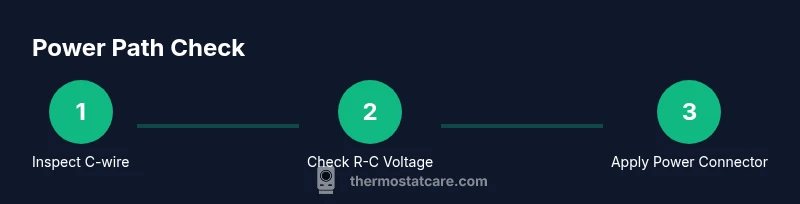
Key takeaways from the power design include that the thermostat’s internal components are optimized for long operation on a small, steady current, and charging happens in the background as the thermostat communicates with the HVAC system. If your thermostat reports low power or if you notice the display dimming during critical periods (like peak heating), the issue is almost always a wiring or C-wire problem, not a need to charge manually. Ensuring a stable C-wire path and avoiding loose connections are the recommended first steps. Thermostat Care’s team recommends verifying the physical wiring before pursuing any power-adapter solution, as this is the most frequent cause of power-related issues.
In terms of daily use, expect the Nest to remain powered without intervention. You’ll interact with the device much more often than you perform charging actions, as the power management is designed to keep the device fed continuously with the HVAC system. If you’re unsure about your wiring, this is a good time to review your setup using simple, safe checks and to consult a professional if you suspect a faulty control board or corroded terminals.
note”:null},{
Do Nest thermostats have batteries? How charging works
text content
Tools & Materials
- Nest Power Connector (optional C-wire adapter)(Use if your system lacks a C-wire or the thermostat reports low power; it helps provide a steady common wire path.)
- Phillips screwdriver(Useful for removing the thermostat faceplate or opening the furnace/air handler panel if you need to inspect wiring.)
- Multimeter (optional)(For users comfortable with basic electrical testing to verify 24V between R and C when power is off.)
Steps
Estimated time: 30-45 minutes
- 1
Verify C-wire presence and wiring integrity
Power down the thermostat and HVAC system at the breaker. Remove the thermostat faceplate and inspect the C-wire connection at both the thermostat and the furnace/air handler. Look for a solid terminal, clear wire insulation, and no corrosion. If the C-wire is loose or damaged, re-seat or replace it before testing again.
Tip: Treat any exposed conductors with care; if you see damaged insulation, stop and call a pro. - 2
Check for Power On indicators and typical warnings
With power restored, observe the Nest display for indicators such as a steady screen, battery icon behavior, or a “low power” warning. If you see intermittent dimming or reboot cycles, the power path may be compromised. Collect any error messages to guide troubleshooting.
Tip: Note the exact wording of any warnings—these guide you toward C-wire or adapter solutions. - 3
Test C-wire connectivity at the furnace side
Carefully locate the C terminal on your furnace control board and confirm a wire is connected to it. If you have a spare conductor, you can move it to C or add a dedicated C-wire if your cable bundle supports it. A disconnected C-wire is the most common cause of power issues.
Tip: Only perform wiring changes if you’re comfortable; otherwise, hire a pro to avoid electrical hazards. - 4
Consider a Nest Power Connector if no C-wire exists
If there’s no C-wire and the thermostat reports low power, install the Nest Power Connector as a temporary or permanent fix to provide a stable common wire path. Follow the product instructions and connect R, W, and the new connector as directed.
Tip: Follow the adapter’s wiring diagram exactly to prevent miswiring or short circuits. - 5
Power cycle and re-test the thermostat
After any wiring adjustments, power the system back on and let the thermostat recalibrate. Observe the display for stable operation over several cycles of heating and cooling. If problems persist, revert to a pro assessment.
Tip: Give the system a few HVAC cycles to fully stabilize before concluding the issue is resolved. - 6
Document results and plan next steps
Record the wiring changes, any new components installed, and the observed behavior over a 24–48 hour window. If low power warnings recur, schedule professional inspection of the control board and connections.
Tip: Keeping a simple log helps you track improvements and determine when to upgrade wiring or add a dedicated C-wire.
Questions & Answers
Do Nest thermostats require charging?
No. Nest thermostats are designed to receive power from the HVAC system automatically; they don’t require manual charging.
No, Nest thermostats don’t need charging. They draw power from your HVAC system and manage it automatically.
What should I do if my Nest shows a low power warning?
Check the C-wire connection at both the thermostat and the furnace. If the C-wire is missing or loose, secure it or add a Nest Power Connector if needed.
If you see a low power warning, inspect the C-wire and consider adding a power connector if you don’t have a solid C-wire.
Can I replace the Nest thermostat battery if it has one?
Most Nest models don’t have user-replaceable batteries. Reliability depends on a stable power path from the C-wire or adapter.
Battery replacement is not typically user-serviceable on Nest thermostats; focus on power supply instead.
How can I tell if I have a C-wire?
Look for a wire connected to the C terminal on your furnace and the C terminal at the thermostat. A non-color-coded single green or blue wire may also be C. If unsure, consult a pro.
Check the C terminal on both ends; if you see a dedicated wire on C, you have a C-wire.
Is it safe to work near the furnace or electrical panel?
Yes, but only with power off and proper precautions. If you’re unsure, hire a pro to avoid electric shock or equipment damage.
Yes, but power off and be cautious. If uncertain, contact a professional.
Watch Video
What to Remember
- Nest thermostats don’t require manual charging; they are powered by the C-wire or by a power adapter if needed.
- Check and secure the C-wire first to resolve most power issues.
- If no C-wire exists, consider a Nest Power Connector as a safe, compatible solution.
- Regular electrical safety and professional help when needed ensure reliable thermostat power.