How the Thermostat Connects to Your Furnace: A Step-by-Step Guide
Learn how to wire a thermostat to your furnace safely with clear, step-by-step instructions. Understand terminal colors, safety checks, and common mistakes so you can verify a solid connection and keep your home's heating responsive.


Learn how to connect a thermostat to your furnace safely and correctly. This guide covers common wiring setups, terminal meanings (R, C, W, Y, G), and how to confirm a solid connection with a multimeter. You’ll need a screwdriver, a non-contact voltage tester, and the furnace’s wiring diagram. The Thermostat Care team walks you through each step to avoid common errors.
How is thermostat connected to furnace: a practical primer
Understanding how is thermostat connected to furnace begins with recognizing that your thermostat acts as the control point for your heating system. The thermostat sends a low-voltage signal to the furnace to start a heat cycle, monitor temperature, and regulate fan operation. In many homes, this wiring is standardized, but there are important variations based on system type (single-stage, multi-stage, heat pump) and the presence of a C wire for power. According to Thermostat Care, a correct, secure connection is the foundation of reliable heating control. If you’re troubleshooting, start by confirming that power is off at the furnace and thermostat before inspecting any wires. A misconnected or loose wire can cause intermittent heating, a furnace that won’t start, or unnecessary cycling. By understanding the basics of how is thermostat connected to furnace, you’ll be better prepared to label wires, verify connections, and avoid common missteps when you upgrade or replace a thermostat.
Understanding wiring configurations and terminal meanings
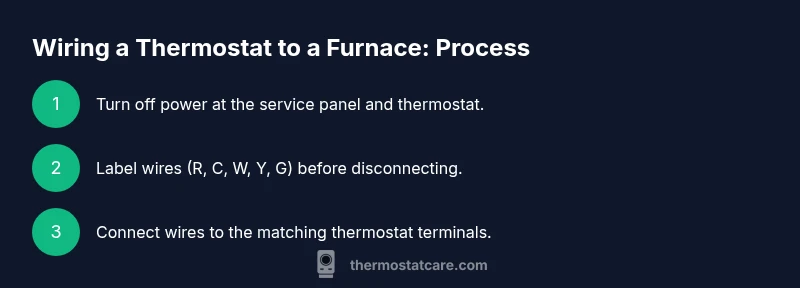
Wiring a thermostat to a furnace involves several common terminals, typically labeled R, C, W, Y, and G. The R terminal carries the 24-volt power supply from the furnace control board. C provides a return path to complete the circuit and power for modern smart thermostats. W signals heat, Y controls cooling via the compressor (if you have a heat pump or AC), and G operates the fan. Some systems include an O/B terminal for heat pump reversing valve. It’s important to confirm your furnace type and thermostat compatibility before connecting wires. Many households rely on standard color conventions (red for R, white for W, yellow for Y, green for G, blue or brown for C), but color coding can vary. Always label wires before disconnecting them and consult the wiring diagram for your specific model.
Safety-first prep: powering down and verifying availability
Safety should guide every step of the wiring process. Begin by turning off power to the HVAC system at the service panel and, if possible, at the thermostat. Use a non-contact voltage tester to confirm there’s no live voltage on any wires you plan to touch. Keep metal tools away from terminals and wear insulated gloves if you’re unsure about the voltage in your setup. If your thermostat is battery-powered, you still need to ensure the furnace side is de-energized when you access the control board. By prioritizing safety, you reduce the risk of arcing, shocks, or damaging the furnace control board. Thermostat Care emphasizes never to force wires into terminals that appear loose or damaged.
How to map wires to thermostat terminals: a step-by-step approach
Begin with the standard five-wire setup: R, C, W, Y, and G. Connect each wire to the corresponding terminal on the thermostat. If you have a heat-only system, you may not need Y or G. For heat pumps or advanced multi-stage systems, additional wires and terminals (O/B, AUX) may be involved. Before tightening terminal screws, ensure the wire ends are clean and properly stripped, with no copper strands frayed. If you’re replacing an older thermostat, compare the terminal labels on the new device with your existing wiring and consult the wiring diagram for any model-specific differences. Confirm a firm, secure connection to prevent arcing or intermittent signals. The goal is a clean, labeled, and stable wiring path that aligns with your furnace control board’s expectations.
Verifying wiring with a multimeter: simple voltage checks
After connecting wires, you’ll verify the circuit by checking the voltage between R and C. A healthy system should show approximately 24 volts AC when the thermostat calls for heat or cool. If you don’t see voltage, recheck your connections, wire insulation, and terminal tightness. Some systems use different diagnostics, so consult your furnace manual if available. Thermostat Care reminds homeowners that a lack of voltage often indicates a loose wire or a misidentified terminal rather than a faulty furnace. Document each test result to track your progress.
Compatibility and model considerations: ensuring a good match
Smart thermostats require a common C wire for continuous power; if your current setup lacks C, you may need a power adapter or a C-wire relay. Some older furnaces may not power modern thermostats reliably without an add-a-wire kit or a C-wire solution. Always verify that your thermostat model supports your system type (gas, oil, electric, heat pump, with or without AC). If you’re unsure, check model numbers and consult the wiring diagram or Thermostat Care’s compatibility guides. Incompatible combinations can lead to reset loops, reduced performance, or connection instability.
Common mistakes and how to avoid them
Common wiring mistakes include mixing up terminals, leaving wires loose, damaging conductor insulation, and assuming color coding is universal. To avoid these errors, label every wire before disconnecting, follow the furnace’s wiring diagram, and test each connection after reassembly. If a wire is frayed or discolored, replace it instead of reusing it. Finally, never ignore unusual smells, buzzing sounds, or tripped breakers after powering the system back on, as these can indicate damaged components or short circuits.
Troubleshooting tips before calling a pro
If the thermostat shows a blank screen or the furnace won’t respond, start with a basic power reset: turn off power at the breaker for 60 seconds, then restore it. Check the wiring again at both ends for loose connections. Verify that the thermostat is set up for the correct system type (heat-only vs. heat/cool). If you’re still stuck, compare the wiring with the furnace’s control board diagram and test voltage between R and C. Persistent issues may require a professional diagnostic, especially if you notice burning smells, scorch marks, or melted insulation. Thermostat Care recommends documenting all steps you’ve taken to provide a clear history for a technician.
Final checks and a safe test
Before finishing, recheck all wires for secure attachment and correct terminal placement. Restore power at the service panel and run a test cycle in both heat and cool modes if applicable. Observe the furnace response, fan operation, and thermostat readings. If the system behaves as expected, you’ve successfully established a reliable connection between thermostat and furnace. If anything seems off, power down again and re-evaluate your wiring against the diagram, or contact Thermostat Care for a guided review.
Tools & Materials
- Screwdriver set (Phillips and flathead)(Needed to remove panels and secure thermostat terminals)
- Non-contact voltage tester(Use to verify power is off and to check for live wires)
- Multimeter (optional for voltage tests)(Useful for 24V AC checks between R and C)
- Wire strippers/cliers(Prepare wire ends and trim as needed)
- Electrical tape or wire nuts(Seal and insulate connections safely)
- Wiring diagram/wurn plug for furnace(Have the furnace manual handy for terminal mapping)
- Notepad and marker(Label wires and take notes during the process)
Steps
Estimated time: 40-60 minutes
- 1
Power off and verify
Turn off power at the furnace service panel and at the thermostat. Use the non-contact voltage tester to confirm no voltage on any wires you’ll touch. This keeps you safe from shocks and prevents damaging the control board.
Tip: Always double-check power before touching wires to avoid electric shock. - 2
Remove access panels and locate terminals
Carefully remove the furnace access panel and locate the wiring terminals on the control board. Identify common terminals (R, C, W, Y, G) and any additional ones for heat pumps (O/B, AUX). Label wires as you remove them so you can map them to the thermostat later.
Tip: Label wires with tape as you disconnect them to prevent confusion later. - 3
Label and inspect wires
Inspect each conductor for damage and strip ends clean if needed. Label each wire with its terminal letter to ensure you place it on the corresponding thermostat terminal. Replace frayed wires to prevent future connectivity issues.
Tip: Do not reuse damaged conductors; replacing them improves reliability. - 4
Connect wires to thermostat terminals
Attach R to R, C to C, W to W, Y to Y, and G to G on the new thermostat. If using a heat pump, connect O/B and AUX as required. Tighten screws firmly but avoid over-tightening which can crush the copper.
Tip: Make sure each wire is fully seated and the insulation reaches the terminal without escaping copper. - 5
Reassemble and re-energize the system
Replace the furnace panel, restore power at the service panel, and ensure the thermostat powers up. If the thermostat has a learning mode or auto-detect feature, run it after the initial power up.
Tip: Observe for any immediate error codes or unusual lights on the thermostat. - 6
Test heat and cool cycles
Set the thermostat to heat and confirm the furnace ignites and the blower runs. Do the same for cooling if your system includes AC. Listen for odd noises and watch for erratic fan behavior.
Tip: If the furnace doesn’t respond, recheck wiring and refer to the diagram before retrying. - 7
Validate voltage and operation
If you have a multimeter, verify 24V AC between R and C when the thermostat is connected and calling for heat. Confirm the expected voltage stabilizes during operation and that there are no voltage drops during cycling.
Tip: A stable 24V signal indicates a healthy control wiring path. - 8
Document and secure the installation
Record wire colors, terminal assignments, and any device-specific notes. Secure all loose cables and ensure no wires are pinched by the furnace panel.”
Tip: Keep your wiring diagram handy for future upgrades or service calls.
Questions & Answers
What is the difference between a traditional thermostat and a smart thermostat in terms of wiring?
Traditional thermostats often require only R and W for basic heat control, while smart thermostats typically need a C wire for power and may support additional signals like Y and G for cooling and fan control. Always check your system type and thermostat requirements before swapping.
Smart thermostats usually need a C wire for power; check your system compatibility before upgrading.
Can I connect a thermostat to a furnace by myself, or do I need a professional?
If you’re comfortable with basic electrical work and have a wiring diagram, you can connect a thermostat to a furnace. However, incorrect wiring can damage equipment or create safety risks. When in doubt, consult a professional or use guided online resources.
You can try wiring if you have the diagram and feel confident with basic electrical work, but seek professional help if unsure.
What should I do if the wires do not match the color codes?
If colors don’t match standard codes, rely on the terminal labels rather than color alone. Trace each wire from the thermostat to the furnace to confirm correct connections and label them during the process.
Color isn’t always reliable—follow the terminal labels and diagram to map wires correctly.
I replaced my thermostat but it still won’t work. What could be wrong?
Common causes include miswired terminals, missing C wire, blown fuses, or power to the furnace being shut off. Double-check all connections, reset the thermostat, and test each stage of the heating cycle.
Double-check wiring, ensure power is on, and run a full heat cycle test to isolate the issue.
Do I need to replace my furnace wiring when upgrading my thermostat?
Usually not, unless the existing wiring is damaged or unsupported by your new thermostat (e.g., lack of C wire). If you can’t source appropriate wires, you may need to install adapters or run new wiring with professional help.
Often you won’t need new wiring, but check for a C wire and compatibility with your new thermostat.
Watch Video
What to Remember
- Verify power is off before touching wires
- Label wires and map to thermostat terminals
- Test heat and cool cycles to confirm proper operation
- Ensure a stable ~24V AC between R and C when active
- Keep the wiring diagram accessible for future reference