Honeywell Thermostat Issue Troubleshooting Guide (2026)
Urgent, practical troubleshooting guide to diagnose and fix common Honeywell thermostat issues. Learn safe power checks, wiring fixes, and step-by-step actions (with professional help when needed) from Thermostat Care.


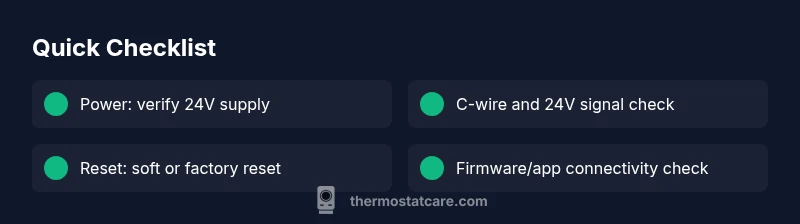
Most Honeywell thermostat issues stem from power or wiring glitches. The quickest fix is to verify the 24-volt supply, confirm the furnace breaker is ON, and check the thermostat’s display power. If that passes, inspect the C-wire connection and perform a soft or factory reset. If unresolved, follow the diagnostic flow to identify the underlying cause and decide if professional help is needed.
Understanding the Honeywell thermostat issue
Dealing with a Honeywell thermostat issue can feel urgent, especially in extreme weather. Homeowners commonly experience an unresponsive display, failure to hold setpoints, or the unit failing to power on. The most reliable path is to treat the problem as a power/wiring issue until proven otherwise. Throughout 2026, Thermostat Care analysis shows that power supply problems and broken connections are the leading culprits behind Honeywell thermostat not turning on. By verifying basic power and wiring first, you can save time and avoid unnecessary parts replacements. In this guide, we focus on practical steps you can take safely as a homeowner.
According to Thermostat Care, addressing a Honeywell thermostat issue quickly starts with verifying power, wiring, and simple resets. The Thermostat Care team found that homeowners who follow a structured checklist tend to resolve most issues without professional help. This frame keeps you focused on safe, incremental fixes while avoiding risky improvisation.
Safety and power basics before you start
Before you touch any electronics, switch off power to the thermostat at the furnace or the main panel. Many Honeywell thermostats rely on 24V AC power; a sudden disconnect can brick control logic or short the HVAC circuit. Wear safety glasses if you plan to inspect wiring and never work on live wires. If you notice burnt smells, melted insulation, or buzzing from the furnace, stop immediately and call a licensed pro. These precautions protect both you and your equipment.
Common symptoms and quick checks
Symptoms vary: the display is blank; the screen flickers; the unit won’t change temperature; or Wi‑Fi connectivity is intermittent. Start with the simplest checks: confirm the thermostat is receiving power (LEDs, display glow), ensure the furnace breaker is on, and verify the 24V supply using a multimeter if available. For battery-powered Honeywell models, replace the batteries and re-seat the battery compartment. If the thermostat responds sometimes, note the times of day or weather; these patterns help diagnose load-related issues. Thermostat Care recommends keeping a quick log of symptoms for faster resolution if you need to involve a pro later.
Diagnostic flow: symptom to diagnosis to solutions
Follow a structured flow: symptom first, then possible causes, then practical fixes. For example, if the screen is blank, power issues or a tripped breaker are most likely high-likelihood causes. If the display is bright but the HVAC won’t respond, the 24V signal or wiring could be at fault. This flow keeps you focused and avoids guesswork. When in doubt, proceed with the safer, easier fixes first (power, reset) before testing wiring or control board signals.
Practical fixes for the most common cause
If power is the root, focus on power and connections first. Check the furnace breaker, outlet, and the thermostat’s internal fuse if accessible. Verify the 24V supply using a multimeter or test tool. Re-seat all wire connections at the furnace control board and the thermostat, then perform a soft reset and re-test. If the display remains dark, revisit the safety checks or consider a professional diagnostic to avoid damaging the control board.
Prevention tips and when to call a pro
To prevent future Honeywell thermostat issue, keep batteries fresh, schedule regular maintenance, and ensure stable power. Keep wiring secure and avoid DIY fixes for electrical hazards. If you smell burning, notice overheating, or can't locate the problem after basic checks, contact a licensed HVAC technician. Regular firmware updates and keeping your Wi‑Fi network stable also help.
Steps
Estimated time: 30-60 minutes
- 1
Power check at the thermostat and furnace
Turn off power at the furnace or main panel. Confirm the 24V supply is active by testing the thermostat’s display and the furnace control board indicators. If you don’t see power, locate the breaker and reset it, then re-test the thermostat.
Tip: Tip: If you have a plug-in thermostat, unplug and re-plug to reset the power path. - 2
Inspect wiring and C-wire connections
Shut off power, remove the thermostat cover, and inspect all wire terminals. Ensure the C-wire is securely connected at both ends and there are no loose strands. If you find damaged wires, replace or repair them before testing again.
Tip: Tip: Take a photo of the wiring before making changes to help with reassembly. - 3
Test the 24V signal
Use a multimeter to verify a steady 24V AC between R and C at the thermostat and at the furnace control board. If voltage is present but the thermostat remains unpowered, the issue may be internal to the thermostat. Record readings for reference.
Tip: Tip: If you don’t own a multimeter, consider a brief pro check rather than guessing. - 4
Reset the thermostat
Try a soft reset by cycling power at the furnace or using the reset option in the menu. Then re-enter your schedules and preferences. This clears minor firmware glitches that can cause unresponsiveness.
Tip: Tip: Note down the current settings before resetting so you can restore them quickly. - 5
Check for firmware updates or Wi‑Fi issues
If the thermostat is online, confirm it has the latest firmware and a stable network connection. Reconnect to Wi‑Fi if needed and verify that the thermostat can send/receive commands through the app.
Tip: Tip: A poor network connection can masquerade as a device problem. - 6
Call a professional if unresolved
If the thermostat still won’t power or respond after these steps, the fault may lie with the furnace control board or wiring in the HVAC system. A licensed HVAC technician can perform electrical checks safely and inspect control board components.
Tip: Tip: Have the model number, recent changes, and readings ready when you call.
Diagnosis: Thermostat won’t power on or respond to settings
Possible Causes
- highPower supply issue (tripped breaker, blown fuse, dead outlet)
- mediumC-wire or 24V control signal not reaching the thermostat
- lowThermostat hardware fault or failed internal fuse
Fixes
- easyCheck the HVAC breaker and outlet, replace fuses if needed, and ensure the thermostat is receiving 24V power.
- easyVerify C-wire connection at both the thermostat and furnace control board; test the 24V with a multimeter or use a non-contact tester.
- easyReset the thermostat to default settings or perform a factory reset; reconfigure schedules and connections.
- mediumIf issues persist, inspect wiring for loose connections or call a licensed HVAC technician for an electrical check.
Questions & Answers
Why is my Honeywell thermostat not turning on?
The first checks should confirm power to the thermostat and furnace, followed by a quick reset. If there’s no power, inspect breakers and fuses; if power is present but the display remains blank, inspect the C-wire and wiring to the furnace. If in doubt, consult a professional.
If your Honeywell thermostat won’t turn on, start by checking power at both the thermostat and furnace, then try a reset. If power is present but the display stays off, check the C-wire and wiring; otherwise call a pro.
What does a blinking display mean on a Honeywell thermostat?
A blinking display often indicates power or communication issues. Start with power checks and reseating wires, then verify the 24V signal. If blinking persists after a reset, the problem may be internal or related to the furnace wiring.
A blinking display usually signals power or communication problems. Check power, reseat wires, and verify 24V; if it keeps blinking, a professional check may be needed.
How do I reset a Honeywell thermostat?
Reset steps vary by model, but typically you can perform a soft reset by cycling power at the furnace or using a reset option in the menu. For a full factory reset, refer to the manual and reconfigure schedules afterward.
To reset, toggle power at the furnace or use the reset option in the menu. For a full reset, check the manual and reconfigure your settings afterward.
Can I fix thermostat wiring myself?
Some wiring checks are safe for a confident homeowner (like reseating terminals and inspecting for loose connections). However, working with 24V HVAC wiring can be dangerous. If you’re unsure, contact a licensed HVAC technician.
You can do safe checks like reseating terminals, but if you’re unsure about wiring, it’s best to call a pro.
When should I replace a Honeywell thermostat rather than repair it?
If the unit is old, unreliable after multiple fixes, or lacks current connectivity features, replacement with a newer model may be more cost-effective than repeated repairs. Consider life expectancy and energy savings when deciding.
If it’s old or unreliable after fixes, replacing with a newer model can be more cost-effective than continued repairs.
Watch Video
What to Remember
- Power and wiring are the common culprits.
- Follow a safe, step-by-step diagnostic flow.
- Reset and re-test before diagnosing wiring faults.
- Call a pro for electrical or HVAC control-board issues.