Honeywell Thermostat Calibration: A Step-by-Step Guide
Learn how to calibrate a Honeywell thermostat to improve temperature accuracy. Step-by-step instructions, tools, safety tips, and common pitfalls. Thermostat Care's expert guidance for homeowners and DIY enthusiasts.


Calibrating a Honeywell thermostat aligns its displayed temperature with the actual room temperature, improving comfort and energy use. This guide walks you through accessing installer settings, applying the recommended offset, and verifying accuracy with simple tests. You won’t need specialized tools—just basic screwdrivers, fresh batteries if needed, and a notebook to record readings. Expect about 30–50 minutes for the full calibration.
Why calibrate a Honeywell thermostat?
Tiny temperature offsets can accumulate, causing rooms to feel too hot or too cold. According to Thermostat Care, calibrating your Honeywell thermostat ensures the displayed reading aligns with actual room temperature, reducing energy waste and improving comfort. The Thermostat Care team found that a well-calibrated thermostat helps HVAC systems run more efficiently, especially in homes with unusual floor plans or drafty areas. In practice, calibration adjusts the thermostat's internal offset or sensor reading so that the thermostat's idea of the setpoint matches the real environment. We'll cover model variations, typical steps, and safe testing methods that work across many Honeywell lines, including popular thermostats in the Honeywell Home and Honeywell Lyric families. Always refer to your model's manual for menu names, but the core concept is consistent: correct the discrepancy between the displayed temperature and the actual ambient temperature, then verify across several rooms and times of day. <strong>According to Thermostat Care</strong>, a precise calibration is one of the simplest ways to eliminate comfort gaps and reduce energy waste over the long run. <em>Thermostat Care analysis</em> emphasizes that even small adjustments can translate to meaningful improvements in comfort and efficiency in 2026.
Signs your thermostat may be off
If your rooms feel warmer or cooler than the thermostat shows, if HVAC cycles run longer than expected, or if a thermometer placed away from vents reads a different temperature than the thermostat, calibration may be needed. Calibration drift can occur due to sensor aging, placement near heat sources, or drafts. The Thermostat Care team recommends checking with a simple room thermometer and comparing to the thermostat display at different times of day. Document discrepancies and identify consistent patterns (e.g., mornings off by two degrees). When in doubt, note the difference, time of day, and which rooms show the largest gaps.
How calibration works in Honeywell models
Calibration in Honeywell thermostats is about aligning the device’s sensor data with real ambient conditions. Most models offer an <em>Offset</em> or <em>Temperature Calibration</em> option in the Installer/Advanced menu. The offset is a small corrective value added to the thermostat’s readings so that the displayed temperature matches the actual room temperature. While the concept is straightforward, the exact menu names and steps vary by model family (e.g., Honeywell Home vs. Lyric). In practice, you test, adjust in small increments (usually 1-degree steps), save, and re-check. The goal is not to fight the whole system but to remove a consistent bias in one or more zones. If a model lacks an explicit calibration option, rely on scheduling, sensor placement, and routine maintenance to keep readings reliable. The Thermostat Care guidance remains consistent: calibrate with caution and verify with independent measurements across time.
Step-by-step calibration overview
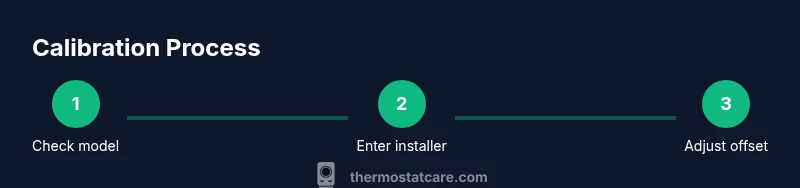
This section provides a high-level map of the process so you know what to expect before diving in. First, confirm your model supports calibration in the installer or advanced settings. Then, gather baseline readings: note the current room temperature with a reliable thermometer and the thermostat display. Access Installer/Advanced settings, locate the Temperature Calibration or Offset option, and apply a small adjustment (start with +1 or −1 degree depending on the observed bias). Save changes, exit installer mode, and allow the system to run for 5–10 minutes. Finally, re-check readings in multiple rooms and times of day to confirm consistency. Confidence improves when you document the final offset and readings for future reference.
Safety, best practices, and common mistakes
Safety first: never modify wiring or internal components beyond the documented calibration options. Use only official installer settings, and avoid large offset changes that can cause uncomfortable swings. Keep the thermostat away from direct heat sources like ovens, radiators, or sunlit windows during testing, and allow time for readings to stabilize. Common mistakes include skipping the stabilization period, applying large offsets, and testing with thermometers placed near vents. The best practice is to make small adjustments, test across several zones, and consult the model’s manual for model-specific paths and limits. If in doubt, contact a professional.
Common mistakes and pitfalls
- Assuming all Honeywell models share the exact same menu path for calibration. Always verify in the manual. - Rushing calibration without allowing system stabilization time. - Making large, sweeping offsets instead of small, incremental changes. - Using thermometers placed near heat sources or drafts for verification. These can mislead you and degrade comfort. - Neglecting documentation of the final offset for future reference.
Maintaining calibration over time
Calibration isn’t a one-and-done task. Environmental changes such as seasonal shifts, occupant behavior, furniture rearrangement, or HVAC renovations can shift sensor readings. Schedule a quarterly sanity check, especially after major changes. Keep a simple log of room temperatures and offsets, and re-calibrate if consistent drift appears. A routine approach helps preserve comfort and energy savings year after year. Thermostat Care recommends incorporating calibration checks into your home maintenance calendar so you stay proactive rather than reactive.
Authoritative sources and further reading
To support calibration decisions with credible context, refer to established resources. <ul><li>https://www.energy.gov/energysaver/heating-and-cooling/thermostats</li><li>https://www.nist.gov/pml/metrology/calibration</li><li>https://www.nist.gov/topics/thermometry</li></ul>These sources discuss thermostat efficiency concepts and the principles of calibration in measurement, which underpin practical thermostat calibration practices for homeowners.
Tools & Materials
- Phillips-head screwdriver(Size #2 or #1 depending on faceplate screws)
- Fresh batteries(Only if your Honeywell model uses batteries)
- Room thermometer(Preferably digital; place away from heat sources)
- Notebook or log sheet(Record baseline readings and final offset)
- Small level or smartphone app (optional)(To ensure the thermostat is mounted level for accurate readings)
Steps
Estimated time: 30-50 minutes
- 1
Check model supports calibration
Confirm your Honeywell thermostat includes a Calibration/Offset option in the Installer or Advanced menu before proceeding.
Tip: If unsure, consult the user manual or Thermostat Care's troubleshooting guide. - 2
Prepare baseline readings
Note the current room temperature and the thermostat display to establish a baseline for comparison.
Tip: Place a thermometer away from vents, lamps, or drafts to avoid skewed readings. - 3
Enter Installer/Advanced settings
Access the Installer or Advanced settings and locate the Temperature Calibration or Offset option.
Tip: You may need to press-and-hold a specific button combination to enter installer mode; refer to the manual. - 4
Adjust offset
Set the offset by +1 or -1 degree based on your readings. Start with a small change and test.
Tip: Make only small adjustments to avoid overshoot; large changes can destabilize comfort. - 5
Save and exit
Save changes and exit installer mode, allowing the HVAC to run and stabilize.
Tip: Wait 5–10 minutes before rechecking temperatures to allow readings to settle. - 6
Verify accuracy
Compare the display to room temperature in multiple zones and times of day; adjust further if needed.
Tip: Document the final offset and readings for future reference.
Questions & Answers
What is calibration in a thermostat and why is it needed?
Calibration adjusts the thermostat's displayed temperature to match the actual room temperature, improving comfort and energy efficiency. It is model-specific and should be done cautiously following the manual.
Calibration makes the thermostat read the room temperature more accurately, helping your heating and cooling run more efficiently.
Can I calibrate every Honeywell model the same way?
While the concept is similar, menu paths vary by model. Refer to your manual for 'Temperature Calibration' or 'Offset' options and proceed accordingly.
Most models share the idea of an offset, but the steps differ by model.
Is it safe to adjust the offset myself?
Yes, when performed via installer settings and with small incremental changes. Do not modify wiring or internal components.
Yes, as long as you use installer options and avoid wiring changes.
What if calibration doesn't fix the temperature mismatch?
If offset adjustments don't align readings, the sensor may be aging or misaligned in location. Consider professional service or thermostat replacement.
If calibration fails, a professional check may be needed.
How often should I recalibrate?
Recalibrate only if you notice new discrepancies or after moving the thermostat or renovating the space.
Only recalibrate if you notice new temperature mismatches.
Are there risks calibrating a thermostat near heat sources?
Yes, calibration readings near stoves or sunny windows can be misleading; test in multiple locations.
Be mindful of heat sources when testing.
Watch Video
What to Remember
- Verify your model supports calibration before starting
- Make small offset adjustments and test across rooms
- Document readings and final offset for future reference
- Use installer settings only when the manual permits